Android LottieAnimationView 使用中遇到的坑
Lottie 是 Airbnb 开源的火热动画库,它可以解析 AE 动画中用Bodymovin 导出的json文件,并在移动设备上利用原生库进行渲染,让程序员告别痛苦的动画。Lottie 现在支持了诸多平台 Android/iOS/RN/Web/Windows,在统一性上也有无可比拟的优势。在Android 使用Lottie 的方式也非常简单,具体可以参照 Lottie github,在使用中,皮皮想分享其中使用的两个注意点。
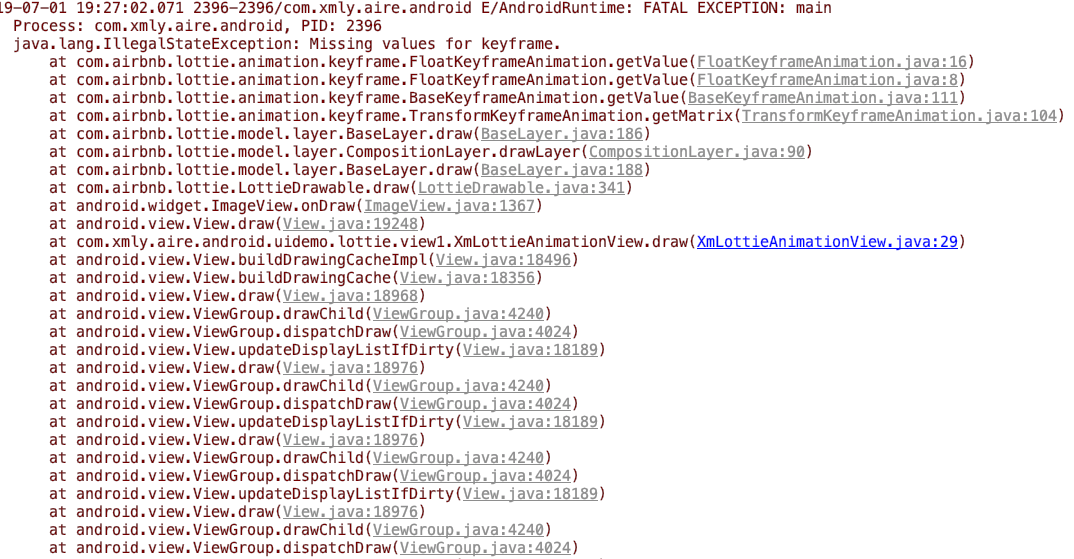
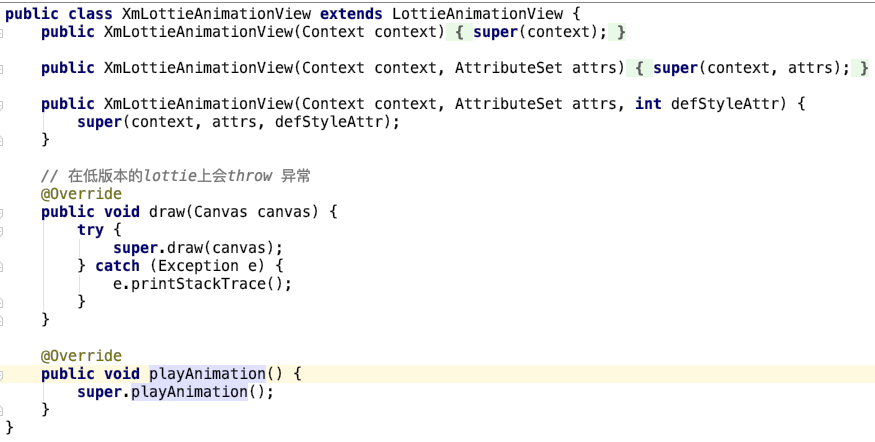
在3.0.0以下版本使用高版本json 会出现 MissingKeyFrame的报错,导致App崩溃
崩溃报错如下:
多个json切换时会发生动画不切换,不播放问题
lottieView.setAnimation("lottie/1.json"); // 1
lottieView.setProgress(0f);
lottieView.loop(true);
lottieView.playAnimation(); // 2
正常的lottie运行代码如下,如果是一个json,这个代码是不会有问题的,但是如果setAnimation有很多次的触发会有一些意想不到得情况。(从这也说明Lottie对多个json运行时不太友好的,应该通过多个LottieAnimationView来实现该功能)
下面解释下为什么这个代码会出问题。
在代码1 setAnimation最终会执行到下面代码:
public void setAnimation(final String animationName, final CacheStrategy cacheStrategy) {
    this.animationName = animationName;
    animationResId = 0;
    if (ASSET_WEAK_REF_CACHE.containsKey(animationName)) {
        WeakReference<LottieComposition> compRef = ASSET_WEAK_REF_CACHE.get(animationName);
        LottieComposition ref = compRef.get();
        if (ref != null) {
        setComposition(ref);
        return;
        }
    } else if (ASSET_STRONG_REF_CACHE.containsKey(animationName)) {
        setComposition(ASSET_STRONG_REF_CACHE.get(animationName));
        return;
    }

    lottieDrawable.cancelAnimation();
    cancelLoaderTask();
    compositionLoader = LottieComposition.Factory.fromAssetFileName(getContext(), animationName,
        new OnCompositionLoadedListener() {
            @Override public void onCompositionLoaded(LottieComposition composition) {
            if (cacheStrategy == CacheStrategy.Strong) {
                ASSET_STRONG_REF_CACHE.put(animationName, composition);
            } else if (cacheStrategy == CacheStrategy.Weak) {
                ASSET_WEAK_REF_CACHE.put(animationName, new WeakReference<>(composition));
            }

            setComposition(composition);
            }
        });
}
注意这个代码在加载文件时是一个异步操作LottieComposition.Factory.fromAssetFileName,加载完成后才会执行 setComposition操作,setComposition代码如下
public void setComposition(@NonNull LottieComposition composition) {
    if (L.DBG) {
      Log.v(TAG, "Set Composition \n" + composition);
    }
    lottieDrawable.setCallback(this);

    boolean isNewComposition = lottieDrawable.setComposition(composition); // 3
    enableOrDisableHardwareLayer();
    if (!isNewComposition) {
      // We can avoid re-setting the drawable, and invalidating the view, since the composition
      // hasn't changed.
      return;
    }

    // If you set a different composition on the view, the bounds will not update unless
    // the drawable is different than the original.
    setImageDrawable(null);
    setImageDrawable(lottieDrawable);

    this.composition = composition;

    requestLayout();
}
在注释3处lottieDrawable会setComposition,代码如下:
public boolean setComposition(LottieComposition composition) {
    if (this.composition == composition) {
      return false;
    }

    clearComposition(); // 4
    this.composition = composition;
    buildCompositionLayer(); // 5
    animator.setCompositionDuration(composition.getDuration());
    setProgress(animator.getValue());
    setScale(scale);
    updateBounds();
    applyColorFilters();

    // We copy the tasks to a new ArrayList so that if this method is called from multiple threads,
    // then there won't be two iterators iterating and removing at the same time.
    Iterator<LazyCompositionTask> it = new ArrayList<>(lazyCompositionTasks).iterator();
    while (it.hasNext()) {
      LazyCompositionTask t = it.next();
      t.run(composition);
      it.remove();
    }
    lazyCompositionTasks.clear();

    composition.setPerformanceTrackingEnabled(performanceTrackingEnabled);

    return true;
}
注释4处 会clear之前设置的composition
public void clearComposition() {
    recycleBitmaps();
    if (animator.isRunning()) {
      animator.cancel();
    }
    composition = null;
    compositionLayer = null;
    imageAssetManager = null;
    invalidateSelf();
}
这时如果lottieView还在运行的话就会停止上一个动画。注释5处 会设置compositionLayer 代码如下
private void buildCompositionLayer() {
    compositionLayer = new CompositionLayer(
        this, Layer.Factory.newInstance(composition), composition.getLayers(), composition);
}
这样我们就拿到了compositionLayer,我们再看lottieView的playAnimation()方法:
public void playAnimation() {
    lottieDrawable.playAnimation();
    enableOrDisableHardwareLayer();
}
此处执行了lottieDrawable的playAnimation()方法
public void playAnimation() {
    if (compositionLayer == null) {
      lazyCompositionTasks.add(new LazyCompositionTask() {
        @Override public void run(LottieComposition composition) {
          playAnimation();
        }
      });
      return;
    }
    animator.playAnimation();
}
这里发现compositionLayer == null的话 会将playAnimation放到一个异步操作中执行,这样等上面的json文件加载完成后就会执行lazyCompositionTasks里的方法。
至此可以发现,如果lottieView里有运行的json动画时,这时更新新的json文件后,compositionLayer != null, playAnimation可能会在onCompositionLoaded还没加载好就执行了,这样动画就是播放的上一个动画,而在新的动画加载完成后会先执行clearComposition导致老的动画停止播放,而新的动画只是设置了,并未开始播放。
分析了多个json动画为什么会出现不切换,不播放的原因后,解决方案就很好搞定了:
1、 设置多个LottieAnimationView 执行,需要对多个LottieView进行管理;
2、 使用postDelay延迟
playAnimation的执行(皮皮设置了50ms后基本可以解决这个问题,不过不能保证这个问题一定不会发生);
3、 让文件流的加载和playAnimation顺序执行,不使用LottieAnimationView,改用LottieDrawable;
皮皮采用的是第三种方法,具体的代码如下:
if (mPetLottieDrawable.isAnimating()) {
    mPetLottieDrawable.cancelAnimation();
}
mPetLottieDrawable.clearComposition();
LottieComposition.Factory.fromAssetFileName(mContext, json, new OnCompositionLoadedListener() {
    @Override
    public void onCompositionLoaded(@Nullable LottieComposition composition) {
        mPetLottieDrawable.setComposition(composition);
        mPetLottieDrawable.setImagesAssetsFolder(image);
        mPetLottieDrawable.playAnimation();
        mPetLottieIv.setVisibility(View.VISIBLE);
        Logger.d(TAG, "playPetLottieAnimationView === playAnimation show");
    }
});
这样就可以完美的解决上述的问题啦。。。
结语
好了,就写这么多吧,我要去呼吸新鲜空气了!
留下我的WX,欢迎各位大神点评。