ES 是近乎线性扩展的分布式系统,所以可以总结成同一个测试模式: 1.使用和线上集群相同硬件配置的服务器搭建一个单节点集群。 2.使用和线上集群相同的映射创建一个 0 副本,1 分片的测试索引。 3.使用和线上集群相同的数据写入进行压测。 4.观察写入性能,或者运行查询请求观察搜索聚合性能。 5.持续压测数小时,使用监控系统记录 eps、requesttime、fielddata cache、GC count 等关键数据。
测试完成后,根据监控系统数据,确定单分片的性能拐点,或者适合自己预期值的临界点。这个数据,就是一个基准数据。之后的扩容计划,都可以以这个基准单位进行。
需要注意的是,测试是以分片为单位的,在实际使用中,因为主分片和副本分片都是在各自节点做 indexing 和 merge 操作,需要消耗同样的写入性能。所以,实际集群的容量预估中,要考虑副本数的影响。也就是说,假如你在基准测试中得到单机写入性能在 10000 eps,那么开启一个副本后所能达到的 eps 就只有 5000 了。还想写入 10000 eps 的话,就需要加一倍机器。
因为esrally 需要使用 pip3
一、PIP 3安装说明
1、下载安装 登陆服务器
[server]$ cd ~
[server]$ mkdir tmp
[server]$ cd tmp
[server]$ wget https://www.python.org/ftp/python/3.6.2/Python-3.6.2.tgz
[server]$ tar zxvf Python-3.6.2.tgz
[server]$ cd Python-3.6.2
[server]$ ./configure --prefix=$HOME/opt/python-3.6.2
[server]$ make
[server]$ make install
修改profile
[server]$ vim /etc/profile
在文件尾部加入配置
export PATH=$HOME/opt/python-3.6.2/bin:$PATH
[server]$ source /etc/profile
验证信息
[server]$ which python3
/root/opt/python-3.6.2/bin/python3
[server]$ python3 --version
Python 3.6.2
安装完毕
如果没有git 还需要安装下
yum install -y curl-devel expat-devel gettext-devel openssl-devel zlib-devel gcc perl-ExtUtils-MakeMaker
yum install -y asciidoc xmlto autoconf
yum remove git
yum install git git version 1.7.1 //版本太旧了 而且这里需要1.9+ SO 。。。。
去 https://github.com/git/git/releases 找个自己喜欢的版本
wget https://github.com/git/git/archive/v2.22.0.tar.gz
tar -zxvf v2.22.0.tar.gz
cd git-2.22.0
make configure
./configure --prefix=/usr/local/git --with-iconv=/usr/local/libiconv
make all doc
make install install-doc install-html
## 创建软链接
ln -s /usr/local/git/bin/git /usr/bin/git
## 验证
git -version
$]# git version 2.22.0
二 、 安装 esrally
官方文档有介绍 Install Python 3.5+ including pip3, git 1.9+ and an appropriate JDK to run Elasticsearch Be sure that JAVA_HOME points to that JDK. Then run the following command, optionally prefixed by sudoif necessary: python 3.5+ git 1.9+ JAVA_HOME 必须配置了JDK
[server]$ pip3 install esrally //pip3 install esrally --target=/data/secoo_program/esrally
如果第一步有任何问题 ,看文档 https://esrally.readthedocs.io/en/stable/install.html
[server]$ esrally configure //首次配置 检测环境,官方详细配置 https://esrally.readthedocs.io/en/stable/configuration.html
____ ____
/ __ \____ _/ / /_ __
/ /_/ / __ `/ / / / / /
/ _, _/ /_/ / / / /_/ /
/_/ |_|\__,_/_/_/\__, /
/____/
Running simple configuration. Run the advanced configuration with:
esrally configure --advanced-config
* Setting up benchmark root directory in /root/.rally/benchmarks
* Setting up benchmark source directory in /root/.rally/benchmarks/src/elasticsearch
Configuration successfully written to /root/.rally/rally.ini. Happy benchmarking!
More info about Rally:
* Type esrally --help
* Read the documentation at https://esrally.readthedocs.io/en/1.2.1/
* Ask a question on the forum at https://discuss.elastic.co/c/elasticsearch/rally
配置完成
三、 使用
官方小demo esrally --distribution-version=6.5.3 这个操作会下载Elasticsearch 6.5.3,然后执行Rally的默认 track - geonames track 。执行完成后,会在命令行产生一个总结报告:
------------------------------------------------------
_______ __ _____
/ ____(_)___ ____ _/ / / ___/_________ ________
/ /_ / / __ \/ __ `/ / \__ \/ ___/ __ \/ ___/ _ \
/ __/ / / / / / /_/ / / ___/ / /__/ /_/ / / / __/
/_/ /_/_/ /_/\__,_/_/ /____/\___/\____/_/ \___/
------------------------------------------------------
| Metric | Task | Value | Unit |
|-------------------------------:|---------------------:|----------:|-------:|
| Indexing time | | 28.0997 | min |
| Merge time | | 6.84378 | min |
| Refresh time | | 3.06045 | min |
| Flush time | | 0.106517 | min |
| Merge throttle time | | 1.28193 | min |
| Median CPU usage | | 471.6 | % |
| Total Young Gen GC | | 16.237 | s |
| Total Old Gen GC | | 1.796 | s |
| Index size | | 2.60124 | GB |
| Totally written | | 11.8144 | GB |
| Heap used for segments | | 14.7326 | MB |
| Heap used for doc values | | 0.115917 | MB |
| Heap used for terms | | 13.3203 | MB |
| Heap used for norms | | 0.0734253 | MB |
| Heap used for points | | 0.5793 | MB |
| Heap used for stored fields | | 0.643608 | MB |
| Segment count | | 97 | |
| Min Throughput | index-append | 31925.2 | docs/s |
| Median Throughput | index-append | 39137.5 | docs/s |
| Max Throughput | index-append | 39633.6 | docs/s |
| 50.0th percentile latency | index-append | 872.513 | ms |
| 90.0th percentile latency | index-append | 1457.13 | ms |
| 99.0th percentile latency | index-append | 1874.89 | ms |
| 100th percentile latency | index-append | 2711.71 | ms |
| 50.0th percentile service time | index-append | 872.513 | ms |
| 90.0th percentile service time | index-append | 1457.13 | ms |
| 99.0th percentile service time | index-append | 1874.89 | ms |
| 100th percentile service time | index-append | 2711.71 | ms |
| ... | ... | ... | ... |
| ... | ... | ... | ... |
| Min Throughput | painless_dynamic | 2.53292 | ops/s |
| Median Throughput | painless_dynamic | 2.53813 | ops/s |
| Max Throughput | painless_dynamic | 2.54401 | ops/s |
| 50.0th percentile latency | painless_dynamic | 172208 | ms |
| 90.0th percentile latency | painless_dynamic | 310401 | ms |
| 99.0th percentile latency | painless_dynamic | 341341 | ms |
| 99.9th percentile latency | painless_dynamic | 344404 | ms |
| 100th percentile latency | painless_dynamic | 344754 | ms |
| 50.0th percentile service time | painless_dynamic | 393.02 | ms |
| 90.0th percentile service time | painless_dynamic | 407.579 | ms |
| 99.0th percentile service time | painless_dynamic | 430.806 | ms |
| 99.9th percentile service time | painless_dynamic | 457.352 | ms |
| 100th percentile service time | painless_dynamic | 459.474 | ms |
----------------------------------
[INFO] SUCCESS (took 2634 seconds)
----------------------------------
我这里的需求很简单,需要测试的是现有集群,所以使用pipeline方式,官方自带的数据样本必须要安装git ,然后下载,而且下载巨慢,可以考虑自己生成数据。
esrally --track=pmc --target-hosts=10.5.5.10:9243,10.5.5.11:9243,10.5.5.12:9243 --pipeline=benchmark-only --client-options="use_ssl:true,verify_certs:true,basic_auth_user:'elastic',basic_auth_password:'changeme'"
四、构建自己的数据测试
官方文档 esrally.readthedocs.io/en/stable/a…
1、下载数据样本
mkdir tutorial
wget http://download.geonames.org/export/dump/allCountries.zip
unzip allCountries.zip
2、转换数据 因为ES 需要JSON ,所以需要把数据样本转换下,脚本命名toJSON.py
import json
cols = (("geonameid", "int", True),
("name", "string", True),
("asciiname", "string", False),
("alternatenames", "string", False),
("latitude", "double", True),
("longitude", "double", True),
("feature_class", "string", False),
("feature_code", "string", False),
("country_code", "string", True),
("cc2", "string", False),
("admin1_code", "string", False),
("admin2_code", "string", False),
("admin3_code", "string", False),
("admin4_code", "string", False),
("population", "long", True),
("elevation", "int", False),
("dem", "string", False),
("timezone", "string", False))
def main():
with open("allCountries.txt", "rt", encoding="UTF-8") as f:
for line in f:
tup = line.strip().split("\t")
record = {}
for i in range(len(cols)):
name, type, include = cols[i]
if tup[i] != "" and include:
if type in ("int", "long"):
record[name] = int(tup[i])
elif type == "double":
record[name] = float(tup[i])
elif type == "string":
record[name] = tup[i]
print(json.dumps(record, ensure_ascii=False))
if __name__ == "__main__":
main()
所有的都放在刚才新建的文件夹里面,使用如下命令转换 python3 toJSON.py > documents.json
3、创建映射文件index.json
{
  "settings": {
    "index.number_of_replicas": 0
  },
  "mappings": {
    "docs": {
      "dynamic": "strict",
      "properties": {
        "geonameid": {
          "type": "long"
        },
        "name": {
          "type": "text"
        },
        "latitude": {
          "type": "double"
        },
        "longitude": {
          "type": "double"
        },
        "country_code": {
          "type": "text"
        },
        "population": {
          "type": "long"
        }
      }
    }
  }
}
This tutorial assumes that you want to benchmark a version of Elasticsearch prior to 7.0.0. If you want to benchmark Elasticsearch 7.0.0 or later you need to remove the mapping type above. 4、创建track.json
{
  "version": 2,
  "description": "Tutorial benchmark for Rally",
  "indices": [
    {
      "name": "geonames",
      "body": "index.json",
      "types": [ "docs" ]
    }
  ],
  "corpora": [
    {
      "name": "rally-tutorial",
      "documents": [
        {
          "source-file": "documents.json",
          "document-count": 11658903,
          "uncompressed-bytes": 1544799789
        }
      ]
    }
  ],
  "schedule": [
    {
      "operation": {
        "operation-type": "delete-index"
      }
    },
    {
      "operation": {
        "operation-type": "create-index"
      }
    },
    {
      "operation": {
        "operation-type": "cluster-health",
        "request-params": {
          "wait_for_status": "green"
        }
      }
    },
    {
      "operation": {
        "operation-type": "bulk",
        "bulk-size": 5000
      },
      "warmup-time-period": 120,
      "clients": 8
    },
    {
      "operation": {
        "operation-type": "force-merge"
      }
    },
    {
      "operation": {
        "name": "query-match-all",
        "operation-type": "search",
        "body": {
          "query": {
            "match_all": {}
          }
        }
      },
      "clients": 8,
      "warmup-iterations": 1000,
      "iterations": 1000,
      "target-throughput": 100
    }
  ]
}
5、验证文件 数量:wc -l documents.json 大小:stat -f "%z" documents.json
注意:此处在运行自己的track,在track.json有配置数据的大小和总量 "document-count": 11658903, "uncompressed-bytes": 1544799789 如果运行时候不一致会导致失败,只需要改成一样就可以了
6、运行你自己的track esrally list tracks --track-path=~/rally-tracks/tutoria 这个path就是刚才你建立的文件夹路径,刚才所有的操作都在这个文件夹进行
dm@io:~ $ esrally list tracks --track-path=~/rally-tracks/tutorial
____ ____
/ __ \____ _/ / /_ __
/ /_/ / __ `/ / / / / /
/ _, _/ /_/ / / / /_/ /
/_/ |_|\__,_/_/_/\__, /
/____/
Available tracks:
Name Description Documents Compressed Size Uncompressed Size
---------- ----------------------------- ----------- --------------- -----------------
tutorial Tutorial benchmark for Rally 11658903 N/A 1.4 GB
运行
Congratulations, you have created your first track! You can test it with
esrally --distribution-version=6.4.0 --track-path=~/rally-tracks/tutorial
运行测试已有集群
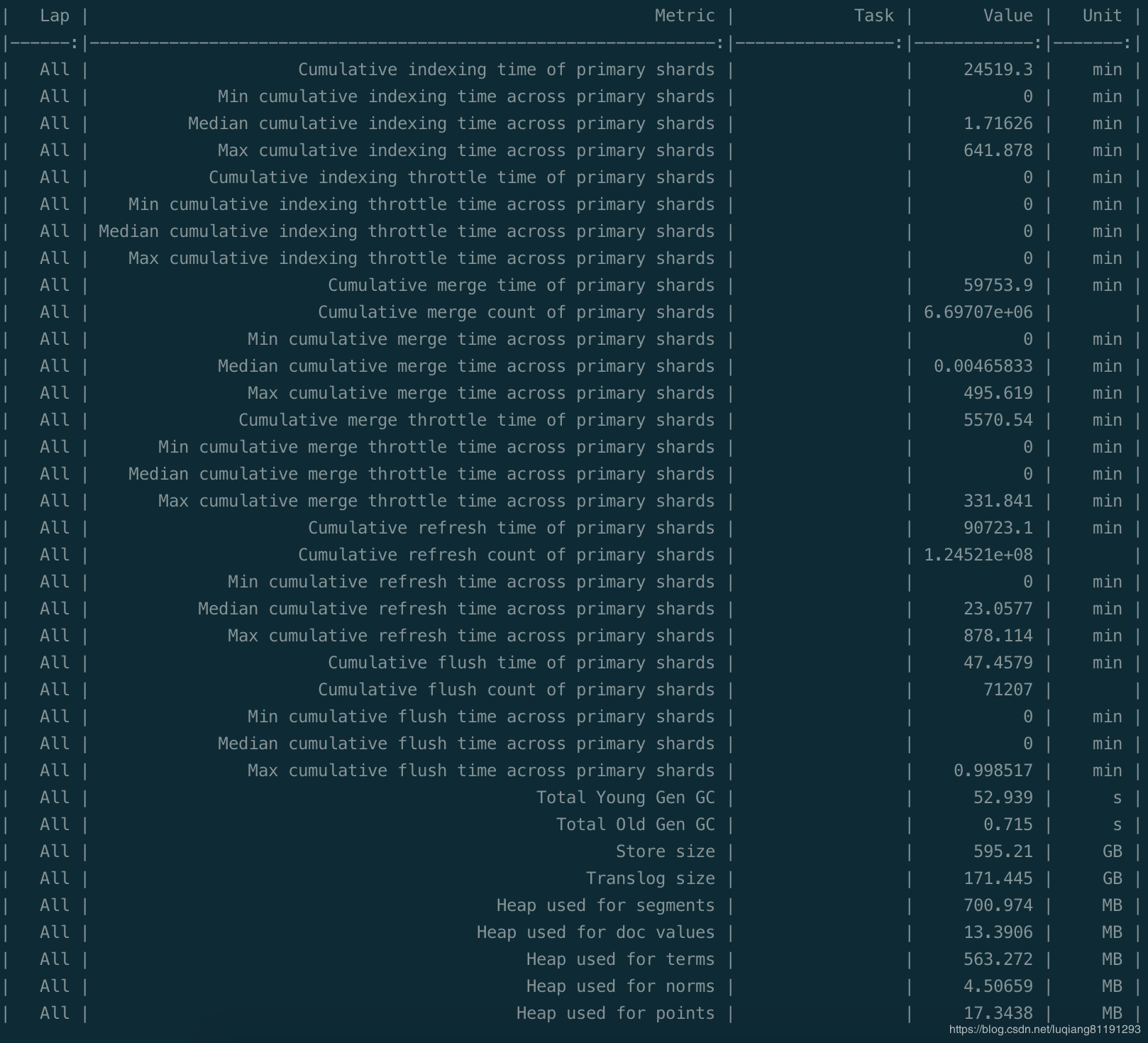
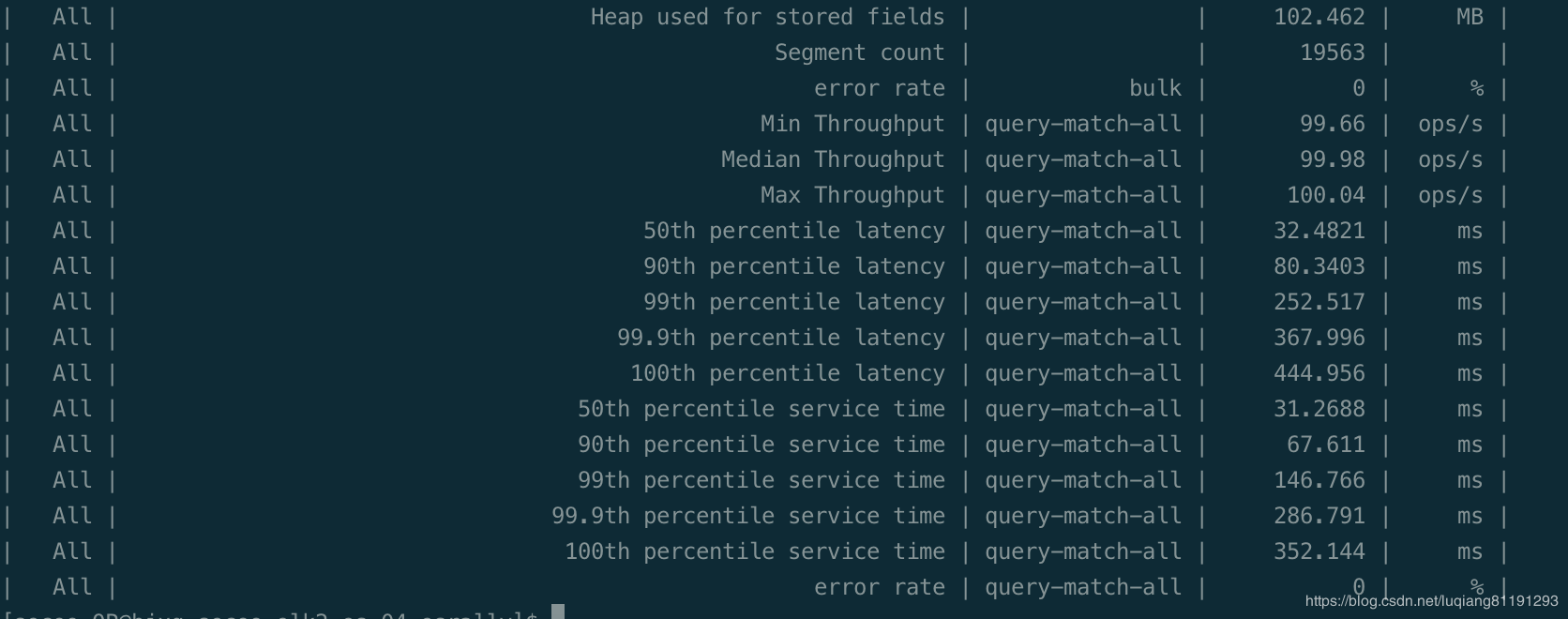
esrally --track-path=/data/secoo_program/esrally/tutorial/ --pipeline=benchmark-only --target-hosts=192.168.41.4:9200,192.168.41.5:9200,192.168.41.6:9200,192.168.41.7:9200,192.168.41.8:9200,192.168.41.9:9200 --client-options="use_ssl:false,verify_certs:true,basic_auth_user:'elastic',basic_auth_password:'fcj5cU1Oh3YUcU3NL6vw'" --offline --report-file=/tmp/logs/report.md
结果