

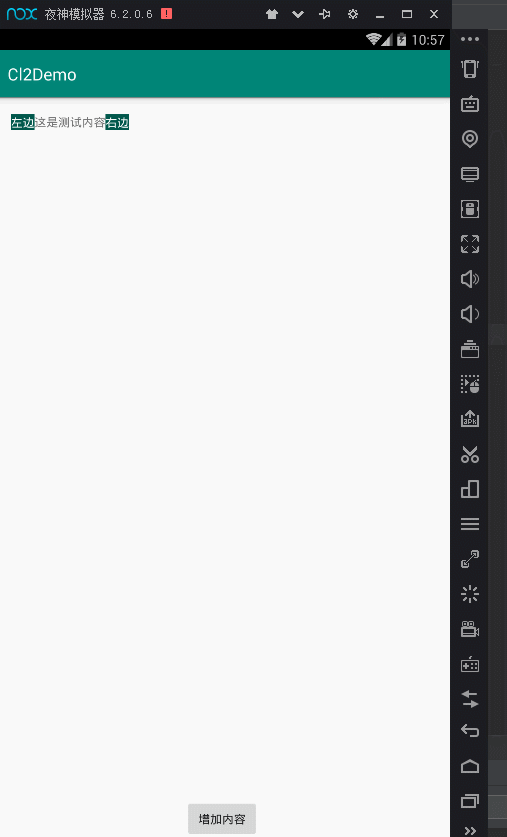
总的来说要实现这种效果.本来还以为要动态计算然后截取什么的,后来发现ConstraintLayout可以实现这种效果.
直接上代码:
<?xml version="1.0" encoding="utf-8"?>
<androidx.constraintlayout.widget.ConstraintLayout
    xmlns:android="http://schemas.android.com/apk/res/android"
    xmlns:app="http://schemas.android.com/apk/res-auto"
    xmlns:tools="http://schemas.android.com/tools"
    android:layout_width="match_parent"
    android:layout_height="match_parent"
    tools:context=".MainActivity">

    <TextView
        android:id="@+id/tv1"
        android:layout_width="wrap_content"
        android:layout_height="wrap_content"
        android:layout_marginLeft="20dp"
        android:layout_marginTop="20dp"
        android:background="@color/colorPrimaryDark"
        android:text="左边"
        android:textColor="#fff"
        app:layout_constraintLeft_toLeftOf="parent"
        app:layout_constraintTop_toTopOf="parent"/>

    <TextView
        android:id="@+id/tv2"
        android:layout_width="wrap_content"
        android:layout_height="wrap_content"
        android:singleLine="true"
        android:text="这是测试内容"
        app:layout_constrainedWidth="true"
        app:layout_constraintBottom_toBottomOf="@+id/tv1"
        app:layout_constraintHorizontal_bias="0"
        app:layout_constraintLeft_toRightOf="@+id/tv1"
        app:layout_constraintRight_toLeftOf="@+id/tv3"
        app:layout_constraintTop_toTopOf="@+id/tv1"
        app:layout_constraintHorizontal_chainStyle="packed"/>

    <TextView
        android:id="@+id/tv3"
        android:layout_width="wrap_content"
        android:layout_height="wrap_content"
        android:layout_marginTop="20dp"
        android:layout_marginRight="20dp"
        android:background="@color/colorPrimaryDark"
        android:text="右边"
        android:textColor="#fff"
        app:layout_constraintLeft_toRightOf="@+id/tv2"
        app:layout_constraintRight_toRightOf="parent"
        app:layout_constraintTop_toTopOf="parent"/>
    <Button
        android:text="增加内容"
        app:layout_constraintLeft_toLeftOf="parent"
        app:layout_constraintRight_toRightOf="parent"
        app:layout_constraintBottom_toBottomOf="parent"
        android:onClick="addText"
        android:layout_width="wrap_content"
        android:layout_height="wrap_content"/>
</androidx.constraintlayout.widget.ConstraintLayout>
这样就可以是实现这种效果了.要注意的点
- 左边布局不能连接中间布局
- 中间布局的重要属性 layout_constrainedWidth layout_constraintHorizontal_bias layout_constraintHorizontal_chainStyle 三个属性一定要设置
- 右边布局一定要连接右边Parent 要不然满一行的时候会挤出去右边布局
另外CL还有好多很好用的控件 比如Group,Barrier等等,2.0以后又出现Flow,Layer等等.还有更厉害的Motionlayout
