

开发React Naive已经一段时间了,将自己的一些学习过程记录下来。便于后期整理,同时给还未入坑的小伙伴提供一些参考,少踩坑。
我是一个android应用开发者,android中四大组件的生命周期相信各位同行们都可以娓娓道来,在开发过程中也是信手拈来。 与之对应的在React Native中,组件也有生命周期。例如
constructor:构造函数,第一个执行的方法
componentWillMount:组件即将渲染,生命周期中只执行一次
render:渲染函数,当有更新或者强制更新的时候调用
componentDidMount:组件第一次渲染结束时调用,只执行一次。
componentWillUnmount: 件即将销毁的时候调用,没有对应的DidUnmount,因为此刻已经销毁掉了
componentWillReceiveProps:组件接受新的props或者props有改变时调用,参数会传进来新的props,旧的props还是可以通过this.props来访问
shouldComponentUpdate:这个地方可以拦截组件渲染,该方法接受两个参数,一个是新的state,一个是新的props,当返回true会继续渲染,返回false,则不会调用渲染。该方法大有用处,在自定义组件的时候需要关注该方法。
介绍完上面这些生命周期,Android是不是感觉和原生开发有些许不同,比如组件退到后台或者回到前台怎么没有相应的回调?对于应用开发者不能忍啊!!!快点还我onRestart, onStart, onResume, onPause, onStop。
可是如何回调上面的方法呢?这是一个问题,在开发中带着这个疑问去研究,再使用React-navigation时,这个问题的答案逐渐浮出了水面。下面就揭开这个问题的面纱。
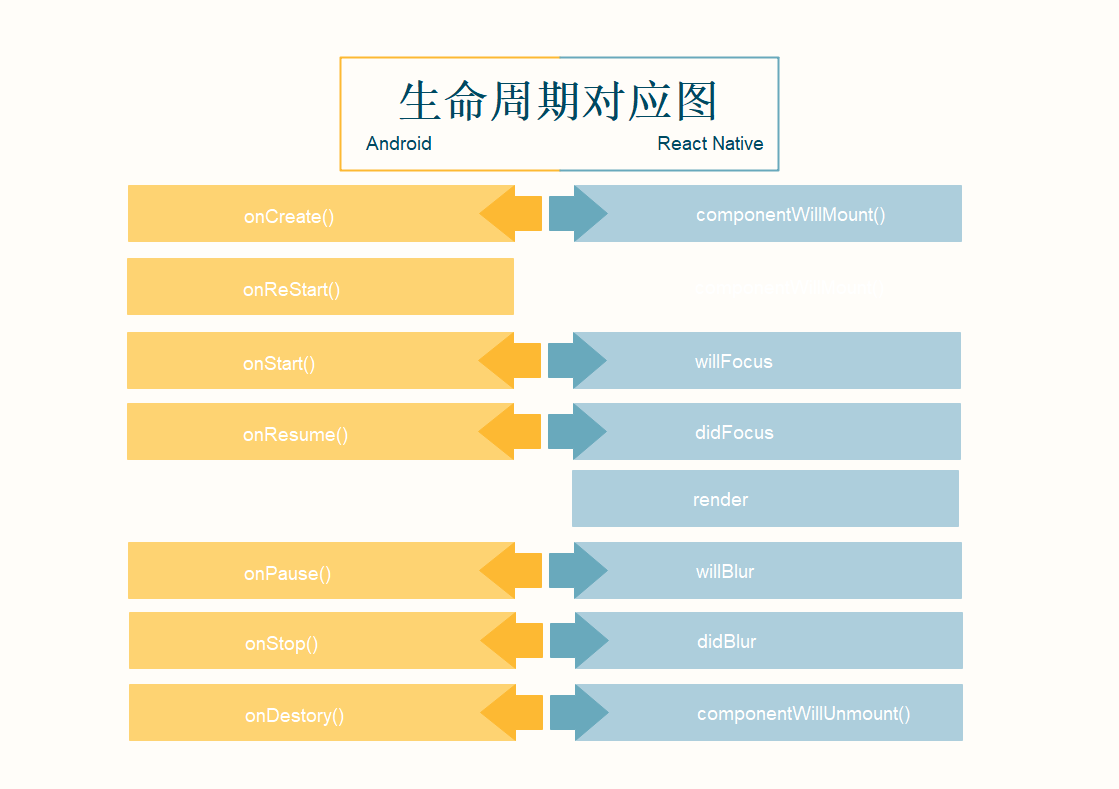
在结合React-Navigation使用过程中,看到了一个方法addListener,这个方法可以监听到组件的四个状态回调:willFocus、didFocus、willBlur、didBlur分别是即将获取焦点、已经获取焦点、即将失去焦点、已经失去焦点,就是在组件推到后台和返回前台是会调用。于是我便利用这个几个方法来在React Native中代替了原生的四个声明周期。简单对应图如下:
- 安装React-Navigation。
yarn add react-navigation
react-native link react-navigation
- 代码实现如下。 创建基类,方法在基类中去实现:
import * as React from "react";
import { Platform, BackHandler } from 'react-native';

export interface AppProps {
}

export default class BaseComponents<T> extends React.Component<T, any> {
  static navigationOptions = {
    header: null
  };

  _navListener:any;

  constructor (props: T) {
    super(props)

    this.onStart = this.onStart.bind(this);
    this.onResume = this.onResume.bind(this);
    this.onPause = this.onPause.bind(this);
    this.onStop = this.onStop.bind(this);
    this.onBackAndroid = this.onBackAndroid.bind(this);
    if (this.props.navigation) {
      this._navListener = this.props.navigation.addListener("willFocus", () => {
        console.log("nel-log", "willFocus");
        this.onStart();
      });

      this._navListener = this.props.navigation.addListener("didFocus", () => {
        console.log("nel-log", "didFocus");
        this.onResume();
      });

      this._navListener = this.props.navigation.addListener("willBlur", () => {
        console.log("nel-log", "willBlur");
        this.onPause();
      });

      this._navListener = this.props.navigation.addListener("didBlur", () => {
        console.log("nel-log", "didBlur");
        this.onStop();
      });

    }

    if (Platform.OS === "android") {
        BackHandler.addEventListener("hardwareBackPress", this.onBackAndroid);
      }
  }

  onBackAndroid() {
    return false;
  }

  onStart() {}

  onResume() {}

  onPause() {}

  onStop() {}
}
以上方案仅供大家参考,实现方案中如果有不合适的地方,还请大家评论区指教。

