备注:本书阅读从 2019年6月中旬开始
《深入理解计算机系统》第三版,由于中文翻译拗口,故结合原版《Computer System 2 Edition》 。英文阅读速度还是比较慢的,于是穿插着看,有些觉得拗口的中文翻译就查原文。计算机本来就是外国舶来品,中文翻译常追求简洁性,导致把很多原文阐述的细节给覆盖了,影响理解,所以还是有必要对应原文查阅。
如何阅读本书
学习系统的唯一方法就是做系统,即在真正的系统上解决具体的问题,或是编写和运行程序。
1.1 Infomation Is Bits + Context
源程序是一序列的bits, 0和1,8-bit chunks called bytes. 一个字节8位。 每个字节表示一个字符。ASCII 每个字符由一个字节的整数表示。
hello.c 这个小程序本质上的内容就是一串字节。每个字节有一个表示ASCII 字符的整数。
所有信息最终都是由bits 来表示的,区别信息类型的是 context (上下文)。
一个c源码文件被编译成可执行文件需要经历四个过程:
preprocessor,compiler,assembler,linker
以上四个阶段组成编译系统(compilation system)。
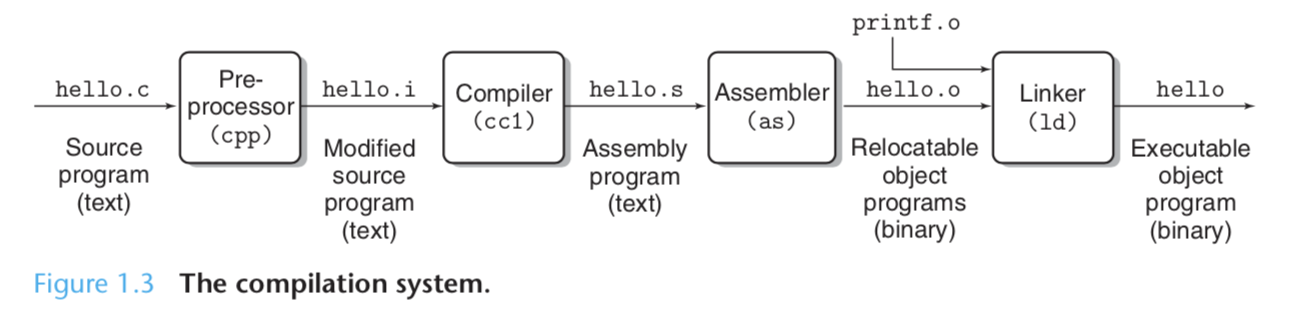
- Preprocessor phase 预处理阶段:根据源文件的头信息解析为 hello.i 格式。 Compilation phase 编译阶段:hello.i --> hello.s which contains an assembly-language program. 即将 C 编译成汇编语言程序。
Q:为何一定要先转为汇编语言?
A:因为汇编语言可以为各种高级语言的 compiler 提供一种通用输出语言。比如 C 编译器 和 Fortran 编译器 both generate in the same 汇编语言。
-
Assembly phase 汇编阶段:Assembler 将 hello.s 翻译成二进制机器码指令,并包装成 hello.o 二进制文件。
-
Linking phase 链接阶段:在 hello 源码中,使用了 printf 打印方法,这个方法属于一个标准 C 库,由 C compiler 提供。printf 方法位于一个单独预编译好的 object file :printf.o 文件中,这个 printf.o 文件必须被合并到 hello.o 程序中才能被调用。Linker 的作用就是将 库文件链接给源文件程序调用。
1.3 理解编译系统如何工作是有帮助的
-
提高程序性能
-
理解 link-time errors
-
避免安全漏洞
1.4 Processor read and interpret instructions stored in memory
hello.c 程序经过编译系统编译之后,生成了 hello 这个 executable object file,在Unix系统,直接在 shell 窗口输入一下命令即可:
unix> ./hello
hello, world
unix>
1.4.1 Hardware organization of a system
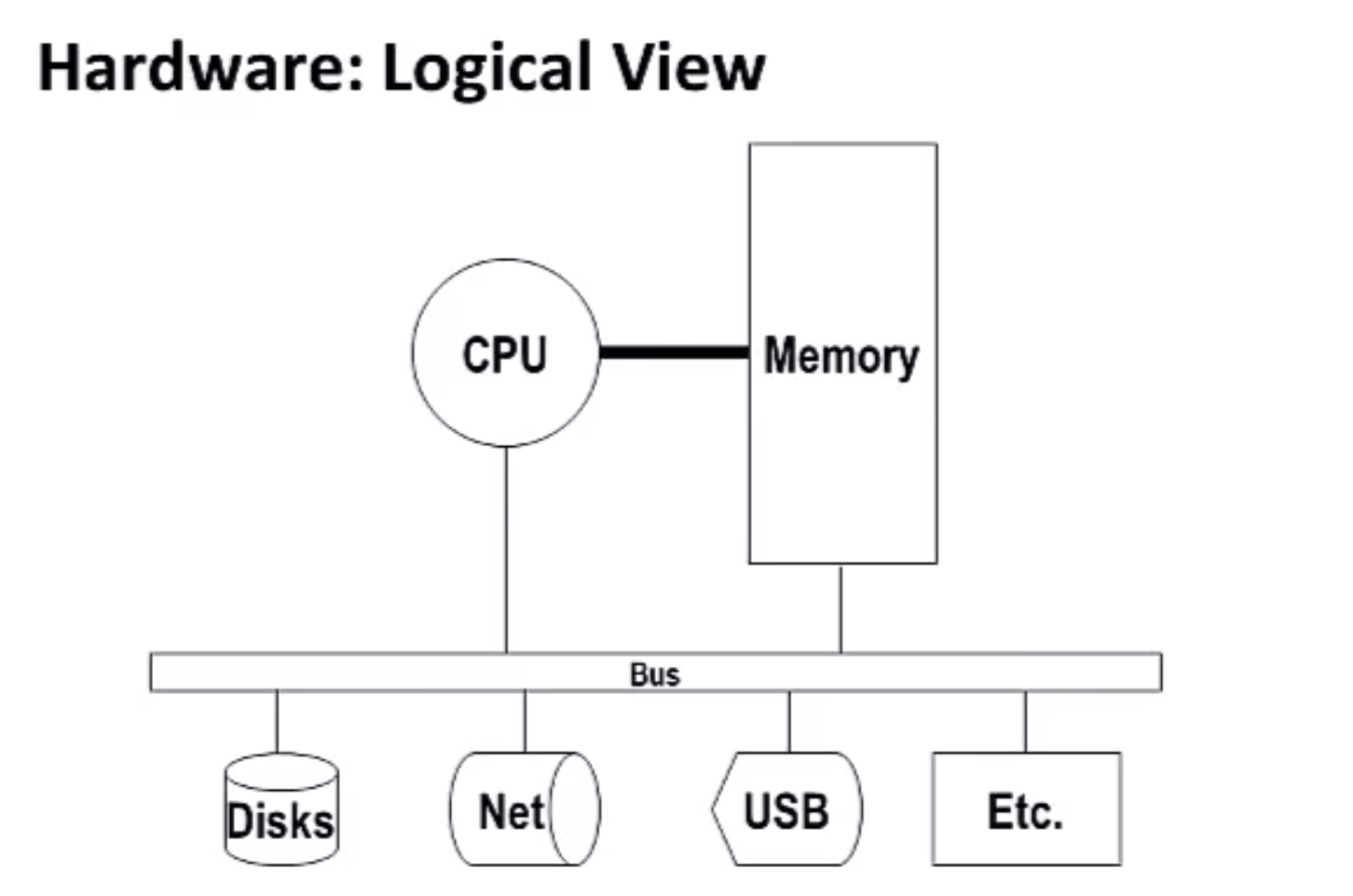
要理解运行 hello 程序发生了什么,需要了解硬件组织架构。
Buses Buses 总线
Running throughout the system is a collection of electrical conduits called buses that carry bytes of infomation back and forth between components. Bus 总线是连通整个系统所有组件的管道,各种信息数据以 bytes 形式穿行于 bus 总线中,从一个 component 传输到其他 component 进行通信。
Bus 总线是专门设计来传输固定大小的字节块,即 words。
word size 随系统变化,普遍都是一个 word 4个字节(32位)、8个字节(64位)
本书假设 bus 一次只传输一个 word, 大小为4个字节。
I/O Devices
I/O Devices 是系统和外界联系的桥梁。比如鼠标、键盘等 for input,显示器 for output,用来存储数据的硬盘。
I/O Devices 和 I/O Bus 连接,数据就是通过 Bus 来传输的。
可以直接把 Bus 总线理解成各个模块之间的数据传输线。
Main Memory 主内存
主内存是临时存储程序和被CPU处理的程序数据的场所。
Logically, memory is organized as a linear array of bytes, each with its own unique address (array index) starting at zero.
把主内存理解成一个打孔带,一整块内存就是内存带中按循序排列好的一长串的孔,一个孔对应一个 byte, 每个孔都有自己唯一的编号,从0算起,作为其地址。
每个指令有N个 bytes 组成,不同类型的数据由不同个数的 byte 组成,如在 IA32 machine running Linux,short 是 2 bytes, long 是 4 bytes,double 是 8 bytes。
CPU
CPU 是解析/执行存储在 Main Memory 的指令(Instructions)的引擎。
At its core is a word-sized storage device (or register 寄存器) called the program counter 程序计数器。任何时间点,程序计数器指向某个机器语言指令,这些指令存放在 Main Memory 存里,程序计数器通过这些指令的 address 来指向对应的指令。
从计算机通电开始,PCU repeatedly executes the instruction pointed at by the program counter, and updates the program counter to point to the next instruction.
1. Program counter 是 CPU 的指挥官,它的手指向主内存上面的任何一条指令,CPU 就屁颠屁颠跑过去执行这条指令。
2. 这条指令执行完之后,CPU 反馈给指挥官,可以指向下一条指令了喂。
3. 指挥官紧接着又指向下一条指令。
4. CPU不断跟一头不知疲倦的驴一样去执行所有让它处理的指令。
   直到系统关机!
CPU reads the instruction from memory pointed at by the 程序计数器,interprets the bits in the instruction, performs some simple operation dictated(规定) by the instruction, and then update the 程序计数器 to point to the next instruction.
这些简单的操作只有很少的数量,都围绕着主内存、寄存器 和 ALU arithmetic/logic unit.
The register file(寄存器) is a small storage device that consists of a collection of word-size registers, each with its own unique name.
ALU computes new data and address values.
流程细节如下:
1. Load:加载
从主内存中复制一个 byte 或 word 到寄存器,覆盖掉寄存器之前的内容。
2. Store:存储
从寄存器中复制一个 byte 或 word to a location in 主内存,覆盖掉这个location 之前的内容。
3. Operate:运算
将两个寄存器的内容(two words)复制到 AUL,在AUL对这两个 words 进行数学运算。然后将运算结果存回到其中一个寄存器,覆盖掉之前的内容。
4. Jump
Extract a word from the instruction itself, 然后把这个 word 复制到 program counter 程序计数器,覆盖掉 PC 之前的内容。
1.4.2 执行 hello 程序
简单了解系统硬件组织和操作之后,就可以开始理解 hello 程序运行时究竟发生了什么了。
We must omit a lot of details here, but for now we will be content with the big picture.
Initially, 当我们在 shell 里输入 ./hello 时,shell 程序 reads each one into a register, 然后 store in memory. 如图所示:
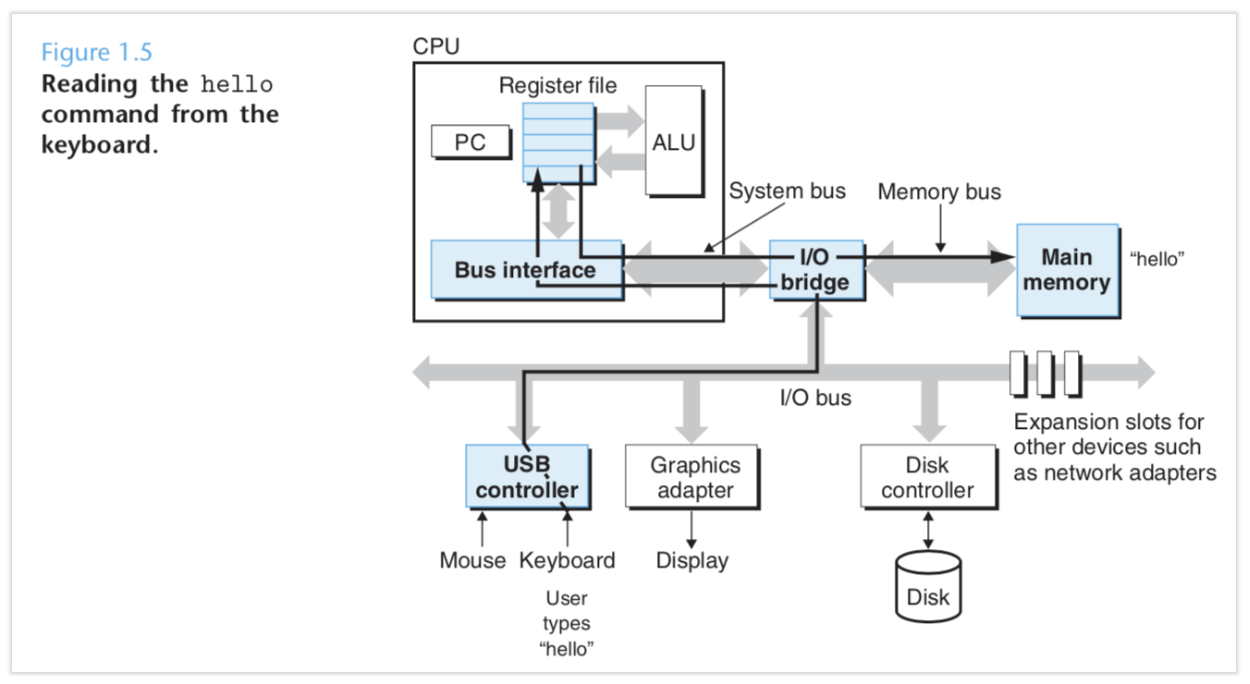
当我们按 enter 时,shell 知道我们输完命令了,shell 就将硬盘上的 hello 可执行文件加载到主内存中。(shell then load the executable hello file by executing a sequence of instructions,that copies the code and data in the hello object file from disk to main memory. )
Using a technique known as direct memory access (DMA, discussed in Chap- ter 6), the data travels directly from disk to main memory, without passing through the processor. This step is shown in Figure 1.6.
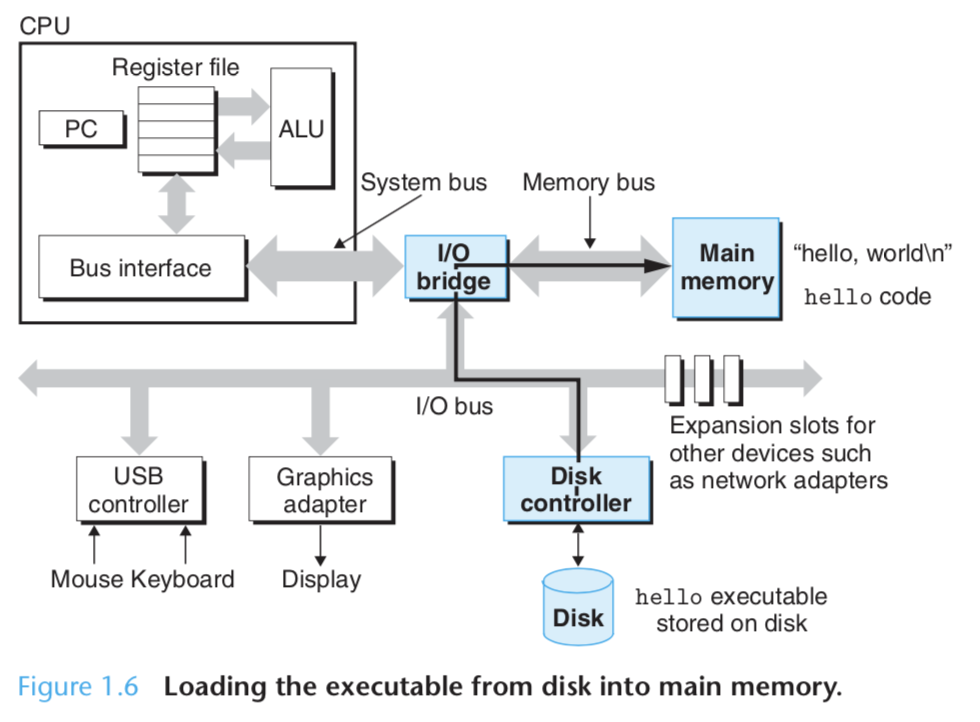
将 hello 文件加载到主内存,实际上是将 hello 文件里的代码和数据加载到主内存。然后处理器开始执行机器语言指令,这些指令位于hello 程序的 main routine 里。
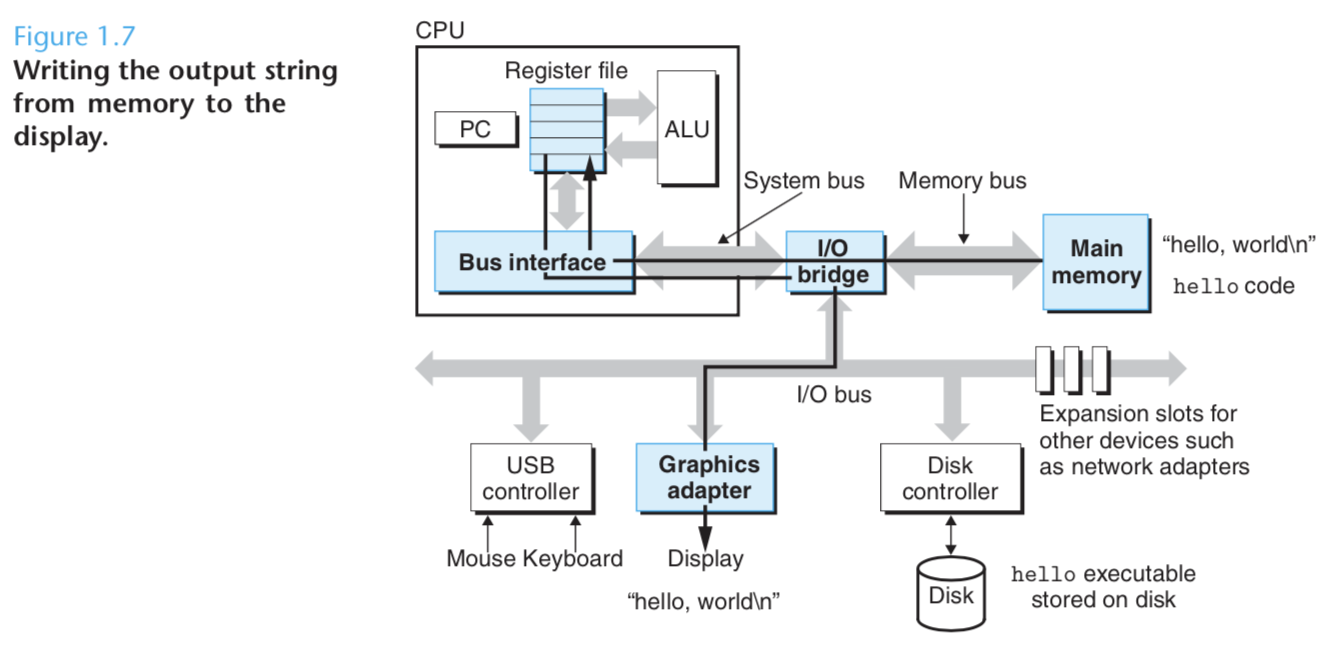
这些机器语言指令 copy the bytes in the "hello, world\n" string from main memory to the register file, 然后再到显示器,即将其显示到显示屏上。过程如下图显示:
1.5 Caches Matter
上面这个例子表明,系统花费很多时间从一个地方将数据移动到另一个地方。这些都是拖慢程序执行的开销。
A register file stores only a few hundred bytes of infomation, as opposed to billions of bytes in the main memory. 处理器从寄存器读取数据的速度要比从主内存读取数据的速度快100倍。
Size of Register file : hundred bytes
Size of Memory: billions of bytes
Speed of Register > 100x Speed of Memory
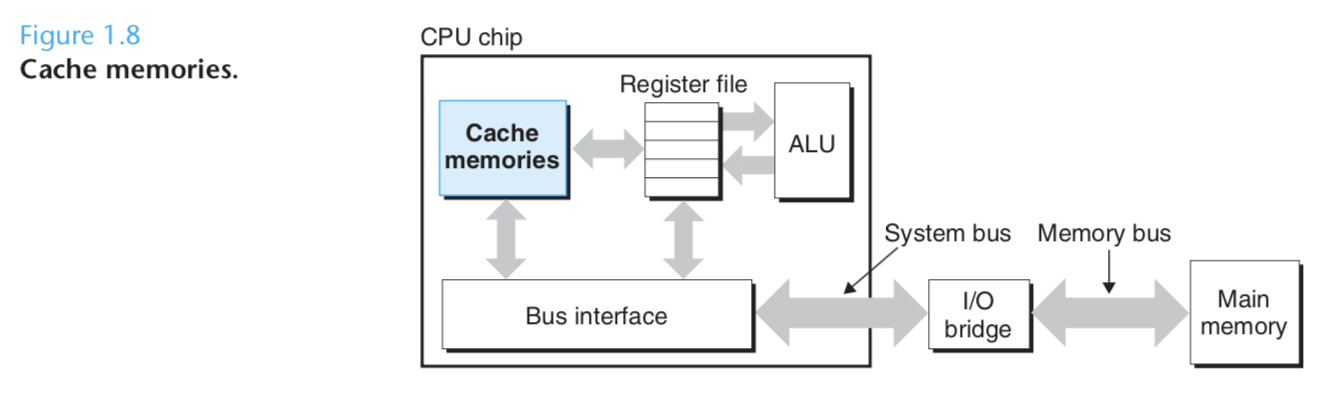
实际发展中,内存一直没太大变化,而处理器日新月异,越来越快,内存和处理器之前的 gap 越来越大。为了解决这个 processor-memory gap,系统设计者引入 cache memory,简称缓存。
缓存的作用:作为临时的 staging areas for information that the processor is likely to need in the near future. An cache on the processor chip holds tens of thousands of bytes and can be accessed nearly as fast as the register file. (Staging area: A staging area is a location where people or data that are assembled before use.) 如下图所示:
1.6 Storage Devices From a Hierachy
这种在处理器和主内存之间插入一个更小但要快得多的缓存的思想已经很普遍。
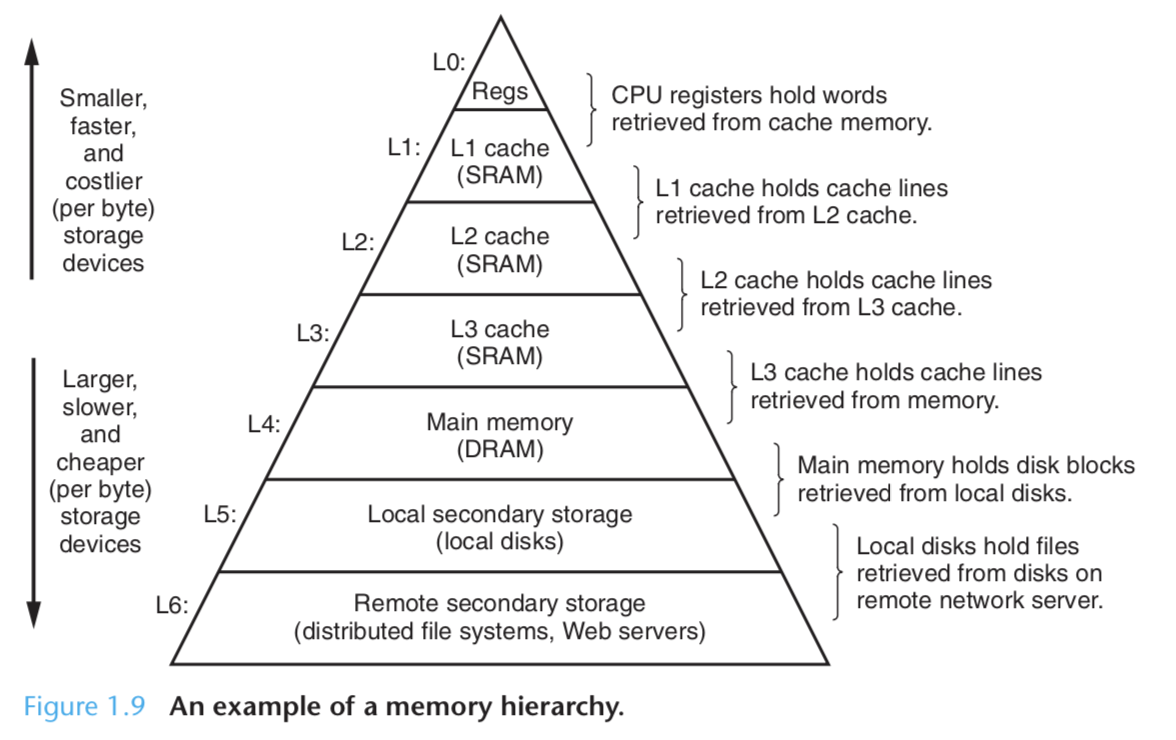
如上图所示,从顶层到底层的各种数据存储设备,存取速度递减,存取容量递增。
上图的内存设备层级构成了 Memory Hierarchy,主要思想:storage at one level serves as a cache for storage at the next lower level.
-
The register fike is a cache for L1 cache.
-
Caches L1 and L2 are caches for L2 and L3, respectively.
-
The L3 cache is a cache for the main Memory, which is a cache for the disk.
1.7 The Operating System Manages the Hardware
操作系统就是一个软件层,铺设在硬件和应用层中间,all attempts by an application program to manipulate the hardware must go through the operating system.
操作系统有两个目的:
- 保护硬件层不被软件直接乱搞,安全性。
- 为软件提供一个简单且统一的机制,来间接访问硬件。

操作系统是如何实现这两个目的的呢?
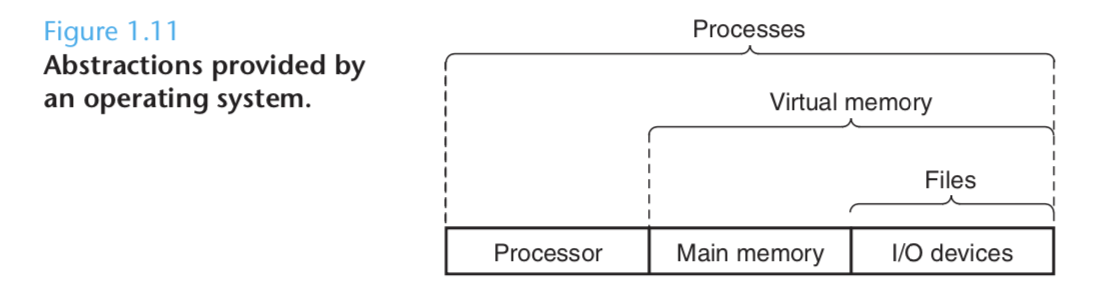
The operating system acheives both goals via the fundamental abstractions shown in Figure 1.11: processes, virtual memory, and files.
-
Files are abstractions for I/O devices.
-
Virtual memory is an abstraction for both the main memory and disk I/O devices.
-
Processes are abstaction for the processor, main memory, and I/O devices.
Aside : Unix 发展史(现代计算机系统的起源和发展历程。)
1960年 IBM 出了一个 OS/360 ,霍尼韦尔出了个 Multics 系统,都很火。

其中 Bell 实验室也参与到 Multics 系统的开发,但后面退出,基于Multics 系统的开发经验,贝尔自己弄个小组,
使用机器语言写了一个比 Multics 更简单的系统,用于 DEC PDP-7 电脑。

Bell 从Multics 系统借鉴了很多概念,如文件系统,shell 等,但实现了一个更小更简单的package.
They dubbed the new system Unix as pun on the complexity of Multics.
之后又使用C语言重写了该系统。

由于但是Unix 向学校公布了源码,后面追随者众,最终流行起来并建立起计算机系统统一标准。

这就是现代计算机系统的起源和发展历程。
1.7.1 Processes 进程
进程给人造成一种错觉:当前跑的程序是系统唯一在运行的程序,因为这个程序能独立使用处理器和主内存,还有I/O设备。
进程是操作系统为运行中的程序抽象出来的一个概念。一个系统可以同时运行多个进程,互不干扰。一个单独的CPU能够通过在进程间进行时间片切换来达到同时执行多个进程 (concurrently)
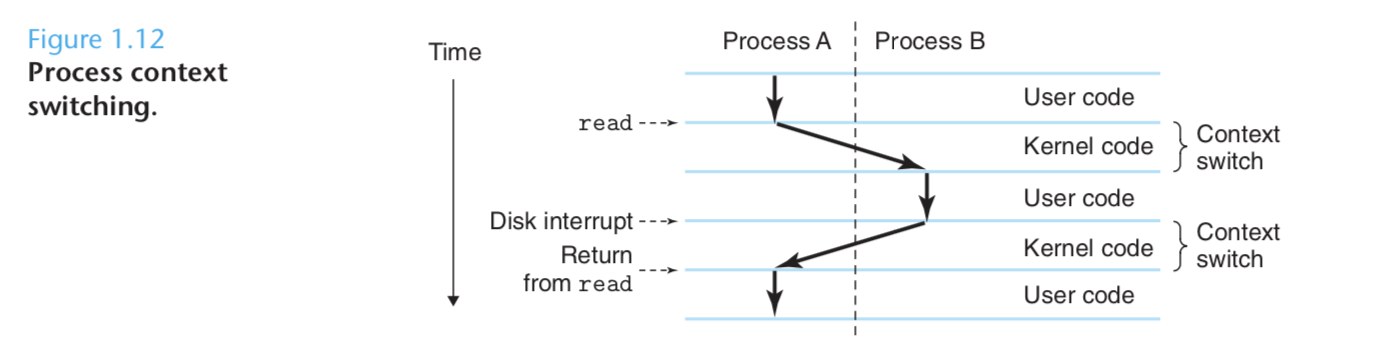
多进程最核心的机制:操作系统通过 context switching 即上下文切换机制来实现多进程。
Context Switching 原理
操作系统记录所有进程运行所需的状态信息, 这个状态(state)就是 context 上下文。
Context 包括以下几个信息:
当前program counter 的值,寄存器的值和主内存里的值。
When performing context switching, processor save the context of the current process, restoring the context of the new process, and then passing control to the new process. The new process picks up exactly where is left off. 如下图所示:
例子:解析上下文切换的详细过程
回到 hello 程序通过 shell 执行的例子:本例子中我们有两个并发进程,分别是 shell 进程和 hello 进程。
Step 1
最开始,shell 进程单独运行,等待输入命令。
Step 2
当我们让 shell 执行 hello 程序时,shell 触发一个 system call 来将自己对CPU的控制权 移交给系统。
Step 3
系统收到控制权,保存 shell 的 context,创建一个 hello 进程和对应的 context,然后将控制权传递给 hello 进程。
Step 4
当hello 进程结束时,操作系统恢复 shell 进程的 context,并将控制权传递给 shell。shell 得到控制权之后继续原地待命,等新的命令行输入。
1.7.2 Threads 线程
A process can actually consist of multipule execution units, called threads, each running in the context of the process, and sharing the same code and global data.
一个进程里的所有线程,共用当前进程的上下文 context(保存了进程的状态值) 和全局变量。
1.7.3 Virtual Memory 虚拟内存
虚拟内存也是一个abstraction,它给每个进程带来了一个假象:每个进程 has exclusive use of the main memory.
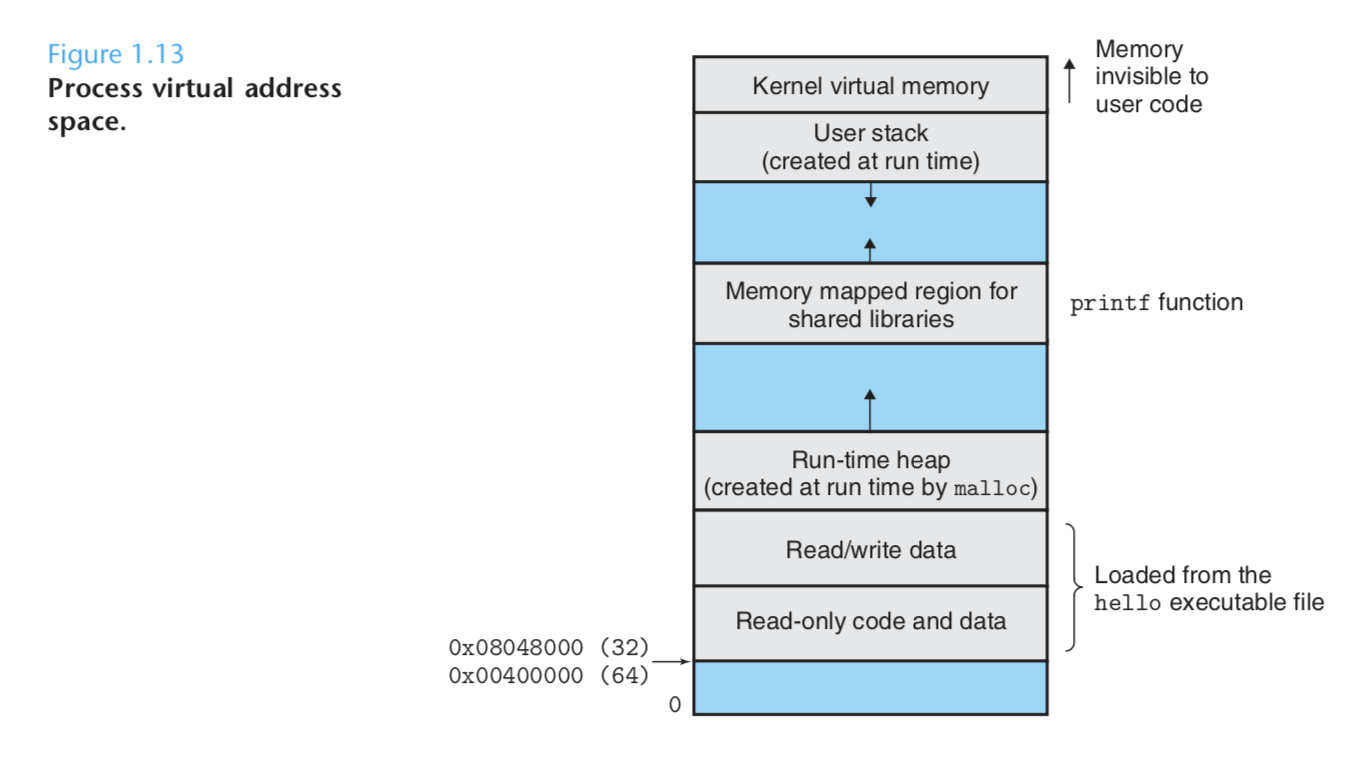
Each process has the same uniform view of memory, which is known as its virtual address space(虚拟地址空间).
对于每个进程来说,虚拟地址空间包含几个定义好的区域,每个区域有各自的功能目的。
Virtual address space 包含以下几部分:
1. Program code and data
The code and data areas are initialized directly from the contetnts of an executable object file, the hello executable.
2. Heap. 堆
紧接着代码和数据区之上的是 run-time heap.
3. Shared libraries.
4. Stack. 栈
At the top of the user's virtual address space is the user stack. Compiler use this stack to implements function calls. 编译器在栈中实现方法的调用。
5. Kernel virtual memory
The top of the address space is reserved to the kernel.
虚拟内存空间的基本思想:The basic idea is to store the contents of a process's virtual memory on disk, and then use the main memory as cache for the disk.
1.7.4 Files 文件
A file is a sequence of bytes. Every I/O device, including disk, keyboards, displays, and even networks, is modeled as a file.
This notion of a file provides applications with a uniform view of the varied I/O devices.
文件的概念,让程序访问这些 I/O 设备变得统一、简单,因为这些IO 设备都被抽象成文件的概念。
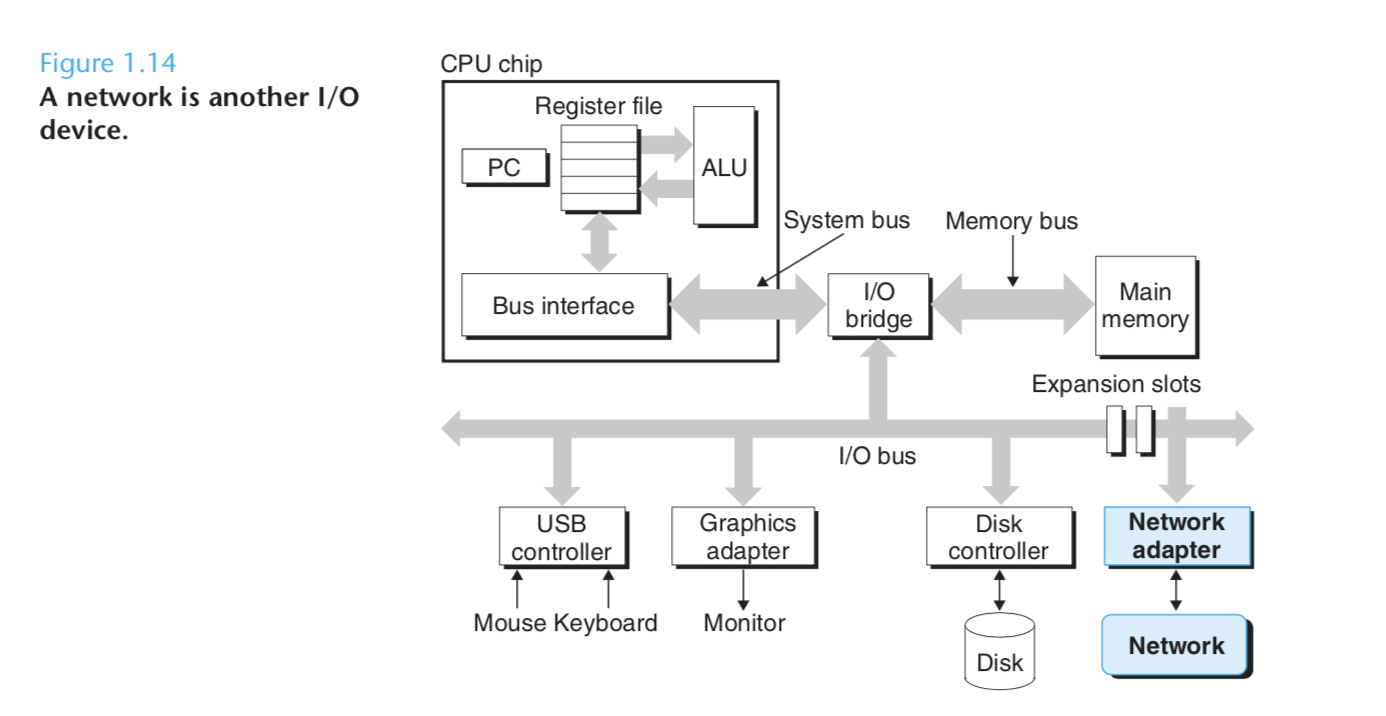
1.8 System Communicate with Other Systems Using Network
Network 可以看成是 another I/O 设备, 如下图所示:
1.9 Important Themes 一些重要主题
To close out this chapter, we highlight several important concepts that cut across all aspects of computer systems.
1.9.1 Concurrency and Parallelism 并发和并行
Throughout the history of computer, two demands have been constant forces driving improvements: we want them to do more, and we want them to do faster.
1. Concurrency
simultaneous activities in a system.
2. Parallelism
refer to the use of concurrency to make a system run faster.
并行可以运用在在系统中的多个抽象层次上。以下从三个层次分析,由高到低。
1. Thread-level Concurrency
从进程层面来讲,并发意味着一个系统可以同时运行多个进程。
从线程层面来讲,并发以为着一个进程里有多个 control flows 同时执行。
Uniprocessor system 单处理器系统
从最初的单核计算机来讲,并发其实是模拟出来的,因为本质上一个 CPU 在同一时间内只能执行单一进程,但是通过 time-sharing 这个概念可以模拟出并发的效果。
time-sharing 这个概念是基于上下文快速切换似的多个进程,可以在同一个 CPU 快速轮流执行,造成多个进程同时执行的假象。
Multiprocessor system 多处理器系统
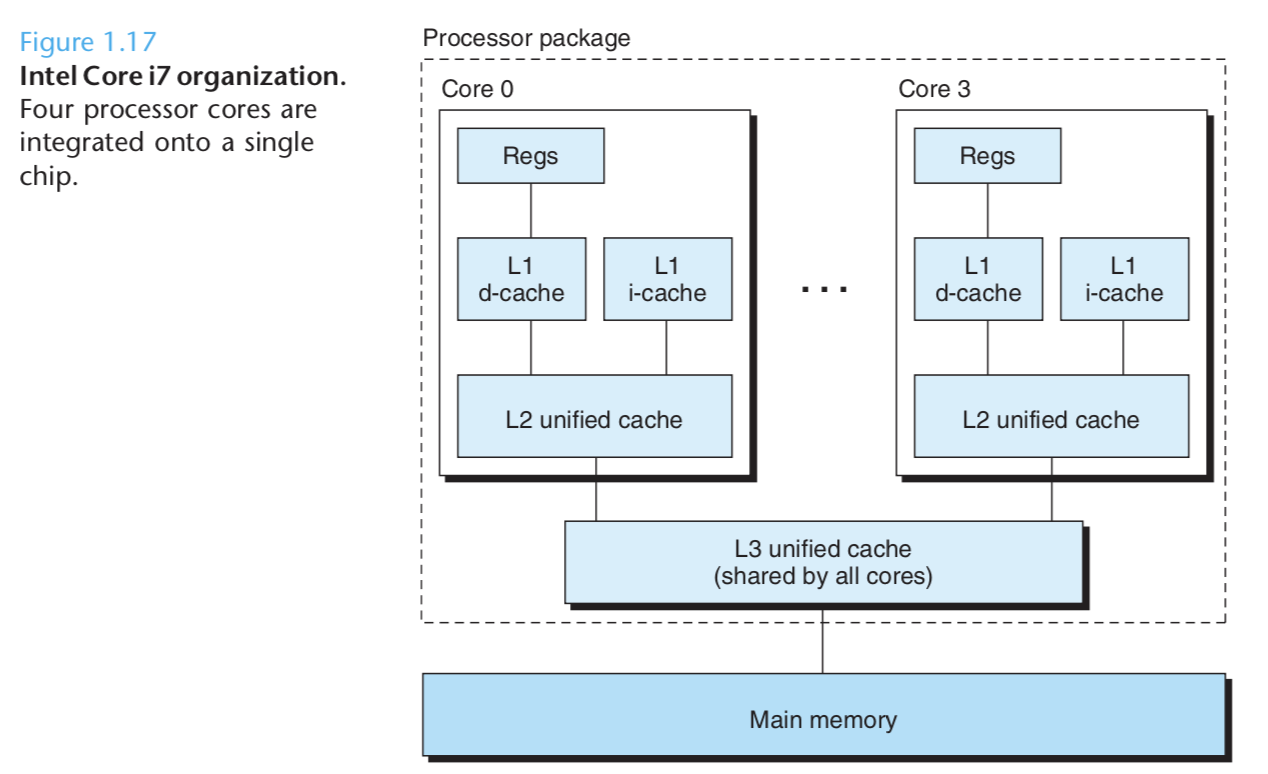
Multi-core processors have several CPUs (referred to as "cores") integrated onto a single integrated-circuit chip. (多核处理器--单个芯片集成多个CPU)
2. Hyperthreading
Also called simultaneous multi-threading:允许一个CPU执行多个 control flows. It involves having multiple copies of some of the CPU hardware, such as 程序计数器、寄存器。
3. Instruction-Level Parallelism
At a much lower level of abstraction, 现代处理器可以同时执行多条指令。
Single-Instruction, Multiple-Data Parallelism
加速进程处理图片、声音和视频。
1.9.2 Abstraction 在计算机系统中的意义
The use of abstractions is one of the most important concepts in computer science.
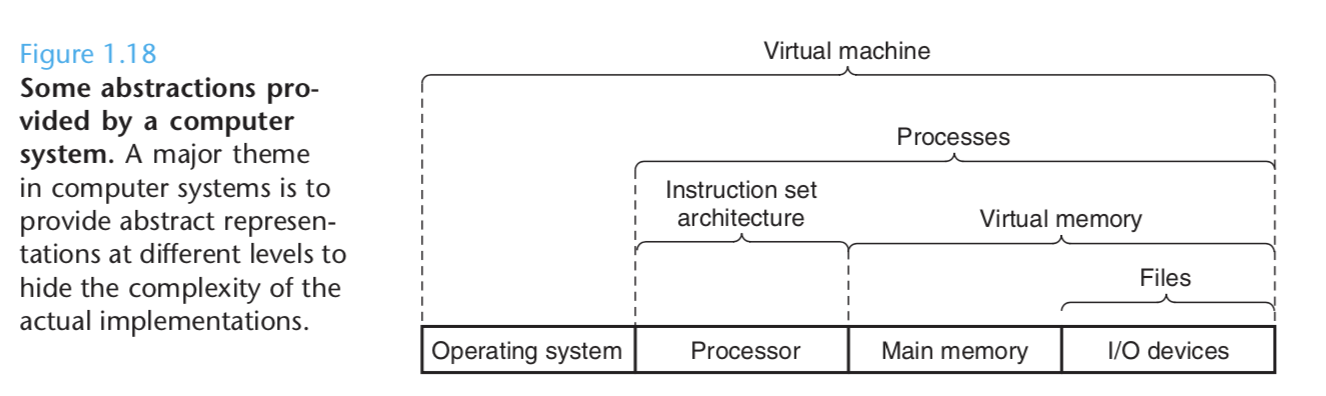
指令集架构(Instruction set architecture)provides an abstraction of the actual hardware.
The virtual machine, providing an abstraction of the entire computer, including the operation system. the processor, and the programs.
1.10 Summary
Processors read and interpret binary instructions that are stored in main memory. Since computers spend most of their time copying data between memory, I/O devices, and the CPU registers, the storage devices in a system are arranged in a hierachy. With the CPU registers at the top, followed by multiple levels of cache memories(L1,L2,L3 caches), DRAM main memory, and disk storage. Storage devices that are higher in the hierachy serve as caches for devices that are lower in the hierachy.
程序可以充分利用这个存储架构来提升性能。
The operating system kernel serves as an intermediary between the application and the hardware. This intermediary provides 3 fundamental abstractions: Files are abstractions for I/O decvices. Virtual memory is an abstraction for both main memory and disk. Processes are abstractions for the processor, main memory, and I/O devices.