Navigator ,在 Flutter 中 Navigator 是管理一组组件跳转的核心组件。使用栈的方式对组件进行管理。不仅是在我们日常使用开发组件跳转中而且在程序入口 App 中,同样是使用 Navigator 对组件的初始化进行管理。
Navigator 栈中管理的不仅仅的是UI类型组件,而且能管理 Navigator 类型的。如下图所示:
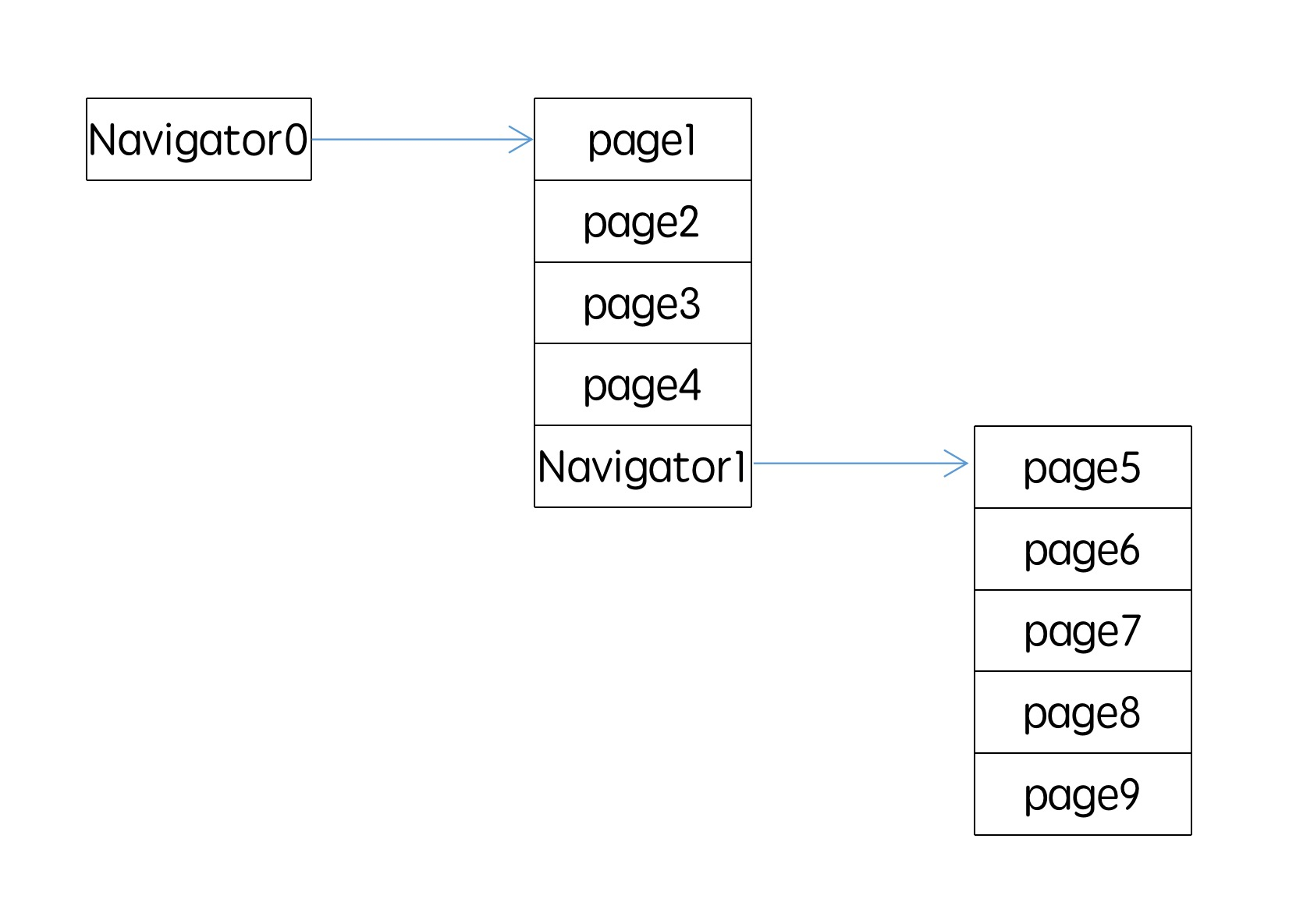
Navigator 的构造方法以及其参数源码如下:
///navigator.dart 749行 源码如下

  /// Creates a widget that maintains a stack-based history of child widgets.
  ///
  /// The [onGenerateRoute] argument must not be null.
  const Navigator({
    Key key,
    this.initialRoute,
    @required this.onGenerateRoute,
    this.onUnknownRoute,
    this.observers = const <NavigatorObserver>[],
  }) : assert(onGenerateRoute != null),
       super(key: key);
其中有三个比较重要的构造参数,第一个是 initialRoute ,类型是 String ,是本 Navigetor 初始化跳转的 Route 对应的 name。onGenerateRoute 是一个带有传入参数 RouteSettings 方法,每当使用当前 Navigator 根据 name 进行页面处理(push、pop等等)都会先走到这个方法进行查找,找出对应的route,RouteSettings 中带有 name、传递参数 arguments ,在方法中需要根据 initialRoute 返回对应的 Route 并且初始化一些需要用 name 进行跳转的 Route。onUnknownRoute 是当使用 pushNamed() 进行跳转新页面无法在 onGenerateRoute 返回对应的 Route 时,则跳转 onUnknownRoute。
使用例子:
Navigator(
      initialRoute: 'signup/personal_info',
      onGenerateRoute: (RouteSettings settings) {
        WidgetBuilder builder;
        switch (settings.name) {
          case 'signup/personal_info':
            builder = (BuildContext _) => CollectPersonalInfoPage();
            break;
          case 'signup/choose_credentials':
            builder = (BuildContext _) => ChooseCredentialsPage();
            break;
          default:
            throw Exception('Invalid route: ${settings.name}');
        }
        return MaterialPageRoute(builder: builder, settings: settings);
      },
    );
Navigator 是一个 StatefulWidget ,所以具体的功能都是在 NavigatorState 中实现的。
例如,我们跳转到一个新组件有两种写法。
一种是
Navigator.of(context).pushNamed('signup/choose_credentials');

///Navigator.of(context)
///navigator.dart 1449行 源码如下:

  static NavigatorState of(
    BuildContext context, {
    bool rootNavigator = false,
    bool nullOk = false,
  }) {
    final NavigatorState navigator = rootNavigator
        ? context.rootAncestorStateOfType(const TypeMatcher<NavigatorState>())
        : context.ancestorStateOfType(const TypeMatcher<NavigatorState>());
    ...省略非关键代码
    return navigator;
  }
可以看出来 .of(contaxt) 方法返回的是 NavigatorState ,也就是说实际调用 .pushNamed() 的是 NavigatorState。在 .of() 方法中有个比较重要的参数是 rootNavigator,但我们设置它为 true 时,能够拿到入口 App 中的NavigatorState 进行操作。当然这里的 App 中的 NavigatorState 并不能对所有的页面都进行处理,如前面图所示,假设 Navigator0 为 App 的 NavigatorState ,它只能对 page1、page2、page3、page4、Navigator1 进行管理,同时, NavigatorState 并没有提供一个获取子 NavigatorState 的方法。
另一种是
Navigator.pushNamed(context, routeName);

///navigator.dart 881行 源码如下:

@optionalTypeArgs
  static Future<T> pushNamed<T extends Object>(
    BuildContext context,
    String routeName, {
    Object arguments,
   }) {
    return Navigator.of(context).pushNamed<T>(routeName, arguments: arguments);
  }
可以看出这种跳转的其实是将第一种写法封装了下。
列举一下常用的一些方法。
- 打开新页面并且根据条件关闭旧页面。
逻辑:
A->B->C->D
在D中调用以下方法, Navigetor 根据历史页面从新到旧 D->C->B->A 依次调用第二个参数传入的方法并且在方法中传入对应的Route,若传入方法返回 true 结束调用,打开新页面。
Navigator.of(context).pushAndRemoveUntil(
            CupertinoPageRoute(builder: (con) => PageMain()), (route) {
          return false;
        });
Navigator.of(context).pushAndRemoveUntil(
            CupertinoPageRoute(builder: (con) => PageMain()),
            ModalRoute.withName("/"));
- 关闭当前页面并打开新页面
//替换,不显示关闭当前页面的过程。
Navigator.of(context).pushReplacement(pageMainRoute);
//有关闭当前页面的动画过程。源码中的实现方式是先pop在push。
Navigator.of(context).popAndPushNamed(routeName);
- 根据条件从现在到开始依次关闭页面
//倒序关闭直到route名为“/”
Navigator.of(context).popUntil(ModalRoute.withName("/"));
//倒序关闭直到返回true
Navigator.of(context).popUntil((route) {
                                return false;
                              });
- 打开新页面,在新页面关闭时返回值
//在新页面关闭时会触发 then ,返回值在方法的参数中。
Navigator.of(context)
              .pushNamed('signup/choose_credentials')
              .then((value) {
            print(value);
          });
//hello为返回值
Navigator.of(context).pop("hello");
- 替换页面
//两者结果一样,都可以用来替换栈中的历史页面
Navigator.of(context).replace(
                          oldRoute: Routes.pageLoginRoute,
                          newRoute: CupertinoPageRoute(
                              builder: (conx) => PageMain()));
Navigator.replaceRouteBelow(
                          context, anchorRoute: Routes.pageLoginRoute,
                          newRoute: Routes.pageLoginRoute);
- 移除历史页面
//移除某个页面
Navigator.of(context).removeRoute(Routes.pageLoginRoute);
//移除某个页面以及之后的页面
Navigator.of(context).removeRouteBelow(Routes.pageLoginRoute);