

背景
页面上展示一个列表,当数据量比较少的时候(几条几十条数据),页面渲染速度还ok,可能没什么太卡顿的现象;可是随着业务量不断扩增,数据量上升到几百条几千条的时候,页面列表要渲染对应条数的dom元素,页面渲染之慢、卡顿情况可以想象
优化
列表滚动到哪 就加载当前滚动区域及滚动区域上下一定范围的数据,其他数据就不渲染出来了。这样就可以控制渲染dom元素的数量,不至于一次性全部加载出来。类似于懒加载
思路
要实现之前,要先有个思路再动手,最开始想的肯定是最完善的。实现过程中发现问题慢慢补充
1、只渲染滚动容器高度的内容。根据一行的高度,算出来要展示多少行
2、如果外层不传一行多高 组件就要自动计算。先渲染一行数据,根据offsetHeight获取一行的高度。获取完高度后,去渲染其他行
实现
    import React,{ Component } from 'react';
    import PropTypes from 'prop-types';
    import throttle from 'lodash/throttle.js';

   export default  class InfiniteList extends Component{
       static propTypes={
           height:PropTypes.oneOfType([PropTypes.string,PropTypes.number]).isRequired,//列表容器的高度
           itemHeight:PropTypes.oneOfType([PropTypes.string,PropTypes.number]),//每一行的高度
           renderItem:PropTypes.func.isRequired,//渲染item的方法
           dataSource:PropTypes.array.isRequired//列表数据源
       }

       constructor(props){
            super(props);
           this.state={
               needCalcItemHeight:!props.itemHeight,//是否需要计算每一行的高度。当父级不传itemHeight的时候,需要计算
               cur:0,//记录在容器最顶部的元素的index
               itemHeight:props.itemHeight,
               size:props.itemHeight?Math.ceil(props.height/props.itemHeight):1
           }
           this.scroll = throttle(this.scroll,60);//节流处理
       }
       componentDidMount(){
           //计算item的高度
            this.calcItemHeight();
           //注册容器滚动监听事件
           this.list.addEventListener('scroll',this.scroll);
       }

       calcItemHeight=()=>{
        const { needCalcItemHeight } =this.state
           if(needCalcItemHeight&&this.firstDom){
               const itemHeight = this.firstDom.offsetHeight;//获取当前div的高度
               this.setState({
                   itemHeight,
                   needCalcItemHeight:false,
                   size:Math.ceil(this.props.height/itemHeight)
               })
           }
       }

       scroll=(e)=>{
           //这个监听事件干嘛呢  计算当前滑动到容器顶部的元素是第几个
           const index = Math.ceil(e.target.scrollTop/this.state.itemHeight);
           if(Math.abs(index-cur)>size){
              this.setState({ cur:index })
           }
          //注意:这里没必要index一变就更新state,会造成很多不必要的render。所以加上个条件,只有当前index-上一次记录的cur>一屏size的时候 再更新cur
       }
       renderFirstDom=()=>{
            const { dataSource,renderItem} =this.props
          return <div ref={(ref)=>{ this.firstDome = ref }}>
          {renderItem(dataSource[0],0)}
          </div>
       }

       handleData=(data)=>{
            const {size,cur} =this.state;
           const newData=[...data];//浅拷贝一份数据
           //该怎么截取数据呢,按照开始的思路,先截取一容器高度的行数。
           if(data.length<size){
               return newData
           }
            return newData.splice(cur,size);
       }

       renderList=()=>{
           //渲染list的时候,要将数据源处理一下,截取出来我们需要渲染的数据
           const data = this.handleData(this.props.dataSource);
           return data.map((item,index)=>{
               return this.props.renderItem(item,index)
           })
       }

       getContent=()=>{
        let content;
           //当父组件没传itemHeight的时候,先渲染一条数据,计算一行的高度
           const { needCalcItemHeight }  = this.state;
           if(needCalcItemHeight){
              content =  this.renderFirstDom()
           }else{
              content= this.renderList()
           }
           return content
       }
       render(){
            const { height } = this.props;

           return(
            <div
                ref={(ref)=>{ this.list =ref}}
                style={{
                    height,
                    overflow:'auto'
                }}
            >
                {this.getContent()}
            </div>
           )
       }
   }
父组件里这么用就行啦
<InfiniteList
    dataSource={data};
    renderItem={(item,index)=>{<div>{item.value}</div>}}
    height={200}
/>
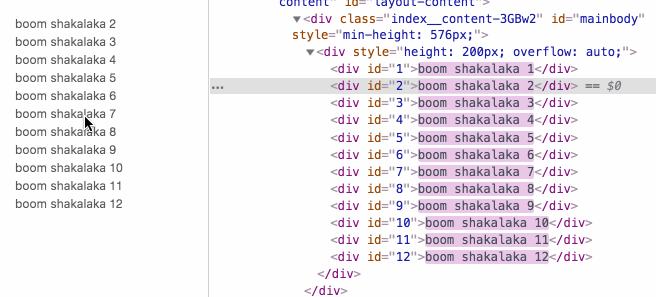
以上代码的效果是啥样呢 列表的高度是200px,根据计算出来的一行的高度,得出当前列表高度能展示12条(上取整计算的)。这么看起来稍微有那么一丢丢效果了,但是是不是数据量太少,无法触发滚动一屏加载更多数据呢。
接下来,继续整理思路 1、能完整的滚动一屏的数据,那起码要保证至少有三屏的数据
    handleData=(data)=>{
            const {size,cur} =this.state;
           const newData=[...data];//浅拷贝一份数据

           if(data.length<size){
               return newData
           },
           let startIndex =0;
           if(cur - size > 0){
               startIndex = cur - size;
           }
            return newData.splice(startIndex,size*3);
       }
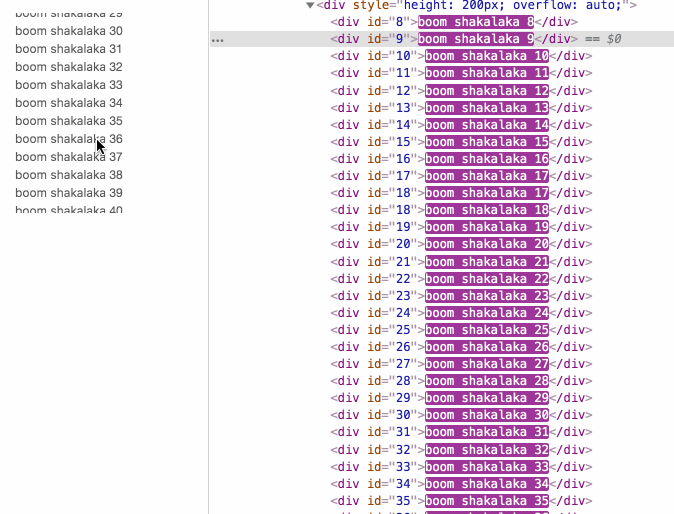
emmm 不对,理解的不对,无法一直滚动加载不是数据量的问题,不管截取多少数据,都只会滚动到所截取数据的末尾。所以真正阻碍滚动的是列表里空间导致的。
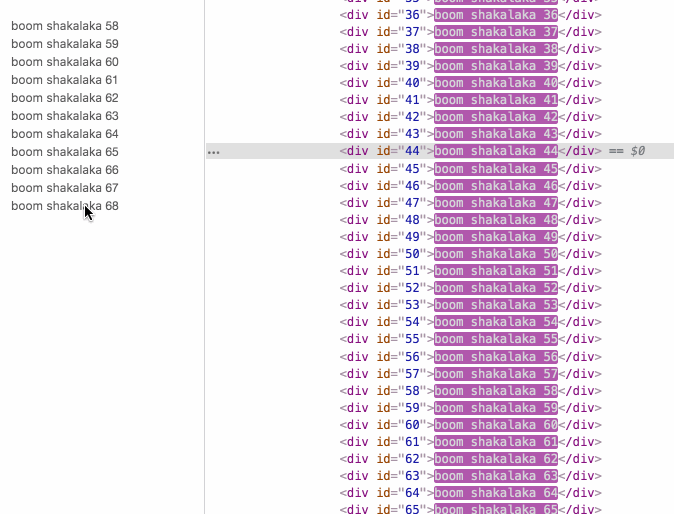
2、用样式撑出来出来原来列表的高度,用margin撑起来,这样就能一直滚动了
getMargin=()=>{
      const { cur, size } = this.state;
    const itemH = this.state.itemHeight;
    const data = this.props.dataSource || [];
    let style = {};

    if (cur - size < 0) {
      style = {
        marginTop: 0,
        marginBottom: (data.length  - (size * 3)) * itemH,
      };
    } else {
      style = {
        marginTop: (cur - size) * itemH,
        marginBottom: (data.length - (cur - size) - (size * 3)) * itemH,
      };
    }
    return style;
}

  getContent=() => {
    let content;
       // 当父组件没传itemHeight的时候,先渲染一条数据,计算一行的高度
    const { needCalcItemHeight, size } = this.state;
    if (needCalcItemHeight) {
      content = this.renderFirstDom();
    } else {
      const { dataSource } = this.props;
      if (dataSource.length > size) {
        content = (<div style={this.getMargin()}>
          {this.renderList()}</div>);// 数据多的需要设置margin了
      } else {
        content = <div>{this.renderList()}</div>;// 像原来一样
      }
    }
    return content;
  }
所以完整代码
  import React,{ Component } from 'react';
    import PropTypes from 'prop-types';
    import throttle from 'lodash/throttle.js';

   export default  class InfiniteList extends Component{
       static propTypes={
           height:PropTypes.oneOfType([PropTypes.string,PropTypes.number]).isRequired,//列表容器的高度
           itemHeight:PropTypes.oneOfType([PropTypes.string,PropTypes.number]),//每一行的高度
           renderItem:PropTypes.func.isRequired,//渲染item的方法
           dataSource:PropTypes.array.isRequired//列表数据源
       }

       constructor(props){
            super(props);
           this.state={
               needCalcItemHeight:!props.itemHeight,//是否需要计算每一行的高度。当父级不传itemHeight的时候,需要计算
               cur:0,//记录在容器最顶部的元素的index
               itemHeight:props.itemHeight,
               size:props.itemHeight?Math.ceil(props.height/props.itemHeight):1
           }
           this.scroll = throttle(this.scroll,60);//节流处理
       }
       componentDidMount(){
           //计算item的高度
            this.calcItemHeight();
           //注册容器滚动监听事件
           this.list.addEventListener('scroll',this.scroll);
       }

       calcItemHeight=()=>{
        const { needCalcItemHeight } =this.state
           if(needCalcItemHeight&&this.firstDom){
               const itemHeight = this.firstDom.offsetHeight;//获取当前div的高度
               this.setState({
                   itemHeight,
                   needCalcItemHeight:false,
                   size:Math.ceil(this.props.height/itemHeight)
               })
           }
       }

       scroll=(e)=>{
           //这个监听事件干嘛呢  计算当前滑动到容器顶部的元素是第几个
           const index = Math.ceil(e.target.scrollTop/this.state.itemHeight);
           if(Math.abs(index-cur)>size){
              this.setState({ cur:index })
           }
          //注意:这里没必要index一变就更新state,会造成很多不必要的render。所以加上个条件,只有当前index-上一次记录的cur>一屏size的时候 再更新cur
       }
       renderFirstDom=()=>{
            const { dataSource,renderItem} =this.props
          return <div ref={(ref)=>{ this.firstDome = ref }}>
          {renderItem(dataSource[0],0)}
          </div>
       }

       handleData=(data)=>{
            const {size,cur} =this.state;
           const newData=[...data];//浅拷贝一份数据

           if(data.length<size){
               return newData
           },
           let startIndex =0;
           if(cur - size > 0){
               startIndex = cur - size;
           }
            return newData.splice(startIndex,size*3);
       }

       renderList=()=>{
           //渲染list的时候,要将数据源处理一下,截取出来我们需要渲染的数据
           const {cur} =this.state;
           const data = this.handleData(this.props.dataSource);
           return data.map((item, index) => (
              <div
                key={`key_${cur}_${index}`}
                style={{ height: itemHeight }}
              >
        {render(item, index)}
      </div>
       }

    getMargin=()=>{
      const { cur, size } = this.state;
    const itemH = this.state.itemHeight;
    const data = this.props.dataSource || [];
    let style = {};

    if (cur - size < 0) {
      style = {
        marginTop: 0,
        marginBottom: (data.length - (size * 3)) * itemH,
      };
    } else {
      style = {
        marginTop: (cur - size) * itemH,
        marginBottom: (data.length - (cur - size) - (size * 3)) * itemH,
      };
    }
    return style;
}

  getContent=() => {
    let content;
       // 当父组件没传itemHeight的时候,先渲染一条数据,计算一行的高度
    const { needCalcItemHeight, size } = this.state;
    if (needCalcItemHeight) {
      content = this.renderFirstDom();
    } else {
      const { dataSource } = this.props;
      if (dataSource.length > size) {
        content = (<div style={this.getMargin()}>
          {this.renderList()}</div>);// 数据多的需要设置margin了
      } else {
        content = <div>{this.renderList()}</div>;// 像原来一样
      }
    }
    return content;
  }

       render(){
            const { height } = this.props;

           return(
            <div
                ref={(ref)=>{ this.list =ref}}
                style={{
                    height,
                    overflow:'auto'
                }}
            >
                {this.getContent()}
            </div>
           )
       }
   }
