一、准备工作---安装环境
1. 安装node环境: https://nodejs.org/en/download/2. 安装vue-cli脚手架: npm install vue-cli -g二、初始化项目以及安装相关的第三方模块
初始化项目:vue init webpack vue-multipage-template安装glob: npm install glob -save-dev --registry=https://registry.npm.taobao.org三、 项目目录展示以及需要调整的文件
1. 项目目录展示
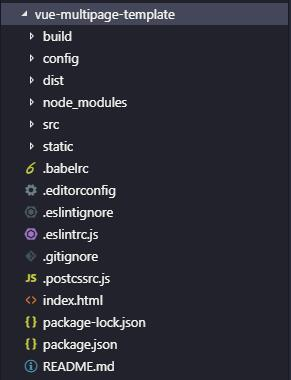
2. 需要调整的文件
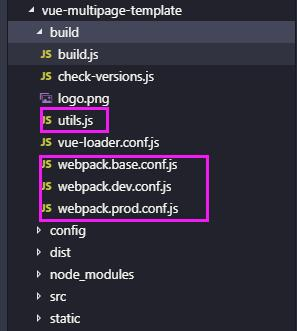
在修改webpack配置的时候,需要对创建好的一些文件做对应的调整。其中主要是调整build文件夹下的一些文件。如图:
除此之外,还需要对src文件夹做一些小小的调整。如图:在src文件夹下新建pages目录,里面放置多页面的html模块以及入口文件。
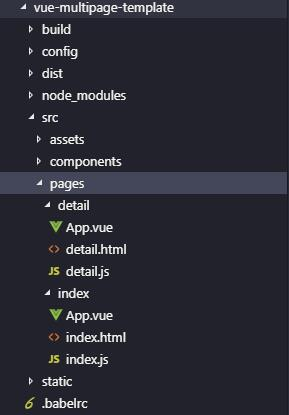
index/App.vue的代码:
<template>
    <div id="app">
         this is index
    </div>
</template>

<script>
export default {
    name: 'App'
}
/script>

<style>
</style>
index/index.html代码:
<!DOCTYPE html><html lang="en"> <head> <meta charset="UTF-8"> <meta name="viewport" content="width=device-width, initial-scale=1.0"> <meta http-equiv="X-UA-Compatible" content="ie=edge"> <title>index</title> </head> <body> <div id="app"></div> <!-- built files will be auto injected --> </body></html>index/index.js入口文件的代码:
// The Vue build version to load with the `import` command// (runtime-only or standalone) has been set in webpack.base.conf with an alias.import Vue from 'vue'import App from './App'Vue.config.productionTip = false/* eslint-disable no-new */new Vue({ el: '#app', components: { App }, template: '<App/>'})以上就是基本的项目目录展示,接下来的部分就是对webpack配置的修改,以满足多页面应用程序开发的需要。主要是对build文件夹下的utils.js、webpack.base.conf.js、webpack.dev.conf.js、webpack.prod.conf.js这四个文件的修改。
四、webpack配置文件的修改
因为配置文件的内容都很多,我只是把主要代码展示,把需要新增的代码或是需要调整的部分做好标注,以减少文章篇幅。
1. build/utils.js
'use strict'const path = require('path')const config = require('../config')const ExtractTextPlugin = require('extract-text-webpack-plugin')const packageConfig = require('../package.json')exports.assetsPath = function (_path) {  ...}exports.cssLoaders = function (options) {  ...}// Generate loaders for standalone style files (outside of .vue)exports.styleLoaders = function (options) {  ...}/** * 多页面配置-----新增的内容
 * 新增entries方法,配置多入口文件
 * 新增htmlPlugin方法,配置多页面的HTML模板 */const glob = require('glob')const HtmlWebpackPlugin = require('html-webpack-plugin')const PAGES_PATH = path.resolve(__dirname, '../src/pages')const merge = require('webpack-merge')//多入口配置// 通过glob模块读取pages文件夹下的每个文件夹下的js后缀文件,作为入口处理exports.entries = function () {  var entryFiles = glob.sync(PAGES_PATH + '/*/*.js')  var entryArr = {}  entryFiles.forEach((filePath) => {      var filename = filePath.substring(filePath.lastIndexOf('\/') + 1, filePath.lastIndexOf('.'))      entryArr[filename] = filePath  })  return entryArr}//html-webpack-plugin多页面配置exports.htmlPlugin = function () {  let entryHtml = glob.sync(PAGES_PATH + '/*/*.html')  let arr = []  entryHtml.forEach((filePath) => {    let filename = filePath.substring(filePath.lastIndexOf('\/') + 1, filePath.lastIndexOf('.'))    let conf = {        // 模板来源        template: filePath,        // 文件名称        filename: filename + '.html',        // 页面模板需要加对应的js脚本,如果不加这行则每个页面都会引入所有的js脚本        chunks: ['manifest', 'vendor', filename],        inject: true    }    if (process.env.NODE_ENV === 'production') {        conf = merge(conf, {            minify: {                removeComments: true,                collapseWhitespace: true,                removeAttributeQuotes: true            },            chunksSortMode: 'dependency'        })    }    arr.push(new HtmlWebpackPlugin(conf))  })  return arr}
exports.createNotifierCallback = () => {  ...}
2. build/webpack.base.conf.js
'use strict'const path = require('path')const utils = require('./utils')const config = require('../config')const vueLoaderConfig = require('./vue-loader.conf')function resolve (dir) {  return path.join(__dirname, '..', dir)}module.exports = {  context: path.resolve(__dirname, '../'),

  //需要把entry的配置调整,其他部分的代码不变  entry: utils.entries(), //使用utils.js导出的entries()  output: {    ....  },  resolve: {    ...  },  module: {    rules: [      ...    ]  },  node: {     ...
  }}
3. build/webpack.dev.conf.js。 这个文件主要是对plugins这部分的配置做修改。需要把plugins配置里的new HtmlWebpackPlugin()给注释或者删除。然后使用utils.js导出的htmlPlugi()
'use strict'const utils = require('./utils')const webpack = require('webpack')const config = require('../config')const merge = require('webpack-merge')const path = require('path')const baseWebpackConfig = require('./webpack.base.conf')const CopyWebpackPlugin = require('copy-webpack-plugin')const HtmlWebpackPlugin = require('html-webpack-plugin')const FriendlyErrorsPlugin = require('friendly-errors-webpack-plugin')const portfinder = require('portfinder')const HOST = process.env.HOSTconst PORT = process.env.PORT && Number(process.env.PORT)const devWebpackConfig = merge(baseWebpackConfig, { module: { rules: utils.styleLoaders({ sourceMap: config.dev.cssSourceMap, usePostCSS: true }) }, // cheap-module-eval-source-map is faster for development devtool: config.dev.devtool, // these devServer options should be customized in /config/index.js devServer: { clientLogLevel: 'warning', historyApiFallback: { rewrites: [ { from: /.*/, to: path.posix.join(config.dev.assetsPublicPath, 'index.html') }, ], }, hot: true, contentBase: false, // since we use CopyWebpackPlugin. compress: true, host: HOST || config.dev.host, port: PORT || config.dev.port, open: config.dev.autoOpenBrowser, overlay: config.dev.errorOverlay ? { warnings: false, errors: true } : false, publicPath: config.dev.assetsPublicPath, proxy: config.dev.proxyTable, quiet: true, // necessary for FriendlyErrorsPlugin watchOptions: { poll: config.dev.poll, } }, plugins: [ new webpack.DefinePlugin({ 'process.env': require('../config/dev.env') }), new webpack.HotModuleReplacementPlugin(), new webpack.NamedModulesPlugin(), // HMR shows correct file names in console on update. new webpack.NoEmitOnErrorsPlugin(), // https://github.com/ampedandwired/html-webpack-plugin /* =================注释掉单页面的配置==================== new HtmlWebpackPlugin({ filename: 'index.html', template: 'index.html', inject: true }), =================注释掉单页面的配置==================== */ // copy custom static assets new CopyWebpackPlugin([ { from: path.resolve(__dirname, '../static'), to: config.dev.assetsSubDirectory, ignore: ['.*'] } ]) ].concat(utils.htmlPlugin()) //==================合并多页面html模板=-=======================})module.exports = new Promise((resolve, reject) => { portfinder.basePort = process.env.PORT || config.dev.port portfinder.getPort((err, port) => { if (err) { reject(err) } else { // publish the new Port, necessary for e2e tests process.env.PORT = port // add port to devServer config devWebpackConfig.devServer.port = port // Add FriendlyErrorsPlugin devWebpackConfig.plugins.push(new FriendlyErrorsPlugin({ compilationSuccessInfo: { messages: [`Your application is running here: http://${devWebpackConfig.devServer.host}:${port}`], }, onErrors: config.dev.notifyOnErrors ? utils.createNotifierCallback() : undefined })) resolve(devWebpackConfig) } })})4. build/webpack.prod.conf.js。这部分跟build/webpack.dev.conf.js修改的地方一样。
'use strict'const path = require('path')const utils = require('./utils')const webpack = require('webpack')const config = require('../config')const merge = require('webpack-merge')const baseWebpackConfig = require('./webpack.base.conf')const CopyWebpackPlugin = require('copy-webpack-plugin')const HtmlWebpackPlugin = require('html-webpack-plugin')const ExtractTextPlugin = require('extract-text-webpack-plugin')const OptimizeCSSPlugin = require('optimize-css-assets-webpack-plugin')const UglifyJsPlugin = require('uglifyjs-webpack-plugin')const env = require('../config/prod.env')const webpackConfig = merge(baseWebpackConfig, { module: { rules: utils.styleLoaders({ sourceMap: config.build.productionSourceMap, extract: true, usePostCSS: true }) }, devtool: config.build.productionSourceMap ? config.build.devtool : false, output: { path: config.build.assetsRoot, filename: utils.assetsPath('js/[name].[chunkhash].js'), chunkFilename: utils.assetsPath('js/[id].[chunkhash].js') }, plugins: [ // http://vuejs.github.io/vue-loader/en/workflow/production.html new webpack.DefinePlugin({ 'process.env': env }), new UglifyJsPlugin({ uglifyOptions: { compress: { warnings: false } }, sourceMap: config.build.productionSourceMap, parallel: true }), // extract css into its own file new ExtractTextPlugin({ filename: utils.assetsPath('css/[name].[contenthash].css'), // Setting the following option to `false` will not extract CSS from codesplit chunks. // Their CSS will instead be inserted dynamically with style-loader when the codesplit chunk has been loaded by webpack. // It's currently set to `true` because we are seeing that sourcemaps are included in the codesplit bundle as well when it's `false`, // increasing file size: https://github.com/vuejs-templates/webpack/issues/1110 allChunks: true, }), // Compress extracted CSS. We are using this plugin so that possible // duplicated CSS from different components can be deduped. new OptimizeCSSPlugin({ cssProcessorOptions: config.build.productionSourceMap ? { safe: true, map: { inline: false } } : { safe: true } }), // generate dist index.html with correct asset hash for caching. // you can customize output by editing /index.html // see https://github.com/ampedandwired/html-webpack-plugin /* =================注释掉单页面的配置==================== new HtmlWebpackPlugin({ filename: config.build.index, template: 'index.html', inject: true, minify: { removeComments: true, collapseWhitespace: true, removeAttributeQuotes: true // more options: // https://github.com/kangax/html-minifier#options-quick-reference }, // necessary to consistently work with multiple chunks via CommonsChunkPlugin chunksSortMode: 'dependency' }), =================注释掉单页面的配置==================== */ // keep module.id stable when vendor modules does not change new webpack.HashedModuleIdsPlugin(), // enable scope hoisting new webpack.optimize.ModuleConcatenationPlugin(), // split vendor js into its own file new webpack.optimize.CommonsChunkPlugin({ name: 'vendor', minChunks (module) { // any required modules inside node_modules are extracted to vendor return ( module.resource && /\.js$/.test(module.resource) && module.resource.indexOf( path.join(__dirname, '../node_modules') ) === 0 ) } }), // extract webpack runtime and module manifest to its own file in order to // prevent vendor hash from being updated whenever app bundle is updated new webpack.optimize.CommonsChunkPlugin({ name: 'manifest', minChunks: Infinity }), // This instance extracts shared chunks from code splitted chunks and bundles them // in a separate chunk, similar to the vendor chunk // see: https://webpack.js.org/plugins/commons-chunk-plugin/#extra-async-commons-chunk new webpack.optimize.CommonsChunkPlugin({ name: 'app', async: 'vendor-async', children: true, minChunks: 3 }), // copy custom static assets new CopyWebpackPlugin([ { from: path.resolve(__dirname, '../static'), to: config.build.assetsSubDirectory, ignore: ['.*'] } ]) ].concat(utils.htmlPlugin()) //==================合并多页面html模板=-=======================})if (config.build.productionGzip) { const CompressionWebpackPlugin = require('compression-webpack-plugin') webpackConfig.plugins.push( new CompressionWebpackPlugin({ asset: '[path].gz[query]', algorithm: 'gzip', test: new RegExp( '\\.(' + config.build.productionGzipExtensions.join('|') + ')$' ), threshold: 10240, minRatio: 0.8 }) )}if (config.build.bundleAnalyzerReport) { const BundleAnalyzerPlugin = require('webpack-bundle-analyzer').BundleAnalyzerPlugin webpackConfig.plugins.push(new BundleAnalyzerPlugin())}module.exports = webpackConfig至此,需要做出调整的文件以及全部修改完了。
通过 npm run dev重新启动项目,
在浏览器localhost:8080/index.html,localhost:8080/detail.html就可以访问对应的页面了。
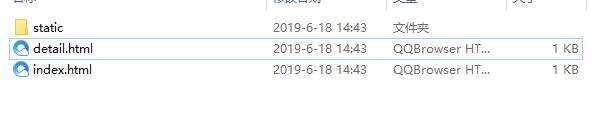
通过 npm run build打包项目,文件也可以正常打包到dist目录了。
参考:
https://blog.csdn.net/qq_38111015/article/details/89147144