几乎之前我经手的所有项目,都有用到日期选择器或者日历的控件,datetimepicker、calendar.js,都是基于JQ的控件。
奈何产品爸爸总提一些UI和交互上的需求,改这些控件的源码不好改啊!碰巧看了一篇用原生js撸日历的文章,传送链接,写的非常棒啊,挺受启迪的我,就在现有的react项目里撸了个轮子,大佬们多多指点那,没有太写样式,主要实现功能来着,效果如下。
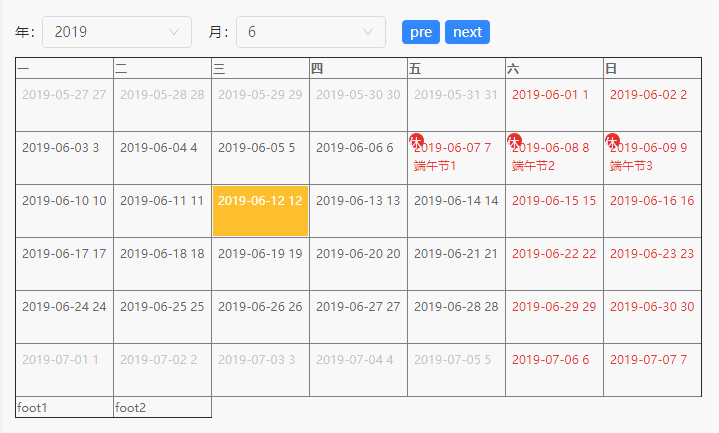
思路
- dom:整体来看,日历是一个7(天) * 6(周)组成的表格,那么我就在state里构建了这样的一个数据结构,然后在render函数里去遍历每周和每天就可以出来雏形了,子元素每天的数据结构是一个对象,方便扩展字段,增加显示文字格式化,假期这些扩展。
this.state = {
    dates: [
        [{}, {}, {}, {}, {}, {}, {}],
        [...],
        [...],
        [...],
        [...],
        [...],
    ],
};- 生成数据结构:
1.通过最上面form中的下拉菜单选择当前月份,转化成moment对象
2.使用moment的startOf('month')方法,找到当月的第一天
3.使用moment的.isoWeekday()方法,找到当月的第一天是星期几
4.通过这两个值,即可计算出日历上的当月显示的第一天,算法如下
let now = moment();
//当月第一天
let firstDayOfMonth = now.clone().startOf('month');
//当月第一天是星期几
let weekOfFirstDay = firstDayOfMonth.isoWeekday();
//日历上的当月显示的第一天
let firstDayOfMonthDisplay = firstDayOfMonth.clone().subtract(weekOfFirstDay - 1, 'days');
5.有了第一天的moment对象,遍历6周和每周7天,就可以组装出上面提到的数据结构了
let dates = [];
//单个日历,显示6周
const weeksNum = 6;
//每周显示7天
const weekDaysNum = 7;
for (let i=0; i<weeksNum; i++){
    let weekList = [];
    for (let j=0; j<weekDaysNum; j++){
        ...
        weekList.push(item);
        currentDate.add(1, 'days');
    }
    dates.push(weekList);
}
- 假期/节日
1.假期的话,组装这样一个{日期: 假期}的映射,在上面步骤中遍历天的时候,判断一下是否存在于这个map中,如果有则把假期名称置到item中。
const holidayMap = {
    "2019-05-01": "劳动节1",
    "2019-05-02": "劳动节2",
    "2019-05-03": "劳动节3",
    "2019-05-04": "五四青年节",
    ...
};
2.类似的还有,非当前月日期的样式,周末样式,公休加班的样式,都是在遍历当天的时候去做判断,把需要的样式push到一个数组里,然后.join(" ")组装成当天完整的样式即可。
- 完整代码如下
import React, { Component } from 'react';
import { Menu, Icon, Form, Select, Row, Col, Button } from 'antd';
import moment from 'moment';
import '@/static/less/le_calendar.less';
const { Option } = Select;
const FormItem = Form.Item;
// console.log(moment);
const DATE_FORMAT = "YYYY-MM-DD";
const holidayMap = {
"2019-05-01": "劳动节1",
"2019-05-02": "劳动节2",
"2019-05-03": "劳动节3",
"2019-05-04": "五四青年节",
"2019-06-07": "端午节1",
"2019-06-08": "端午节2",
"2019-06-09": "端午节3",
};
class queryForm extends React.Component {
constructor(props) {
super(props);
this.state = {
options: {
years: [],
months: [],
},
};
};
state = {
};
componentDidMount = function () {
let mySelf = this;
mySelf.init();
};
init = () => {
let mySelf = this;
mySelf.initOptions();
mySelf.setDefaultOption();
};
initOptions = function(){
let mySelf = this;
let options = mySelf.state.options;
let now = moment();
const yearOfNow = now.year();
let yearsOptions = [];
let monthsOptions = [];
const startYear = yearOfNow - 20;
const endYear = yearOfNow + 20;
const startMonth = 1;
const endMonth = 12;
for (let i=startYear; i<endYear; i++){
let item = {
key: i,
label: i,
}
yearsOptions.push(item);
}
for (let i=startMonth; i<=endMonth; i++){
let item = {
key: i,
label: i,
}
monthsOptions.push(item);
}
// console.log(platformOptions);
options.years = yearsOptions;
options.months = monthsOptions;
mySelf.setState({
options: options
});
};
setDefaultOption = () => {
let mySelf = this;
let form = mySelf.props.form;
// let options = mySelf.state.options;
let now = moment();
const yearOfNow = now.year();
const monthOfNow = now.month() + 1;
// console.log(options);
let defaultYearOption = {key: yearOfNow, label: yearOfNow};
let defaultMonthOption = {key: monthOfNow, label: monthOfNow};
// console.log(defaultOption)
let formData = {
year: defaultYearOption,
month: defaultMonthOption,
};
form.setFieldsValue(formData);
};
changeMonth = (pars) => {
let mySelf = this;
let form = mySelf.props.form;
let res = form.getFieldsValue();
let month = Number(res.month.key) + Number(pars);
let monthOption = {key: month, label: month};
// console.log(monthOption);
let formData = {
month: monthOption,
};
form.setFieldsValue(formData);
mySelf.props.changeCalendar();
};
render() {
let mySelf = this;
// eslint-disable-next-line
let { getFieldDecorator, getFieldValue } = mySelf.props.form;
let { options } = mySelf.state;
// console.log(options);
return (
<div>
<Row className="margin-bottom-5">
<Col span={24}>
<Form
layout="inline"
// wrappedComponentRef={(inst) => this.queryForm = inst}
>
<FormItem
label="年"
>
{getFieldDecorator('year', {
})(
<Select
labelInValue
size={'default'}
placeholder="year"
style={{ width: 150 }}
onChange={ () => setTimeout(() => { mySelf.props.changeCalendar() },0) }
>
{options.years.map(function(item,index){
return <Option key={item.key}>{item.label}</Option>;
})}
</Select>
)}
</FormItem>
<FormItem
label="月"
>
{getFieldDecorator('month', {
})(
<Select
labelInValue
size={'default'}
placeholder="month"
style={{ width: 150 }}
onChange={ () => setTimeout(() => { mySelf.props.changeCalendar() },0) }
>
{options.months.map(function(item,index){
return <Option key={item.key}>{item.label}</Option>;
})}
</Select>
)}
</FormItem>
<FormItem>
<Button type="primary" size="small" onClick={() => mySelf.changeMonth(-1)}>pre</Button>
<Button type="primary" size="small" onClick={() => mySelf.changeMonth(1)} className="margin-left-5">next</Button>
</FormItem>
</Form>
</Col>
</Row>
</div>
);
}
};
let QueryFormComponent = Form.create()(queryForm);
class LeCalendar extends Component {
constructor(props) {
super(props);
this.state = {
//渲染日历过程中,当前显示月的moment对象
monthDisplay: "",
dates: [
[],
[],
],
};
};
componentDidMount = () => {
let mySelf = this;
mySelf.init();
// mySelf.generateDates();
};
init = () => {
let mySelf = this;
mySelf.changeCalendar();
};
generateDates = () => {
let mySelf = this;
let dates = [];
//单个日历,显示6周
const weeksNum = 6;
//每周显示7天
const weekDaysNum = 7;
//日历中的今天
const todayDate = moment().format(DATE_FORMAT);
//渲染日历过程中,当前显示月的moment对象
let now = mySelf.state.monthDisplay;
//当前显示的月份
let nowMonth = now.month();
// console.log(nowMonth);
//当月第一天
let firstDayOfMonth = now.clone().startOf('month');
//当月第一天是星期几
let weekOfFirstDay = firstDayOfMonth.isoWeekday();
//日历上的当月显示的第一天
let firstDayOfMonthDisplay = firstDayOfMonth.clone().subtract(weekOfFirstDay - 1, 'days');
//渲染日历过程中,使用的当前moment对象
let currentDate = firstDayOfMonthDisplay.clone();
// console.log(firstDayOfMonthDisplay.format(DATE_FORMAT));
const otherMonthClass = "other-month";
const dayOffClass = "day-off";
const holidayClass = "holiday";
const todayClass = "today";
for (let i=0; i<weeksNum; i++){
let weekList = [];
for (let j=0; j<weekDaysNum; j++){
let date = currentDate.format(DATE_FORMAT);
let dateDisplay = currentDate.date();
let currentMonth = currentDate.month();
let currentWeekDay = currentDate.isoWeekday();
let classNameList = [];
let classNameStr = "";
let content = "";
// console.log(currentMonth);
// console.log(currentDate.isoWeekday());
//今天
if (todayDate === date){
classNameList.push(todayClass);
}
//非当前月
if (currentMonth !== nowMonth){
classNameList.push(otherMonthClass);
}
//周末
if ([6, 7].includes(currentWeekDay)){
classNameList.push(dayOffClass);
}
//节假日
if (holidayMap[date]){
classNameList.push(holidayClass);
content = holidayMap[date];
}
classNameStr = classNameList.join(" ");
let item = {
momentObj: currentDate,
date: date,
dateDisplay: dateDisplay,
classNameStr: classNameStr,
content: content
};
weekList.push(item);
currentDate.add(1, 'days');
}
dates.push(weekList);
}
mySelf.setState({
dates
});
// console.log(dates);
};
changeCalendar = () => {
let mySelf = this;
let form = mySelf.queryForm.props.form;
let res = form.getFieldsValue();
let year = Number(res.year.key);
let month = Number(res.month.key) -1;
let now = moment();
now.year(year).month(month);
mySelf.state.monthDisplay = now;
mySelf.generateDates();
// console.log(firstDayOfMonthDisplay.format(DATE_FORMAT));
console.log(now.format(DATE_FORMAT));
};
render() {
// let { } = this.props;
let mySelf = this;
let { dates } = mySelf.state;
let renderWeekDays = (days) => {
let dom = null;
// console.log(days);
dom = (
<React.Fragment>
{days.map((item,index) => {
let tdDom = (
<td key={index}>
<div className={item.classNameStr + ' day-cell'}>
<div className="header">{ item.date } {item.dateDisplay}</div>
<div>{ item.content }</div>
</div>
</td>
);
return tdDom;
})}
</React.Fragment>
);
return dom
};
let renderWeeks = (dates) => {
let dom = null;
// console.log(dates);
dom = (
<React.Fragment>
{dates.map((item,index) => {
let trDom = (
<tr key={index}>
{ renderWeekDays(item) }
</tr>
);
return trDom;
})}
</React.Fragment>
);
return dom
};
return (
<div>
<QueryFormComponent
wrappedComponentRef={(inst) => mySelf.queryForm = inst}
changeCalendar={() => mySelf.changeCalendar()}
/>
<table border="1" className="le-calendar-container">
<thead>
<tr>
<th>一</th>
<th>二</th>
<th>三</th>
<th>四</th>
<th>五</th>
<th>六</th>
<th>日</th>
</tr>
</thead>
<tbody>
{ renderWeeks(dates) }
</tbody>
<tfoot>
<tr>
<td>foot1</td>
<td>foot2</td>
</tr>
</tfoot>
</table>
</div>
);
}
}
export default LeCalendar;