@Handler
public Handler() {
    this(null, false);
}

public Handler(Looper looper, Callback callback, boolean async) {
    mLooper = looper;
    mQueue = looper.mQueue;
    mCallback = callback;
    mAsynchronous = async;
}

private boolean enqueueMessage(MessageQueue queue, Message msg, long uptimeMillis) {
    msg.target = this;
    if (mAsynchronous) {
        msg.setAsynchronous(true);
    }
    return queue.enqueueMessage(msg, uptimeMillis);
}
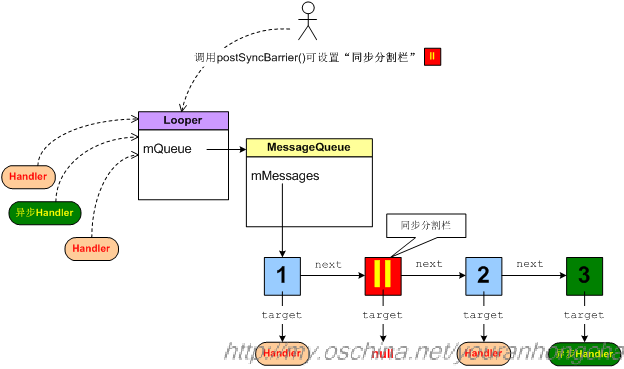
所谓“同步障碍syncBarrier”,可以被理解为一个特殊Message,它的target域为null。它不能通过sendMessageAtTime()等函数打入到消息队列里,而只能通过调用MessageQueue的postSyncBarrier()来打入。 “同步障碍”是起什么作用的呢?它就像一个卡子,卡在消息链表中的某个位置,当消息循环不断从消息链表中摘取消息并进行处理时,一旦遇到这种“同步障碍”,那么即使在障碍之后还有若干已经到时的普通Message,也不会摘取这些消息了。但是如果队列中还设置有“异步Message”,那么还是会摘取已到时的“异步Message”的。 “同步分割栏”这种卡子会一直卡在消息队列中,除非我们调用removeSyncBarrier()删除这个卡子。 在Android的消息机制里,“普通Message”和“异步Message”就只有这些区别。也就是说如果没有在MessageQueue里postSyncBarrier,普通Message和异步Message没有什么区别。
@MessageQueue
// Indicates whether next() is blocked waiting in pollOnce() with a non-zero timeout.
private boolean mBlocked;

boolean enqueueMessage(Message msg, long when) {
    /** ... **/
    synchronized (this) {
        /** ... **/
        msg.markInUse();
        msg.when = when;
        Message p = mMessages;
        boolean needWake;
        if (p == null || when == 0 || when < p.when) {
            // New head, wake up the event queue if blocked.
            msg.next = p;
            mMessages = msg;
            needWake = mBlocked;
        } else {
            // Inserted within the middle of the queue.  Usually we don't have to wake
            // up the event queue unless there is a barrier at the head of the queue
            // and the message is the earliest asynchronous message in the queue.
            needWake = mBlocked && p.target == null && msg.isAsynchronous();
            Message prev;
            for (;;) {
                prev = p;
                p = p.next;
                if (p == null || when < p.when) {
                    break;
                }
                if (needWake && p.isAsynchronous()) {
                    needWake = false;
                }
            }
            msg.next = p; // invariant: p == prev.next
            prev.next = msg;
        }

        // We can assume mPtr != 0 because mQuitting is false.
        // 通过向管道写入数据,唤醒block的线程
        if (needWake) {
            nativeWake(mPtr);
        }
    }
    return true;
}
消息入队的时候,如果插入队列头,且当前线程处于block的状态,或者对列头为同步障碍,当前处于block状态,插入位置前有异步Message, 此时消息入队成功后会通过nativeWake方法唤醒线程。
@Looper.cpp
void Looper::wake() {
    . . . . . .
    ssize_t nWrite;
    do {
        nWrite = write(mWakeWritePipeFd, "W", 1);
    } while (nWrite == -1 && errno == EINTR);

    if (nWrite != 1) {
        if (errno != EAGAIN) {
            ALOGW("Could not write wake signal, errno=%d", errno);
        }
    }
}
wake()动作主要是向一个管道的“写入端”写入了“W”,调用wake唤醒epoll_wait
@Looper

public static void loop() {
    final Looper me = myLooper();
    if (me == null) {
        throw new RuntimeException("No Looper; Looper.prepare() wasn't called on this thread.");
    }
    final MessageQueue queue = me.mQueue;
    ......
    for (;;) {
        Message msg = queue.next(); // might block
        if (msg == null) {
            // No message indicates that the message queue is quitting.
            return;
        }
        ......
        msg.target.dispatchMessage(msg);
        ......
        msg.recycleUnchecked();
    }
}
/**
@MessageQueue

Message next() {
    final long ptr = mPtr;
    if (ptr == 0) {
        return null;
    }
    int pendingIdleHandlerCount = -1; // -1 only during first iteration
    int nextPollTimeoutMillis = 0;
    for (;;) {
        if (nextPollTimeoutMillis != 0) {
            Binder.flushPendingCommands();
        }
        nativePollOnce(ptr, nextPollTimeoutMillis);
        synchronized (this) {
            // Try to retrieve the next message.  Return if found.
            final long now = SystemClock.uptimeMillis();
            Message prevMsg = null;
            Message msg = mMessages;
            // 如果从队列里拿到的msg是个“同步分割栏”,那么就寻找其后第一个“异步消息”
            if (msg != null && msg.target == null) {
                // Stalled by a barrier.  Find the next asynchronous message in the queue.
                do {
                    prevMsg = msg;
                    msg = msg.next;
                } while (msg != null && !msg.isAsynchronous());
            }
            if (msg != null) {
                if (now < msg.when) {
                    // Next message is not ready.  Set a timeout to wake up when it is ready.
                    nextPollTimeoutMillis = (int) Math.min(msg.when - now, Integer.MAX_VALUE);
                } else {
                    // Got a message.
                    mBlocked = false;
                    if (prevMsg != null) {
                        prevMsg.next = msg.next;
                    } else {
                        mMessages = msg.next;
                    }
                    msg.next = null;
                    if (DEBUG) Log.v(TAG, "Returning message: " + msg);
                    msg.markInUse();
                    return msg;
                }
            } else {
                // No more messages.
                nextPollTimeoutMillis = -1;
            }
            // Process the quit message now that all pending messages have been handled.
            if (mQuitting) {
                dispose();
                return null;
            }
            // If first time idle, then get the number of idlers to run.
            // Idle handles only run if the queue is empty or if the first message
            // in the queue (possibly a barrier) is due to be handled in the future.
            if (pendingIdleHandlerCount < 0
                    && (mMessages == null || now < mMessages.when)) {
                pendingIdleHandlerCount = mIdleHandlers.size();
            }
            if (pendingIdleHandlerCount <= 0) {
                // No idle handlers to run.  Loop and wait some more.
                mBlocked = true;
                continue;
            }
            if (mPendingIdleHandlers == null) {
                mPendingIdleHandlers = new IdleHandler[Math.max(pendingIdleHandlerCount, 4)];
            }
            mPendingIdleHandlers = mIdleHandlers.toArray(mPendingIdleHandlers);
        }
        // 处理idle handlers部分
        // We only ever reach this code block during the first iteration.
        for (int i = 0; i < pendingIdleHandlerCount; i++) {
            final IdleHandler idler = mPendingIdleHandlers[i];
            mPendingIdleHandlers[i] = null; // release the reference to the handler
            boolean keep = false;
            try {
                keep = idler.queueIdle();
            } catch (Throwable t) {
                Log.wtf(TAG, "IdleHandler threw exception", t);
            }
            if (!keep) {
                synchronized (this) {
                    mIdleHandlers.remove(idler);
                }
            }
        }
        // Reset the idle handler count to 0 so we do not run them again.
        pendingIdleHandlerCount = 0;
        // While calling an idle handler, a new message could have been delivered
        // so go back and look again for a pending message without waiting.
        nextPollTimeoutMillis = 0;
    }
}
当消息队列中没有消息需要马上处理时,会判断用户是否设置了Idle Handler,如果有的话,则会尝试处理mIdleHandlers中所记录的所有Idle Handler,此时会逐个调用这些Idle Handler的queueIdle()成员函数。 我们举一个例子,在ActivityThread中,在某种情况下会在消息队列中设置GcIdler,进行垃圾收集
每当我们向消息队列发送事件时,最终会间接向管道的“写入端”写入数据,于是epoll通过管道的“读取端”立即就感知到了风吹草动,epoll_wait()在等到事件后,随即进行相应的事件处理。这就是消息循环阻塞并处理的大体流程。当然,因为向管道写数据只是为了通知风吹草动,所以写入的数据是非常简单的“W”字符串. 结合native层,Looper循环的整体流程大概如下图:
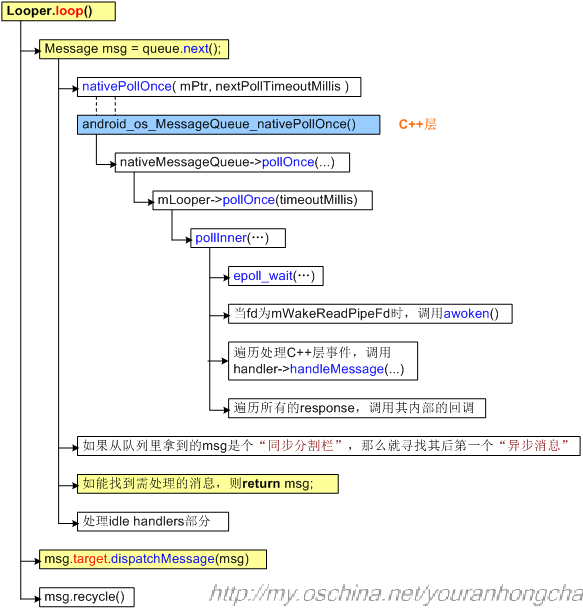
pollInner()调用epoll_wait()时传入的timeoutMillis参数,其实来自于前文所说的MessageQueue的next()函数里的nextPollTimeoutMillis,next()函数里在以下3种情况下,会给nextPollTimeoutMillis赋不同的值: 1)如果消息队列中的下一条消息还要等一段时间才到时的话,那么nextPollTimeoutMillis赋值为Math.min(msg.when - now, Integer.MAX_VALUE),即时间差; 2)如果消息队列已经是空队列了,那么nextPollTimeoutMillis赋值为-1; 3)不管前两种情况下是否已给nextPollTimeoutMillis赋过值了,只要队列中有Idle Handler需要处理,那么在处理完所有Idle Handler之后,会强制将nextPollTimeoutMillis赋值为0。这主要是考虑到在处理Idle Handler时,不知道会耗时多少,而在此期间消息队列的“到时情况”有可能已发生改变。
不管epoll_wait()的超时阀值被设置成什么,只要程序从epoll_wait()中返回,就会尝试处理等到的epoll事件。目前我们的主要关心点是事件机制,所以主要讨论当fd 等于mWakeReadPipeFd时的情况,此时会调用一下awoken()函数。该函数很简单,只是在读取mWakeReadPipeFd而已