CSS
层叠样式表 (Cascading Style Sheets,缩写为 CSS),是一种 样式表 语言,用来描述 HTML 或 XML(包括如 SVG、MathML、XHTML 之类的 XML 分支语言)文档的呈现。
发展历史
1、1994 年由哈肯·维姆·莱和伯特·波斯(Bert Bos)共同设计了
2、1996 年 12 月 CSS1 诞生
3、1997 年初 W3C 组织了专门管 CSS 的工作组其负责人是克里斯·里雷
4、1998 年 5 月 W3C 发表了 CSS2
5、2011 年 6 月发布了 CSS2.1
6、从 2011 年开始 CSS 被分为多个模块单独升级,统称为 CSS 3
CSS选择器
1、简单选择器(Simple selectors):通过元素类型、class 或 id 匹配一个或多个元素。
类型选择器(又名元素选择器)
<html>
    <head>
        <style>
            <!--类型选择器-->
            span{
                color: red;
            }
        </style>
    </head>
    <body>
        <span>我是一段文字</span>
    </body>
</html>
类选择器
<html>
    <head>
        <style>
            <!--类选择器-->
            .frist {
                color: red;
            }
            .second {
                color: blue;
            }
        </style>
    </head>
    <body>
        <span class="frist">我是一段文字</span>
        <span class="second">我是一段文字</span>
    </body>
</html>
ID 选择器
<html>
    <head>
        <style>
            <!--id 择器-->
            #frist {
                color: red;
            }
            #second {
                color: blue;
            }
        </style>
    </head>
    <body>
        <span id="frist">我是一段文字</span>
        <span id="second">我是一段文字</span>
    </body>
</html>
通用选择器
<html>
    <head>
        <style>
            <!--通用选择器-->
            * {
                color: red;
            }
        </style>
    </head>
    <body>
        <span id="frist">我是一段文字</span>
        <span id="second">我是一段文字</span>
    </body>
</html>
2、属性选择器(Attribute selectors):通过 属性 / 属性值 匹配一个或多个元素
存在和值(Presence and value)属性选择器
<html>
    <head>
        <style>
            [data-vegetable="frist"] {
                color: red;
            }
            [data-vegetable="second"] {
                color: blue;
            }
        </style>
    </head>
    <body>
        <span data-vegetable="frist">我是一段文字</span>
        <span data-vegetable="second">我是一段文字</span>
    </body>
</html>
[attr]:该选择器选择包含 attr 属性的所有元素,不论 attr 的值为何。
<html>
    <head>
        <style>
            .box [class] {
                color: red;
            }
            .box [id] {
                color: blue;
            }
        </style>
    </head>
    <body>
        <div class="box">
            <span class="frist">我是第一段文字</span>
            <span class="second">我是第二段文字</span>
            <span id="third">我是第三段文字</span>
            <span id="fourth">我是第四段文字</span>
        </div>
    </body>
</html>
结果

[attr=val]:该选择器仅选择 attr 属性被赋值为 val 的所有元素
<html>
    <head>
        <style>
            .box [id="one"] {
                color: red;
            }
            .box [id="third"] {
                color: blue;
            }
        </style>
    </head>
    <body>
        <div class="box">
            <span class="frist" id="one">我是第一段文字</span>
            <span class="second"id="one">我是第二段文字</span>
            <span id="third">我是第三段文字</span>
            <span id="fourth">我是第四段文字</span>
        </div>
    </body>
</html>
结果

[attr~=val]:该选择器仅选择具有 attr 属性的元素,而且要求 val 值是 attr 值包含的被空格分隔的取值列表里中的一个。
<html>
    <head>
        <style>
            .box [id~="one"]{
                color: red;
            }
        </style>
    </head>
    <body>
        <div class="box">
            <span class="frist" id="frist one">我是第一段文字</span>
            <span class="second"id="firstone">我是第二段文字</span>
            <span id="third">我是第三段文字</span>
            <span id="fourth">我是第四段文字</span>
        </div>
    </body>
</html>
结果

[attr*=val]
<html>
    <head>
        <style>
            .box [id*="one"] {
                color: blue;
            }
        </style>
    </head>
    <body>
        <div class="box">
            <span class="frist" id="frist one">我是第一段文字</span>
            <span class="second"id="firstone">我是第二段文字</span>
            <span id="third">我是第三段文字</span>
            <span id="fourth">我是第四段文字</span>
        </div>
    </body>
</html>
结果

3、伪类和伪元素
伪类
一个 CSS 伪类(pseudo-class) 是一个以冒号(:)作为前缀,被添加到一个选择器末尾的关键字,当你希望样式在特定状态下才被呈现到指定的元素时,你可以往元素的选择器后面加上对应的伪类(pseudo-class)。你可能希望某个元素在处于某种状态下呈现另一种样式,例如当鼠标悬停在元素上面时,或者当一个复选框被禁用或被勾选时,又或者当一个元素是它在 DOM 树中父元素的第一个子元素时
<html>
    <head>
        <style>
            <!--伪类-->
            span:hover {
                color: red;
            }
        </style>
    </head>
    <body>
        <span>我是一段文字</span>
    </body>
</html>
伪元素
伪元素(Pseudo-element)跟伪类很像,但它们又有不同的地方。它们都是关键字,但这次伪元素前缀是两个冒号 (::) , 同样是添加到选择器后面去选择某个元素的某个部分。
<html>
    <head>
        <style>
            <!--伪元素-->
            span::before {
                content:"文案:";
            }
        </style>
    </head>
    <body>
        <span>我是一段文字</span>
    </body>
</html>
结果

组合器和多个选择器
并集选择器
<html>
    <head>
        <style>
            <!--并集选择器-->
            .frist , .second {
                color: red;
            }
        </style>
    </head>
    <body>
        <span class="frist">我是一段文字</span>
        <span class="second">我是一段文字</span>
    </body>
</html>
后代选择器
<html>
    <head>
        <style>
            <!--后代选择器-->
            .box .second {
                color: red;
            }
        </style>
    </head>
    <body>
        <div class="box">
            <span class="frist">我是一段文字
                <span class="second">我是一段文字</span>
            </span>
        </div>
    </body>
</html>
子代选择器
<html>
    <head>
        <style>
            <!--子代选择器-->
            .box > .frist > .second {
                color: red;
            }
        </style>
    </head>
    <body>
        <div class="box">
            <span class="frist">我是一段文字
                <span class="second">我是一段文字</span>
            </span>
        </div>
    </body>
</html>
相邻兄弟选择器
<html>
    <head>
        <style>
            <!--相邻兄弟选择器-->
            <!--所有frist后面的second-->
            .frist + .second {
                color: red;
            }
        </style>
    </head>
    <body>
        <div class="box">
            <div>
                <span class="frist">我是一段文字</span>
                <span class="second">我是一段文字</span>
            </div>
             <div>
                <span class="second">我是一段文字</span>
                <span class="second">我是一段文字</span>
            </div>
        </div>
    </body>
</html>
结果

通用兄弟选择器
<html>
    <head>
        <style>
            <!--通用兄弟选择器-->
            <!--所有frist后面的所有second-->
            .frist ~ .second {
                color: red;
            }
        </style>
    </head>
    <body>
        <div class="box">
            <div>
                <span class="frist">我是一段文字</span>
                <span class="second">我是一段文字</span>
                <span class="second">我是一段文字</span>
            </div>
             <div>
                <span class="second">我是一段文字</span>
                <span class="second">我是一段文字</span>
            </div>
        </div>
    </body>
</html>
结果

盒子模型
当你的浏览器展现一个元素时,这个元素会占据一定的空间。这个空间由四部分组成。 中间是元素呈现内容的区域。这个区域的外面是内边距。再外面是边框。最外面的是外边距,外边距将该元素与其它元素分开。
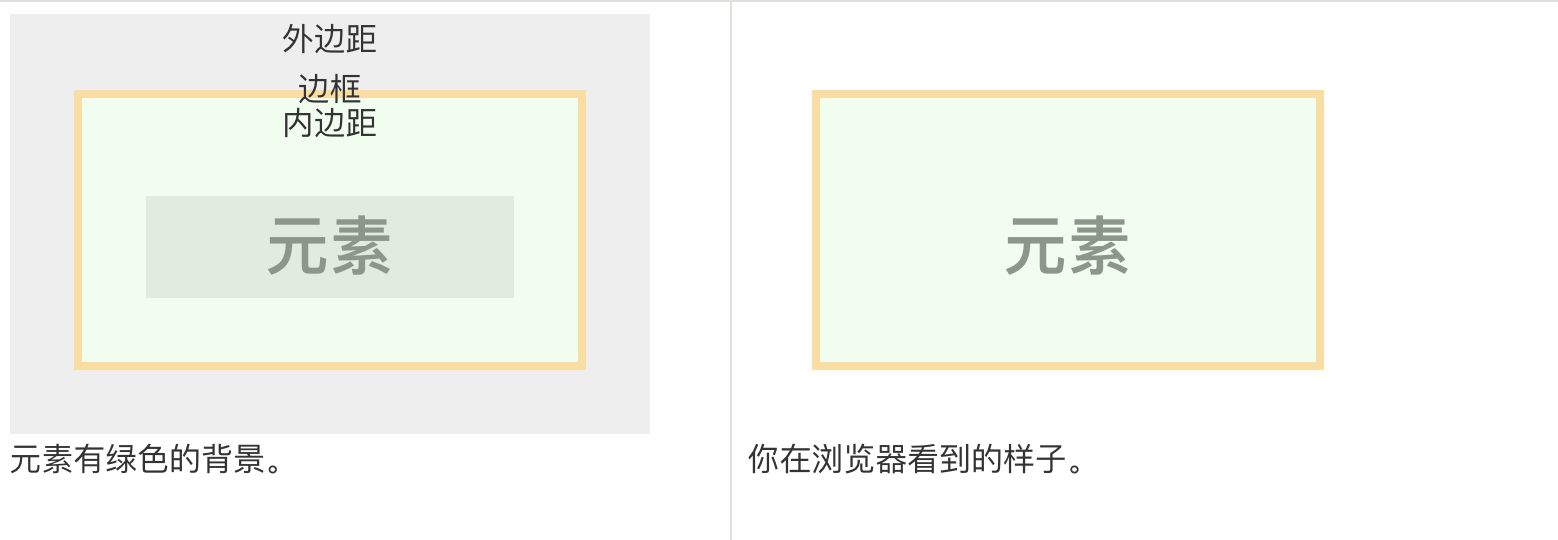
可用 margin 控制外边距,padding 控制内边距
如果你指定一个宽度,它将会作用于元素四周(上、右、下、左)。 如果你指定两个宽度, 第一个宽度会作用于顶部和底部,第二个宽度作用于右边和左边。 你也可以按照顺序指定四个宽度: 上、右、下、左。
文档流
css元素分为三类
1、行内元素(内联元素)
2、块元素
3、行内块元素
1、标准的文档流 内联元素 的流动方向是从左往右依次排列如果空间不过会另起一行, 内联元素 不受宽高的影响,它的宽度高度是由自身决定
2、块元素 的流动方向是从上往下每一个块元素独占一行,它的高度是由它内部文档流中元素的高度总和决定的
3、行内块元素既有结合了内联元素和块元素的特点,流动反向从左到右依次排列如果空间不过会另起一行而且受宽高的影像
4、可用 position:fixed 和 float:left , position: absolute 脱离标准的文档流