

###1.用法 我们先看一下VIewModel的简单用法
MyViewModel model = ViewModelProviders.of(this).get(MyViewModel.class);
简单的一句话就可以在activity或者fragment里获取VIewModel对象,然后可以对他执行操作。然后通过注册观察者通知ui组件更新内容
 model.getUsers().observe(this, users -> {
            // update UI
        });
###2.大致流程以及源码解析
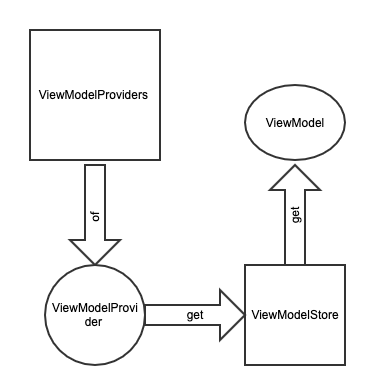
既然大家知道VIewModel的用法,那么它的内部实现是什么样的,这里我先说一下大致的流程,就是ViewModelProviders通过of方法获取ViewModelProvider对象,然后通过ViewModelProvider的get方法获取到的ViewModel对象。既然大家知道大致的流程,那边下边我们来看一下具体的代码实现吧。 首先看一下ViewModelProvider的of方法,看看他是如何创建ViewModelProvider的。
 /**
     * Creates a {@link ViewModelProvider}, which retains ViewModels while a scope of given Activity
     * is alive. More detailed explanation is in {@link ViewModel}.
     * <p>
     * It uses the given {@link Factory} to instantiate new ViewModels.
     *
     * @param activity an activity, in whose scope ViewModels should be retained
     * @param factory  a {@code Factory} to instantiate new ViewModels
     * @return a ViewModelProvider instance
     */
    @NonNull
    @MainThread
    public static ViewModelProvider of(@NonNull FragmentActivity activity,
            @Nullable Factory factory) {
        Application application = checkApplication(activity);
        if (factory == null) {
            factory = ViewModelProvider.AndroidViewModelFactory.getInstance(application);
        }
        return new ViewModelProvider(ViewModelStores.of(activity), factory);
    }
中间的方法是为了适配非v4包下的activity或者fragment,所以先不看那个方法,先看一下最后一句。new了一个ViewModelProvider对象,需要两个参数,一个ViewModelStore和一个factory。第二个参数很简单就是一个工厂创建出来的。那么接下来看第一个参数ViewModelStore是如何创建的。
 /**
     * Returns the {@link ViewModelStore} of the given activity.
     *
     * @param activity an activity whose {@code ViewModelStore} is requested
     * @return a {@code ViewModelStore}
     */
    @NonNull
    @MainThread
    public static ViewModelStore of(@NonNull FragmentActivity activity) {
        if (activity instanceof ViewModelStoreOwner) {
            return ((ViewModelStoreOwner) activity).getViewModelStore();
        }
        return holderFragmentFor(activity).getViewModelStore();
    }
这里我们还是先跳过中间的部分,还是适配非v4包下的activity和fragment,直接看最后的return,这里调用了一个静态方法holderFragmentFor,我们进入到这个方法去看看他执行了什么操作。
 /**
     * @hide
     */
    @RestrictTo(RestrictTo.Scope.LIBRARY_GROUP)
    public static HolderFragment holderFragmentFor(FragmentActivity activity) {
        return sHolderFragmentManager.holderFragmentFor(activity);
    }
这里返回了HolderFragment,这个是我们的重点,待会我们说他。这个HolderFragment内部有一个成员变量,直接返回了ViewModelStore,下边是源码。
public class HolderFragment extends Fragment implements ViewModelStoreOwner {
    private ViewModelStore mViewModelStore = new ViewModelStore();
  @NonNull
    @Override
    public ViewModelStore getViewModelStore() {
        return mViewModelStore;
    }
}
这里省去了部分代码,这里我们找到了ViewModelStore是如何创建的。知道了如何创建ViewModeStore,我们来看看它做了什么
/**
 * Class to store {@code ViewModels}.
 * <p>
 * An instance of {@code ViewModelStore} must be retained through configuration changes:
 * if an owner of this {@code ViewModelStore} is destroyed and recreated due to configuration
 * changes, new instance of an owner should still have the same old instance of
 * {@code ViewModelStore}.
 * <p>
 * If an owner of this {@code ViewModelStore} is destroyed and is not going to be recreated,
 * then it should call {@link #clear()} on this {@code ViewModelStore}, so {@code ViewModels} would
 * be notified that they are no longer used.
 * <p>
 * {@link android.arch.lifecycle.ViewModelStores} provides a {@code ViewModelStore} for
 * activities and fragments.
 */
public class ViewModelStore {

    private final HashMap<String, ViewModel> mMap = new HashMap<>();

    final void put(String key, ViewModel viewModel) {
        ViewModel oldViewModel = mMap.put(key, viewModel);
        if (oldViewModel != null) {
            oldViewModel.onCleared();
        }
    }

    final ViewModel get(String key) {
        return mMap.get(key);
    }

    /**
     *  Clears internal storage and notifies ViewModels that they are no longer used.
     */
    public final void clear() {
        for (ViewModel vm : mMap.values()) {
            vm.onCleared();
        }
        mMap.clear();
    }
}
ViewModelProvider整个创建过程已经介绍完了,下边我们来看看他的get方法是如何获取ViewModel对象的,在看get方法之前先看一下ViewModelStore
/**
 * Class to store {@code ViewModels}.
 * <p>
 * An instance of {@code ViewModelStore} must be retained through configuration changes:
 * if an owner of this {@code ViewModelStore} is destroyed and recreated due to configuration
 * changes, new instance of an owner should still have the same old instance of
 * {@code ViewModelStore}.
 * <p>
 * If an owner of this {@code ViewModelStore} is destroyed and is not going to be recreated,
 * then it should call {@link #clear()} on this {@code ViewModelStore}, so {@code ViewModels} would
 * be notified that they are no longer used.
 * <p>
 * {@link android.arch.lifecycle.ViewModelStores} provides a {@code ViewModelStore} for
 * activities and fragments.
 */
public class ViewModelStore {

    private final HashMap<String, ViewModel> mMap = new HashMap<>();

    final void put(String key, ViewModel viewModel) {
        ViewModel oldViewModel = mMap.put(key, viewModel);
        if (oldViewModel != null) {
            oldViewModel.onCleared();
        }
    }

    final ViewModel get(String key) {
        return mMap.get(key);
    }

    /**
     *  Clears internal storage and notifies ViewModels that they are no longer used.
     */
    public final void clear() {
        for (ViewModel vm : mMap.values()) {
            vm.onCleared();
        }
        mMap.clear();
    }
}
ViewModelStore很简单内部维护一个HashMap,提供三个方法,存、取和清空。
public class ViewModelProvider {
/**
     * Returns an existing ViewModel or creates a new one in the scope (usually, a fragment or
     * an activity), associated with this {@code ViewModelProvider}.
     * <p>
     * The created ViewModel is associated with the given scope and will be retained
     * as long as the scope is alive (e.g. if it is an activity, until it is
     * finished or process is killed).
     *
     * @param modelClass The class of the ViewModel to create an instance of it if it is not
     *                   present.
     * @param <T>        The type parameter for the ViewModel.
     * @return A ViewModel that is an instance of the given type {@code T}.
     */
    @NonNull
    @MainThread
    public <T extends ViewModel> T get(@NonNull Class<T> modelClass) {
        String canonicalName = modelClass.getCanonicalName();
        if (canonicalName == null) {
            throw new IllegalArgumentException("Local and anonymous classes can not be ViewModels");
        }
        return get(DEFAULT_KEY + ":" + canonicalName, modelClass);
    }

/**
     * Returns an existing ViewModel or creates a new one in the scope (usually, a fragment or
     * an activity), associated with this {@code ViewModelProvider}.
     * <p>
     * The created ViewModel is associated with the given scope and will be retained
     * as long as the scope is alive (e.g. if it is an activity, until it is
     * finished or process is killed).
     *
     * @param key        The key to use to identify the ViewModel.
     * @param modelClass The class of the ViewModel to create an instance of it if it is not
     *                   present.
     * @param <T>        The type parameter for the ViewModel.
     * @return A ViewModel that is an instance of the given type {@code T}.
     */
    @NonNull
    @MainThread
    public <T extends ViewModel> T get(@NonNull String key, @NonNull Class<T> modelClass) {
        ViewModel viewModel = mViewModelStore.get(key);

        if (modelClass.isInstance(viewModel)) {
            //noinspection unchecked
            return (T) viewModel;
        } else {
            //noinspection StatementWithEmptyBody
            if (viewModel != null) {
                // TODO: log a warning.
            }
        }

        viewModel = mFactory.create(modelClass);
        mViewModelStore.put(key, viewModel);
        //noinspection unchecked
        return (T) viewModel;
    }
}
ViewModelProvider先创建一个有规律的key,然后通过这个这个可以去ViewModelStore中取,如果匹配我们的viewModel那么就返回,如果不匹配,就通过工厂创建一个新的Viewmodel,然后存到ViewModelStore中,然后返回ViewModel对象。这样整个获取ViewModel对象的过程就分析完了,下边我们来看看那个HolderFragment,在这里我们看到ViewModel是如何销毁的。 ###3.ViewModel的死亡
public abstract class ViewModel {
    /**
     * This method will be called when this ViewModel is no longer used and will be destroyed.
     * <p>
     * It is useful when ViewModel observes some data and you need to clear this subscription to
     * prevent a leak of this ViewModel.
     */
    @SuppressWarnings("WeakerAccess")
    protected void onCleared() {
    }
}
Vm 只有一个onCleared方法,那么他是在何时调用呢?这里就要看之前提到的HolderFragment
public class HolderFragment extends Fragment {
    private static final String LOG_TAG = "ViewModelStores";

    private static final HolderFragmentManager sHolderFragmentManager = new HolderFragmentManager();

    /**
     * @hide
     */
    @RestrictTo(RestrictTo.Scope.LIBRARY_GROUP)
    public static final String HOLDER_TAG =
            "android.arch.lifecycle.state.StateProviderHolderFragment";

    private ViewModelStore mViewModelStore = new ViewModelStore();

    public HolderFragment() {
        setRetainInstance(true);
    }

    @Override
    public void onCreate(@Nullable Bundle savedInstanceState) {
        super.onCreate(savedInstanceState);
        sHolderFragmentManager.holderFragmentCreated(this);
    }

   @Override
    public void onDestroy() {
        super.onDestroy();
        mViewModelStore.clear();
    }

    public ViewModelStore getViewModelStore() {
        return mViewModelStore;
    }

    static class HolderFragmentManager {
        private Map<Activity, HolderFragment> mNotCommittedActivityHolders = new HashMap<>();
        private Map<Fragment, HolderFragment> mNotCommittedFragmentHolders = new HashMap<>();
        ……
         private static HolderFragment createHolderFragment(FragmentManager fragmentManager) {
            HolderFragment holder = new HolderFragment();
            fragmentManager.beginTransaction().add(holder, HOLDER_TAG).commitAllowingStateLoss();
            return holder;
        }
         HolderFragment holderFragmentFor(FragmentActivity activity) {
            FragmentManager fm = activity.getSupportFragmentManager();
            HolderFragment holder = findHolderFragment(fm);
            if (holder != null) {
                return holder;
            }
            holder = mNotCommittedActivityHolders.get(activity);
            if (holder != null) {
                return holder;
            }

            if (!mActivityCallbacksIsAdded) {
                mActivityCallbacksIsAdded = true;
                activity.getApplication().registerActivityLifecycleCallbacks(mActivityCallbacks);
            }
            holder = createHolderFragment(fm);
            mNotCommittedActivityHolders.put(activity, holder);
            return holder;
        }
  ……
}
Vm 创建的时候提到过 实例化了一个 HolderFragment 。并且实例化的时候通过上面createHolderFragment 方法将其fragmentManager.beginTransaction().add(holder, HOLDER_TAG).commitAllowingStateLoss(); 我们知道commit 之后 fragment 将会拥有灵魂,获得生命周期。再看其onDestroy方法里 调用了 mViewModelStore.clear();
###4.那么为什么旋转屏幕为什么不会onClear 因为在HolderFragment的构造方法里调用了setRetainInstance(true); 这一节先介绍到这,下边会跟进为什么VIewModel会和activity声明周期结合,并且如何把数据更新的。
