git基础命令
一、 ls运用
“ls”可查看当前目录下有那些文件
在桌面新建"git-demo-1"目录,目录中创建文件"css、images、index.html、js"
$cd ~/Desktop
$cd git-demo-1
$ls
在终端输入"ls"后得到以下结果
css images index.html js
"ls -a"可查看当前目录下所有的文件包含隐藏文件
在终端输入"ls -a"得到以下结果
. .DS_Store css index.html
.. .git images js
"ls -l"可查看当前目录下所有文件的权限和最后修改时间
在终端输入"ls -l"得到以下结果
total 0
drwxr-xr-x 3 tianqiang staff 96 5 22 17:18 css
drwxr-xr-x 3 tianqiang staff 96 5 22 17:49 images
-rw-r--r-- 1 tianqiang staff 0 5 22 17:09 index.html
drwxr-xr-x 3 tianqiang staff 96 5 22 17:25 js
"ls -al"可查看所有文件包含隐藏文件的权限和最后修改时间
在终端输入"ls -al"得到以下结果
total 16
drwxr-xr-x 8 tianqiang staff 256 5 22 17:58 .
drwx------@ 10 tianqiang staff 320 5 23 11:05 ..
-rw-r--r--@ 1 tianqiang staff 6148 5 22 17:48 .DS_Store
drwxr-xr-x 15 tianqiang staff 480 5 22 17:58 .git
drwxr-xr-x 3 tianqiang staff 96 5 22 17:18 css
drwxr-xr-x 3 tianqiang staff 96 5 22 17:49 images
-rw-r--r-- 1 tianqiang staff 0 5 22 17:09 index.html
drwxr-xr-x 3 tianqiang staff 96 5 22 17:25 js
二、cat运用
"cat filename"显示文件内容
在桌面新建cat-demo1.txt文件,在里面输入内容"hello" 在终端输入 cat cat-demo1.txt得到以下结果
cd ~/Desktop
cat cat-demo1.txt
hello
"cat > filename"创建新文件
在终端输入cat > cat-demo2.txt << EOF,新建cat-demo2.txt文件,并输入"world"
cat > cat-demo2.txt << EOF
> world
> EOF
"cat file1 file2 >>file3"将file1和file2文件内容赋予file3
在终端新建文件"cat-demo3.txt",将demo1和demo2的内容赋予demo3
cd ~/Desktop
touch cat-demo3.txt
cat cat-demo1.txt cat-demo2.txt >> cat-demo3.txt
hello world
三、mv运用
"mv"移动文件或重命名文件
将"cat-demo3.txt"重命名为"mv-demo.txt"
cd ~/Desktop
mv cat-demo3.txt mv-demo.txt
新建将"mv-demo"目录,将"mov-demo.txt"移动到"mv-demo"
mkdir mov-demo
mv mv-demo.txt mv-demo
cd mv-demo
ls
mv-demo.txt
四、touch运用
"touch"修改文件或目录的时间,若文件不存在会新建一个文件
修改文件时间
cd mv-demo
touch mv-demo.txt
ls -l
total 8
-rw-r--r--@ 1 tianqiang staff 17 5 23 14:50 mv-demo.txt
touch mv-demo.txt
total 8
-rw-r--r--@ 1 tianqiang staff 17 5 23 14:53 mv-demo.txt
创建文件
touch touch-demo
ls -l
total 8
-rw-r--r--@ 1 tianqiang staff 17 5 23 14:53 mv-demo.txt
-rw-r--r-- 1 tianqiang staff 0 5 23 14:55 touch-demo
五、 常见的自带命令
| 操作 | 命令 |
|---|---|
| 进入目录 | cd |
| 显示当前目录 | pwd |
| 创建目录 | mkdir 目录名 |
| 创建目录 | mkdir -p 目录路径 |
| 我是谁 | whoami |
| -- | -- |
| 查看路径 | ls 路径 |
| 查看路径 | ls -a 路径 |
| 查看路径 | ls -l 路径 |
| 查看路径 | ls -al 路径 |
| -- | -- |
| 创建文件 | echo '1' > 文件路径 |
| 强制创建文件 | echo '1' >! 文件路径 |
| 追加文件内容 | echo '1' >> 文件路径 |
| 创建文件 | touch 文件名 |
| 改变文件更新时间 | touch 文件名 |
| -- | -- |
| 复制文件 | cp 源路径 目标路径 |
| 复制目录 | cp -r 源路径 目标路径 |
| -- | -- |
| 移动节点 | mv 源路径 目标路径 |
| -- | -- |
| 删除文件 | rm 文件路径 |
| 强制删除文件 | rm -f 文件路径 |
| 删除目录 | rm -r 目录路径 |
| 强制删除目录 | rm -rf 目录路径 |
| -- | -- |
| 查看目录结构 | tree 让 Windows 支持 tree |
| 建立软链接 | ln -s 真实文件 链接 |
| -- | -- |
| 下载文件 | curl -L www.baidu.com > |
| 拷贝网页 | wget -p -H -e robots=off |
| 磁盘占用 | df -kh |
| 当前目录大小 | du -sh . |
| 各文件大小 | du -h |
六 、alias 缩写
使用 alias 对命令进行简写,可以是日常操作更加便捷和快速
~/.bashrc
 alias la='ls -a'
 alias ll='ls -l'
 alias gst='git status -sb'
 alias ga='git add'
 alias ga.='git add .'
 alias gc='git commit'
 alias gc.='git commit .'
 alias open='start'
source ~/.bashrc
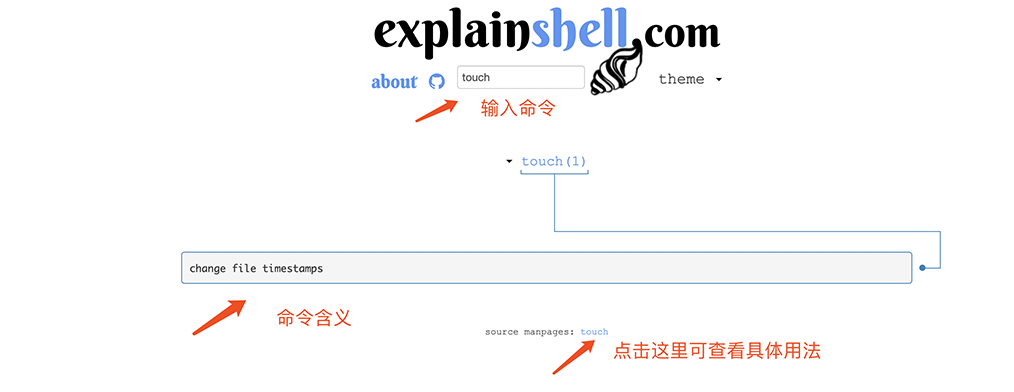
七、explainshell.com网站运用
如果有不会的命令可以来这个网站查