

- 解决移动端input默认高亮边框
-webkit-tap-highlight-color:transparent;2. 去除移动端div点击有按压阴影问题
div {-webkit-tap-highlight-color: rgba(0, 0, 0, 0);}
3. 截取银行卡显示前四位和后四位 用vue可直接循环替换
v-text="item.bankCode.substr(0,4)+'**************'+item.bankCode.substr(-4)"4. 验证输入非空,验证手机号格式、身份证号格式、验证浮点型正则封装(其余类型有待完善,欢迎指出)项目实战中常用的
//验证
function yz(type, val, ts) {
    var bol = '';
    //定义正则
    var reg1 = /\S/, //验证非空
        reg2 = /^1(3|4|5|6|7|8)\d{9}$/, //手机号
        reg3 = /(^\d{15}$)|(^\d{18}$)|(^\d{17}(\d|X|x)$)/, //身份证
        reg4 = /^((\d+\.\d*[1-9]\d*)|(\d*[1-9]\d*\.\d+)|(\d*[1-9]\d*))$/;
    //浮点型
    //验证类型

    switch (type) {
        //非空
        case 'has':
            testVal(reg1);
            break;
            //手机号
        case 'phone':
            testVal(reg2);
            break;
            //身份证
        case 'sfz':
            testVal(reg3);
            break;
            //浮点
        case 'numberf':
            testVal(reg4);
            break;
    }

    function testVal(r) {
        if (!r.test(val)) {
            $public.toast(ts);
            console.log(ts)
            return bol = false;
        } else {
            return bol = true;
        }
    }
    return bol;
}
5. input只能输入数字
<input class="inputnumber" v-model="initial" type="number" onkeyup="value=value.replace(/[^\d\.]/g,'')" onblur="value=value.replace(/[^\d\.]/g,'')"/>
6. 三目运算在添加删除class方面可以减少很多js代码
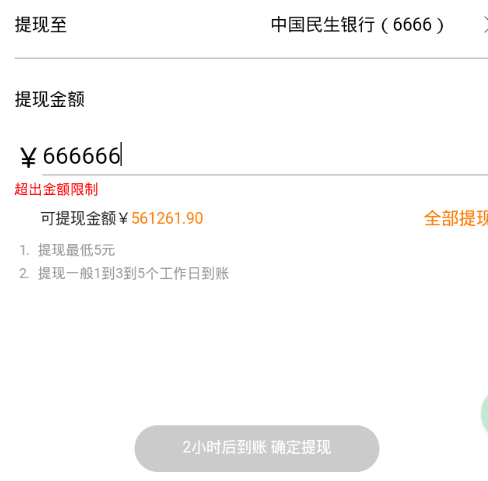
<div class="button" :class="initial > ctxnum || initial == 0 ? 'bctxbtn' : 'ctxbtn'" tapmomde @click="withdraw()">2小时后到账 确定提现</div>
此处为项目中提现的场景,进入提现页面是按钮是灰色且不可点击,输入数字后变为可点击,超出可提现金额时,又会变为不可点击
.bctxbtn {
            pointer-events: none;   /* 设置div不可点击*/
        }
7. input的radio自定义样式,尝试了好多次达不到想要的效果,最后终于不需要依赖第三方插件,css轻松搞定
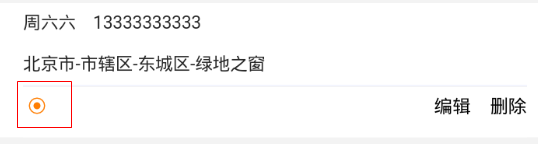
<div class="radio-box">
     <h4 class="item-select" :class="item.isDefault == 1 ? 'itemselectactive' : '' " @click="eachclick(index,item.id)"><span></span></h4>
</div>
css代码
        .item-select {
            position: absolute;
            left: 5px;
            top: 10px;
            border-radius: 50%;
            width: 12px;
            height: 12px;
            border: 1px solid #FF7E02;
        }

        .item-select span {
            display: inline-block;
            width: 6px;
            height: 6px;
            margin: auto;
            border-radius: 50%;
            background-color: #fff;
            position: absolute;
            top: 3px;
            left: 3px;
        }

        .itemselectactive span {
            background-color: #FF7E02;
        }

        .radio-box {
            position: relative;
            width: 20px;
            height: 30px;
            float: left;
        }
后续会增加一些,都是项目中用到的,欢迎前端前来交流,如有更好更简洁的代码欢迎指出

