生命周期图
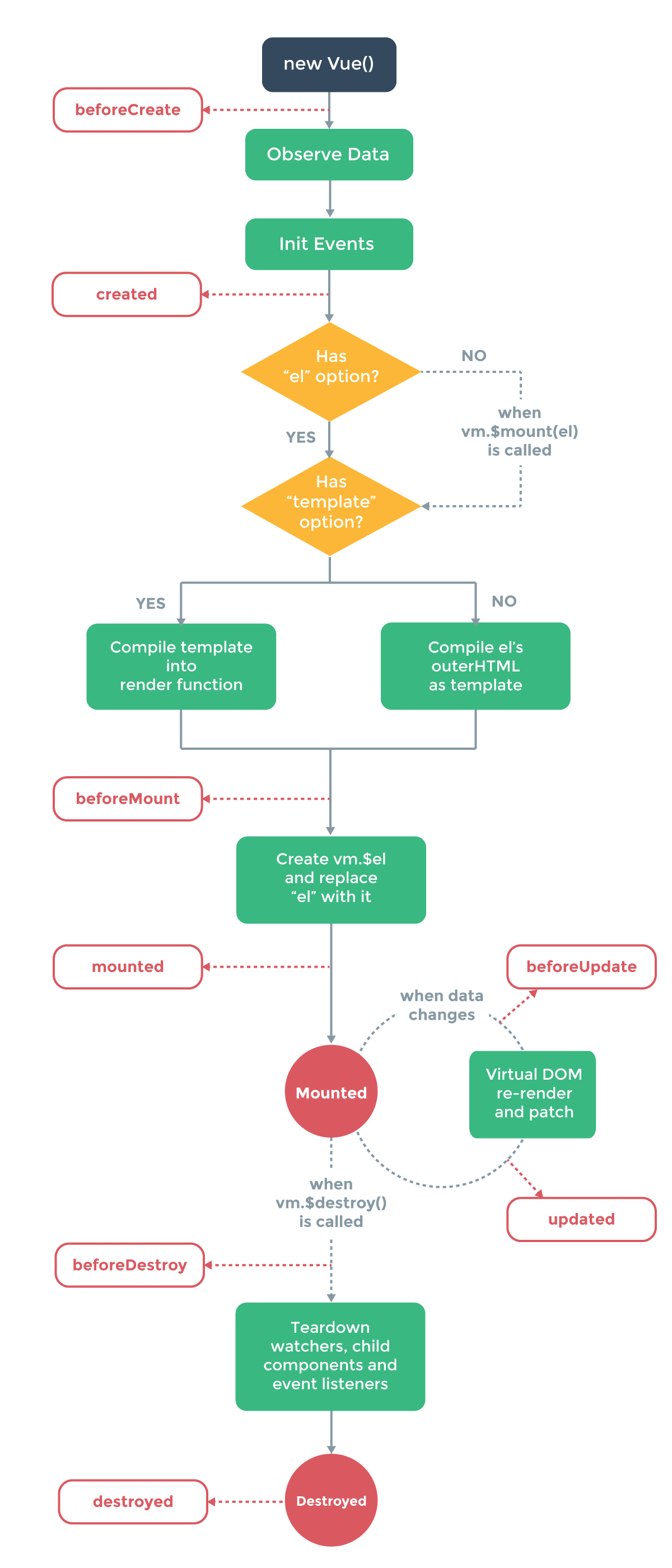
在了解vue生命周期的时候可以先运行以下代码,观察congsole.log出来的结果
<!DOCTYPE html>
<html lang="en">
<head>
  <meta charset="UTF-8">
  <meta name="viewport" content="width=device-width, initial-scale=1.0">
  <meta http-equiv="X-UA-Compatible" content="ie=edge">
  <title>vue生命周期学习</title>
  <script src="https://cdn.bootcss.com/vue/2.4.2/vue.js"></script>
</head>
<body>
  <div id="app">
    <h1>{{message}}</h1>
  </div>
</body>
<script>
  var vm = new Vue({
    el: '#app',
    data: {
      message: 'Vue的生命周期'
    },
    beforeCreate: function() {
      console.group('------beforeCreate创建前状态------');
      console.log("%c%s", "color:red" , "el     : " + this.$el); //undefined
      console.log("%c%s", "color:red","data   : " + this.$data); //undefined
      console.log("%c%s", "color:red","message: " + this.message)
    },
    created: function() {
      console.group('------created创建完毕状态------');
      console.log("%c%s", "color:red","el     : " + this.$el); //undefined
      console.log("%c%s", "color:red","data   : " + this.$data); //已被初始化
      console.log("%c%s", "color:red","message: " + this.message); //已被初始化
    },
    beforeMount: function() {
      console.group('------beforeMount挂载前状态------');
      console.log("%c%s", "color:red","el     : " + (this.$el)); //已被初始化
      console.log(this.$el);
      console.log("%c%s", "color:red","data   : " + this.$data); //已被初始化
      console.log("%c%s", "color:red","message: " + this.message); //已被初始化
    },
    mounted: function() {
      console.group('------mounted 挂载结束状态------');
      console.log("%c%s", "color:red","el     : " + this.$el); //已被初始化
      console.log(this.$el);
      console.log("%c%s", "color:red","data   : " + this.$data); //已被初始化
      console.log("%c%s", "color:red","message: " + this.message); //已被初始化
    },
    beforeUpdate: function () {
      console.group('beforeUpdate 更新前状态===============》');
      console.log("%c%s", "color:red","el     : " + this.$el);
      console.log(this.$el);
      console.log("%c%s", "color:red","data   : " + this.$data);
      console.log("%c%s", "color:red","message: " + this.message);
    },
    updated: function () {
      console.group('updated 更新完成状态===============》');
      console.log("%c%s", "color:red","el     : " + this.$el);
      console.log(this.$el);
      console.log("%c%s", "color:red","data   : " + this.$data);
      console.log("%c%s", "color:red","message: " + this.message);
    },
    beforeDestroy: function () {
      console.group('beforeDestroy 销毁前状态===============》');
      console.log("%c%s", "color:red","el     : " + this.$el);
      console.log(this.$el);
      console.log("%c%s", "color:red","data   : " + this.$data);
      console.log("%c%s", "color:red","message: " + this.message);
    },
    destroyed: function () {
      console.group('destroyed 销毁完成状态===============》');
      console.log("%c%s", "color:red","el     : " + this.$el);
      console.log(this.$el);
      console.log("%c%s", "color:red","data   : " + this.$data);
      console.log("%c%s", "color:red","message: " + this.message)
    }
  })
</script>
</html>
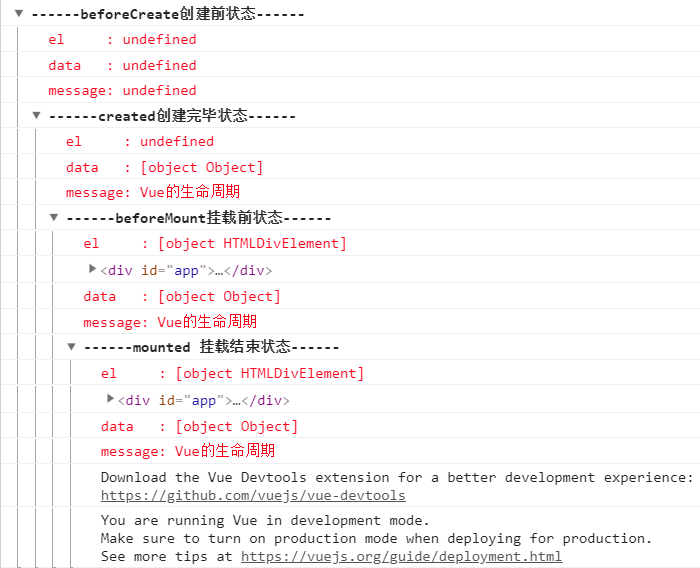
输出结果:
1,beforeCreate:在实例初始化之后,数据观测 (data observer) 和 event/watcher 事件配置之前被调用。(在这之前它会执行一个mergeOptions函数,得到$options选项,并把它设置成Vue实例的一个属性。)
------beforeCreate创建前状态------
el     : undefined
data   : undefined
message: undefined
2,created:在模板渲染成html前调用,实例已完成以下的配置:数据观测 (data observer),属性和方法的运算,watch/event 事件回调。然而,挂载阶段还没开始,$el 属性目前不可见。
------created创建完毕状态------
el     : undefined
data   : [object Object]
message: Vue生命周期
3,beforeMount:在挂载开始之前被调用,相关的 render 函数首次被调用。(模板编译)
该钩子在服务器端渲染期间不被调用。
------beforeMount挂载前状态------
 el     : [object HTMLDivElement]
    <div id="app">
        <h1>{{message}}</h1>
    </div>
 data   : [object Object]
 message: Vue生命周期
4,mounted:
el 被新创建的 vm.$el 替换,并挂载到实例上去之后调用该钩子。如果 root 实例挂载了一个文档内元素,当 mounted 被调用时 vm.$el 也在文档内。
注意 mounted 不会承诺所有的子组件也都一起被挂载。如果你希望等到整个视图都渲染完毕,可以用 vm.$nextTick 替换掉 mounted:
mounted: function () {
  this.$nextTick(function () {
    // Code that will run only after the
    // entire view has been rendered
  })
}
该钩子在服务器端渲染期间不被调用。
------mounted挂载前状态------
 el     : [object HTMLDivElement]
    <div id="app">
        <h1>Vue生命周期</h1>
    </div>
 data   : [object Object]
 message: Vue生命周期