解决IE兼容问题:
1是可以直接在入口文件中引入import 'babel-polyfill'
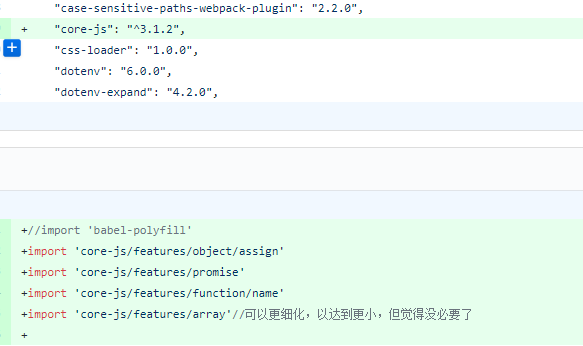
2 现在介绍的是通过单独使用core-js的某个类库来解决,如
import 'core-js/features/object/assign'
import 'core-js/features/promise'
import 'core-js/features/function/name'
如果可以在按需引入来解决问题,就按需引入好了,因为babel-polyfill文件包引入,导致项目体积过大
修改代码如下图 :
需安装core-js : yarn add core-js
解决完了上面的问题后,IE10及以下的竟然又出现了'MAP'未定义, 'Set'未定义的情况
以为是我没有包含到需要的文件,于是我又import 'babel-polyfill'回来作测试,发现'MAP'未定义, 'Set'未定义的情况 依然存在 ,
于是在网上查了下,'MAP'未定义可以引入以下代码(最好是在html中引入) :
function Map() {
    this.elements = new Array();
    // 获取Map元素个数
    this.size = function() {
        return this.elements.length;
    },
    // 判断Map是否为空
    this.isEmpty = function() {
        return (this.elements.length < 1);
    },
    // 删除Map所有元素
    this.clear = function() {
        this.elements = new Array();
    },
    // 向Map中增加元素(key, value)
    this.put = function(_key, _value) {
        if (this.containsKey(_key) == true) {
            if (this.containsValue(_value)) {
                if (this.remove(_key) == true) {
                    this.elements.push({
                        key : _key,
                        value : _value
                    });
                }
            } else {
                this.elements.push({
                    key : _key,
                    value : _value
                });
            }
        } else {
            this.elements.push({
                key : _key,
                value : _value
            });
        }
    },
    // 向Map中增加元素(key, value)
    this.set = function(_key, _value) {
        if (this.containsKey(_key) == true) {
            if (this.containsValue(_value)) {
                if (this.remove(_key) == true) {
                    this.elements.push({
                        key : _key,
                        value : _value
                    });
                }
            } else {
                this.elements.push({
                    key : _key,
                    value : _value
                });
            }
        } else {
            this.elements.push({
                key : _key,
                value : _value
            });
        }
    },
    // 删除指定key的元素,成功返回true,失败返回false
    this.remove = function(_key) {
        var bln = false;
        try {
            for (i = 0; i < this.elements.length; i++) {
                if (this.elements[i].key == _key) {
                    this.elements.splice(i, 1);
                    return true;
                }
            }
        } catch (e) {
            bln = false;
        }
        return bln;
    },

    // 删除指定key的元素,成功返回true,失败返回false
    this.delete = function(_key) {
        var bln = false;
        try {
            for (i = 0; i < this.elements.length; i++) {
                if (this.elements[i].key == _key) {
                    this.elements.splice(i, 1);
                    return true;
                }
            }
        } catch (e) {
            bln = false;
        }
        return bln;
    },

    // 获取指定key的元素值value,失败返回null
    this.get = function(_key) {
        try {
            for (i = 0; i < this.elements.length; i++) {
                if (this.elements[i].key == _key) {
                    return this.elements[i].value;
                }
            }
        } catch (e) {
            return null;
        }
    },

    // set指定key的元素值value
    this.setValue = function(_key, _value) {
        var bln = false;
        try {
            for (i = 0; i < this.elements.length; i++) {
                if (this.elements[i].key == _key) {
                    this.elements[i].value = _value;
                    return true;
                }
            }
        } catch (e) {
            bln = false;
        }
        return bln;
    },

    // 获取指定索引的元素(使用element.key,element.value获取key和value),失败返回null
    this.element = function(_index) {
        if (_index < 0 || _index >= this.elements.length) {
            return null;
        }
        return this.elements[_index];
    },

    // 判断Map中是否含有指定key的元素
    this.containsKey = function(_key) {
        var bln = false;
        try {
            for (i = 0; i < this.elements.length; i++) {
                if (this.elements[i].key == _key) {
                    bln = true;
                }
            }
        } catch (e) {
            bln = false;
        }
        return bln;
    },

    // 判断Map中是否含有指定key的元素
    this.has = function(_key) {
        var bln = false;
        try {
            for (i = 0; i < this.elements.length; i++) {
                if (this.elements[i].key == _key) {
                    bln = true;
                }
            }
        } catch (e) {
            bln = false;
        }
        return bln;
    },

    // 判断Map中是否含有指定value的元素
    this.containsValue = function(_value) {
        var bln = false;
        try {
            for (i = 0; i < this.elements.length; i++) {
                if (this.elements[i].value == _value) {
                    bln = true;
                }
            }
        } catch (e) {
            bln = false;
        }
        return bln;
    },

    // 获取Map中所有key的数组(array)
    this.keys = function() {
        var arr = new Array();
        for (i = 0; i < this.elements.length; i++) {
            arr.push(this.elements[i].key);
        }
        return arr;
    },

    // 获取Map中所有value的数组(array)
    this.values = function() {
        var arr = new Array();
        for (i = 0; i < this.elements.length; i++) {
            arr.push(this.elements[i].value);
        }
        return arr;
    };

    /**
    * map遍历数组
    * @param callback [function] 回调函数;
    * @param context [object] 上下文;
    */
    this.forEach = function forEach(callback,context){
        context = context || window;

        //IE6-8下自己编写回调函数执行的逻辑
        var newAry = new Array();
        for(var i = 0; i < this.elements.length;i++) {
            if(typeof  callback === 'function') {
                var val = callback.call(context,this.elements[i].value,this.elements[i].key,this.elements);
                newAry.push(this.elements[i].value);
            }
        }
        return newAry;
    }

}
'SET'未定义可以引入 es6-shim.js:
<script src="//cdn.bootcss.com/es6-shim/0.35.4/es6-shim.js"></script>
这两个问题是解决了,但是IE又报缺少对象
真是心塞, 如果大家有解决办法,可以留言告诉我。。