

首先,我们给thymeleaf一个定义:
Thymeleaf是一个Java库,它是一个XML / XHTML / HTML5模板引擎,能够应用于转换模板文件,以显示您的应用程序产生的数据和文本。
它尤其适合于基于XHTML / HTML5的web服务应用程序,同时它可以处理任何XML文件,作为web或独立的应用程序。
Thymeleaf的主要目的是提供一个优雅和格式良好的方式创建模板。为了实现这一目标,它把预定义的逻辑放在XML的标记和属性上,而不是显式放在XML标记的内容上。
依靠智能缓存去解析文件,致使其执行期间的I / O操作达到了最少数量,因此其处理的模板的能力实非常快速的。最大的特点是能够直接在浏览器中打开并正确显示模板页面,而不需要启动整个Web应用。
在Spring Boot中,我们先要添加依赖
<!--thymeleaf  -->
<dependency>
    <groupId>org.springframework.boot</groupId>
    <artifactId>spring-boot-starter-thymeleaf</artifactId>
</dependency>
然后配置application.properties
#thymeleaf start
spring.thymeleaf.prefix=classpath:/templates/
spring.thymeleaf.suffix=.html
spring.thymeleaf.mode=HTML5
spring.thymeleaf.encoding=UTF-8
spring.thymeleaf.content-type=text/html
#开发时注意关闭缓存,不然没法看到实时页面
spring.thymeleaf.cache=false
#thymeleaf end
在Controller层中,代码如下
/**
 * 测试hello
 * @return
 */
@RequestMapping(value = "/hello",method = RequestMethod.GET)
public String hello(Model model,String username) {
    model.addAttribute("name", username);
    return "hello";
}
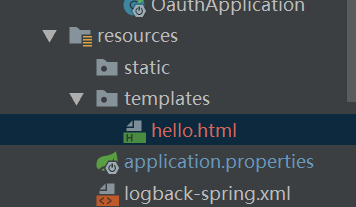
resource.templates中视图层代码如下
<!DOCTYPE HTML>
<html xmlns:th="http://www.thymeleaf.org">
<head>
    <title>hello</title>
    <meta http-equiv="Content-Type" content="text/html; charset=UTF-8" />
</head>
<body>
<!--/*@thymesVar id="username" type="java.lang.String"*/-->
<p th:text="'Hello!, ' + ${username} + '!'" >3333</p>
</body>
</html>
我也只是简单尝试使用还没有深入学,这里thymeleaf模板中的语法这里不多做介绍
