

1,首先做好布局,嗯嗯这个不多说看代码; 2,页面初始化
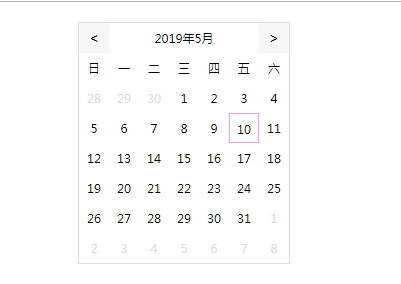
3,头部往前切换月份头部的月份-1,一直往前点到了1月份就年份-1月份为12;往后点击头部月份+1,一直往后点到了12月份就年份+1月份为1;调用调用【lastMonthFns(firstDate, topMonth);currentMonFn(hasDay, topMonth, day); nextMonFn();】
4,点击头部的N年N月,页面切换

5,在有日期的页面,点击了哪一个日期,则那个日期就被选中,如果是点击了上一个或者下一个月的日期,则页面会切换到对应的哪一个月份(这就是为什么留空填写上一个月的日期,这可快速切换上一个月或者下一个月)
6,逻辑基本是这样的啦...................嗯嗯成为大神还有十万八千里那么长的一段路
贴一下代码吧 <!doctype html>
<head>
	<meta charset="UTF-8">
	<title>HTML5自由者</title>
	<style>
		.main {
			width: 210px;
			height: 240px;
			border: 1px solid #ddd;
			margin: 20px auto;
		}

		.top {
			height: 30px;
			width: 100%;
			line-height: 30px;
			font-size: 12px;
			text-align: center;
		}

		.top span.left,
		.top span.right {
			display: inline-block;
			height: 30px;
			width: 30px;
			font-size: 14px;
			text-align: center;
			line-height: 30px;
			background: #f7f7f7;
			cursor: default;
		}

		.top span#yearsBox {
			cursor: default;
		}

		.top span.left {
			float: left
		}

		.top span.right {
			float: right
		}

		.content {
			width: 100%;
			height: 180px;
		}

		ul,
		li {
			list-style: none;
			padding: 0;
			margin: 0;
			font-size: 12px;
			cursor: pointer;
			box-sizing: border-box;
		}

		li {
			width: 30px;
			height: 30px;
			float: left;
			line-height: 30px;
			text-align: center;
		}

		#_day li:hover {
			border: 1px solid #fd9de4;
		}

		#_day li.active {
			border: 1px solid #fd9de4;
		}

		.block {
			color: #ddd;
		}

		.list-month {
			width: 50px;
			height: 50px;
			text-align: center;
			line-height: 50px;
		}
	</style>
</head>

<body>
	<div class="main">
		<div class="top">
			<span class="left" onClick="preFn()"><</span><span id="yearsBox" onClick="changeMonth()">2019年5月</span><span class="right" onClick="nextFn()">></span>
		</div>
		<div class="content">
			<ul id="_title">

			</ul>
			<ul id="_day">

			</ul>

		</div>
	</div>
	<script type="text/javascript">
		const data = new Date();//获取当前前的时间
		const years = data.getFullYear();
		const month = data.getMonth();
		const day = data.getDate();
		const yearsBox = document.getElementById("yearsBox");
		const dayBox = document.getElementById("_day");
		const titleBox = document.getElementById("_title");
		let _titleTxt="<li>日</li><li>一</li><li>二</li><li>三</li><li>四</li><li>五</li><li>六</li>";
		let _html = [];
		currentFn(day); //页面初始化

		//点击头部切换月份
		function changeMonth() {
			_html = [];
			titleBox.innerHTML = "";
			let yAddM = yearsBox.innerHTML;
			let currentYears = parseInt(yAddM);
			yearsBox.innerHTML = "";
			let cnum = ['一', '二', '三', '四', '五', '六', '七', '八', '九', '十', '十一', '十二'];
			for(let i = 0; i < 12; i++) {
				let indexMonth = cnum[i];
				_html.push("<li class='list-month' onClick='getThMonth(" + (i + 1) + "," + currentYears + ")'>" + indexMonth + "月</li>");
			}
			yearsBox.innerHTML = currentYears + "年";
			dayBox.innerHTML = _html.join("");
		}

		//选择了哪一个月份
		function getThMonth(month, currentYears) {
			titleBox.innerHTML = _titleTxt;
			_html = [];
			let topMonth = month;
			let years = currentYears;
			let hasDay = getDay(years, topMonth);
			let firstDay = years + "-" + topMonth + "-1";
			let lastDay = years + "-" + topMonth + "-" + hasDay;
			let firstDate = new Date(firstDay).getDay();
			let lastDate = new Date(lastDay).getDay();
			lastMonthFns(firstDate, topMonth, );
			currentMonFn(hasDay, topMonth, day);
			nextMonFn();
			yearsBox.innerHTML = years + "年" + topMonth + "月";
			dayBox.innerHTML = _html.join("");

		}

		//当前月份天数
		function currentFn(day) {
			let yAddM = yearsBox.innerHTML;
			let currentYears = parseInt(yAddM);
			let currentMonth = yAddM.slice(5, yAddM.length);
			let topMonth = parseInt(currentMonth);
			titleBox.innerHTML = _titleTxt;
			let hasDay = getDay(years, topMonth);
			let firstDay = years + "-" + topMonth + "-1";
			let lastDay = years + "-" + topMonth + "-" + hasDay;
			let firstDate = new Date(firstDay).getDay();
			let lastDate = new Date(lastDay).getDay();
			lastMonthFns(firstDate, topMonth, );
			currentMonFn(hasDay, topMonth, day);
			nextMonFn();
			yearsBox.innerHTML = years + "年" + topMonth + "月";
			dayBox.innerHTML = _html.join("");
		}

		//往前点击月份,年份
		function preFn(day) {
			_html = [];
			let yAddM = yearsBox.innerHTML;
			let currentYears = parseInt(yAddM);
			let currentMonth = yAddM.slice(5, yAddM.length);
			let topMonth = parseInt(currentMonth);
			yearsBox.innerHTML = "";
			if(yAddM.length > 5) {
				if(topMonth === 1) {
					let hasDay = getDay(currentYears - 1, 12);
					let firstDay = (currentYears - 1) + "-" + 12 + "-1";
					let firstDate = new Date(firstDay).getDay();
					yearsBox.innerHTML = (currentYears - 1) + "年" + 12 + "月";
					lastMonthFns(firstDate, topMonth);
					currentMonFn(hasDay, topMonth, day);
					nextMonFn();
				} else {
					let hasDay = getDay(currentYears, (topMonth - 1));
					let firstDay = currentYears + "-" + (topMonth - 1) + "-1";
					let firstDate = new Date(firstDay).getDay();
					yearsBox.innerHTML = currentYears + "年" + (topMonth - 1) + "月";
					lastMonthFns(firstDate, (topMonth - 1));
					currentMonFn(hasDay, topMonth, day);
					nextMonFn();
				}
				dayBox.innerHTML = _html.join("");
			} else {
				yearsBox.innerHTML = (currentYears - 1) + "年";
				changeMonth();
			}

		}

		//往前点击月份,年份
		function nextFn(day) {
			_html = [];
			let yAddM = yearsBox.innerHTML;
			let currentYears = parseInt(yAddM);
			let _topMonth = yAddM.slice(5, yAddM.length);
			let topMonth = parseInt(_topMonth) + 1;
			if(yAddM.length > 5) {
				console.log('NAN')
				if(topMonth === 13) {
					let hasDay = getDay(currentYears + 1, 1);
					let firstDay = (currentYears + 1) + "-" + 1 + "-1";
					let firstDate = new Date(firstDay).getDay();
					yearsBox.innerHTML = (currentYears + 1) + "年" + 1 + "月";
					lastMonthFns(firstDate, topMonth);
					currentMonFn(hasDay, topMonth, day);
					nextMonFn();
				} else {
					let hasDay = getDay(currentYears, (topMonth + 1));
					let firstDay = currentYears + "-" + topMonth + "-1";
					let firstDate = new Date(firstDay).getDay();
					console.log(firstDay, firstDate)
					yearsBox.innerHTML = currentYears + "年" + (topMonth) + "月";
					lastMonthFns(firstDate, topMonth, day);
					currentMonFn(hasDay, topMonth);
					nextMonFn();
				}
				dayBox.innerHTML = _html.join("");
			} else {
				yearsBox.innerHTML = (currentYears + 1) + "年";
				changeMonth();
			}
		}

		//点击每一天可拿到那一天的年月日
		function getThTime(day, pop) {
			_html = [];
			if(pop === -1) {
				preFn(day);
			} else if(pop === 1) {
				nextFn(day);
			} else {
				currentFn(day)
			}
			let preGetTime = document.getElementById("yearsBox");
			let month = preGetTime.innerHTML;
			//console.log(month+day+"日");
		}

		//前面月的日期
		function lastMonthFns(firstDate, topMonth) {
			let lastMDay = getDay(years, topMonth - 1);
			let _firstDate = firstDate === 0 ? 7 : firstDate;
			for(var i = 0; i < _firstDate; i++) {
				let _day = lastMDay - (_firstDate - i - 1)
				_html.push("<li class='block' onClick='getThTime(" + _day + ",-1)'>" + _day + "</li>");
			}
		}

		//当月的日期
		function currentMonFn(hasDay, _topMonth, day) {
			for(var i = 1; i < hasDay + 1; i++) {
				if(i === day) {
					_html.push("<li class='active' onClick='getThTime('+i+',0)'>" + i + "</li>");
				} else {
					_html.push("<li onClick='getThTime(" + i + ",0)'>" + i + "</li>");
				}

			}
		}

		//下一个月的日期
		function nextMonFn() {
			let dateLength = 42 - _html.length + 1;
			for(var i = 1; i < dateLength; i++) {
				_html.push("<li class='block' onClick='getThTime(" + i + ",1)'>" + i + "</li>");
			}
		}

		//获取每一个月有多少天
		function getDay(years, month) {
			//此处构造的日期为下个月的第0天,天数索引从1开始,第0天即代表上个月的最后一天
			var curMonthDays = new Date(years, month, 0).getDate();
			return curMonthDays
		}
	</script>
</body>

