1.触发重排和重绘
- 添加或删除可见DOM元素
- 元素位置改变
- 元素尺寸改变
- DOM内容改变
- 页面渲染初始化
- 浏览器尺寸改变
css属性: offsetTop scrollTop clientTop getComputedStyle()
2.消耗的性能
操作DOM以及引起重排和重绘消耗CPU及GPU的性能,家用GPU图形能力天生不足。
3.Vue优点
-
性能好
vue的核心是虚拟dom,在js层对比,只改变部分数据,使用虚拟dom可减少dom操作,从而提升性能。
-
视图、数据分离,提高开发效率。
-
维护成本低。
-
渐进式MVVM框架,适用性强。
4.vue特点
改数据是异步的,会在一段时间内把要更改的数据打包压入执行栈,一起执行。
5.vue基础
1.数组变异方法:
1.pop push shift unshift reverse sort splice
2.vm.$set(vm.array,idnex,value)
3.vue.set(vm.array,idnex,value)
通过数组index和length不能改变数组数据
2.对象数据改变方法:
var vm = new vue({
	el:'#app',
	data:{
	obj:{
        a:10
	}
}})
vm.$set(vm.obj,key,value)
vue.set(vm.obj,key,value)
3.vue指令
-
v-once 只渲染为第一次获取的数据
-
v-html 渲染html 注意避免XSS攻击
-
<template v-if='flag'> </template> 条件渲染 -
v-show 条件渲染 相当于改变display样式,适用于经常改变时使用。v-show 不支持template。
-
v-bind:src='' v-bind:class='' 绑定属性 可简写 为 :src='' :classs=['','' :style= 'styleobj'] -
v-on:click 绑定事件 简写 @click -
列表循环
v-for="(item,index)in list" :key='index' <template></template>上不能写key值 应该写在里面的结构上 -
v-model指令在表单<input>、<textarea>及<select>元素上创建双向数据绑定 -
自定义指令
Vue.directive('slice',{  //全局自定义指令
    bind(el,bingings,vnode){
		el//绑定的dom节点
		bingings//绑定的信息
		//vnode//虚拟节点
    },
    update(el,bindings,vnode){

    },
    inserted(el,bindings,vnode){

    }
})
4. 过滤器 filter
Vue.filter('filterName' (val)=>{
    return val.toLocaleString();
})
<div>{{money | filterName }}</div>
filter 可串联使用多个
5.挂载
el=> $mount=>template=>找到对应dom的outhtml作为模板,生成AST,再利用render函数生成虚拟dom,然后替换原来的dom;
有template优先使用template。
有定义render函数时会执行定义的函数
6.生命周期
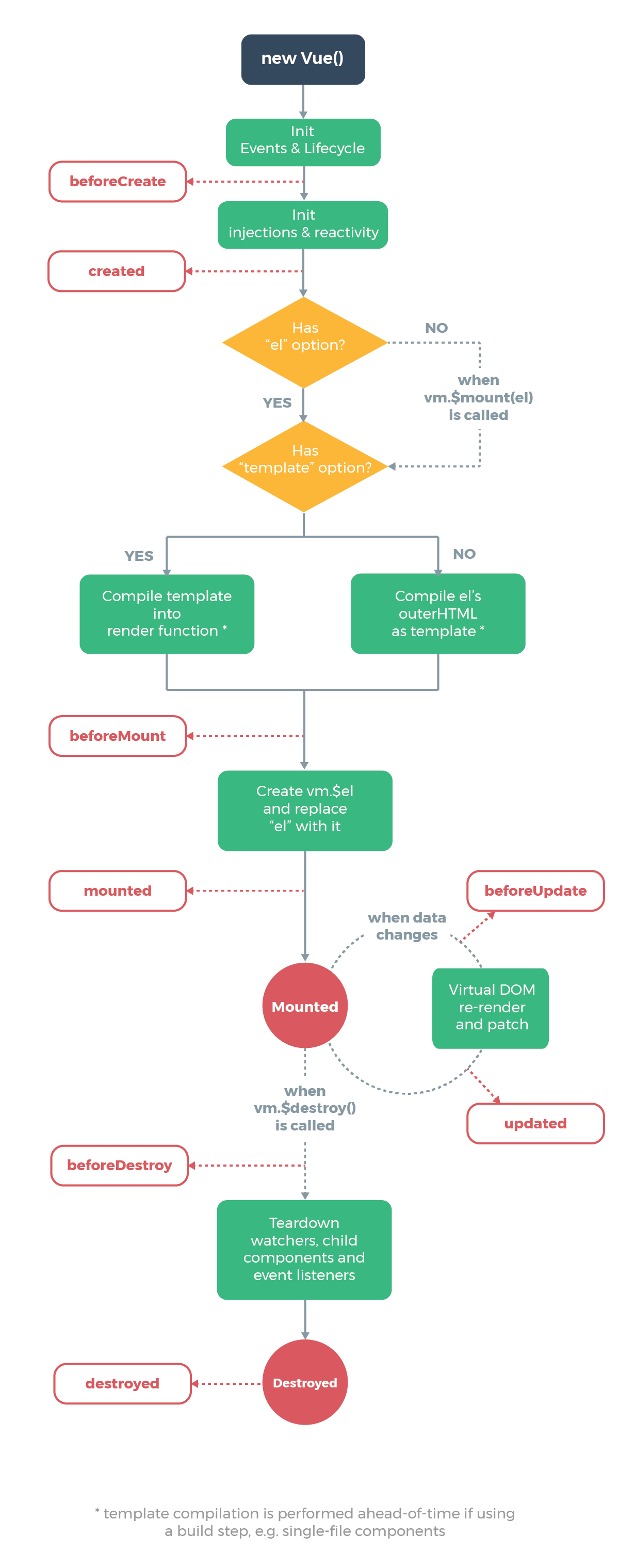
7.计算属性/侦听器/methods
computed :
1.只有涉及的数据发生改变时才会触发computed中的函数。
2.计算属性可以观察多个数据,其中一个改变就会触发重新渲染。
3.计算属性可以返回新数据。
4.计算属性不可执行异步任务。
watch:
1.第一次不会执行watch中的函数,在监听的对象中加上immediate:true 就会触发第一次渲染执行该函数。
2.一个函数只能监听一个数据的改变。
3.侦听器只能观察原始的数据。
4.侦听器可以执行异步任务。
methods:页面渲染就会触发methods函数。
6.组件
1.全局组件
Vue.component('hello-world',{
	template:'<div>hello world</div>' ,//组件定义
    data(){}//组件中data要写成函数形式
})

<div id = 'app'>
    <hello-world></hello-world>  //使用组件尽量使用连字符命名
</div>
2.局部组件
new Vue({
    el:'#app',
    data:{},
    component:{  //局部组件需写在component中
        hello-world:{
            template:'<div>hello world</div>' ,//组件定义
            data(){
                return{
					msg:'hello world'
				}
            }
        }
    }
})

<div id = 'app'>
    <hello-world></hello-world>  //使用组件尽量使用连字符命名
</div>
3.父子组件传值
new Vue({
    el:'#app',
    data:{},
    component:{//局部组件需写在component中
        props:{
            a:{
                type:'String',  //类型
                default:'hello wrold', //默认值
                required:true  //必须
            },
            b:{
                type:'Array',
                default:()=>{
                    return [1,2,3] //引用值需写成函数形式封闭作用域
                },
                required:true
            },
            title:{
			   type:'Number',
                default:10,
                required:true,
            	validator(value){  //传值校验
        	return value>10
   		 	}
        }
      } //父组件传值给子组件,子组件需在props中定义
        hello-world:{
            template:'<div>
       				 <p> a + b </p>
        			</div>'
        }
    }
})

<div id = 'app'>
    <hello-world a='1' b ='2'></hello-world>  //使用组件尽量使用连字符命名
</div>
4. 父向子传值方式
-
父子组件推荐采用props特性传值
v-bind ='$attrs'//在子组件中绑定子组件中未定义的属性,传给孙组件、inheritAttrs:false //不在行间显示 -
vm.$parent vm.$children 父子组件数据 不常用 -
provide inject不常用
5.子向父传值
Vue.component('welcome-button', {
  template: `
    <button v-on:click="$emit('welcome')">
      Click me to be welcomed
    </button>
  `
})
<div id="emit-example-simple">
  <welcome-button v-on:welcome="sayHi"></welcome-button>
</div>
new Vue({
  el: '#emit-example-simple',
  methods: {
    sayHi: function () {
      alert('Hi!')
    }
  }
})
6.事件总线
    Vue.prototype.bus = new Vue();
    const vm = new Vue({
      el: '#app',
      components: {

        myComponent: {
          data() {
            return {
              content: ''
            }
          },
          created() {
            this.bus.$on('clickevent', content => { //订阅clickevent事件
              this.content = content;
            })
          },
          template: `<div>{{content}}</div>`
        },


        myInput: {
          data() {
            return {
              inputval: ''
            }
          },
          methods: {
            handleClick() {
              this.bus.$emit('clickevent', this.inputval) //发布clickevent事件
            }
          },
          template: `<div>
                    <input  type='text' v-model.lazy='inputval'/>
                    <button @click = 'handleClick'>提交</button>
                    </div>`
        }
      }

    })
7.vue-router
import Vue from 'vue'
import Router from 'vue-router'
import defaultPage from '@/layout/default'
import index from '@/page/index'

Vue.use(Router)

export default new Router({
  mode:'history',
  linkExactActiveClass:'exact', //精准匹配
  linkActiveClass:'active',//  模糊匹配 包含父路由
  routes: [{
    path: '/',
    name: 'default',
    component: defaultPage,
    redirect: '/index',  //重定向  进入/路径时默认转到/index页
    children: [{
      path: '/index',
      name: 'index',
      component: index
    }, {
      path: '/changeCity',
      name: 'changeCity',
      component: () => import('@/page/changeCity')
    }, {
      path: 'goods/:name',
      name: 'goods',
      component: () => import('@/page/goodsList')
    }]
  },
  {
    path: '/blank',
    name: 'blankpage',
    component: () => import('@/layout/blank'),
    children: [{
      path: '/login',
      name: 'login',
      component: () => import('@/page/login')
    },
    {
      path: '/register',
      name: 'register',
      component: () => import('@/page/register')
    }
    ]
  }
  ]
})
1.路由跳转
<router-link tag='li' :to="{name:'login'}">登录</router-link>
<router-view></router-view>//组件显示区
路由跳转 事件中 this.$router.push('/home')或 this.$router.replace('/home');
2. 动态路由
<router-link tag='li' :to="{name:'question',params:{id:questionId}}">问题</router-link>
const router = new VueRouter({
  routes: [
    // 动态路径参数 以冒号开头
    { path: '/user/:id', component: User }
  ]
})
3.导航守卫
组件内守卫
beforeRouteLeave(to,from,next){
    if(this.name){
        const flag = window.confirm('你确定要离开吗?')
        if(flag){
            this.name = '';
            next()
        }
    }

  beforeRouteEnter(to,from,next){
	next()
  }
  全局守卫: route.beforeEnter(to,from,next) main.js
  路由独享守卫: beforeEnter(to,from,next) 写在路由配置页route.js
8.Vuex
1.注册vuex
import Vue from 'vue'
import Vuex from 'vuex'
Vue.use(Vuex)

export default new Vuex.Store({
  state,
  mutations,
  actions,
  getters:{  //相当于vuex中的计算属性
        person(state,getters){
            return `${position}${userName}${getters.person} `
        }
    }
})

const state = {
  position: {},
  userName: ''
}
const mutations = {
  setPosition (state, val) {
    state.position = val
  },
  setUserName (state, val) {
    state.userName = val
  }
}
const actions = {
  setPosition ({
    commit
  }, val) {
    // 异步请求后端当前位置
    commit('setPosition', val)
  }
}
2. 使用vuex
使用store中的数据需要在计算属性中定义使用的变量。在data中定义不会双向绑定。
computed:{ name(){return this.$store.state.name} }
3.mapState /mapGetters
import {mapState,mapGetters} from 'vuex';
computed:{
...mapState(['name','age','look'])  //取值
    ...mapgetters({
         newPerson:person
    })
}
4. mutations/actions
export default new Vuex.Store({
    mutations:{
		change(state,{tempobj,name}){
            state.studentList.push(tempobj);
            state.name = name;
		}
	},
    actions:{
        changeStudent({commit},val){
            setTimeout(()=>{
                commit('change',val)
            },2000)
        }
    }
})

组件中使用mutations
methods:{
	handle(){
		this.$store.commit('change',{tempobj,name:fy}) //触发mutations中的同步任务用commit
        this.$store.dispatch('changeStudent',{tempobj,name:fy})//触发actions中的异步任务用dispatch
    }
}
也可以使用mapmutations/mapActions
import {mapMutations,mapActions} from 'vuex'
methods:{
		...mapMutations(['change']),  //mapmutations方法使用
         handle(){
		this.change('tempobj',name:'fy')
        }

    	...mapActions(['changeStudent']),//mapActions方法使用
            this.changeStudent('tempobj',name:'fy')
	}
5.modules
根据功能vuex模块化
state会分模块,getters,mutations,actions会放在全局。
获取statae: this.$store.state.moduleName.xxx
获取getters: this.$store.getters.xxx
获取mutations: this.$store.commit('')
获取actions: this.$store.dispatch('')
namespaced:'true'//命名空间
有命名空间时,使用mapState,mapmutations,mapactions,mapgetters时需在前面加上模块前缀。
...mapXXX(['moduleName',['XXX','XXX']),
9.webpack配置
module.expots = {
	productionSourceMap:false, //是否打包sourceMap
	outputDir:'./dist'  //输出目录
	publicPath: process.env.NODE_ENV ? 'http://www.xxx.com' : '/',
	assetsDir:'assets', //静态资源打包进一个文件
	chainWebpack:config=>{
        config.resolve.alias.set('v',path.resolve(_dirname,'src/view'))
	}
}