

Block的小技巧
Xcode 有一个内置的Block的Snippet, 只要输入inline就会出现了。
C Inline Block as Variable - Save a block to a variable to allow reuse or passing it as an argument.
returnType(^blockName)(parameterTypes) = ^(parameters){
    statements
};
但是这个其实不是完整的Block的定义方式, 如果想要完整的定义方式。
returnType(^blockName)(parameterTypes) = ^returnType(parameters){
    statements
};
Block常用场景
1. Block临时使用
[myArray enumerateObjectsUsingBlock:^(id object, NSUInteger index, BOOL*stop) {
    [self doSomethingWith:object];
}];
[myArray enumerateObjectsWithOptions:NSEnumerationConcurrent usingBlock:^(idobj, NSUInteger idx, BOOL *stop) {
    [self doSomethingWith:object];
}];
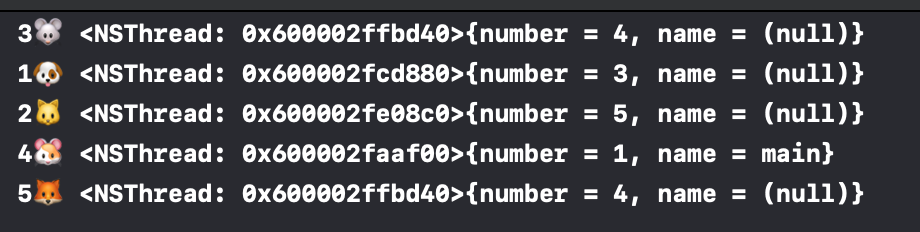
NSArray* enumerateArray = @[@"1🐶", @"2🐱", @"3🐭", @"4🐹", @"5🦊" ];
[enumerateArray enumerateObjectsWithOptions:NSEnumerationConcurrent usingBlock:^(id obj, NSUInteger idx, BOOL *stop) {
NSLog(@"%@ %@", obj, [NSThread currentThread]);
}];值得注意的是这个选项有两种一种是并发执行,另一种反向执行。
NSEnumerationOptions
    -> NSEnumerationConcurrent
    -> NSEnumerationReverse
NSEnumerationConcurrent 特别注意
调用的顺序是不确定的和未定义的(nondeterministic and undefined); 这个标志是一个提示,在某些情况下可能会被实施忽略; 块的代码必须是安全的,因为可能是会并发调用。
2. Block短期使用,但是会储存(例如: 需要存储起来,但只会调用一次,或者有一个完成时期。比如一个 UIView 的动画,动画完成之后,需要使用 block 通知外面,一旦调用 block 之后,这个 block 就可以删掉。)
[UIView animateWithDuration:0.2
                 animations:^{
                    // animations go here
                 }
];

[UIView animateWithDuration:0.2
                 animations:^{
                    // animations go here
                 } completion:^(BOOL finished) {
                    // block fires when animation has finished
                 }
];

[UIView animateKeyframesWithDuration:0.2
                               delay:0.0
                             options:UIViewKeyframeAnimationOptionCalculationModeLinear
                          animations:^{
                                // animations go here
                          }
                          completion:^(BOOL finished) {
                                // block fires when animaiton has finished
                          }
];
3. Block长期使用(如作为属性)
// block来代替delegate
-(void) viewDidLoad {
[super viewDidLoad];
Person* person = [[Person alloc] init];
person.run = ^(){
NSLog(@"RUNING 🏃♂️🏃♂️");
};
_p = person;
}
-(void)touchesBegan:(NSSet<UITouch *> *)touches withEvent:(UIEvent *)event{
self.p.run();
}