

一般爬虫步骤
rsp = request.get(url,headers,params)  #获取页面
html = etree.HTML(rsp.text)  #用xpath进行解析
result = html.xpath(xxxx) #今天学习的是xxxx的内容
with open(filename,'w') as f: #写入文件
    f.write()
    f.close()
xpath使用
示例html
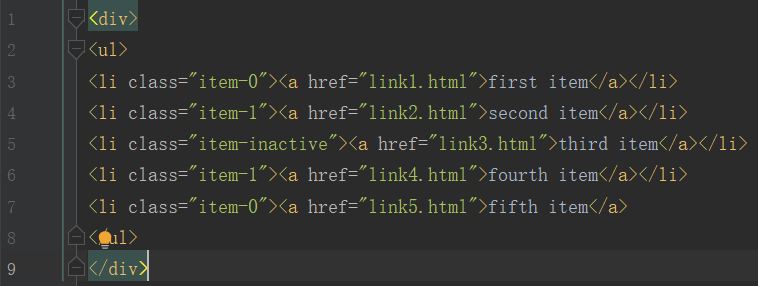
- 获取所有节点
result = html.xpath('//*')- 获取子节点/子孙节点
通过/获取子节点,//获取子孙节点
result = html.xpath('//li/a')  #获取li子节点a
result = html.xpath('//ul//a') #获取ul子孙节点a
- 获取父节点
用/../实现
result = html.xpath('//a[@href="link4.html"]/../@class')
- 属性匹配
result = html.xpath('//li[@class="item-0"]')- 属性多值匹配
text = """
first item
"""
html = etree.HTML(text)
result = html.xpath('//li[contains(@class,"li-first")]/a/text()')
#或者('li[contains(@class,"li")]')
print(result)
- 多属性匹配
text = """
first item
"""
html = etree.HTML(text)
result = html.xpath('//li[contains(@class,"li-first") and @name="item"]/a/text()')
print(result)
- 属性获取
result = html.xpath('//li/a/@href')
#区分属性匹配- 文本获取
result = html.xpath('//li[@class="item-0"]/a/text()')
或者
result = html.xpath('//li[@class="item-0"]//text()')- 按序选择
- last()
- position()等函数
- 节点轴选择
实例:爬取豆瓣top250
headers={
    'User-Agent':'Mozilla/5.0 (Windows NT 10.0; Win64; x64) AppleWebKit/537.36 (KHTML, like Gecko) Chrome/73.0.3683.103 Safari/537.36'
}

total=[]

#利用xpath解析获取网页内容
def getdetails(url):
    try:
        res = requests.get(url,headers=headers)
        html = etree.HTML(res.text)
        film = html.xpath('//*[@id="content"]/div/div[1]/ol/li')
        for div in film:
            title = div.xpath('div/div[2]/div[1]/a/span[1]/text()')[0]
            score = div.xpath('div/div[2]/div[2]/div/span[2]/text()')[0]
            detail = div.xpath('div/div[2]/div[2]/p[1]/text()')[0].strip()
            introduction = div.xpath('div/div[2]/div[2]/p[2]/span/text()')[0]
            total.append({
                "title":title,
                'score':score,
                "detail":detail,
                "introduction":introduction
            })
    except:
        print('Crawl failure')
    return total

if __name__ == '__main__':
    for i in range(10):
        num = i*25
        url = 'https://movie.douban.com/top250?start={}&filter='.format(num)
        print(url)
        getdetails(url)
        print('page {} has been crawled'.format(i))

filename = 'movieInformation.json'
with open(filename,'w') as f:
    jsObj = json.dumps(total) #dumps()将json对象转化为字符串
    f.write(jsObj)
    f.close()
