引子
随着自动化工具和平台的蓬勃发展,越来越多的优秀的框架给自动化测试人员提供了很好的脚手架,比如httprunner给我们提供了标准化的测试模板,测试人员可以更专心的关注测试场景和测试用例,快速的创建创建自动化用例,大大提高了工作效率。不过学习一些基础的框架和包,可以帮助我们打牢基础,拓展思路,也可以帮助我们理解上层框架的设计和构建。这个系列文章尝试使用Python Requests包 + unittest框架构建一个API自动化测试小工具。大部分内容尝试使用可执行代码形式展现。
初章
- 需要基础:pyhon基本语法,ipython,API基本知识,jupyter
requests基础
这篇篇主要讲requests的基础,脑图后面可能还会更新
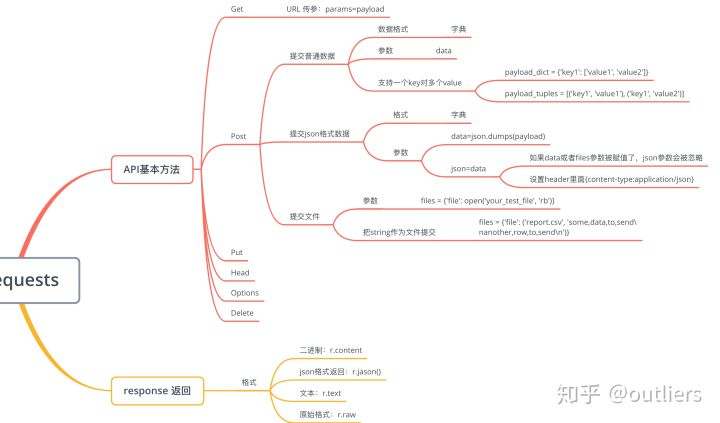
下面部分内容主要参考http://docs.python-requests.org文档进行编写,可以通过jupyter运行内容,源文件放在https://github.com/Danielyan86/Python-Study/tree/master/AutomationTest/API/python_request 使用jupyter打开之后可以自行编辑和运行,示例截图:
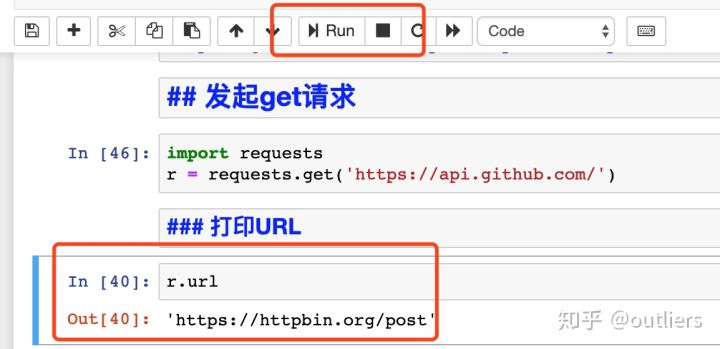
发起get请求
import requests
r = requests.get('https://api.github.com/')
打印URL
r.url
'https://httpbin.org/post'
返回内容
打印返回内容,requests会根据服务器返回自动解码
r.text
'{\n  "args": {}, \n  "data": "", \n  "files": {\n    "file": "some,data,to,send\\nanother,row,to,send\\n"\n  }, \n  "form": {}, \n  "headers": {\n    "Accept": "*/*", \n    "Accept-Encoding": "gzip, deflate", \n    "Content-Length": "184", \n    "Content-Type": "multipart/form-data; boundary=f565f6f75bd50aee53991e56796bed39", \n    "Host": "httpbin.org", \n    "User-Agent": "python-requests/2.19.1"\n  }, \n  "json": null, \n  "origin": "222.209.32.233, 222.209.32.233", \n  "url": "https://httpbin.org/post"\n}\n'
当发起一个request请求时候,requests会根据http返回头部猜测编码格式
r.encodingencoding的编码格式也可以被改变,当你改变r.encoding值时候,r.text内容也会做出相应的改变
r.encoding = 'ISO-8859-1'按照二进制格式输出
r.content如果需要根据返回二进制内容创建图片,可以参考以下代码格式
from PIL import Image
from io import BytesIO
i = Image.open(BytesIO(r.content))
按照json格式输出
为了防止json解码失败,r.json()会抛出异常,比如,如果返回204(没有内容),则r.json()抛出异常
r = requests.get('https://api.github.com/events')
r.json()
按照原生内容输出
requests.get('https://api.github.com/events', stream=True)
r.raw
r.raw.read(10)
可以餐区下面这样的模式把streamed格式内容存入文件中
with open(filename, 'wb') as fd:
    for chunk in r.iter_content(chunk_size=128):
        fd.write(chunk)
使用r.iter_content 可以帮你节省很多事情,chunk_size的值你可以根据实际使用场景而定
POST请求
post提交数据格式是字典,参数名是data
payload = {'key1': 'value1', 'key2': 'value2'}

r = requests.post("https://httpbin.org/post", data=payload)
r.json()
当提交的表单一个key有多个value时候,可以用以下格式构建需要提交的字典参数
payload_dict = {'key1': ['value1', 'value2']}
r2 = requests.post('https://httpbin.org/post', data=payload_dict)
print(r2.text)
json格式提交数据
data参数可以接受按照json格式编码后的字符串
import json

url = 'https://httpbin.org/post'
payload = {'some': 'data'}

r = requests.post(url, data=json.dumps(payload))
r.json()
字典格式的数据也可以直接传给json参数
import json

url = 'https://httpbin.org/post'
payload = {'some': 'data'}

r = requests.post(url, json=payload)
r.json()
需要注意的是,如果data或者files参数被赋值了,json参数会被忽略。使用json参数时候,需要把header里面的content-type更新为application/json
提交文件
url = 'https://httpbin.org/post'
files = {'file': open('your_test_file', 'rb')}
r = requests.post(url, files=files)
r.text
也可以设置filename, content_type, headers:
url = 'https://httpbin.org/post'
files = {'file': ('report.xls', open('your_test_file', 'rb'), 'application/vnd.ms-excel', {'Expires': '0'})}

r = requests.post(url, files=files)
r.text
可以把string当成文件提交
url = 'https://httpbin.org/post'
files = {'file': ('report.csv', 'some,data,to,send\nanother,row,to,send\n')}

r = requests.post(url, files=files)
r.json()
第一小节先到这里,因为篇幅问题,没有把代码回显都打出来,有兴趣的可以用jupyter运行一下。码字不易,码文字和代码更不易,点个赞鼓励一下呗~
公众号:自动化测试工作坊