最近在写小程序项目的时候、有个点击复制微信号的功能、如下图所示:
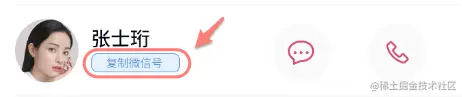
工作中本就是要不断的学以致用,所以总结了一下。
点击复制功能:
wxml:
<text class="wx_number" bindtap=“getNumber" data-phone="{{item.phone}}">复制微信号</text>
js:
getNumber(e) {
var wxnumber = e.currentTarget.dataset.phone;
wx.setClipboardData({
data: wxnumber,
success: function (res) {
wx.showToast({
title: '复制成功',
})
wx.getClipboardData({
success: function(res) {
console.log(res.data)
if (res.data==""){
wx.showToast({
title: '暂未设置微信号',
})
}
}
})
}
})
},
验证:
接下来就找个输入框Ctrl+v 粘贴一下试试吧!
tips:还有个长按复制的方法,把text标签的selectable改为“true”就好了。
selectable="true"
拨打电话
wxml:
<text class="call_number" data-reply-phone="{{counselor.phone}}" bindtap="phoneCall"></text>
js:
phoneCall: function(e) {
wx.makePhoneCall({
phoneNumber: e.currentTarget.dataset.replyPhone,
success: function(res) {
},
})
},
以上就是这两个地方的处理方法了,除此之外还有个即时聊天的功能、想知道小伙伴们都是用哪种方法解决的,欢迎各位大佬多多指点!

