

需求背景
组内项目git是托管到gitlab的,每个项目需要以相同的配置来配置webook,来关联第三方应用以方便管理。目前gitlab之中有多个组,而多个组下有多个项目,总项目数估计约100+。给出的解决方案是通过selenium自动配置webhook。
环境搭建
selenium以javascript驱动,默认已经搭建好node环境。项目搭建环境如下:
npm init -y
npm i -S selenium-webdriver
npm i -S chromedriver --chromedriver_cdnurl=https://npm.taobao.org/mirrors/chromedriver
chromedriver版本
当升级了chrome版本之后,对于的chromedriver版本也应该对应升级。
参考资料
项目实现
项目难点:
- 登录态的持久化
- ajax异步请求的处理
- 分页数据获取
- 设置单个webhook
登录持久化
登录验证
公司使用的cas登录,可以简单通过当前域名是否为gitlab所在的域名来判断。对于一般普通的项目,可以通过特定的dom是否存在来判断。
// webhook.js part

const { host } = require('../const');

class Webhook{
    static start(driver, url){
        return new Webhook(driver, url);
    }
    constructor(driver, url) {
        this.driver = driver;
        this.urls = [];
        this.groups = [];
        this.init(url);
    }
    async init(url){
        const { type, groups } = getTaskType(url);
        this.groups = groups;
        if(type === 1){
            this.urls = [url];
        }else {
            await this.getGroupsUrls(groups);
        }
        await this.setBatch();
    }
    async checkLogin(){
        const curl = await this.driver.getCurrentUrl();
        const currentUrl = new url.URL(curl);
        return currentUrl.host === host;
    }
}
登录持久化
登录信息使用本地chrome的应用文件,通过指定--user-data-dir来实现(chromium命令行参数)。既可以实现一次登录,在浏览器的整个session里面,保持登录状态,并且下冷启动浏览器也不需要登录,与正常浏览器一样使用。
注意:userChromeDir每个人都可能不一样,可通过chrome://version/中的个人资料路径来获取。
例如:/Users/lake/Library/Application Support/Google/Chrome/Default,当使用了userChromeDir的程序,在每次只能开启 一个 chrome的实例,不然会报错。
// app.js

const { Builder, Capabilities } = require('selenium-webdriver');
const chrome = require('selenium-webdriver/chrome');
const chromedriver = require('chromedriver');
const { userChromeDir } = require('./const');
const webDriverPath = chromedriver.path;
const Webhook = require('./gitlab/webhook');

const service = new chrome.ServiceBuilder(webDriverPath).build();
chrome.setDefaultService(service);

const seedUrl = 'https://gitlab.yourcompany.name.com';


;(async function app() {
    const driver = await new Builder()
        .withCapabilities(Capabilities.chrome())
        .forBrowser('chrome')
        .setChromeOptions(
            new chrome.Options()
                .addArguments(`--user-data-dir=${userChromeDir}`)
        )
        .build();
    Webhook.start(driver, seedUrl);
})();
自动登录
需通过账号密码,点击登录。
// webhook.js part
const { By } = require('selenium-webdriver');

class Webhook{
    async login(){
        // 邮箱登录
        const driver = this.driver;
        await driver.findElement(By.id('account-btn')).click();
        const $name = driver.findElement(By.id('input-username'));
        const $pwd = driver.findElement(By.id('password'));
        const $button = driver.findElement(By.css('form button'));
        await $name.sendKeys(gitlabPwd.user);
        await $pwd.sendKeys(gitlabPwd.password);
        await $button.click();
    }
}

// gitlabPwd.js
module.exports = {
    user: 'youreamil@xxx.com',
    password: '123456'
}
ajax数据的获取
group下的项目是通过ajax请求来获取。目前通过延时2s来实现。也可通过driver.wait、until.elementIsEnabled来实现。
// webhook.js part

driver.sleep(1000 * 2);
group数据获取
当前goup项目url的获取
获取当前页面之中列表下的a链接属性即可。考虑到文字链接或者图标链接会有重复,需要对生成的数组进行去重。
// webhook.js part

const { By } = require('selenium-webdriver');

class Webhook{
    async getCurrentPageProjectUrls(){
        const driver = this.driver;
        const $links = await driver.findElements(By.css('#js-groups-subgroups_and_projects-tree .group-row  a.no-expand'));
        const links = await Promise.all($links.map(link => link.getAttribute('href')));
        return Array.from(new Set(links));
    }
}
分页数据的获取
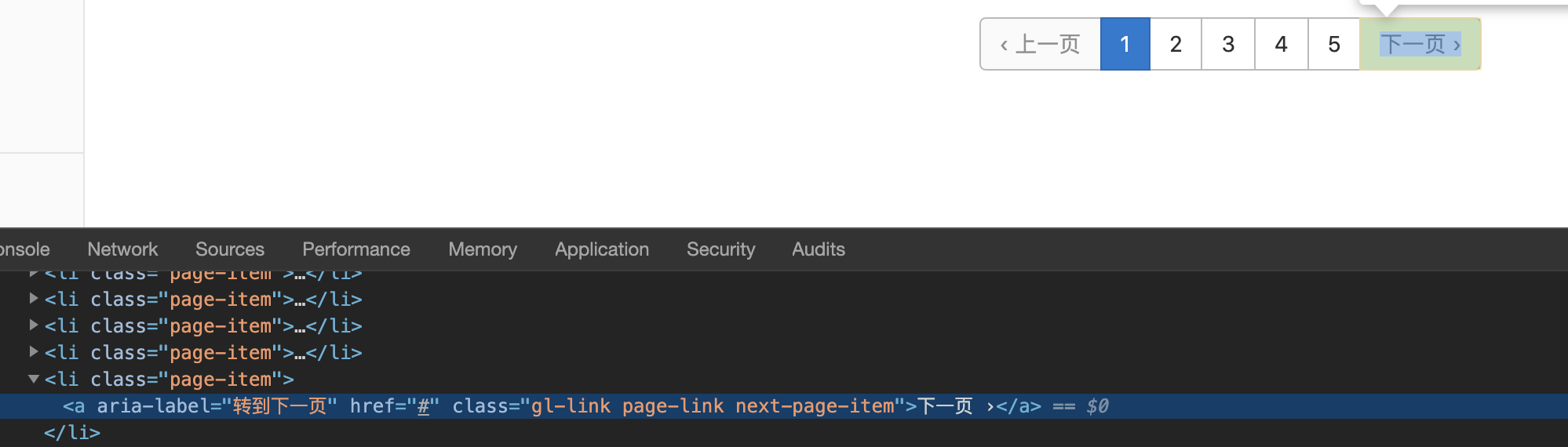
当前页面数据获取完成之后, 即可通过点击下一页再获取页面的所有项目的url。
非最后一页的dom
最后一页的dom
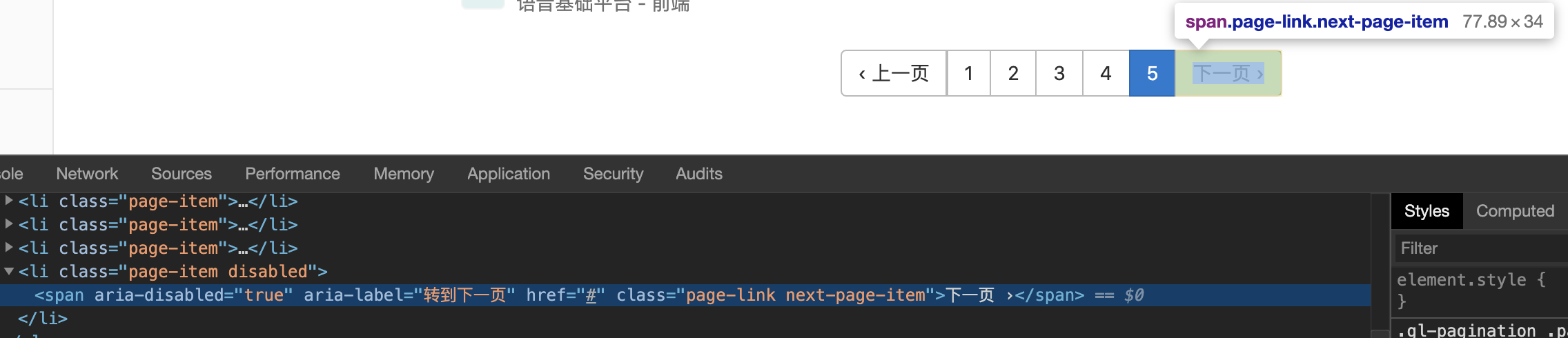
即可通过是否存在css选择器a.next-page-item,By.css('a.next-page-item')来条件来结束循环。
// webhook.js part

const { By } = require('selenium-webdriver');

class Webhook{
    async getGroupUrls(groupUrl){
        const driver = this.driver;
        // 当前页面的数据
        await driver.get(groupUrl);
        let $nextButton = null;
        do{
            const isLogined = await this.checkLogin();
            if (!isLogined) await this.login();
            await driver.sleep(1000 * 2);
            const urls = await this.getCurrentPageProjectUrls();
            this.urls = [...this.urls, ...urls];
            try {
                $nextButton = await driver.findElement(By.css('a.next-page-item'));
                await $nextButton.click();
            } catch (error) {
                $nextButton = null;
                console.log(`group project collected!`);
            }
        }while($nextButton);
    }
}
设置单个webhook
将获取到的所有项目依次设置webhook,对于已经设置过的项目则需要跳过,不再重复设置。
// webhook.js part

class Webhook{
    async getGroupsUrls(groups){
        for (let index = 0; index < groups.length; index++) {
            const group = groups[index];
            await this.getGroupUrls(`https://${host}/${group}`);
        }
    }

    async setBatch(){
        const urls = this.urls;
        console.log('all project url: ', urls);
        while (urls.length > 0){
            const url = urls.pop();
            await this.setOne(url);
        }
    }

    async setOne(projecturl){
        const driver = this.driver;
        await driver.get(`${projecturl}/-/settings/integrations`);
        const isLogined = await this.checkLogin();
        if(!isLogined) await this.login();
        const isWebhookRegistered = await this.checkIsRegistedWebhook();
        if (isWebhookRegistered){
            console.log(`${projecturl} teambition webhook has already created, skipped!`);
            return;
        }
        await driver.findElement(By.id('hook_merge_requests_events')).click();
        const $hookUrl = driver.findElement(By.id('hook_url'));
        const $hookToken = driver.findElement(By.id('hook_token'));
        await $hookUrl.sendKeys(hook.hookUrl);
        await $hookToken.sendKeys(hook.hookToken);
        await driver.findElement(By.name('commit')).click();
        console.log(`${projecturl} teambition webhook is now created!`);
    }

    async checkIsRegistedWebhook(){
        const driver = this.driver;
        const $webhooks = await driver.findElements(By.css('#content-body .card .light-header'));
        const texts = await Promise.all($webhooks.map(webhook => webhook.getText()));
        return texts.some(text => text === hook.hookUrl);
    }
}
