对于call和apply,我们都知道它们的用处及区别(call接收参数使用,号分开;而apply接收一个参数数组), 但不一定弄清楚它们的使用细节及性能比较。
使用细节
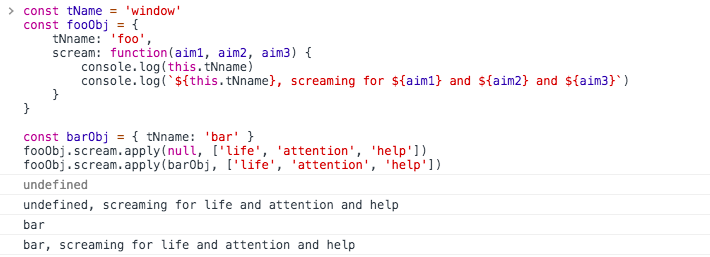
const tName = 'window'
const fooObj = {
    tNname: 'foo',
    scream: function(aim1, aim2, aim3) {
        console.log(this.tNname)
        console.log(`${this.tNname}, screaming for ${aim1} and ${aim2} and ${aim3}`)
    }
}

const barObj = { tNname: 'bar' }
fooObj.scream.apply(null, ['life', 'attention', 'help'])
fooObj.scream.apply(barObj, ['life', 'attention', 'help'])
当this为null或者undefined时,调用对象(作用域)为window,这里const定义的tName与var定义不同,var定义变量会挂载到window上,const、let不会。所以此处,window.tName为undefined.
fooObj.scream.call(barObj,['life','attention','help'])
fooObj.scream.call(barObj,'life', 'attention', 'help')
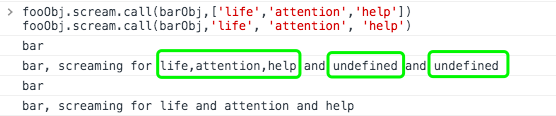
还有一个常用方法-bind(传参方式和call一致) bind()可以绑定作用域,传参方式和call()方法一致,与call不同在于,bind方法返回一个新的函数,不是执行该方法。
// 绑定并执行
fooObj.scream.bind(barObj, 'life', 'attention', 'help')()
具体使用场景
应用示例
- const foo = [[1,2,3],[4,5,6,7],[8,9]] 扁平化foo数组
const foo = [[1,2,3],[4,5,6,7],[8,9]]
console.log([].concat.apply([],foo))  //打印出[1,2,3,4,5,6,7,8,9]
- 最大值、最小值
const foo = [1,2,3,4,5]
const max = Math.max.apply(null,foo)
const max_ = Math.max.call(null, ...foo)
const min = Math.min.apply(null,foo)
...
- bind方法兼容
if (!Function.prototype.bind) {
    Function.prototype.bind = function () {
        var self = this,
            context = [].shift.call(arguments), // 移除获取第一项,shift会直接修改原数组
            args = [].slice.call(arguments); // 类数组转为数组,Array.prototype.slice.call(arguments)的简写,slice方法返回新数组且不会修改原数组
        return function () {
            // 这里注意bind是返回一个绑定了上下文和参数的函数,需要再调用执行,调用时传递的参数,即下面的arguments与上面的不是同一个。
            self.apply(context, [].concat.call(args,[].slice.call(arguments)));
        }
    }
}
性能比较
某些场景下,call和apply都能实现我们的需求。它们在性能方面有没有明显不同呢?
call方法接受参数用,逗号分开,apply方法接受数组传参,所以参数较少时,call的性能肯定优于apply。在angular、vue的源码中,我们能发现使用call与apply的地方,都有判断参数长度,来选择调用call或者apply。实际在使用中,我们如果知道参数长度,可以直接使用call。相反,不确定参数长度,可以使用apply。
附
此外,查阅MDN-apply(),我们可以看到这一段
Since ECMAScript 5th Edition, you can also use any kind of object which is array-like. In practice, this means it's going to have a
lengthproperty, and integer("index") properties in the range (0..length-1). For example, you could use a NodeList, or a custom object like {'length': 2, '0': 'eat', '1': 'bananas'}.
apply()方法第二个参数可以是一个类数组。
const newArr = Array.apply(null, {length: 3})
console.log(newArr)

看一个类数组转化为数组的例子
function的arguments是类数组,我们可以将其转化为数组。
var args = Array.prototype.slice.call(arguments);
var args = [].slice.call(arguments);

// ES2015
const args = Array.from(arguments);
const args = [...arguments];
对参数使用slice会阻止某些JavaScript引擎中的优化 (比如 V8 - 更多信息)。如果你关心性能,尝试通过遍历arguments对象来构造一个新的数组。另一种方法是使用被忽视的Array构造函数作为一个函数:
var args = (arguments.length === 1 ? [arguments[0]] : Array.apply(null, arguments));