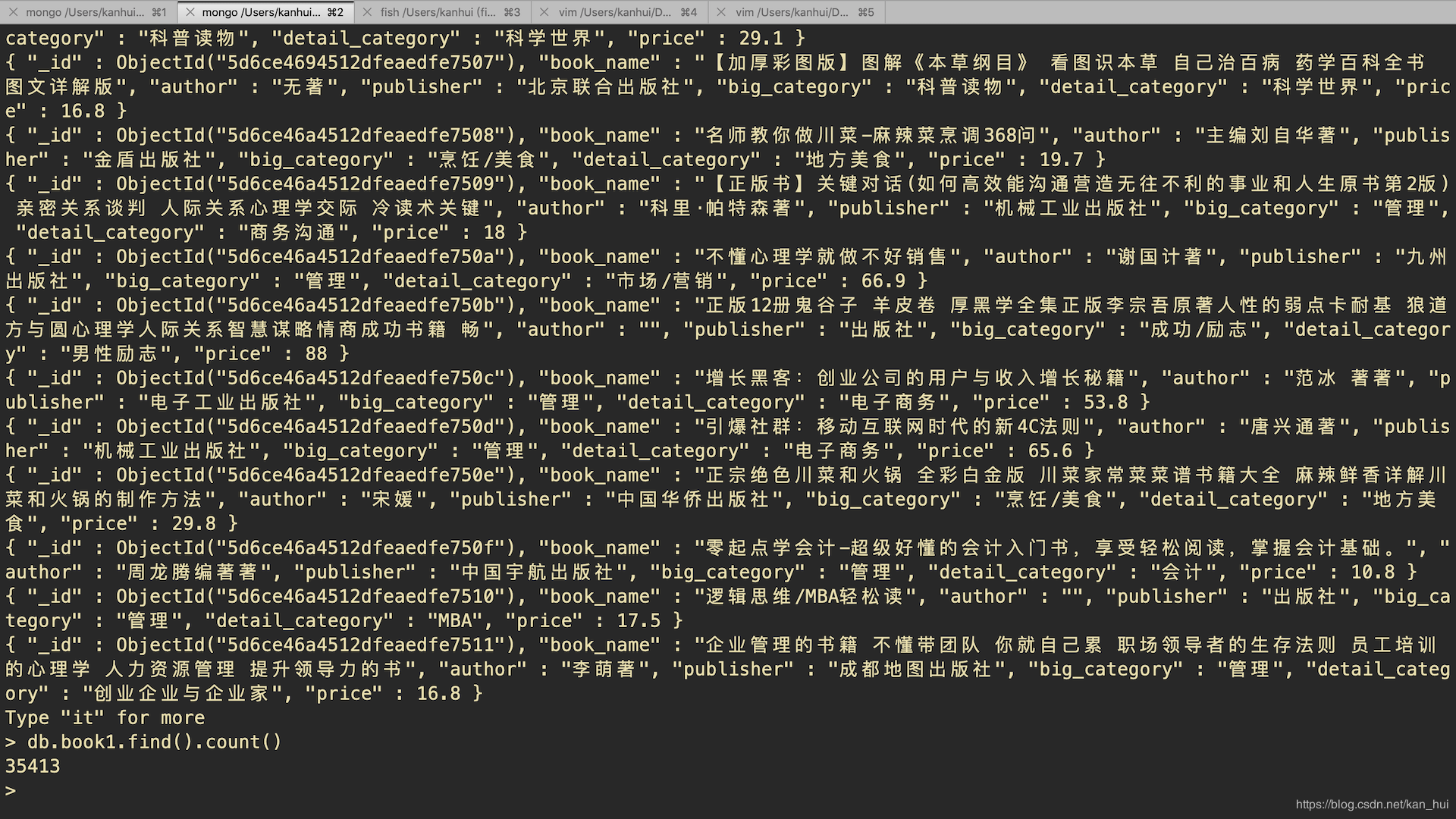
原文在这:www.huihuidehui.com/posts/46548… 在刚刚入门scrapy后尝试写了一个小的爬虫,目标是爬取苏宁易购下的所有的图书信息.
就是下面的每个大分类下的所有小分类的所有所售图书信息。我所抓取的数据有每个图书所在的大分类、小分类、作者、出版社、价格(这个数据的获取稍微麻烦一点)。
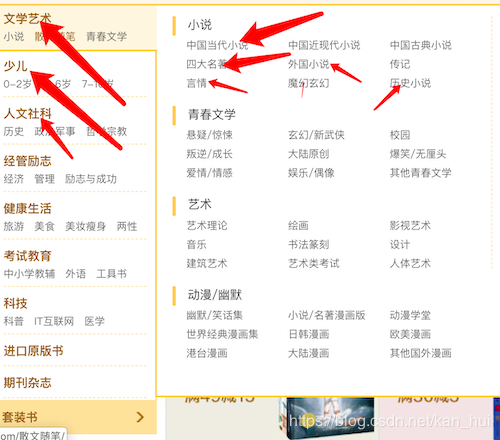
第一步: 分析网页
首先需要找到我们要爬取的数据的位置。以及分析怎么在python中提取我们需要的数据。
1.1 找到要爬取的数据位置
分类信息
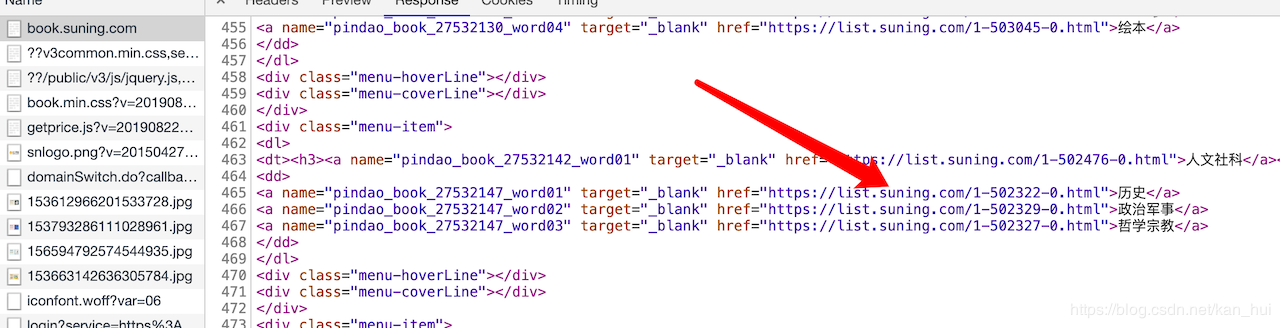
- 打开谷歌浏览器进入https://book.suning.com/按F12进入控制台,进入network选项后,刷新一下。如下图所示,在第一个请求获取的响应中已经是包含了所有分类的url地址了。所以可以把此url当作初始url。
图书信息
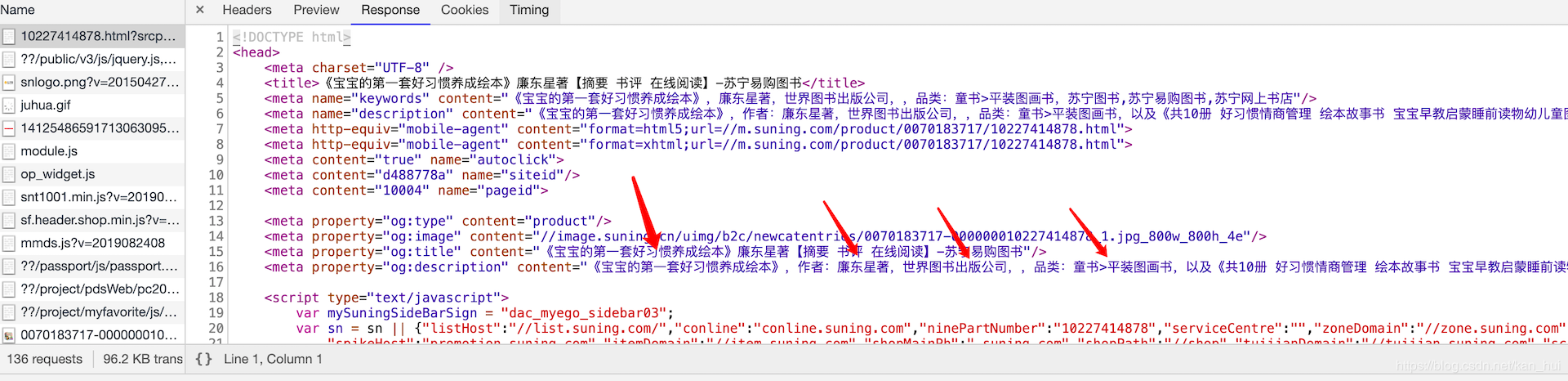
- 接下寻找图书的详细信息所在的位置。随便打开一个图书的链接。进入控制台查看第一个请求所获得的响应。如下图所示可以看到我们需要获取的信息除了价格外全都有了。
价格信息
-
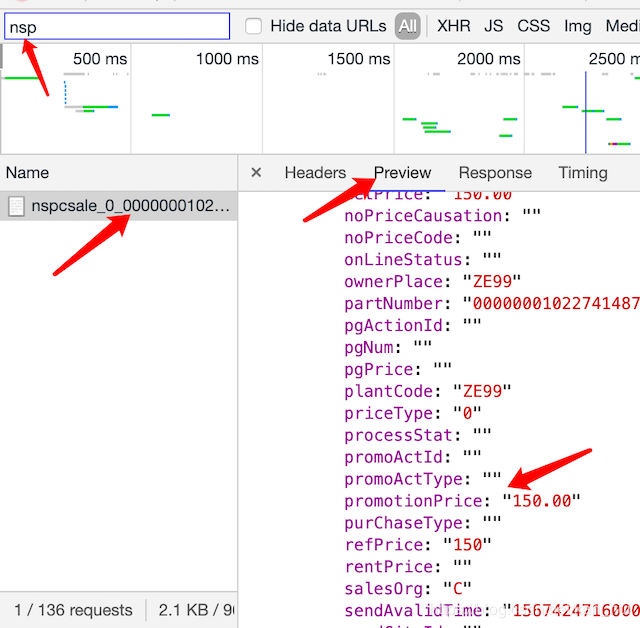
现在只剩下一个价格信息了,在图书的详情页面打开控制台找到nsp开头的那个请求,价格就在这个请求里面。如下图。查看这个请求的url地址可以发现有两个参数是不确定的https://pas.suning.com/nspcsale_0_000000010227414878_000000010227414878_0070183717_120_536_5360101_502282_1000235_9232_11809_Z001___R9011546_1.0___.html 其中的10227414878,701837171是不确定的。这两个参数的是在图书的详情页面的链接中是有的。直接正则提取就可以(比如这个https://product.suning.com/0070183717/10227414878.html?srcpoint=pindao_book_27582454_prod01) 后面的R9011546是可以去掉的。通过多观察几个图书的请求价格的url链接可以发现
120_536_5360101_502282_1000235_9232_11809_Z001_是固定的。所以最终请求价格的url地址https://pas.suning.com/nspcsale_0_{}{}{}120_536_5360101_502282_1000235_9232_11809_Z001_1.0__.html"。
{}部分在代码中会用format函数格式化。
1.2 分析如何获取数据 正则 or xpath?
找到了需要的数据所在的位置后,下一步就是从网页中提取数据。
提取分类的url
- 可以在谷歌浏览器中使用xpath helper尝试使用xpath定位到每个小分类的位置。并获取分类的url。用代码实现如下:
# 获取每个大分类下的所有小分类并遍历获取每个小分类对应的url地址
categories_big = response.xpath("//div[@class='menu-list']/div") # 这里的reponse是scrapy默认的parse函数里的参数
        for category_big in categories_big:
            detail_categories = category_big.xpath("./dl/dd/a")
            for detail_category in detail_categories:
            	# 得到小分类的url地址
                category_detail_url = detail_category.xpath("./@href").extract_first()
获取图书信息
- 获取图书信息这一步可以使用正则表达式来完成简单粗暴!!!。
		# 首先用xpath的获取1.1图书信息图中的meta标签的值。
        res = response.xpath("//meta[@property='og:description']/@content").extract_first()
        # 下面的代码是直接正则拿到数据。
        item = {}
        item['book_name'] = re.findall(r"《(.*)》,作者", res)[0] if len(re.findall(r"《(.*)》,作者", res)) else ''
        # item['author'] = re.findall(r"作者:(.*)著", res)[0] if len(re.findall(r"作者:(.*)著", res)) else ''
        item['author'] = re.findall(r"作者:(.*),.*出版", res)[0] if len(re.findall(r"作者:(.*),.*出版", res)) else ''
        item['publisher'] = re.findall(r"作者:.*,(.*)出版", res)[0] if len(re.findall(r"作者:.*,(.*)出版", res)) else ''
        item['publisher'] = item['publisher'] + '出版社'
        item['big_category'] = re.findall(r"品类:(.*)>", res)[0] if len(re.findall(r"品类:(.*)>", res)) else ''
        item['detail_category'] = re.findall(r">(.*),以及", res)[0] if len(re.findall(r">(.*),以及", res)) else ''
价格
- 前面已经得到了获取价格的url地址直接请求就可以,返回的数据是直接正则拿到价格。这个简单就不详细说了。主要是这个数据还需要另外请求一个url就比较麻烦。。。
第二步: 开始编写代码
2.1 新建scrapy项目
- 这里我假设你已经安装好了python3并且装了scrapy模块。如果没有,百度一下?教程很多!
- 选择一个合适的目录打开终端
 scrapy startproject suning
 cd suning
 scrapy genspider book suning.com
2.2 项目结构
(13-爬虫) kanhui@kanhui-Mac ~/D/2/2/1/suning> tree
.
├── scrapy.cfg
└── suning
    ├── __init__.py
    ├── __pycache__
    │   ├── __init__.cpython-37.pyc
    │   ├── items.cpython-37.pyc
    │   ├── pipelines.cpython-37.pyc
    │   └── settings.cpython-37.pyc
    ├── items.py
    ├── middlewares.py
    ├── pipelines.py
    ├── settings.py
    ├── setup.py
    └── spiders
        ├── __init__.py
        ├── __pycache__
        │   ├── __init__.cpython-37.pyc
        │   └── book.cpython-37.pyc
        └── book.py
2.3详细代码
book.py
#!/usr/bin/env python
# -*- coding: utf-8 -*-
# ************************************************************************
# *
# * @file:book.py
# * @author:kanhui
# * date:2019-09-01 14:01:05
# * @version vim 8
# *
# ************************************************************************
import scrapy
import re
from suning.items import SuningItem
from copy import deepcopy


class BookSpider(scrapy.Spider):
    name = 'book'
    allowed_domains = ['suning.com']
    start_urls = ['https://book.suning.com/?safp=d488778a.46602.crumbs.2']

    def parse(self, response):
        '''获取图书分类地址,进行分组'''
        categories_big = response.xpath("//div[@class='menu-list']/div")
        for category_big in categories_big:

            detail_categories = category_big.xpath("./dl/dd/a")
            for detail_category in detail_categories:
                category_detail_url = detail_category.xpath("./@href").extract_first()
                # yield一个request对象
                print("爬取分类")
                yield scrapy.Request(
                    category_detail_url,
                    callback=self.parse2
                )
                print("结束一个分类的爬去")

    def parse2(self, response):

        # 获取当前页面的每个图书的信息
        results = response.xpath("//div[@class='res-info']")
        for res in results:
            item = {}
            book_detail_url = res.xpath("./p[@class='sell-point']/a/@href").extract_first()

            ids = re.findall(r"com/(.*)/(.*).html", book_detail_url)
            if len(ids):
                item['shop_id'], item['prdid'] = ids[0]
            else:
                item['shop_id'] = item['prdid'] = ''

            # yield一个request对象
            yield scrapy.Request(
                'https:' + book_detail_url,
                callback=self.parse3,
                meta=item
            )

            self.base_url = "https://list.suning.com/{}-{}.html"
            # cur_url = response.xpath("//a[@class='']/@href").extract_first()
            cur_url = response.url
            # 当前的页码数恰好和下一页的url地址中的也码数相同。

            prefix, cur_page = re.findall(r"com/(.*)-(.*).html", cur_url)[0]

            if int(cur_page) < 100:
                next_url = self.base_url.format(prefix, str(int(cur_page) + 1))
                print("爬取{}页。\n".format(str(cur_page)))
                yield scrapy.Request(
                    next_url,
                    callback=self.parse2
                )

    def parse3(self, response):
        '''书籍详情页面'''
        res = response.xpath("//meta[@property='og:description']/@content").extract_first()
        item = {}
        item['book_name'] = re.findall(r"《(.*)》,作者", res)[0] if len(re.findall(r"《(.*)》,作者", res)) else ''
        # item['author'] = re.findall(r"作者:(.*)著", res)[0] if len(re.findall(r"作者:(.*)著", res)) else ''
        item['author'] = re.findall(r"作者:(.*),.*出版", res)[0] if len(re.findall(r"作者:(.*),.*出版", res)) else ''
        item['publisher'] = re.findall(r"作者:.*,(.*)出版", res)[0] if len(re.findall(r"作者:.*,(.*)出版", res)) else ''
        item['publisher'] = item['publisher'] + '出版社'
        item['big_category'] = re.findall(r"品类:(.*)>", res)[0] if len(re.findall(r"品类:(.*)>", res)) else ''
        item['detail_category'] = re.findall(r">(.*),以及", res)[0] if len(re.findall(r">(.*),以及", res)) else ''
        ids = response.meta
        shop_id = ids.get('shop_id')
        prdid = ids.get('prdid')
        prdid = "0" * (18 - len(prdid)) + prdid
        url = "https://pas.suning.com/nspcsale_0_{}_{}_{}_120_536_5360101_502282_1000235_9232_11809_Z001_1.0___.html".format(
            prdid, prdid, shop_id)
        yield scrapy.Request(
            url,
            self.get_price,
            meta=deepcopy(item)
        )

    def get_price(self, response):
        item = response.meta
        price = re.findall(r'"promotionPrice":"(.*)","bookPrice"', response.text)[0] if len(
            re.findall(r'"promotionPrice":"(.*)","bookPrice"', response.text)) else 0
        item['price'] = float(price)
        book_item = SuningItem()
        book_item['book_name'] = item.get('book_name')
        book_item['author'] = item.get('author')
        book_item['publisher'] = item.get('publisher')
        book_item['big_category'] = item.get('big_category')
        book_item['detail_category'] = item.get('detail_category')
        book_item['price'] = item.get('price')
        yield book_item
item.py
#!/usr/bin/env python
class SuningItem(scrapy.Item):
    # define the fields for your item here like:
    # name = scrapy.Field()
    big_category = scrapy.Field()
    detail_category = scrapy.Field()
    book_name = scrapy.Field()
    price = scrapy.Field()
    publisher = scrapy.Field()
    author = scrapy.Field()
piplines.py
from pymongo import MongoClient

client = MongoClient()
collections = client['suning']['book1']


class SuningPipeline(object):
  def process_item(self, item, spider):
      collections.insert(dict(item))
      print(str(item))
      return item
注意:需要启动mongodb后才可以存储到本地数据库。另外只修改了这三个文件其余文件均未修改。
最后
- 程序运行结果如下图,我运行了大概30分钟抓到了30000多条数据。