最近在整一个酒店导航的功能(用mui实现).因为之前也有些接触第一个想到的就是url跳转打开app并将必要参数通过url传到app 实现导航功能.思路是没错,(其实到最后发现也没啥难的)一步一步开始...先看看app效果:
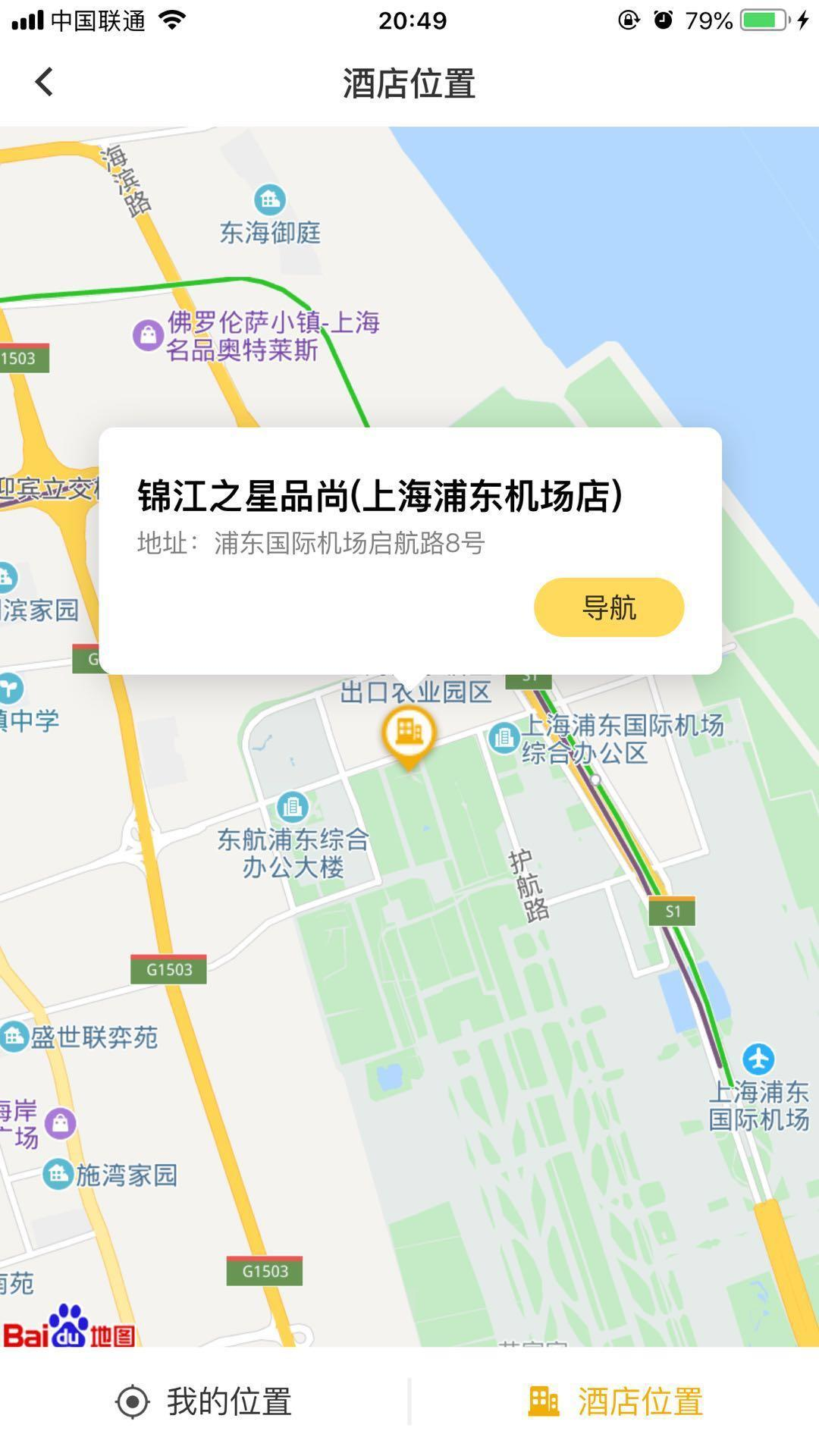
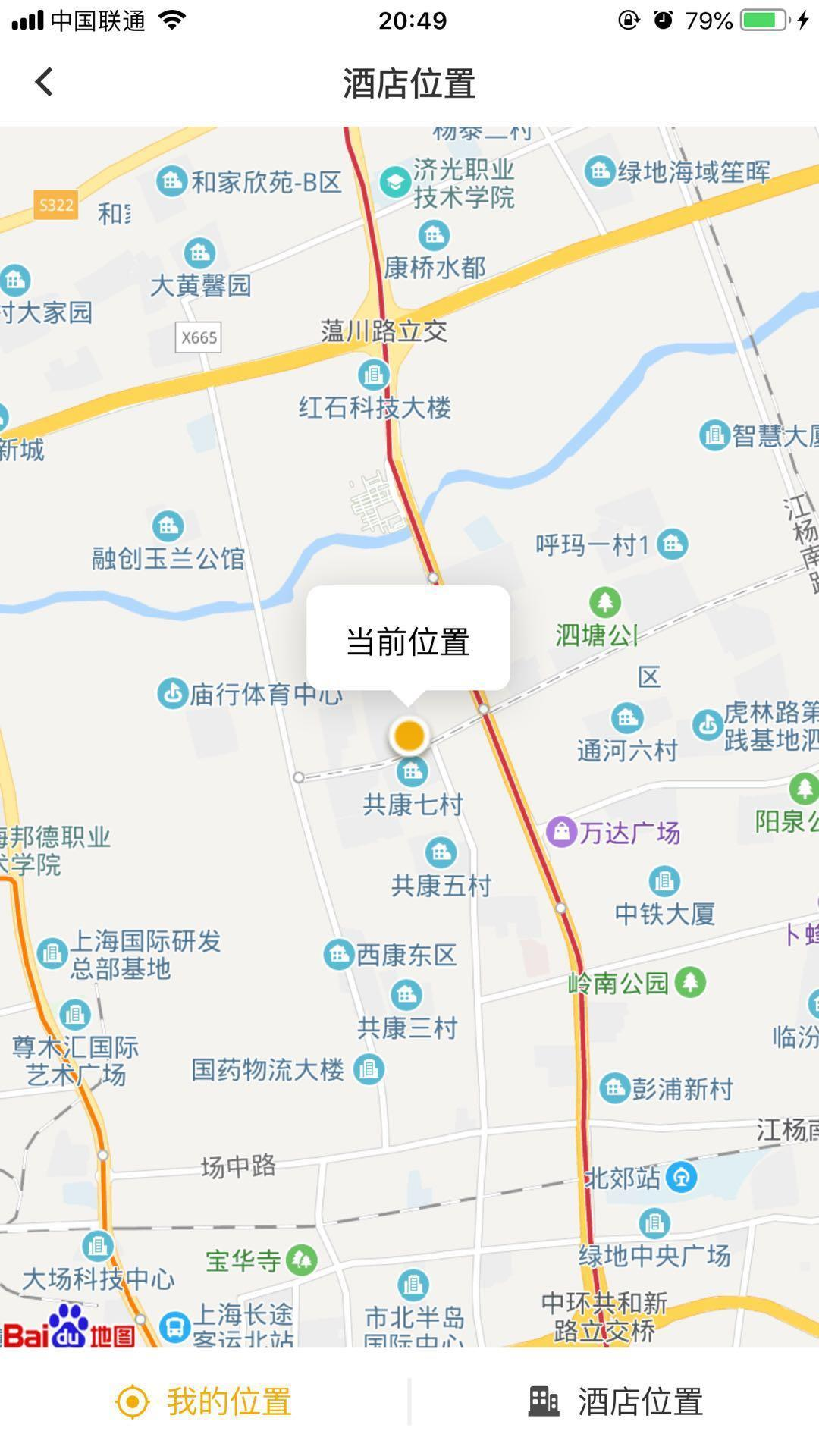
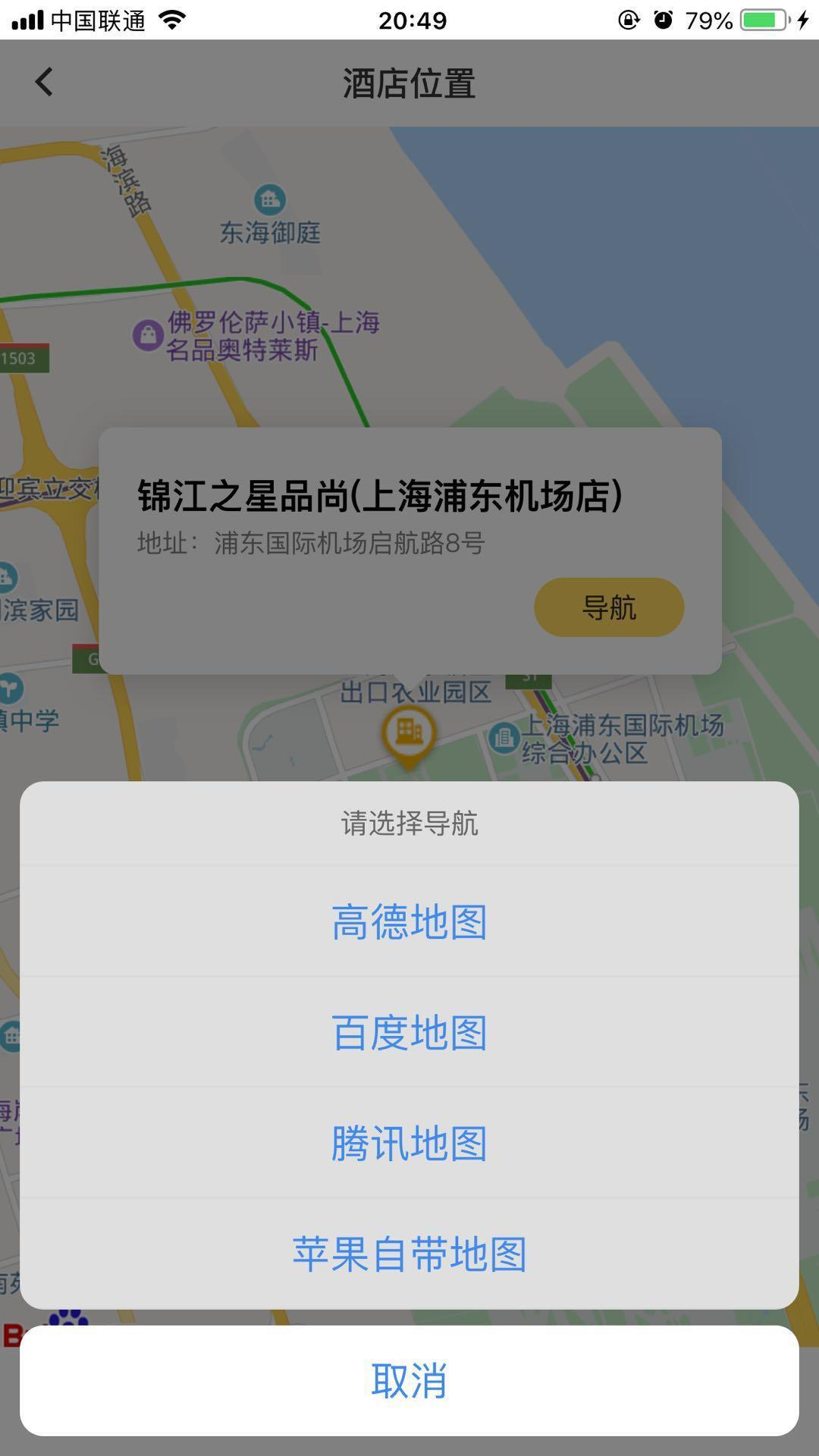
- 首先得把样子搭建出来(前提条件啊哈哈不多说了) - 查看需要跳转的app文档 (我们要求是如上图了 文档主要查看`url`这一块) - 检测手机是否有此app 给出提示(这一块做的不够好 mui 没有提供检测手机app的api 这时候就体现出`cordova`好处了,有兴趣的小伙伴可以自行查询) >第一步搭建页面布局 这个因为关联的东西比较多 我就贴一部分样式代码了 主要还是js这块.
/*样式*/
body{line-height: normal;}
.map-fotter{
	position: fixed;
	bottom: 0;
	left:0;
	width: 100%;
	height: 55px;
	background-color: #fff;
}
.map-fotter img{
	width: 18px;
	height: 18px;
	margin-right:8px;
}
.map-fotter .mineAddress.active{
	color: rgba(243, 174, 5, 1);
}
.map-fotter .mineAddress{
	height: 100%;
	font-size: 16px;
	color: rgba(0, 0, 0, .8);
	-webkit-box-flex: 1;
	-ms-flex: 1;
	-webkit-flex: 1;
	flex: 1;
}
.map-fotter .line{
	height: 24px;
	border-right: 2px solid rgba(0, 0, 0, .06);
}

#marker-div,#minePos-div{
	font-size: 13px;
	padding:19px;
	box-sizing:border-box;
	color: rgba(0, 0, 0, .5);
	-webkit-border-radius:8px;
	-moz-border-radius:8px;
	border-radius:8px;
	-webkit-box-shadow:0px 4px 20px 0px rgba(0,0,0,0.18);
	-moz-box-shadow:0px 4px 20px 0px rgba(0,0,0,0.18);
	box-shadow:0px 4px 20px 0px rgba(0,0,0,0.18);
}
#minePos-div>span{
	font-size: 16px;
	display: inline-block;
	margin-top: -2px;
	color: rgba(0, 0, 0, 1);
}
h4{
	color: rgba(0, 0, 0,1);
	height:20px;
	line-height: 22px;
	display: -webkit-box ;
	overflow: hidden;
	text-overflow: ellipsis;
	word-break: break-all;
	-webkit-box-orient: vertical;
	-webkit-line-clamp:1;
}
#marker-div::before,#minePos-div::before{
	display:inline-block;
	content: "";width:0;z-index: 9;
	height:0;position: absolute;
	left:calc(50% - .08rem);
	bottom: -.078rem;
	border-left: 0.08rem solid transparent;
	border-top: 0.08rem solid #fff;
	border-right: 0.08rem solid transparent;
	/* border-bottom: 0.1rem solid red; */
}
#marker-div .navigations .navLine{
	width: 76px;
	height: 30px;
	font-size: 14px;
	margin-top:8px;
	background-color: rgba(255, 218, 93, 1);
	color: rgba(0, 0, 0, .8);
	-webkit-border-radius: 36px;
	-moz-border-radius: 36px;
	border-radius: 36px;
	text-align: center;
	line-height: 30px;
	position: relative;
	z-index: 6666;
}
/*  导航 */
.nav-box,.model{
	position: fixed;
	width: 100%;
	height: 100%;
	left: 0;
	top: 0;
	z-index: 11;
}
.model{
	background-color: rgba(0, 0, 0, .5);
	z-index: 12;
}
.map-group{
	position: fixed;
	bottom: 0;
	left: 0;
	width: 100%;
	z-index: 13;
}
.map-group{
	padding: 10px;
}
.map-group .map-title{
	height: 43px;
	line-height: 43px;
	font-size: 14px;
	color: rgba(102, 102, 102, 1);
	text-align: center;
	background-color: rgba(223, 223, 223, 1);
	border-radius: 12px 12px 0 0;
	border-bottom: 1px solid rgba(0, 0, 0, .0283);
}
.map-group .type-warpe{
	border-radius: 0 0 12px 12px;
	background-color: rgba(223, 223, 223, 1);
	overflow: hidden;
}
.map-group .map-type{
	height: 56px;
	line-height: 56px;
	font-size: 20px;
	color: rgba(64, 137, 239, 1);
	border-bottom: 1px solid rgba(0, 0, 0, .0283);
	text-align: center;
}
.map-group .close{
	height: 56px;
	margin-top: 8px;
	line-height: 56px;
	color: rgba(64, 137, 239, 1);
	font-size: 20px;
	background-color: #fff;
	-webkit-border-radius: 12px;
	-moz-border-radius: 12px;
	border-radius: 12px;
	text-align: center;
}
#shortPrompt{
	bottom: 220px;
}
/* animation */
.animateDown{
	display:flex;
}
/* 布局*/
<header class="mui-bar mui-bar-nav headerNavBg" style="background-color: #fff;">
	<a class="mui-action-back mui-icon mui-icon-left-nav mui-pull-left"></a>
	<h1 class="mui-title whiteFont" style="color: #333;">酒店位置</h1>
	<!--<a id='done' class="mui-btn mui-btn-link mui-pull-right mui-btn-blue mui-disabled">完成</a>-->
</header>
<div class="mui-content">
	<!--<input type="text" id="address" />-->
	<div id="allmap" style="width: 100%;height:500px;-webkit-user-select:text;">
		地图加载中...
	</div>
	<div class="map-fotter flex flex_ai_center flex_jc_space-between">
		<div class="flex mineAddress flex_ai_center flex_jc_center" data-id="1">
			<img src="../../static/images/hotel/minePosition@3x.png" alt="icon">
			<span class="position">我的位置</span>
		</div>
		<span class="line"></span>
		<div class="flex mineAddress flex_ai_center flex_jc_center active">
			<img src="../../static/images/hotel/hotelPosition@3x.png" alt="icon">
			<span class="position">酒店位置</span>
		</div>
	</div>

	<div class="nav-box mui-hidden">
		<div class="model"></div>
		<div class="map-group flex flex_column">
			<span class="map-title">请选择导航</span>
			<div class="flex flex_column type-warpe">
				<span class="map-type checkMap" data-id="1">高德地图</span>
				<span class="map-type checkMap" data-id="2">百度地图</span>
				<span class="map-type checkMap" data-id="3">腾讯地图</span>
				<span class="map-type checkMap iosMap mui-hidden" data-id="4">苹果自带地图</span>
			</div>
			<span class="close">取消</span>
		</div>
	</div>

</div>
刚开始 想着做这个url跳转的时候 可费劲了 网上一堆堆的 不知道是啥 官方的文档也都是些 链接跳转 存在很多 问题. 经过一次次的筛选 还是给他搞出来了 心累 ...(我用的接口都是路线规划如果有别的需求 请看别的) 这个功能只要找对了文档其实很简单(呸呸呸 说过了)
-
苹果自带的地图 url 文档说明 点我啊啊啊啊啊啊啊 找这个 废了老大劲.
-
百度地图uri/api/android 点我查看啊啊啊啊啊啊啊啊啊 (ios 也在一起的)
-
高德地图url文档 这个也很坑 直接看 URL找不到android ios的 点我啊啊啊啊啊啊啊啊(ios 也在一起 )
-
腾讯的我就不写了 很好找的, 我下面也提供了跳转方法
####路由传值的字段说明我就不一一注明了 文档比我说的清楚.
/*
@method jump app
@param data-id 给app标注的id
@param {function} checkOutApp 判断是否有此app
*/
$(document).on("tap",".checkMap",function(){ //跳出app 打开某地图
	if(currentPosition){
		if($(this).attr("data-id")==2){
			// plus.runtime.openURL("baidumap://map/navi?location="+param.lat+","+param.lon+"&coord_type=wgs84&src=andr.baidu.openAPIdemo");   // 百度地图
			// plus.runtime.openURL("baidumap://map/direction?origin=name:天安门|latlng:34.264642646862,108.95108518068&destination=40.007623,116.360582&coord_type=bd09ll&mode=driving&src=ios.baidu.openAPIdemo");   // 百度地图
			window.location.href="baidumap://map/direction?origin=name:我的位置|latlng:"+currentPosition.lat+","+currentPosition.lng+"&destination=name:"+param.address+"|latlng:"+param.lat+","+param.lon+"&coord_type=bd09ll&mode=driving&src=ios.baidu.openAPIdemo";   // 百度地图
		}else if($(this).attr("data-id")==3){
			window.location.href="qqmap://map/routeplan?type=drive&from=我的位置&fromcoord="+currentPosition.lat+","+currentPosition.lng+"&to="+param.address+"&tocoord="+param.lat+","+param.lon+"&referer=OB4BZ-D4W3U-B7VVO-4PJWW-6TKDJ-WPB77" // 腾讯地图
		}else if($(this).attr("data-id")==1){
			if(plus.os.name == "iOS"){
				var iosurl='iosamap://path?sourceApplication=applicationName&sid=BGVIS1&slat='+currentPosition.lat+'&slon='+currentPosition.lng+'&sname=我的位置&did=BGVIS2&dlat='+param.lat+'&dlon='+param.lon+'&dname='+param.address+'&dev=0&t=0';
				plus.runtime.openURL(encodeURI(iosurl));  // 高德地图
			}else{
				plus.runtime.openURL("androidamap://route/plan/?sid=BGVIS1&slat="+currentPosition.lat+"&slon="+currentPosition.lng+"&sname=我的位置&did=BGVIS2&dlat="+param.lat+"&dlon="+param.lon+"&dname="+param.address+"&dev=0&t=0");  // 高德地图
			}
		}else{
			alert('2')
			window.location.href="maps://http://maps.apple.com/?daddr="+param.address+"&dirflg=d&t=h"; // 苹果地图
		}

		// setTimeout(function(){

		checkOutApp();

			// testApp();//
		// },500)
	}else{
		$('#shortPrompt').remove();
		setTimeout(function(){
			shortPrompt('正在获取定位信息或暂无定位权限,请稍后再试')
			getCurrentPosition() //重新获取授权定位
		},4000)
	}

})

function checkOutApp() {

				var isBlur = false;

				// 通过URL scheme来调起APP
				// location.href = 'baidumap://';

				setTimeout(function() {

					if (!isBlur) {
						// location.href = 'APP的下载链接';
						$('#shortPrompt').remove();// 防止多次点击 重叠
						shortPrompt('如手机没有地图app,请先前往安装');
					}else{
						$('#shortPrompt').remove();
					}

				},500);

				// if(!document.hidden){
				// 	shortPrompt('您可能没有安装该地图导航应用')
				// }else{
				// 	alert("切到前台")
				// 	$('#shortPrompt').remove()
				// }

				// window 每次失去焦點

				window.onblur = function() {

					isBlur = true;

				};

				var hiddenProperty = 'hidden' in document ? 'hidden' :

					'webkitHidden' in document ? 'webkitHidden' :

					'mozHidden' in document ? 'mozHidden' :

					null;

				var visibilityChangeEvent = hiddenProperty.replace(/hidden/i, 'visibilitychange');

				var onVisibilityChange = function() {

					if (document[hiddenProperty]) {

						isBlur = true;

					}

				}

				document.addEventListener(visibilityChangeEvent, onVisibilityChange);

			}
# 全部的js记得引用 地图的包 我用的是百度地图
<script type="text/javascript">

			var windowW = document.documentElement.clientWidth;
			var windowH = document.documentElement.clientHeight;
			if(windowW == 375){
				document.documentElement.style.fontSize = '100px';
			}else{
				document.documentElement.style.fontSize = windowW*100 / 375 + 'px';
			}

			// var param;//hotel 坐标
			var param={}
				param.lat=31.194175;
				param.lon=121.439146;
				param.title="你好啊"
				param.address="我是测试地址啊打算ID哈斯是框架"
			var currentPosition; ///当前坐标
			var height = document.documentElement.clientHeight || document.body.clientHeight;
			var showMarker=1 ;// 1 显示 2隐藏
			$('#allmap').css('height',height-44-52);
			var map = new BMap.Map("allmap");
			function mapInit(lat,lon,title,address){


				var point = new BMap.Point(lon, lat);
				var myIcon = new BMap.Icon('../../static/images/hotel/hotelSelect@3x.png',new BMap.Size(36,42)); //设置新坐标
				// var myIcon = new BMap.Icon("http://lbsyun.baidu.com/jsdemo/img/fox.gif",new BMap.Size(300,157)); //设置新坐标
				var marker = new BMap.Marker(point,{icon:myIcon});  // 创建标注
				map.centerAndZoom(point, 14); //初始化地图,point为中心点,缩放级别为15


			function ComplexCustomOverlay(point, text, title){
				this._point = point;
				this._text = text;
				this._title = title;
			}
			ComplexCustomOverlay.prototype = new BMap.Overlay();
			ComplexCustomOverlay.prototype.initialize = function(map){
				this._map = map;
				var div = this._div = document.createElement("div");
				var divId = document.createAttribute("id"); //创建属性
				divId.value = 'marker-div'; //设置属性值
				div.setAttributeNode(divId);
				div.style.position = "absolute";
				div.style.zIndex = BMap.Overlay.getZIndex(this._point.lat);
				div.style.backgroundColor = "#fff";
				div.style.width = "315px";
				div.style.MozUserSelect = "none";
				var h3= this._h3= document.createElement("h4");
				div.appendChild(h3)
				h3.appendChild(document.createTextNode(this._title));
				var span = this._span = document.createElement("span");
				div.appendChild(span);
				span.appendChild(document.createTextNode("地址:"+this._text));
				var that = this;

				var navigation = this._navigation = document.createElement("div");
				var navClass=document.createAttribute("class");
				navClass.value="navigations flex flex_jc_flex-end"; // 设置导航属性
				navigation.setAttributeNode(navClass)
				div.appendChild(navigation);
				navigation.innerHTML="<span class='navLine'>导航</span>";

				navigation.addEventListener('touchstart',function(){ //点击导航
					if(plus.os.name == "iOS"){
						$('.iosMap').removeClass("mui-hidden")
					}
					$('.nav-box').removeClass("mui-hidden");
					$('.map-group').addClass('animateDown')
				})

				map.getPanes().labelPane.appendChild(div);

				return div;
			}
			ComplexCustomOverlay.prototype.draw = function(){
				var map = this._map;
				var pixel = map.pointToOverlayPixel(this._point);
				this._div.style.left = (pixel.x - 157) + "px";
				this._div.style.top  = pixel.y - 158 + "px";
			}

			var myCompOverlay = new ComplexCustomOverlay(point, address,title);


				map.addOverlay(marker)
				map.addOverlay(myCompOverlay);              // 将标注添加到地图中
		        var opts = {
		            width: 300,     // 信息窗口宽度
		            height: 100,     // 信息窗口高度
		            title: "<h4>"+title+"</h4>" // 信息窗口标题
		        };
		        var infoWindow = new BMap.InfoWindow('<div id="ddress_c">地址:'+address+'</div>', opts);  // 创建信息窗口对象

		        // map.openInfoWindow(infoWindow, point); //开启信息窗口
		        marker.addEventListener("click", controlMarker);


				//判断手机浏览器是否支持定位


			}

			getCurrentPosition()// 获取当前位置
			var gc = new BMap.Geocoder(); //将坐标转换成地址

			//  显示隐藏 marker
			function controlMarker(){
				if(showMarker==1){
					showMarker=2
					$("#marker-div").addClass('mui-hidden')
				}else{
					showMarker=1
					$("#marker-div").removeClass('mui-hidden')
				}
			}

			//  位置切换
			$('.map-fotter').on("tap",".mineAddress",function(){
				var type=$(this).attr("data-id");
				$(this).addClass("active");
				$(this).siblings().removeClass("active");
				if(type && type==1){

					if(currentPosition){
						var myIcon = new BMap.Icon('../../static/images/hotel/current@3x.png',new BMap.Size(28,28)); //设置新坐标
						var mk = new BMap.Marker(currentPosition,{icon:myIcon});

						// alert('您的位置:'+currentPosition.lng+','+currentPosition.lat);

						function ComplexCustomOverlay(point, text, title){
							this._point = point;
							this._text = text;
							this._title = title;
						}
						ComplexCustomOverlay.prototype = new BMap.Overlay();
						ComplexCustomOverlay.prototype.initialize = function(map){
							this._map = map;
							var div = this._div = document.createElement("div");
							var divId = document.createAttribute("id"); //创建属性
							divId.value = 'minePos-div'; //设置属性值
							div.setAttributeNode(divId);
							div.style.position = "absolute";
							div.style.zIndex = BMap.Overlay.getZIndex(this._point.lat);
							div.style.backgroundColor = "#fff";
							div.style.width = "103px";
							div.style.height = "53px";
							div.style.MozUserSelect = "none";
							var h3= this._h3= document.createElement("span");
							div.appendChild(h3)
							h3.appendChild(document.createTextNode(this._title));


							map.getPanes().labelPane.appendChild(div);

							return div;
						}
						ComplexCustomOverlay.prototype.draw = function(){
							var map = this._map;
							var pixel = map.pointToOverlayPixel(this._point);
							this._div.style.left = (pixel.x - 52) + "px";
							this._div.style.top  = pixel.y - 78 + "px";
						}

						var myCompOverlay = new ComplexCustomOverlay(currentPosition, '','当前位置');
						$('#minePos-div').remove();
						$('#marker-div').remove();
						$('.BMap_Marker').remove();
						map.addOverlay(mk); //current@3x
						map.addOverlay(myCompOverlay);
						map.panTo(currentPosition);
					}else {
						$('#shortPrompt').remove();
						shortPrompt('暂无定位权限')
						getCurrentPosition() //重新获取授权定位
					}

					$(this).children('img').attr('src','../../static/images/hotel/minePositionS@3x.png')
					$(this).siblings('.mineAddress').children('img').attr('src','../../static/images/hotel/hotelNone@3x.png')
				}else{
					$('#minePos-div').remove();
					$('#marker-div').remove();
					$('.BMap_Marker').remove();
					mapInit(param.lat,param.lon,param.title,param.address)

					$(this).children('img').attr('src','../../static/images/hotel/hotelPosition@3x.png')
					$(this).siblings('.mineAddress').children('img').attr('src','../../static/images/hotel/minePosition@3x.png')
				}
			})

			//处理定位后的信息
			function showLocation(r) {
				if(this.getStatus() == BMAP_STATUS_SUCCESS) { //定位成功
					//新建中心点 并将地图中心移动过去
					var centerPoint = new BMap.Point(r.longitude, r.latitude);
					map.panTo(centerPoint);
					map.setCenter(centerPoint);
					gc.getLocation(centerPoint, function(rs) {
						var addComp = rs.addressComponents;
						var mapAddress = addComp.province + addComp.city + addComp.district +
							addComp.street + addComp.streetNumber;
						//mui.alert(mapAddress);
//						var address = document.getElementById('address');
//						address.value = mapAddress;
//						address.readOnly = 'readonly';

					});
					//新建标注
					var myIcon = new BMap.Icon("../../static/images/hotel/hotelSelect@3x.png",new BMap.Size(36,42));
					var mk = new BMap.Marker(centerPoint,{icon:myIcon});
					//设置marker的样式与偏移
					console.log(JSON.stringify(mk))
					//          mk.disableDragging(); // 不可拖拽
					map.addOverlay(mk);
				} else {
					mui.alert('failed' + this.getStatus()); //定位失败
				}
			}

			// 跳转 地图app

			mui.init({
				swipeBack: true,
				beforeback: function() {},
				gestureConfig:{
					hold:true,
					release:true
				}
			});

			function getCurrentPosition(){
				//  获取当前位置
				var geolocation = new BMap.Geolocation();
				geolocation.getCurrentPosition(function(r){
				if(this.getStatus() == BMAP_STATUS_SUCCESS){
					currentPosition=r.point // 当前位置
					if(r.accuracy==null){
						getCurrentPosition();//重新拉去再次授权
					}
				}else {
						alert('failed'+this.getStatus());
					}
				},{enableHighAccuracy: true})
			}

			mui.plusReady(function() {
				var self = plus.webview.currentWebview();
				param = plus.webview.currentWebview();

				getJurisdiction(); // 获取权限;
				// if(plus.canOpenURL('iosamap://')){
					console.log(navigator.userAgent)
				// }
				if(self.lat && self.lon) {

					//app 接收参数
					mapInit(self.lat,self.lon,self.title,self.address)
				}

				var old_back = mui.back;
				mui.back = function(){
				    self.close();
				    //继续当前页面原有返回逻辑
				    old_back();
				}
$(document).on("tap",".checkMap",function(){ //跳出app 打开某地图
	if(currentPosition){
		if($(this).attr("data-id")==2){
			// plus.runtime.openURL("baidumap://map/navi?location="+param.lat+","+param.lon+"&coord_type=wgs84&src=andr.baidu.openAPIdemo");   // 百度地图
			// plus.runtime.openURL("baidumap://map/direction?origin=name:天安门|latlng:34.264642646862,108.95108518068&destination=40.007623,116.360582&coord_type=bd09ll&mode=driving&src=ios.baidu.openAPIdemo");   // 百度地图
			window.location.href="baidumap://map/direction?origin=name:我的位置|latlng:"+currentPosition.lat+","+currentPosition.lng+"&destination=name:"+param.address+"|latlng:"+param.lat+","+param.lon+"&coord_type=bd09ll&mode=driving&src=ios.baidu.openAPIdemo";   // 百度地图
		}else if($(this).attr("data-id")==3){
			window.location.href="qqmap://map/routeplan?type=drive&from=我的位置&fromcoord="+currentPosition.lat+","+currentPosition.lng+"&to="+param.address+"&tocoord="+param.lat+","+param.lon+"&referer=OB4BZ-D4W3U-B7VVO-4PJWW-6TKDJ-WPB77" // 腾讯地图
		}else if($(this).attr("data-id")==1){
			if(plus.os.name == "iOS"){
				var iosurl='iosamap://path?sourceApplication=applicationName&sid=BGVIS1&slat='+currentPosition.lat+'&slon='+currentPosition.lng+'&sname=我的位置&did=BGVIS2&dlat='+param.lat+'&dlon='+param.lon+'&dname='+param.address+'&dev=0&t=0';
				plus.runtime.openURL(encodeURI(iosurl));  // 高德地图
			}else{
				plus.runtime.openURL("androidamap://route/plan/?sid=BGVIS1&slat="+currentPosition.lat+"&slon="+currentPosition.lng+"&sname=我的位置&did=BGVIS2&dlat="+param.lat+"&dlon="+param.lon+"&dname="+param.address+"&dev=0&t=0");  // 高德地图
			}
		}else{
			alert('2')
			window.location.href="maps://http://maps.apple.com/?daddr="+param.address+"&dirflg=d&t=h"; // 苹果地图
		}

		// setTimeout(function(){

		checkOutApp();

			// testApp();//
		// },500)
	}else{
		$('#shortPrompt').remove();
		setTimeout(function(){
			shortPrompt('正在获取定位信息或暂无定位权限,请稍后再试')
			getCurrentPosition() //重新获取授权定位
		},4000)
	}

});
				// mui('.type-warpe').on("release",".checkMap",function(){
				// 	$(this).css("background-color",'rgba(223, 223, 223, 1)');
				// })
				$(document).on('tap',".close,.model",function(){
					$('.nav-box').addClass("mui-hidden");
					$('.map-group').removeClass("animateDown");
				})

			});
			function checkOutApp() {

				var isBlur = false;

				// 通过URL scheme来调起APP
				// location.href = 'baidumap://';

				setTimeout(function() {

					if (!isBlur) {
						// location.href = 'APP的下载链接';
						$('#shortPrompt').remove();// 防止多次点击 重叠
						shortPrompt('如手机没有地图app,请先前往安装');
					}else{
						$('#shortPrompt').remove();
					}

				},500);

				// if(!document.hidden){
				// 	shortPrompt('您可能没有安装该地图导航应用')
				// }else{
				// 	alert("切到前台")
				// 	$('#shortPrompt').remove()
				// }

				// window 每次失去焦點

				window.onblur = function() {

					isBlur = true;

				};

				var hiddenProperty = 'hidden' in document ? 'hidden' :

					'webkitHidden' in document ? 'webkitHidden' :

					'mozHidden' in document ? 'mozHidden' :

					null;

				var visibilityChangeEvent = hiddenProperty.replace(/hidden/i, 'visibilitychange');

				var onVisibilityChange = function() {

					if (document[hiddenProperty]) {

						isBlur = true;

					}

				}

				document.addEventListener(visibilityChangeEvent, onVisibilityChange);

			}
			$(document).ready(function() {
				// var href = window.location.href;
				// param = GJ.getUrlParam(href);

				if(param) {
					if(!mui.os.plus) {
						//浏览器 接收参数
						if(param.lat && param.lon) {
							//app 接收参数
							mapInit(param.lat,param.lon,param.title,param.address)
						}
					}
				}
			});
			function getJurisdiction(){
				plus.geolocation.getCurrentPosition(function(res) {
					//成功回调  应用有权限
					// user_latitude = res.coords.latitude; //纬度
					// user_longitude = res.coords.longitude; //经度
					//mui.alert("经度:"+user_longitude+" 纬度:"+user_latitude);
				}, function(e) {
					console.log('Gelocation Error: code - ' + e.code + '; message - ' + e.message);
					switch(e.code) {
						case 10:
							mui.alert('请开启应用的定位权限', '温馨提示','确定',function(){},'div');
							break;
						case 9:
							//mui.alert('请开启手机定位服务');
							mui.alert('请开启手机定位服务', '温馨提示','确定',function(){},'div');
							break;
						case 2:
							if(e.message.indexOf("[geolocation:13]") > -1) {
								//如果网络开启,定位失败,提示检查定位权限
								mui.alert('请开启应用的定位权限', '温馨提示','确定',function(){},'div');
							}
							if(e.message.indexOf("[geolocation:14]") > -1) {
								//如果应用的权限开了,提示网络异常
								mui.alert('请检查网络是否正常', '温馨提示','确定',function(){},'div');
							}
							break;
						case e.PERMISSION_DENIED:
							mui.alert('请求定位被拒绝', '温馨提示','确定',function(){},'div');
							break;
						case e.POSITION_UNAVAILABLE:
							mui.alert("位置信息不可用", '温馨提示','确定',function(){},'div');
							break;
						case e.TIMEOUT:
							mui.alert("获取位置信息超时", '温馨提示','确定',function(){},'div');
							break;
						case e.UNKNOWN_ERROR:
							mui.alert("未知错误", '温馨提示','确定',function(){},'div');
							break;
					}
				}, {
					//超时未获取到经纬度信息  执行失败回调  (默认为5秒)
					timeout: 3000
				})
			}

		</script>