记录下 自己花了一上午时间做的 UNIAPP 自定义 loading 自定义 toast 同理 只是给组件传个参数过去而已
个人觉得用UNIAPP开发小程序 还是vuex 好使 即使有的大佬 随随便便自己写个状态管理 或者自己写个 计算属性 之类的 反正我是做不到
先上个动图 看看 先不说好不好看,咱主要实现功能 我是随便找了个 loading动画

首先自带的loading及toast 虽然不难看 但是用多了 感觉千篇一律
使用到的知识点
- vuex
- 组件基本用法
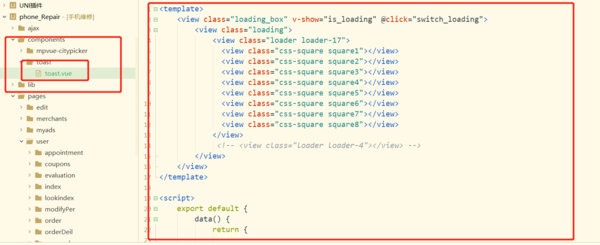
######首先自己写个 loading 的组件
// 引入vuex 状态库
import store from "./store";
// 在main.js中注册全局组件
import toast from './components/toast/toast.vue'
Vue.component('toast',toast)
//挂在到Vue原型链上
Vue.prototype.$store = store;
//是否显示加载中 的方法 调用store中的mutations方法
function loading(tf){
	if(tf){
		store.commit("switch_loading",tf)
	}else{
		store.commit("switch_loading")
	}
}
//也挂在到原型链上 方便在每个页面中  使用 this.$loading()  去显示加载中
Vue.prototype.$loading = loading;
######在store中加上控制显示隐藏的方法
//一个非常简单的store的示例
import Vue from 'vue'
import Vuex from 'vuex'
Vue.use(Vuex)
const store = new Vuex.Store({
	state: {
		loading:false
	},
	mutations: {
		//tf作为主动控制的参数
		switch_loading(state,tf){
			if(tf){
				state.loading = tf;
			}else{
				state.loading = !state.loading
			}
		}
	}
})
export default store
######最后在组件toast.vue中 加上控制方法 控制属性
<template>
	<view class="loading_box" v-show="is_loading" @click="switch_loading">
		<view class="loading">
			<view class="loader loader-17">
			  <view class="css-square square1"></view>
			  <view class="css-square square2"></view>
			  <view class="css-square square3"></view>
			  <view class="css-square square4"></view>
			  <view class="css-square square5"></view>
			  <view class="css-square square6"></view>
			  <view class="css-square square7"></view>
			  <view class="css-square square8"></view>
			</view>
			 <!-- <view class="loader loader-4"></view> -->
		</view>
	</view>
</template>

<script>
	export default {
		data() {
			return {

			};
		},
		methods:{
			switch_loading(){
				this.$store.commit("switch_loading")
			}
		},
        //实测直接在标签属性里写  $store.state.XX  拿不到数据  所以这里通过 计算属性去监听一下
		computed:{
			is_loading(){
				return this.$store.state.loading
			}
		}
	}
</script>
最后 在任何一个页面中 只要在页面标签加上
以及在请求中 或者需要显示loading的时候 加上一句
this.$loading();
用法跟 uni.showLoading() 差不多
this.$loading();
//或者
this.$loading(false);