配置hosts路径
C:\Windows\System32\drivers\etc
数据库访问路径
运行MongoDB服务器:mongod --dbpath c:\data\db
http://book.youbaobao.xyz:7001/project/template
imooc-cli-dev项目init命令
- imooc-cli-dev init test-project --targetPath C:/Users/17897/Desktop/moc/imooc-cli-dev/commands/init/lib --force
- imooc-cli-dev init test-project --debug --force
stepread.js
function stepRead (callback) {
  function onkeypress (s) {
    output.write(s) // 写入
    line += s
    switch (s) {
      case '\r':
        input.pause() // 暂停输入流
        callback(line)
        break;
    }
  }

  const input = process.stdin    // 输入流
  const output = process.stdout  // 输出流
  let line = ''

  emitKeyPressEvents(input)
  input.on('keypress', onkeypress) // 监听 keypress

  input.setRawMode(true) // ?
  input.resume() // ?
}

function emitKeyPressEvents (stream) {
  function onData (chunk) {
    g.next(chunk.toString())
  }
  const g = emitKeys(stream)
  g.next()

  stream.on('data', onData) // 监听 data
}

function* emitKeys (stream) {
  while (true) {
    let ch = yield
    stream.emit('keypress', ch) // 发射 keypress
  }
}

stepRead(function (s) {
  console.log('answer:' + s)
})
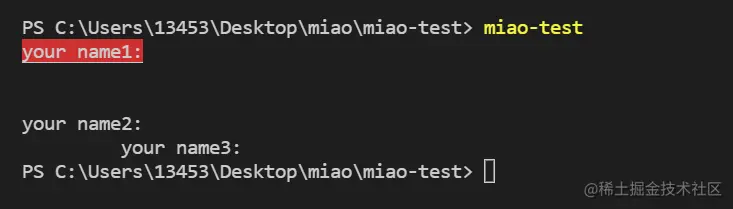
console.log('\x1B[41m\x1B[4m%s\x1B[0m', 'your name1:')
console.log('\x1B[2B%s', 'your name2:')
console.log('\x1B[10G%s', 'your name3:')