Koa 是一个新的 web 框架,由 Express 幕后的原班人马打造, 致力于成为 web 应用和 API 开发领域中的一个更小、更富有表现力、更健壮的基石。 通过利用 async 函数,Koa 帮你丢弃回调函数,并有力地增强错误处理。 Koa 并没有捆绑任何中间件, 而是提供了一套优雅的方法,帮助您快速而愉快地编写服务端应用程序。
创建项目
- 新建一个node-koa文件,初始化文件夹
npm init -y
- 安装相应依赖包
npm install koa --save // 安装koa
npm install koa-router --save // 安装 koa-router 处理路由的中间键
- 在 node-koa 文件下新建一个app.js文件,处理我们的内容
const Koa = require('koa') // 导入 koa 模块
// 辅助模块必须依赖与 koa 模块才能使用
const router = require("./router") // 将路由模块抽离成为一个单独的模块
const static = require('koa-static') // 导入管理静态资源的包
const koaBody = require('koa-body') // 导入解析post请求数据的包
const { join } = require('path') // 导入路径模块
const cors = require('koa-cors') // 导入解决跨域的包
const app = new Koa() // 引入的koa是一个构造函数,需要实例


// 将辅助模块绑定到koa的实例上
app
    .use(cors()) // 解决跨域问题
    .use(koaBody()) // 解析post请求数据
    .use(static(join(__dirname, 'static'))) // 指定静态资源的引用路径是从static目录开始的
    .use(router.routes()) // koa-router模块规定
    .use(router.allowedMethods()) // koa-router模块规定
    .listen(3000) // 监听 3000 端口
- 将路由模块抽离出来方便管理,根目录下新建一个router文件,然后新建一个index.js放置内容
const Router = require('koa-router') // 导入 koa 路由管理模块 koa-router
const fs = require('fs') // 导入文件模块
const path = require('path')
const router = new Router() // 引入的koa-router是一个构造函数,需要实例

/**
 * 规定设置一下接口
 * 端口号:3000
 * “/” 目录访问home页面
 * get 请求根目录
 */

// 在正式项目的时候会把路由管理抽离出去一个单独的模块,方便管理
router.get("/", async (ctx, next) => {
    // 注意: 这里直接读取home.html是读取不到的,需要去找到当前文件的绝对路径
    ctx.body = fs.readFileSync(path.resolve(__dirname, 'home.html'), "utf8")
})
// 访问home路由返回home页面
router.get("/user", async (ctx, next) => {
    console.log(ctx.method);
    ctx.body = "只会番茄炒蛋"
})
// post请求 利用koa-body解析获取post发送的数据
router.post("/postData", async (ctx, next) => {
    console.log(ctx.request.body) // 查看post请求发送的数据
    ctx.body = ctx.request.body // 将post发送的数据返回回去
})
module.exports = router
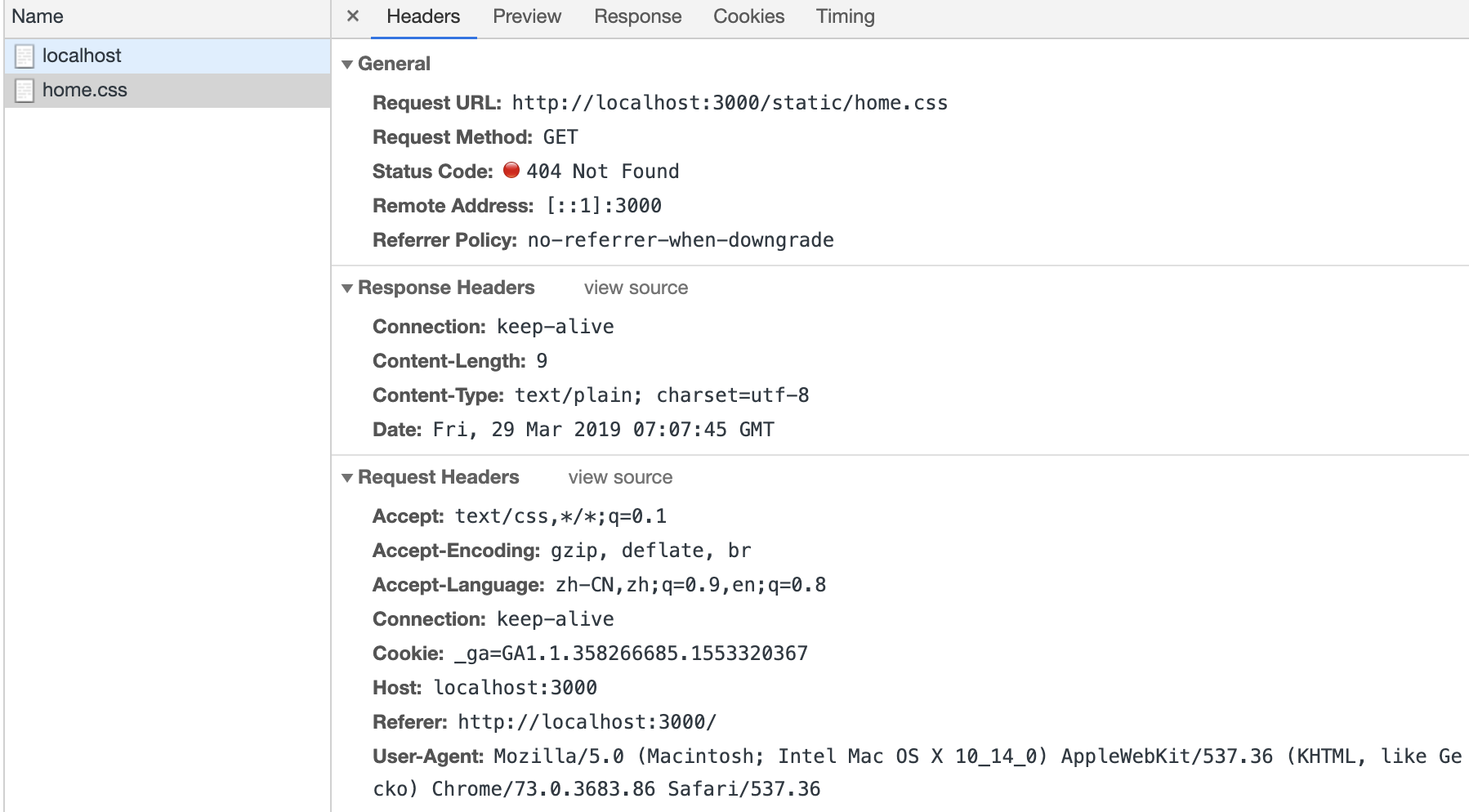
当我们访问 "/" 根路径的时候会自动读取 home 页面的内容返回出出去,home 页面中引用了静态css样式,这是我们会发现有一个报错信息。
home.html页面内容
<!DOCTYPE html>
<html>

<head>
    <meta charset="utf-8">
    <meta http-equiv="X-UA-Compatible" content="IE=edge">
    <title>Page Title</title>
    <meta name="viewport" content="width=device-width, initial-scale=1">
    <link rel="stylesheet" href="/css/home.css">
</head>
<script src="https://code.jquery.com/jquery-3.3.1.min.js"></script>
<script src='/js/home.js'></script>

<body>
    <h1>我是根路径返回的页面</h1>
</body>

</html>
报错信息

- 这时候需要一个对应的中间键去管理这些静态资源
// 通常情况下,会把所有的静态资源的文件放在一个统一的文件夹下,一般在根目录创建一个static文件夹。
- 安装 koa-static 包去管理静态资源的路径
npm i koa-static --save // 配置请看app.js文件
路由模块的post请求
如果要拿到post请求的数据,需要安装另外一个模块 koa-body 可以解析post请求的数据,监听所有的post请求过来的数据,把数据解析好以后放到 ctx.request.body 上。
router.post("/postData", async (ctx, next) => {
    console.log(ctx.request.body) // 查看post请求发送的数据
    ctx.body = ctx.request.body // 将post请求发送的数据返回
})
在home.html页面引用的home.js内容如下
$(function () {
    $(document).click(() => {
        $.post("http://localhost:3000/postData",
            {
                name: "fanqie",
                age: "18"
            },
            function (data, status) {
                console.log(data);
                console.log(status);
            }
        )
    })
})
结果如下:

如何解决跨域问题?
koa-cors模块解决跨域问题
npm install koa-cors --save
将解决跨域的中间键挂载到koa实例上,配置请看app.js文件。