

前言
Spring boot + Mybatis + Thymeleaf + Druid +mySql
开发环境(小编使用的版本)
JDK版本 :1.8及以上 (JDK1.8);
开发工具 :Intellij IDEA (IDEA2018.2);
服务器 :Tomcat(务必比JDK版本高,小编不在解释(Jar包不用配置、War需要配置)) (Tomcat9) ;
JRE包 :Maven仓库 (Maven3.6);
数据库 :MySql(MySql5.5) ;
正题
Spring boot :2.1.1RELEASE ;
Thymeleaf
Mybatis
阿里云的连接池 : Druid ;
步骤
1.创建Springboot:
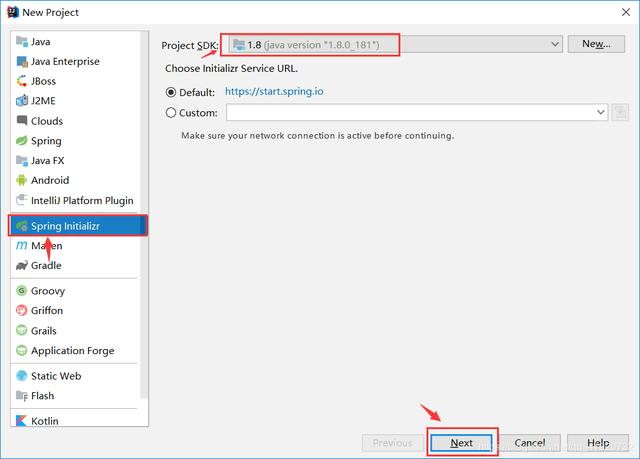
2.创建项目文件结构
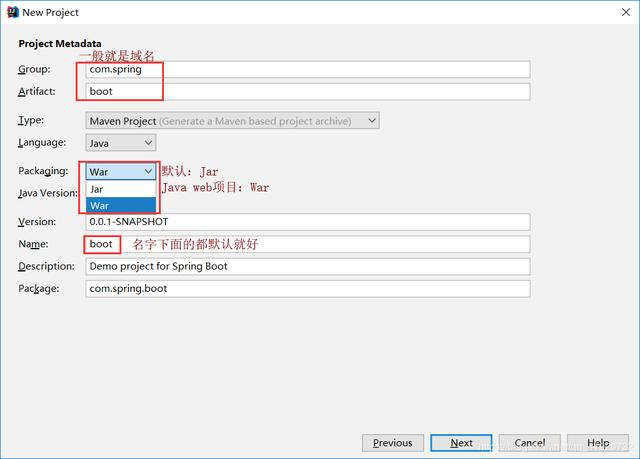
3.POM依赖
如果使用阿里云的连接池不选择JDBC,小编用的阿里云这里不选择
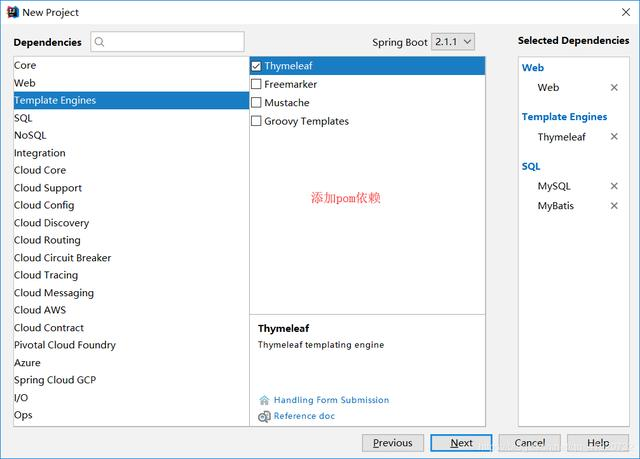
点击Finish;
注:可能Maven中无Jar包需要从仓库下载,需要耐心等待(可以去听首歌)
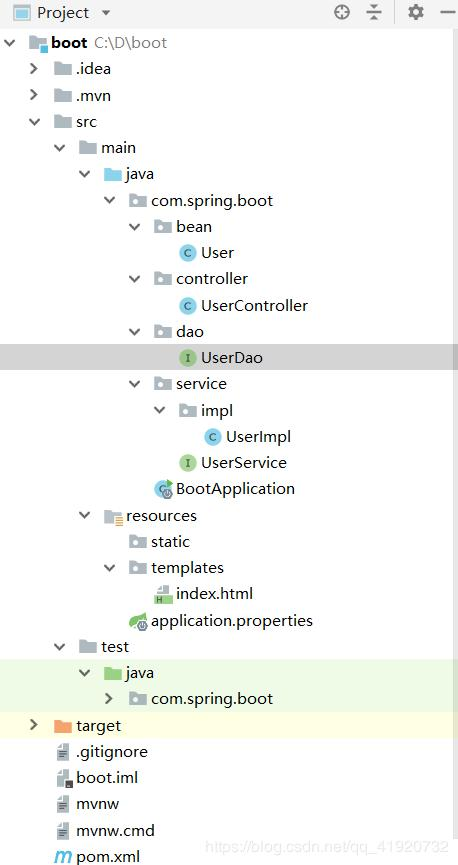
4.项目结构
5.POM
<project xmlns="maven.apache.org/POM/4.0.0" xmlns:xsi="www.w3.org/2001/XMLSch…"
xsi:schemaLocation="maven.apache.org/POM/4.0.0 maven.apache.org/xsd/maven-4…">
4.0.0
org.springframework.boot
spring-boot-starter-parent
2.1.1.RELEASE
com.spring
boot
0.0.1-SNAPSHOT
boot
Demo project for Spring Boot
<java.version>1.8</java.version>
org.springframework.boot
spring-boot-devtools
true
com.alibaba
druid-spring-boot-starter
1.1.10
org.springframework.boot
spring-boot-starter-thymeleaf
org.springframework.boot
spring-boot-starter-web
org.mybatis.spring.boot
mybatis-spring-boot-starter
1.3.2
mysql
mysql-connector-java
runtime
org.springframework.boot
spring-boot-starter-test
test
org.springframework.boot
spring-boot-maven-plugin
注:IDEA失效解决方法
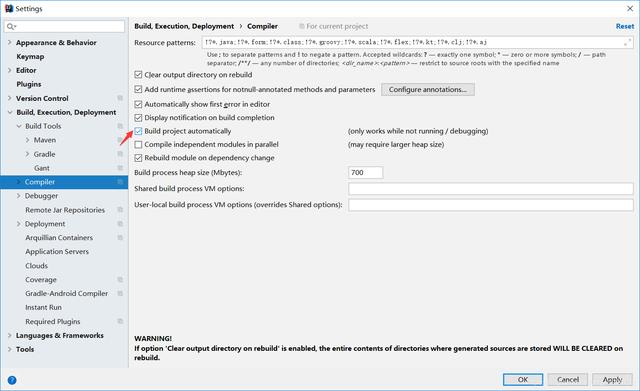
6.小编使用的application.properties文件,项目启动识别两种格式的文件properties和yml文件:
#缓存设置为false, 修改之后马上生效
spring.thymeleaf.cache=false
spring.thymeleaf.encoding=UTF-8
#spring.thymeleaf.prefix=classpath:/templates/
#spring.thymeleaf.suffix=.html
server.port=8080
server.tomcat.uriEncoding=utf-8
spring.datasource.type=com.alibaba.druid.pool.DruidDataSource
spring.datasource.url=jdbc:mysql://localhost:3306/web?useUnicode=true&serverTimezone=GMT%2B8&characterEncoding=utf-8&allowMultiQueries=true&useSSL=false
spring.datasource.username=root
spring.datasource.password=root
spring.datasource.druid.driverClassName=com.mysql.cj.jdbc.Driver
#初始化连接
spring.datasource.initialSize=20
#最大空闲数
spring.datasource.maxActive=50
#最小空闲数
spring.datasource.minIdle=10
#获取连接等待时间
#spring.datasource.druid.max-wait=60000
#最小等待时间
#spring.datasource.minEvictableIdleTimeMillis=3600000
7.其他文件生成
User.java
package com.spring.boot.bean;
public class User {
public Integer uid;
public String uname;
public String upassword;
public Integer getUid() {
return uid;
}
public void setUid(Integer uid) {
this.uid = uid;
}
public String getUanme() {
return uname;
}
public void setUanme(String uanme) {
this.uname = uanme;
}
public String getUpassword() {
return upassword;
}
public void setUpassword(String upassword) {
this.upassword = upassword;
}
@Override
public String toString() {
return "User{" +
"uid=" + uid +
", uname='" + uname + ''' +
", upassword='" + upassword + ''' +
'}';
}
}
UserDao.java
注解的形式,小编感觉比XML好用
package com.spring.boot.dao;
import com.spring.boot.bean.User;
import org.apache.ibatis.annotations.Select;
import org.apache.ibatis.annotations.Update;
import java.util.List;
public interface UserDao {
@Select("select * from user")
public List AllUser();
@Update(" ")
public int Update(User user);
}
UserService.java
package com.spring.boot.service;
import com.spring.boot.bean.User;
import java.util.List;
public interface UserService {
public List AllUser();
public int Update(User user);
}
UserImpl.java
主要是注解问题Service可以命名,主要还是看自己的日常使用
package com.spring.boot.service.impl;
import com.spring.boot.bean.User;
import com.spring.boot.dao.UserDao;
import com.spring.boot.service.UserService;
import org.springframework.beans.factory.annotation.Autowired;
import org.springframework.stereotype.Service;
import java.util.List;
@Service
public class UserImpl implements UserService {
@Autowired
private UserDao userDao;
@Override
public List AllUser() {
return userDao.AllUser();
}
@Override
public int Update(User user) {
return userDao.Update(user);
}
}
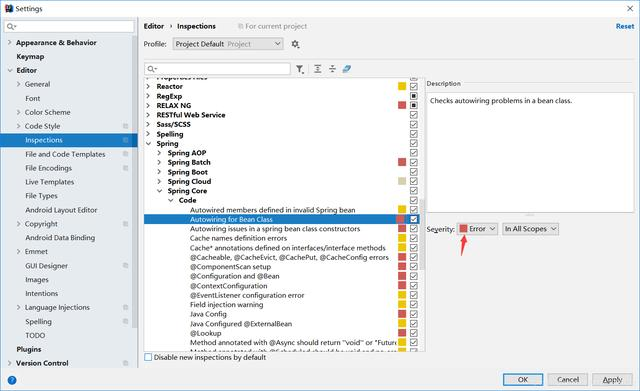
注:userDao报红解决方法
UserController.java
package com.spring.boot.controller;
import com.spring.boot.bean.User;
import com.spring.boot.service.impl.UserImpl;
import org.springframework.beans.factory.annotation.Autowired;
import org.springframework.stereotype.Controller;
import org.springframework.ui.Model;
import org.springframework.web.bind.annotation.RequestMapping;
@Controller
public class UserController {
@Autowired
private UserImpl userimpl;
@RequestMapping("/index")
public String index(Model model, User user){
model.addAttribute("user",userimpl.AllUser());
user.uid = 2;
user.uname = "nan";
user.upassword = "lou";
userimpl.Update(user);
System.out.println("******************"+userimpl.AllUser());
System.out.println("******************"+userimpl.Update(user));
return "index";
}
}
index.html
TitleSpring boot+Thymeleaf!
8.界面显示
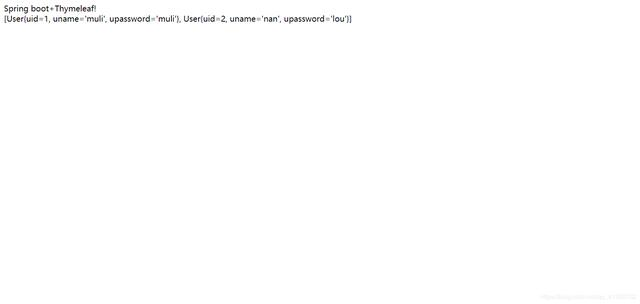
注:后续功能再写!
欢迎工作一到五年的Java工程师朋友们加入Java架构师:697558955
群内提供免费的Java架构学习资料(里面有高可用、高并发、高性能及分布式、Jvm性能调优、Spring源码,MyBatis,Netty,Redis,Kafka,Mysql,Zookeeper,Tomcat,Docker,Dubbo,Nginx等多个知识点的架构资料)合理利用自己每一分每一秒的时间来学习提升自己,不要再用"没有时间“来掩饰自己思想上的懒惰!趁年轻,使劲拼,给未来的自己一个交代!
