版本记录
| 版本号 | 时间 |
|---|---|
| V1.0 | 2019.03.24 星期日 |
前言
定时器NSTimer大家都用过,包括轮询等都是通过定时器实现的,在定时器使用的时候大家不仅要知道使用原理还要知道其中的一些注意事项。接下来这个专题我们就一起走进定时器。感兴趣的可以看下面几篇文章。
1. NSTimer应用解析(一) —— NSTimer的基本使用(一)
源码
1. Swift
首先看下项目组织结构
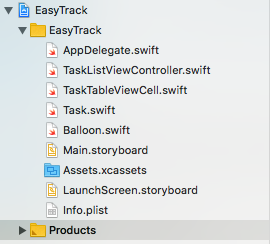
下面看下xib文件
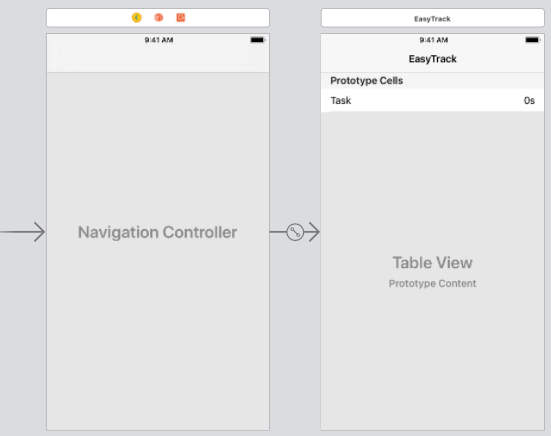
接着就是源码了
1. TaskListViewController.swiftimport UIKit
class TaskListViewController: UIViewController {
@IBOutlet weak var tableView: UITableView!
@IBOutlet weak var balloon: Balloon!
var taskList: [Task] = []
var timer: Timer?
var displayLink: CADisplayLink?
var startTime: CFTimeInterval?, endTime: CFTimeInterval?
let animationDuration = 3.0
var height: CGFloat = 0
override func viewDidLoad() {
super.viewDidLoad()
navigationItem.rightBarButtonItem = UIBarButtonItem(barButtonSystemItem: .add,
target: self,
action: #selector(presentAlertController))
}
}
// MARK: - UITableViewDelegate
extension TaskListViewController: UITableViewDelegate {
func tableView(_ tableView: UITableView, didSelectRowAt indexPath: IndexPath) {
guard let cell = tableView.cellForRow(at: indexPath) as? TaskTableViewCell else {
return
}
cell.updateState()
showCongratulationsIfNeeded()
}
}
// MARK: - UITableViewDataSource
extension TaskListViewController: UITableViewDataSource {
func tableView(_ tableView: UITableView,
numberOfRowsInSection section: Int) -> Int {
return taskList.count
}
func tableView(_ tableView: UITableView,
cellForRowAt indexPath: IndexPath) -> UITableViewCell {
let cell = tableView.dequeueReusableCell(withIdentifier: "TaskCell", for: indexPath)
if let cell = cell as? TaskTableViewCell {
cell.task = taskList[indexPath.row]
}
return cell
}
}
// MARK: - Actions
extension TaskListViewController {
@objc func presentAlertController(_ sender: UIBarButtonItem) {
createTimer()
let alertController = UIAlertController(title: "Task name",
message: nil,
preferredStyle: .alert)
alertController.addTextField { textField in
textField.placeholder = "Task name"
textField.autocapitalizationType = .sentences
}
let createAction = UIAlertAction(title: "OK", style: .default) {
[weak self, weak alertController] _ in
guard
let self = self,
let text = alertController?.textFields?.first?.text
else {
return
}
DispatchQueue.main.async {
let task = Task(name: text)
self.taskList.append(task)
let indexPath = IndexPath(row: self.taskList.count - 1, section: 0)
self.tableView.beginUpdates()
self.tableView.insertRows(at: [indexPath], with: .top)
self.tableView.endUpdates()
}
}
let cancelAction = UIAlertAction(title: "Cancel", style: .cancel, handler: nil)
alertController.addAction(createAction)
alertController.addAction(cancelAction)
present(alertController, animated: true, completion: nil)
}
}
// MARK: - Timer
extension TaskListViewController {
func createTimer() {
if timer == nil {
let timer = Timer(timeInterval: 1.0,
target: self,
selector: #selector(updateTimer),
userInfo: nil,
repeats: true)
RunLoop.current.add(timer, forMode: .common)
timer.tolerance = 0.1
self.timer = timer
}
}
func cancelTimer() {
timer?.invalidate()
timer = nil
}
@objc func updateTimer() {
guard let visibleRowsIndexPaths = tableView.indexPathsForVisibleRows else {
return
}
for indexPath in visibleRowsIndexPaths {
if let cell = tableView.cellForRow(at: indexPath) as? TaskTableViewCell {
cell.updateTime()
}
}
}
}
// MARK: - Animation
extension TaskListViewController {
func showCongratulationsIfNeeded() {
if taskList.filter({ !$0.completed }).count == 0 {
cancelTimer()
showCongratulationAnimation()
} else {
createTimer()
}
}
func showCongratulationAnimation() {
height = UIScreen.main.bounds.height + balloon.frame.size.height
balloon.center = CGPoint(x: UIScreen.main.bounds.width / 2,
y: height + balloon.frame.size.height / 2)
balloon.isHidden = false
startTime = CACurrentMediaTime()
endTime = animationDuration + startTime!
displayLink = CADisplayLink(target: self, selector: #selector(updateAnimation))
displayLink?.add(to: RunLoop.main, forMode: .common)
}
@objc func updateAnimation() {
guard
let endTime = endTime,
let startTime = startTime else {
return
}
let now = CACurrentMediaTime()
if now >= endTime {
displayLink?.isPaused = true
displayLink?.invalidate()
balloon.isHidden = true
}
let percentage = (now - startTime) * 100 / animationDuration
let y = height - ((height + balloon.frame.height / 2) / 100 * CGFloat(percentage))
balloon.center = CGPoint(x: balloon.center.x + CGFloat.random(in: -0.5...0.5), y: y)
}
}2. TaskTableViewCell.swiftimport UIKit
class TaskTableViewCell: UITableViewCell {
@IBOutlet weak var taskLabel: UILabel!
@IBOutlet weak var timeLabel: UILabel!
var task: Task? {
didSet {
taskLabel.text = task?.name
setState()
updateTime()
}
}
func updateState() {
guard let task = task else {
return
}
task.completed.toggle()
setState()
updateTime()
}
func updateTime() {
guard let task = task else {
return
}
if task.completed {
timeLabel.text = "Completed"
} else {
let time = Date().timeIntervalSince(task.creationDate)
let hours = Int(time) / 3600
let minutes = Int(time) / 60 % 60
let seconds = Int(time) % 60
var times: [String] = []
if hours > 0 {
times.append("\(hours)h")
}
if minutes > 0 {
times.append("\(minutes)m")
}
times.append("\(seconds)s")
timeLabel.text = times.joined(separator: " ")
}
}
private func setState() {
guard let task = task else {
return
}
if task.completed {
taskLabel.attributedText = NSAttributedString(string: task.name,
attributes: [.strikethroughStyle: 1])
} else {
taskLabel.attributedText = NSAttributedString(string: task.name,
attributes: nil)
}
}
}3. Task.swiftimport Foundation
class Task {
let name: String
let creationDate = Date()
var completed = false
init(name: String) {
self.name = name
}
}4. Balloon.swiftimport UIKit
@IBDesignable class Balloon: UIView {
override func draw(_ rect: CGRect) {
let balloonColor = UIColor(named: "rw-green") ?? UIColor.green
let cordColor = UIColor(named: "rw-dark") ?? UIColor.black
let ovalPath = UIBezierPath(ovalIn: CGRect(x: 0, y: 0, width: 66, height: 93))
balloonColor.setFill()
ovalPath.fill()
let trianglePath = UIBezierPath()
trianglePath.move(to: CGPoint(x: 33, y: 81.5))
trianglePath.addLine(to: CGPoint(x: 42.96, y: 98.75))
trianglePath.addLine(to: CGPoint(x: 23.04, y: 98.75))
trianglePath.close()
balloonColor.setFill()
trianglePath.fill()
let cordPath = UIBezierPath()
cordPath.move(to: CGPoint(x: 33.29, y: 98.5))
cordPath.addCurve(to: CGPoint(x: 33.29, y: 126.5),
controlPoint1: CGPoint(x: 33.29, y: 98.5),
controlPoint2: CGPoint(x: 27.01, y: 114.06))
cordPath.addCurve(to: CGPoint(x: 33.29, y: 157.61),
controlPoint1: CGPoint(x: 39.57, y: 138.94),
controlPoint2: CGPoint(x: 39.57, y: 145.17))
cordPath.addCurve(to: CGPoint(x: 33.29, y: 182.5),
controlPoint1: CGPoint(x: 27.01, y: 170.06),
controlPoint2: CGPoint(x: 33.29, y: 182.5))
cordColor.setStroke()
cordPath.lineWidth = 1
cordPath.stroke()
}
}下面就是具体效果了
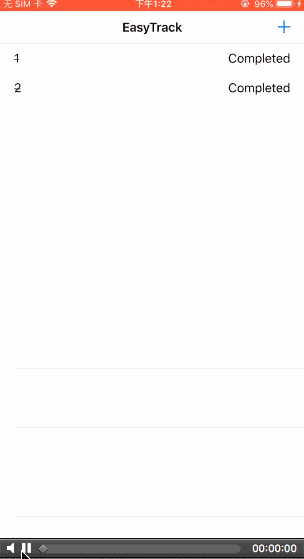
后记
本篇主要讲述了NSTimer相关,感兴趣的给个赞或者关注~~~