1.下载资源
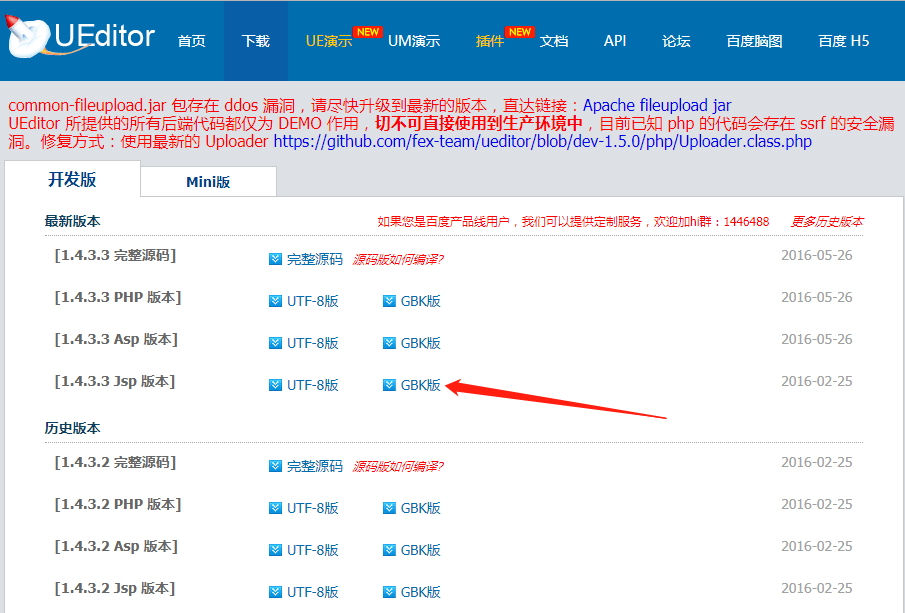
可以直接从Ueditor的官方网站:ueditor.baidu.com/website/dow… 下载自己对应的资源-我下载的是jsp最新版本。
2.引入
(1)将下载到的下载资源直接引入到自己的项目中,我是放到、static/UE下了。
(2)在main.js中引入使用资源
import "../static/UE/ueditor.config.js";
import "../static/UE/ueditor.all.min.js";
import "../static/UE/lang/zh-cn/zh-cn.js";
import "../static/UE/ueditor.parse.min.js";
(3)不要忘记修改ueditor.config.js
/**
   * 编辑器资源文件根路径。它所表示的含义是:以编辑器实例化页面为当前路径,指向编辑器资源文件(即dialog等文件夹)的路径。
   * 鉴于很多同学在使用编辑器的时候出现的种种路径问题,此处强烈建议大家使用"相对于网站根目录的相对路径"进行配置。
   * "相对于网站根目录的相对路径"也就是以斜杠开头的形如"/myProject/ueditor/"这样的路径。
   * 如果站点中有多个不在同一层级的页面需要实例化编辑器,且引用了同一UEditor的时候,此处的URL可能不适用于每个页面的编辑器。
   * 因此,UEditor提供了针对不同页面的编辑器可单独配置的根路径,具体来说,在需要实例化编辑器的页面最顶部写上如下代码即可。当然,需要令此处的URL等于对应的配置。
   * window.UEDITOR_HOME_URL = "/xxxx/xxxx/";
   */
  window.UEDITOR_HOME_URL = "/static/UE/";
3.使用
(1)首先需要一个容器
(2)设置初始宽高不需要px单位
(3)在页面beforeDestroy()时,也就是页面跳转,关闭的时候记得要editor.destroy()将Ueditor摧毁,不然页面会报错。
(4)具体配置可以去官方网站进行查看:fex.baidu.com/ueditor/
(5)图片上传的配置因为没用,就没仔细和后端配合了。
<template>
  <div>
    <div id="editor"></div>
  </div>
</template>

<script>
export default {
  data() {
    return {
      editor: null
    };
  },

  components: {},

  computed: {},

  mounted() {
    let that = this;
    this.editor = UE.getEditor("editor", {
      initialFrameWidth: "100%",
      initialFrameHeight: "240"
    });
    that.editor.ready(() => {
      that.editor.addListener("contentChange", function() {
        that.editor.ready(() => {
          let text = that.editor.getContent();
          that.$emit("change", text);
        });
      });
    });
  },
  created() {},
  beforeDestroy() {
    this.editor.destroy();
  },
  methods: {
    setData(text) {
      var that = this;
      this.editor.ready(() => {
        this.editor.setContent(text);
      });
    }
  }
};
</script>
<style lang='scss' scoped>
</style>
使用中遇到的问题
1.文件路径配置不对

如果是根目录,则这样应该没问题
我的线上是 http://---.com ---> /static/UE/
如果不是是根目录 /static/UE/ 但是如果不在根目录,则就会因为资源找不到造成这种错误,改为
域名是 http://---.com/damin/ ---> /damin/static/UE/
2.ZeroClipboard is not defined
这个网上有人说ZeroClipboard.js中修改下就行了,只是记录下,目前没试过!
之前
if (typeof define === "function" && define.amd) {
    define(function () {
      return ZeroClipboard;
    });
  } else if (typeof module === "object" && module && typeof module.exports === "object" && module.exports) {
    module.exports = ZeroClipboard;
  }else{
      window.ZeroClipboard = ZeroClipboard;
  }
改为
if (typeof define === "function" && define.amd) {
    define(function () {
      return ZeroClipboard;
    });
  } else if (typeof module === "object" && module && typeof module.exports === "object" && module.exports) {
    module.exports = ZeroClipboard;
  }
  window.ZeroClipboard = ZeroClipboard;