nth-child
:nth-child(number) 直接匹配第number个元素:not(:first-child) 除第一个元素之外的子元素:nth-child(n+2) n+2表示从第二个开始:nth-last-child(n+2) 这样获取除最后一个div中所有的div;也可以用:not(:last-child) :nth-child(2n) 获取子元素中第2,4,6,8,... 的元素:nth-child(3n) 获取子元素中第3,6,9,... 的元素:nth-child(odd) 奇数匹配使用:nth-child(even) 偶数匹配使用上面的选择器可以直接在class之后,也可以在后面加span/p/div等类型后,如下:
/* analysis-res class下的除了第一个之外的元素 */
.analysis-res:not(:first-child) {
    color: #5792b1;
    font-weight: bold;
}

/*  analysis-res class下span标签中除了第一个之外的元素 */
.analysis-res span:not(:first-child) {
    color: #5792b1;
    font-weight: bold;
}
nth-of-type
nth-of-type要是不研究一下还真容易理
解错,它说的是按照类型来选择,看下面这个例子。
<style>
  p:nth-of-type(1),p:nth-of-type(3){
    color:red;
  }
</style>
<h1>标题</h1>
<p>这是段落1</p>
<p>这是段落2</p>
<span>这是span1</span>
<span>这是span2</span>
<span>这是span3</span>
<p>这是段落3</p>
效果如下:
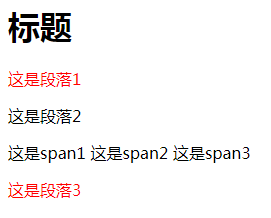
这个也不难理解就是按照类型来计算,碰到一个同类型就加1,直到遇到所设定的元素就添加相应样式:
.item:nth-of-type{color:red}那么直接在class后面:nth-of-type呢?
<style>
  .item:nth-of-type(3){
    color:red;
  }
</style>
<h1>标题</h1>
<p class="item">这是段落1</p>
<p>这是段落2</p>
<span>这是span1</span>
<span class="item">这是span2</span>
<span class="item">这是span3</span>
<p class="item">这是段落3</p>
<p class="item">这是段落4</p>
<p class="item">这是段落5</p>
效果如下:
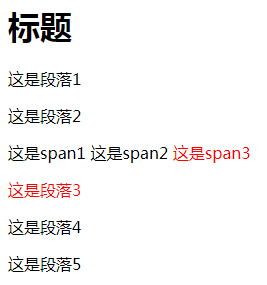
总结
nth-child
按照个数来算。nth-of-type
按照类型来计算,同类型不断加1,直达找到累计的第几个