Vuex相当于一个商店,你可以在商店上架各种各样的商品,项目中的组件就相当于买家,他们可以购买商店中的任何商品,当一个组件买走了某样商品,那么商店中该样商品的数量就会减少一个。
Vuex有五个核心概念,State,Getter,Mutations,Actions和Module。State,Getter和Mutations是必须的,它们的关系官网有一张图能非常清晰的说明:
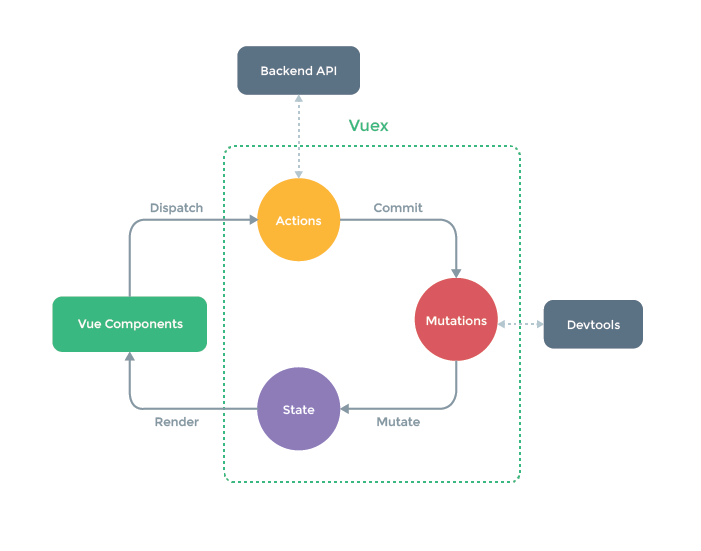
- State(状态数据属性,数据驱动视图)
- Getters(获取状态中存储的值)
- Mutations(修改状态的唯一方法就是mutations,但mutations中的方法是同步的)
- Actions(Actions中方法是异步的,组件中通过dispatch触发Actions,在Actions中commit触发mutations,然后修改State)
- Module(分块管理相关状态)
上图流程是这样的,你在State中声明了一个数据属性,在某个组件中引用了它,那么它就会被渲染render到这个组件,当这个组件想异步的修改这个State值时,它就需要想Actions分发dispatch某个方法,在Actions异步的触发commit Mutations中的某个方法,而只有Mutations中的被触发的这个方法才能修改State的值。
State
在State中定义了一个count属性,之后这个count可以被项目中任意的组件所使用。
state: {
    count: 1,
}
获取State属性的方法有三种,第一种通过this.$store访问,后两种都是通过vuex提供的辅助函数mapState,使用它之前需要从vuex中导入。因为State中的属性是响应式的,从store实例中读取状态最简单的方法就是在计算属性中返回某个状态。
第一种方式:通过每个组件拥有的$store访问
computed:{
    count(){
        return this.$store.state.count
    }
}
第二种方式,通过mapState访问
import {mapState} from 'vuex'

computed:mapState{
    //1.箭头函数
    count: state => state.count,
    //2.传字符串参数‘count’等同于state => state.count,counAlisa是别名,之前的都可以起别名
    countAlisa:'count',
    //3.传一个函数,在显示count值之前,还能在组件内做一些其他操作
    countLocalState(state){
      return state.count + this.num;
    }
}

//当计算属性的方法名与state中属性名同名时,就可以这样简写
computed: mapState([
  'count'
])
第三种方式,对象的展开运算符,目的是将它与局部计算属性混合使用
computed:{
  ...mapState({
    //这里的操作与第二种方式是一样的
    count:state => state.count,
    countAlisa:'count',
    countLocalState(state){
        return state.count + this.num;
    }
  })
}

//当计算属性的方法名与state中属性名同名时,就可以这样简写
computed:{
    ...mapState([
      'count',
      'msg'
    ])
 },
Getters
可以认为是 store 的计算属性,可以对State中的数据做一些过滤,计算长度。在state中定义一个list列表。
state: {
    lists: [
        { id: 1, msg: "hi1" },
        { id: 2, msg: "hi2" },
        { id: 3, msg: "hi3" },
        { id: 4, msg: "hi4" },
        { id: 5, msg: "hi5" }
    ]
}

getters{

    //参数为state,通过属性访问
    listLength: state =>{
        return state.lists.length;
    }

    listFilter(state){
        return state.lists.filter(item => item.id < 4);
    }

    //第二个参数还可以传getters
    listFilterLength: (state, getters) => {
        return getters.listFilter.length
    }

    //通过函数访问
    getListById: (state) => (id) => {
        return state.todos.find(item => item.id === id)
    }
}
在组件中访问getters基本上与state相似,这里不过多赘述,可以参考vuex官方文档。
computed:{
    listLength(){
        return this.$store.getters.listLength
    },
    getListById(){
        return this.$store.getters.getListById(2);
}
import { mapGetters } from 'vuex'

computed: {
  // 使用对象展开运算符将 getter 混入 computed 对象中
    ...mapGetters([
      'listLength',
      'listFilterLength',
    ])
 }
Mutations
Mutations是改变State的唯一方法,但是它的方法必须是同步的,如果有异步操作,那么在stata中的数据可能和视图中的数值不同。
mutations: {
    addNum(state, num) {
        state.count += num;
    },
    //在mutations中做异步,在stata中的数据可能和视图中的数值不同,payload为载荷,此方式为错误示范
    addCountByasync(state, payload) {
        setTimeout(() => {
            state.count += payload.num;
        }, 1000)
    },
    addCountByasync2(state, num) {
        state.count += num;
    }
},
在组件内通过methods方法提交,也是有$store方式和辅助函数的方式:
methods{
    addCountByasync(){
        //1.第一个参数是事件的名字,第二个参数是传递的数据
        this.$store.commit('addCountByasync', {num: 5})

        //以对象方式提交
        this.$store.commit({
            type:'addCountByasync',
            num:5
        })
    },
}
以下的辅助函数访问方式参考vuex的官方文档
import { mapMutations } from 'vuex'

export default {
  // ...
  methods: {
    ...mapMutations([
      'increment', // 将 `this.increment()` 映射为 `this.$store.commit('increment')`

      // `mapMutations` 也支持载荷:
      'incrementBy' // 将 `this.incrementBy(amount)` 映射为 `this.$store.commit('incrementBy', amount)`
    ]),
    ...mapMutations({
      add: 'increment' // 将 `this.add()` 映射为 `this.$store.commit('increment')`
    })
  }
}
Actions
Actions的方法就是为了解决Mutations中不能做异步操作的问题,所有的异步操作放在Actions里面,只在Mutations中修改State的值。现在组件中dispatch Actions,Actions commit Mutations。
mutations: {
    addCountByasync2(state, num) {
        state.count += num;
    }
}
actions: {
    addCountByasync({ commit }, payload) {
        setTimeout(() => {
            commit('addCountByasync2', payload.num)
        }, 1000)
    }
}
在组件内的methods中分发:
methods:{
    addCountByasync2(){
      this.$store.dispatch('addCountByasync', {num: 5})
    }
}
Modules
就是根据数据的业务类型分为几个模块,每个模块都有上述的四种对象,通过模块来调用,模块的用法请参考vuex手册。
vuex开发中遇到的坑
在给State中的某个数据对象添加新属性时,无法更新到视图,需要手动设置,使得数据可以驱动视图。所以最好我们在Store中初始化好属性,不要临时添加。
state: {
    myProp: {

    }
},
getters: {
    myProp: (state) => {
        return state.myProp;
    }
},
mutations: {
    changeStateProp(state, name) {
        //这样修改数据视图是无法更新的
        // state.myProp.name = name;
        //手动设置,给State中的数据对象添加新属性
        Vue.set(state.myProp, 'name', name)
    }
},
actions: {
    changeStateProp({ commit }, payload) {
        commit('changeStateProp', payload.name);
    }
}
某个组件内:
<h2>{{ myProp }}</h2>
<button  @click="changeStateProp">修改state数据</button>
computed:{
    myProp(){
      return this.$store.getters.myProp
    }
},
methods: {
    changeStateProp(){
      this.$store.dispatch('changeStateProp', {name:'kitty'});
    }
}
总结
官网上有一段话,用来做总结:
如果您不打算开发大型单页应用,使用 Vuex 可能是繁琐冗余的。确实是如此——如果您的应用够简单,您最好不要使用 Vuex。一个简单的 store 模式就足够您所需了。但是,如果您需要构建一个中大型单页应用,您很可能会考虑如何更好地在组件外部管理状态,Vuex 将会成为自然而然的选择。
该笔记是听完某视频vue老师讲的课程之后做的笔记,如有侵权,请告知。