入门
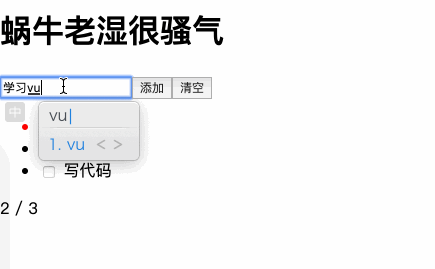
作为前端最容易上手的框架,Vue入门其实没啥说的,我放一段清单的代码,大家能看懂就说明能上手了
<template>
  <div id="app">
    <h1>{{title}}</h1>
    <div>
      <input type="text" v-model="val">
      <button @click="add">添加</button>
      <button @click="clear">清空</button>
    </div>
    <ul>
      <li v-for="todo in todos" :key="todo.title" :class="{done:todo.done}">
        <input type="checkbox" v-model="todo.done">
        {{todo.title}}
      </li>
    </ul>
    <p>{{active}} / {{all}}</p>
  </div>
</template>
<script>
export default {
name: "app",
data() {
return {
title: "蜗牛老湿很骚气",
val: "",
todos: []
};
},
mounted() {
const todos = localStorage.getItem("todos");
if (todos) {
this.todos = JSON.parse(todos);
} else {
this.todos = [
{ title: "吃饭", done: true },
{ title: "睡觉", done: false },
{ title: "写代码", done: false }
];
}
},
computed: {
active() {
return this.todos.filter(v => !v.done).length;
},
all() {
return this.todos.length;
}
},
watch: {
todos: {
deep: true,
handler(todos) {
localStorage.setItem("todos", JSON.stringify(todos));
}
}
},
methods: {
clear() {
this.todos = this.todos.filter(v => !v.done);
},
add() {
if (this.val) {
this.todos.push({ title: this.val, done: false });
this.val = "";
}
}
}
};
</script>
<style>
li.done {
color: red;
text-decoration: line-through;
}
</style>
复制代码
大概包含的内容如下,对这个例子熟悉后,才是我们的正文,如果上面代码有没看懂的地方,快去Vuejs官网回顾一下吧
- 变量渲染
- 循环渲染
- class渲染
- 计算属性
- 监听器
- 绑定事件
- 生命周期
组件化
Vue单文件组件。Vue的单文件组件相信大家都体验过,通过vue-cli初始化的项目自动就支持了,新建Child1.vue
<template>
    <div>Child1</div>
</template>
<script>
export default {
}
</script>
复制代码
App中使用
<template>
  <div id="app">
    <Child1></Child1>
  </div>
</template>

<script>
import Child1 from '@/components/Child1'
export default {
  name: "app",
  components:{Child1}

}

</script>
复制代码
下面就迎来了第一个常见问题, 如果组件多了,他们之间如何通信唠嗑呢,不要小看这个问题,骚气的面试官,比如我,就经常喜欢问,下面我们来演示一下Vue组件之间常用的通信收件
1. 父传子组件
父子组件传值,最简单的就是通过props传递,话不多说看代码
// App
<template>
  <div id="app">
    <Child1 :title="title1"></Child1>
  </div>
</template>
<script>
import Child1 from '@/components/Child1'
export default {
name: "app",
data(){
return {
title1:'我是你爸爸'
}
},
components:{Child1}
}
</script>
复制代码
// Child1
<template>
<div>
<h2>Child2</h2>
<div>{{title}}</div>
</div>
</template>
<script>
export default {
props:['title']
}
</script>
复制代码
2. 子传父
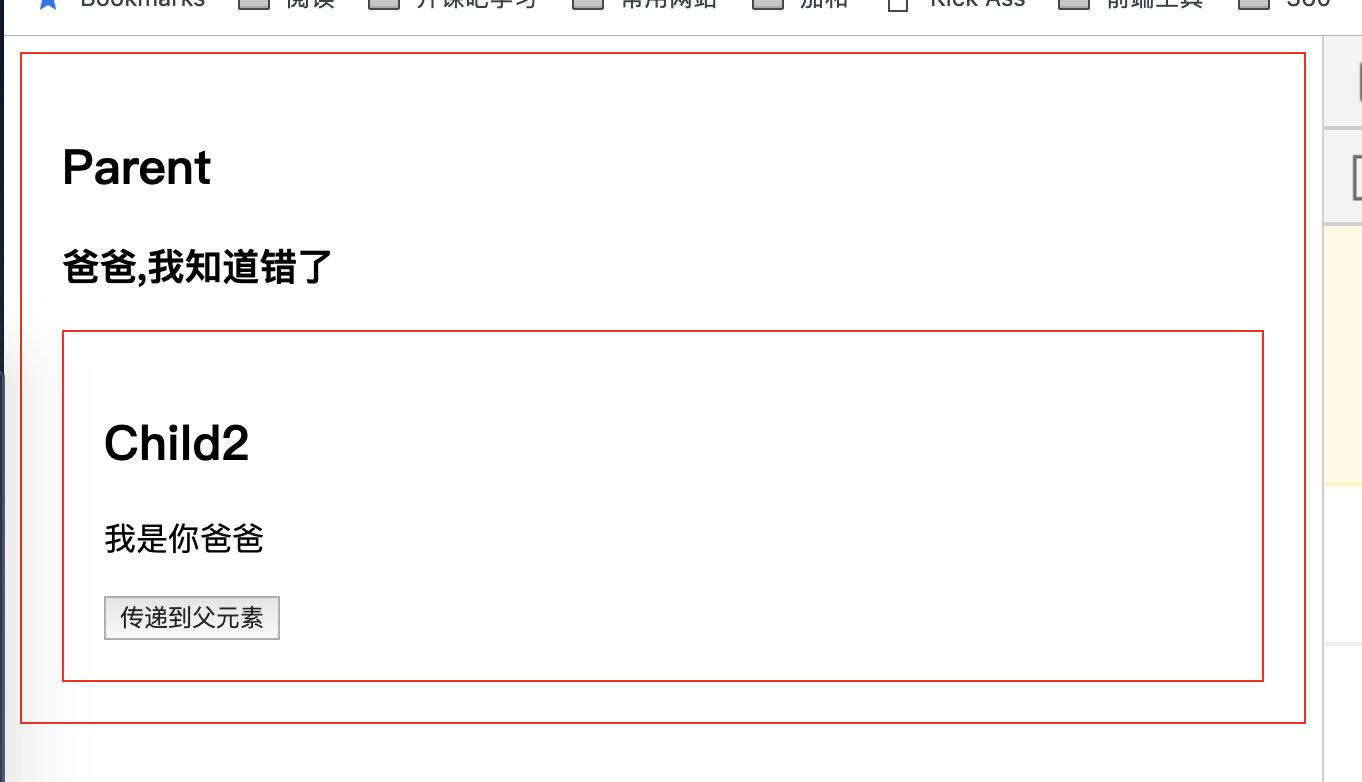
Vue更推荐单向数据流,所以子组件像修改传递的数据,需要通知父组件来修改,使用$emit触发父元素传递的事件
<template>
  <div id="app">
    <h2>Parent</h2>
    <h3>{{msg}}</h3>
    <Child1 :title="title1" @getmsg="getmsg"></Child1>
  </div>
</template>
<script>
import Child1 from '@/components/Child1'
export default {
name: "app",
data(){
return {
msg:'',
title1:'我是你爸爸'
}
},
methods:{
getmsg(msg){
console.log(msg)
this.msg = msg
}
},
components:{Child1}
}
</script>
<style>
div{
border:1px red solid;
padding:20px;
}
</style>
复制代码
// child1
<template>
<div>
<h2>Child2</h2>
<p>{{title}}</p>
<button @click="toParent">传递到父元素</button>
</div>
</template>
<script>
export default {
props:['title'],
methods:{
toParent(){
this.$emit('getmsg','爸爸,我知道错了')
}
}
}
</script>
复制代码
3. 兄弟组件
兄弟组件不能直接通信,只需要父元素搭个桥即可,大家自己体验即可
4. 祖先后代 provide & inject
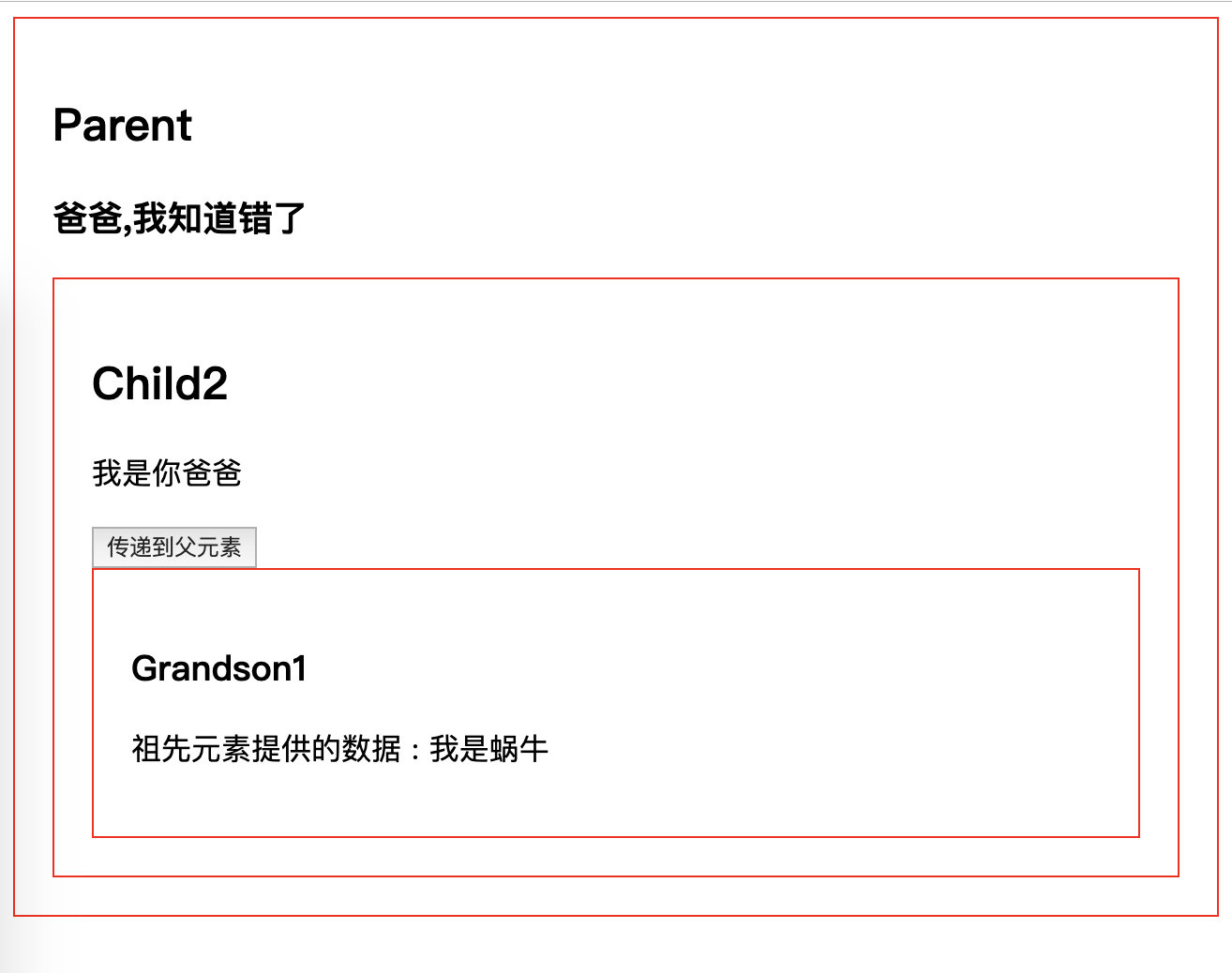
props一层层传递,爷爷给孙子还好,如果嵌套了五六层还这么写,感觉自己就是一个沙雕,所以这里介绍一个 稍微冷门的API, provice/inject,类似React中的上下文,专门用来跨层级提供数据
现在很多开源库都使用这个api来做跨层级的数据共享,比如element-ui的tabs 和 select
<script>
import Child1 from '@/components/Child1'
export default {
name: "app",
provide:{
woniu:'我是蜗牛'
},
components:{Child1}
}
</script>
<style>
复制代码
// 子孙元素
<template>
<span class="hljs-tag"><<span class="hljs-name">div</span>></span>
<span class="hljs-tag"><<span class="hljs-name">h3</span>></span>Grandson1<span class="hljs-tag"></<span class="hljs-name">h3</span>></span>
<span class="hljs-tag"><<span class="hljs-name">p</span>></span>
祖先元素提供的数据 : {{woniu}}
<span class="hljs-tag"></<span class="hljs-name">p</span>></span>
<span class="hljs-tag"></<span class="hljs-name">div</span>></span>
</template>
<script>
export default {
<span class="hljs-attr">inject</span>:[<span class="hljs-string">'woniu'</span>]
}
</script>
复制代码
但是provider和inject不是响应式的,如果子孙元素想通知祖先,就需要hack一下,Vue1中有dispatch和boardcast两个方法,但是vue2中被干掉了,我们自己可以模拟一下
原理就是可以通过this.children来获取父组件和子组件,我们递归一下就可以了
5. dispatch
递归获取$parent即可 比较简单
<button @click="dispatch('dispatch','哈喽 我是GrandGrandChild1')">dispatch</button>
复制代码
methods: {dispatch(eventName, data) { <span class="hljs-keyword">let</span> parent = <span class="hljs-keyword">this</span>.$parent <span class="hljs-comment">// 查找父元素</span> <span class="hljs-keyword">while</span> (parent ) { <span class="hljs-keyword">if</span> (parent) { <span class="hljs-comment">// 父元素用$emit触发</span> parent.$emit(eventName,data) <span class="hljs-comment">// 递归查找父元素</span> parent = parent.$parent }<span class="hljs-keyword">else</span>{ <span class="hljs-keyword">break</span> } } }
} 复制代码
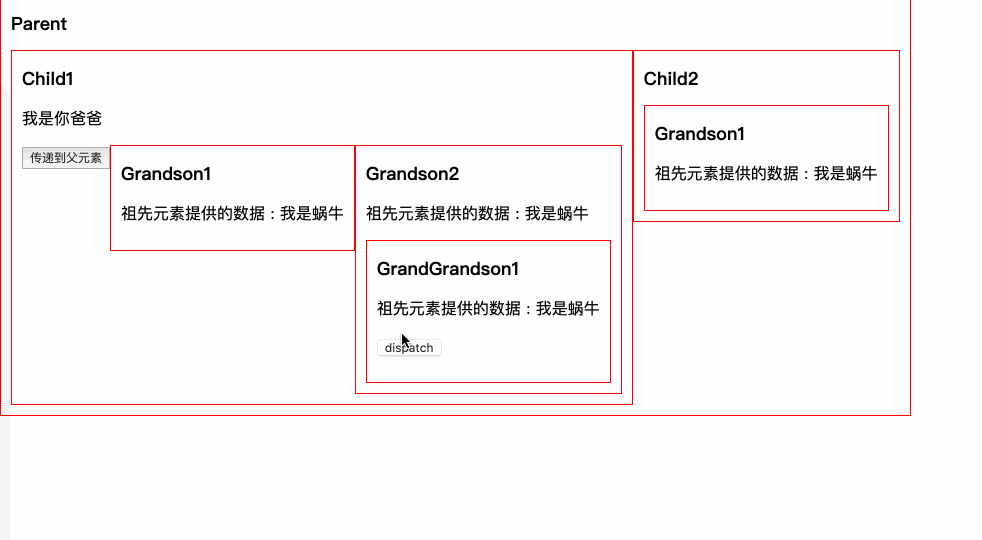
注意只向上传递了,并没有影响别的元素
6. boardcast
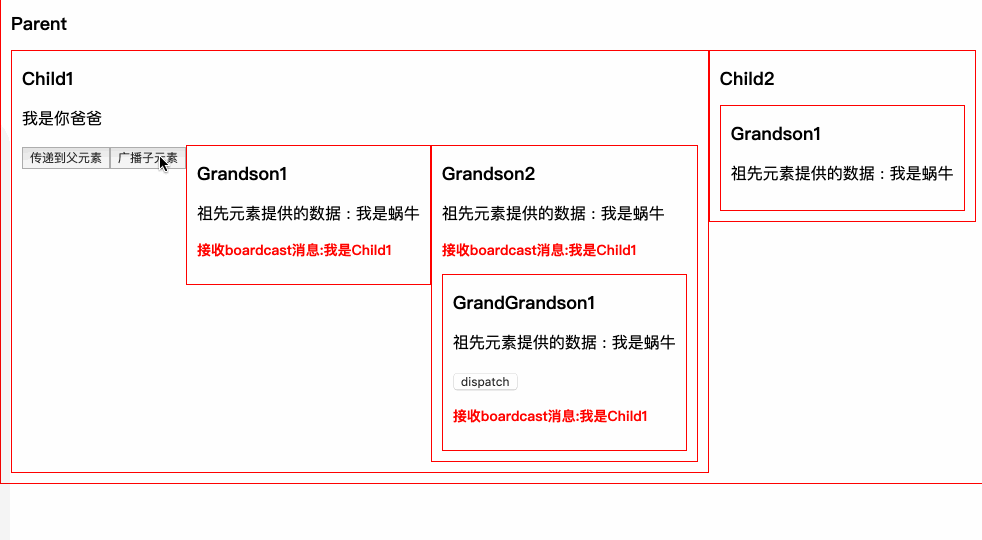
和dispatch类似,递归获取$children 来向所有子元素广播
<button @click="$boardcast('boardcast','我是Child1')">广播子元素</button>
复制代码
function boardcast(eventName, data){
this.$children.forEach(child => {
// 子元素触发$emit
child.$emit(eventName, data)
if(child.$children.length){
// 递归调用,通过call修改this指向 child
boardcast.call(child, eventName, data)
}
});
}
{
methods: {
$boardcast(eventName, data) {
boardcast.call(<span class="hljs-keyword">this</span>,eventName,data)
}
}
}
复制代码
7. 全局挂载dispatch和boardcast
想用的时候,需要自己组件内部定理dispatch和boardcast太烦了,我们挂载到Vue的原型链上,岂不是很high,找到main.js
Vue.prototype.$dispatch = function(eventName, data) {
let parent = this.$parent
// 查找父元素
while (parent ) {
if (parent) {
// 父元素用$emit触发
parent.$emit(eventName,data)
// 递归查找父元素
parent = parent.$parent
}else{
break
}
}
}
Vue.prototype.%3C%2Fspan%3E%7B%0A%20%20boardcast.call(%3Cspan%20class%3D%22hljs-keyword%22%3Ethis%3C%2Fspan%3E%2CeventName%2Cdata)%0A%7D%0A%3Cspan%20class%3D%22hljs-function%22%3E%3Cspan%20class%3D%22hljs-keyword%22%3Efunction%3C%2Fspan%3E%20%3Cspan%20class%3D%22hljs-title%22%3Eboardcast%3C%2Fspan%3E(%3Cspan%20class%3D%22hljs-params%22%3EeventName%2C%20data%3C%2Fspan%3E)%3C%2Fspan%3E%7B%0A%20%20%3Cspan%20class%3D%22hljs-keyword%22%3Ethis%3C%2Fspan%3E.) children.forEach(child => {
// 子元素触发
children.forEach(child => {
// 子元素触发 emit(eventName, data)
if(child.$children.length){
// 递归调用,通过call修改this指向 child
boardcast.call(child, eventName, data)
}
});
}
emit(eventName, data)
if(child.$children.length){
// 递归调用,通过call修改this指向 child
boardcast.call(child, eventName, data)
}
});
}
复制代码
这样组件里直接就可以用了 无压力
8. 没啥关系的组件:event-bus
如果俩组件没啥关系呢,我们只能使用订阅发布模式来做,并且挂载到Vue.protytype之上,我们来试试,我们称呼这种机制为总线机制,也就是喜闻乐见的 event-bus
class Bus{
  constructor(){
    // {
    //   eventName1:[fn1,fn2],
    //   eventName2:[fn3,fn4],
    // }
    this.callbacks = {}
  }
  $on(name,fn){
    this.callbacks[name] = this.callbacks[name] || []
    this.callbacks[name].push(fn)
  }
  $emit(name,args){
    if(this.callbacks[name]){
      // 存在 遍历所有callback
      this.callbacks[name].forEach(cb=> cb(args))
    }
  }
}
Vue.prototype.$bus = new Bus()
复制代码
使用
// 使用
eventBus(){
    this.$bus.$emit('event-bus','测试eventBus')
}

// 监听
this.$bus.$on("event-bus",msg=>{
    this.msg = '接收event-bus消息:'+ msg
})
复制代码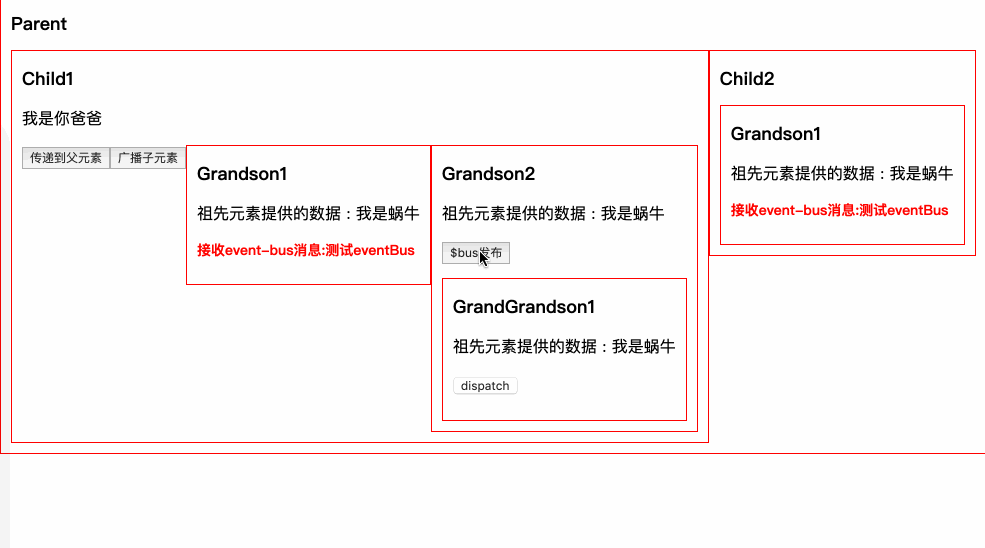
其实本身Vue就是一个订阅发布的实现,我们偷个懒,把Bus这个类可以删掉,新建一个空的Vue实例就可以啦
Vue.prototype.$bus = new Vue()
复制代码