#0 安装 laravel/socialite
#install
composer require laravel/socialite

#在你的 config/app.php 文件中添加以下配置信息
'providers' => [
    Laravel\Socialite\SocialiteServiceProvider::class,
],

'aliases' => [
    'Socialite' => Laravel\Socialite\Facades\Socialite::class,
],
#1 安装 socialiteProviders/weixin
#install
composer require socialiteproviders/weixin

#在你的 config/app.php 文件中添加以下配置信息
'providers' => [
     \SocialiteProviders\Manager\ServiceProvider::class,
],

#在你的 app/Providers/EventServiceProvider.php 文件中添加以下事件处理器
protected $listen = [
    \SocialiteProviders\Manager\SocialiteWasCalled::class => [
        'SocialiteProviders\Weixin\WeixinExtendSocialite@handle',
    ],
];
#2 添加配置
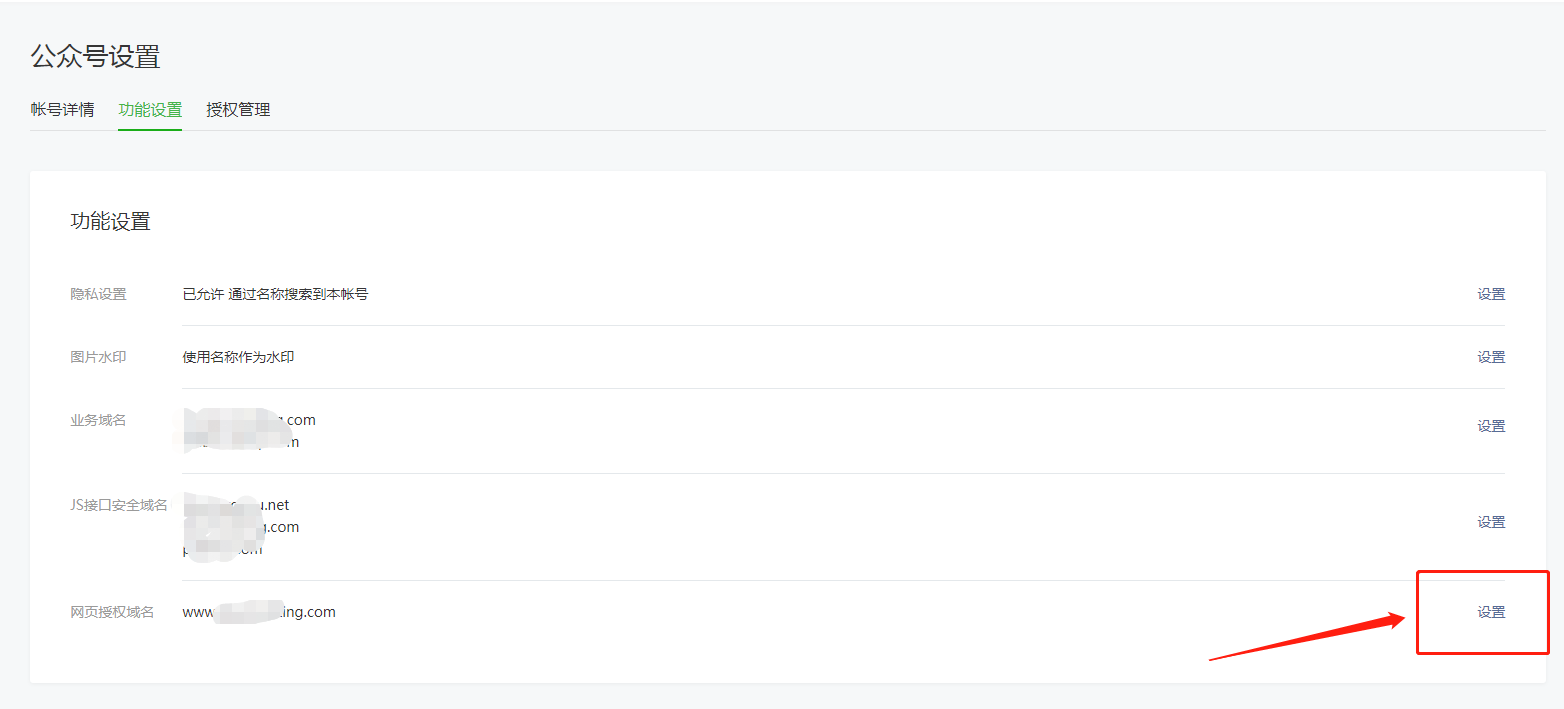
域名需要现在
公众号设置->功能设置->网页授权域名中先添加
//微信登录
'weixin' => [
    'client_id'     => env('MACAO_WECHAT_OFFICIAL_ACCOUNT_APPID', 'YOUR_AppID'),
    'client_secret' => env('MACAO_WECHAT_OFFICIAL_ACCOUNT_SECRET', 'YOUR_AppSecret'),
    'redirect'      => 'http://www.top-booking.com/weixin/callback',

    # 这一行配置非常重要,必须要写成这个地址。
    'auth_base_uri' => 'https://公众号中设置的域名/connect/qrconnect',
],
#3 代码调用
## routes/web.php
Route::get('/weixin', 'WeChatController@weixin')->name('weixin');
Route::get('/weixin/callback', 'WeChatController@weixinlogin');

## App\Http\Controllers\WeChatController
<?php

namespace App\Http\Controllers;

use Auth;
use Illuminate\Http\Request;
use App\Models\Order\Order;
use App\Models\Admin\Admin as User;
use Illuminate\Support\Str;use Log;
use Socialite;

class WeChatController extends Controller
{
    public function weixin(){
        return Socialite::with('weixin')->redirect();
    }

    public function weixinlogin(){
        $user = Socialite::driver('weixin')->user();
        dd($user);
        $check = User::where('uid', $user->id)->where('provider', 'qq_connect')->first();
        if (!$check) {
            $customer = User::create([
                'uid' => $user->id,
                'provider' => 'qq_connect',
                'name' => $user->nickname,
                'email' => 'qq_connect+' . $user->id . '@example.com',
                'password' => bcrypt(Str::random(60)),
                'avatar' => $user->avatar
            ]);
        } else {
            $customer = $check;
        }

        Auth::login($customer, true);
        return redirect('/');
    }
}