vue-插槽 (vue 2.6+)
v-slot指令自 Vue 2.6.0 起被引入,提供更好的支持slot和slot-scope特性的 API 替代方案
文档参考
普通(具名)插槽
就是子组件里定义一个slot占位符,父组件调用时,在slot对应的位置填充模板就好了
- Vue 2.5
<template slot="xxx">...</template> - Vue 2.6+
<template v-slot:xxx>...</template>
作用域插槽
- Vue 2.5
<template slot="xxx" slot-scope="xxx">...</template> - Vue 2.6+
<template v-slot:xxx="props">...</template>
案例(理解插槽)
介绍: ToDo 案例,父组件向子组件传每个 todo 数据。然后子组件向父组件反向传递一个 checkBox 的 Boolean 值,父组件用此判断每个 todo 的显示样式。
- 子组件中代码
<template>
  <div>
    <li>
      <slot name="item" v-bind="{checked}"></slot>
      <input type="checkbox" v-model="checked" class="checkBox">
    </li>
  </div>
</template>

<script>
export default {
  name: 'TodoItem',
  props: ['item'],
  data() {
    return {
      checked: false
    }
  }
}
</script>
- 父组件中的代码
<!--vue 2.5 slot-->
<todo-item v-for="(item, index) in list" :key="index">
    <span slot="item" :style='{fontSize: "20px"}'>{{item}}</span>
</todo-item>

<!--vue 2.5 slot-scope-->
<todo-item v-for="(item, index) in list" :key="index">
    <template slot="item" slot-scope="scopeProps">
      <span :style='{fontSize: "20px", color: scopeProps.checked ? "blue" : "red"}'>{{item}}</span>
    </template>
</todo-item>

<!--vue 2.6+ v-slot -->
<!-- 用子组件传过来的 checkBox 的值,父组件控制 -->
<todo-item v-for="(item, index) in list" :key="index">
    <template v-slot:item="itemProps">
      <span :style='{fontSize: "20px", color: itemProps.checked ? "blue" : "red"}'>{{item}}</span>
    </template>
</todo-item>
效果如下显示:
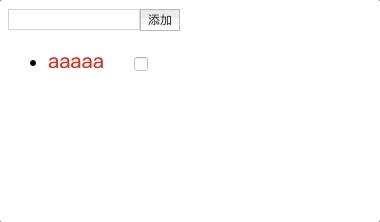
从数据流动理解作用域插槽的使用方式
- 1.父组件传递了 todo 数组中的值给子组件;
- 2.子组件通过props接受了数组数据;
- 3.子组件拿到数据后渲染,并且通过
<slot name="item" v-bind="{checked}"></slot>将checked传递到父组件 (注意是以对象的形式传递; - 4.父组件通过
<template v-slot:item="itemProps">...</template>中的itemProps来接收值。
v-slot 使用场景
element-ui里的table组件。table组件的数据都是来自调用者的,然后table会把每一行的row,在开发者需要时,传递出去。
eg:
<el-table-column label="项目名称" prop="name" show-overflow-tooltip align="center" fixed width="180">
  <template slot-scope="scope">
    <span :class="getProjectNameClass(scope.row)" @click="goProgress(scope.row)">{{ scope.row.name }}</span>
  </template>
</el-table-column>