<!DOCTYPE html>
<html lang="en">
<head>
<meta charset="UTF-8">
<meta name="viewport" content="width=device-width, initial-scale=1.0">
<meta http-equiv="X-UA-Compatible" content="ie=edge">
<title>简单贪吃蛇游戏-----------新手上路多多指教</title>
**<!--思路在底部,多多指教-->**
<style>
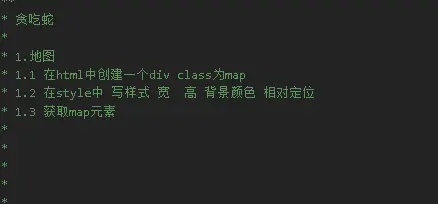
/* 给地图添加默认样式 */
.map {
width: 600px;
height: 500px;
position: relative;
;
background-color:
}
</style>
</head>
<body>
<div class="map"></div>
<script>
// 获取地图
var map = document.querySelector(".map");
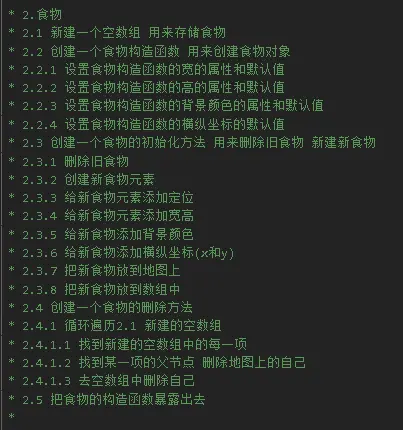
// 食物
(function () {
// 创建一个数组用来储存小蛇
var elements = [];
// 食物构造函数
function Food(width, height, x, y, color) {
// 此处如果没有赋值就是初始化默认值
this.width = width || 20;
this.height = height || 20;
this.x = x || 0;
this.y = y || 0;
this.color = color || "green";
}
// 食物初始化
Food.prototype.init = function (map) {
// 先删除食物
this.remove();
// 创建食物
var cib = document.createElement("div");
// 给食物添加样式
cib.style.position = "absolute"
cib.style.width = this.width + 'px';
cib.style.height = this.height + 'px';
cib.style.backgroundColor = this.color;
// 食物坐标
this.x = Math.floor(Math.random() * map.offsetWidth / this.width) * this.width;
this.y = Math.floor(Math.random() * map.offsetHeight / this.height) * this.height;
cib.style.left = this.x + 'px';
cib.style.top = this.y + 'px';
// 添加到地图中
map.appendChild(cib);
// 添加到数组中
elements.push(cib);
}
// 删除旧食物
Food.prototype.remove = function () {
for (var i = 0; i < elements.length; i++) {
var ele = elements[i];
// 删除父元素的子元素
ele.parentNode.removeChild(ele);
elements.splice(i, 1);
}
}
// 暴露给window对象,使外界可以访问
window.Food = Food;
}());
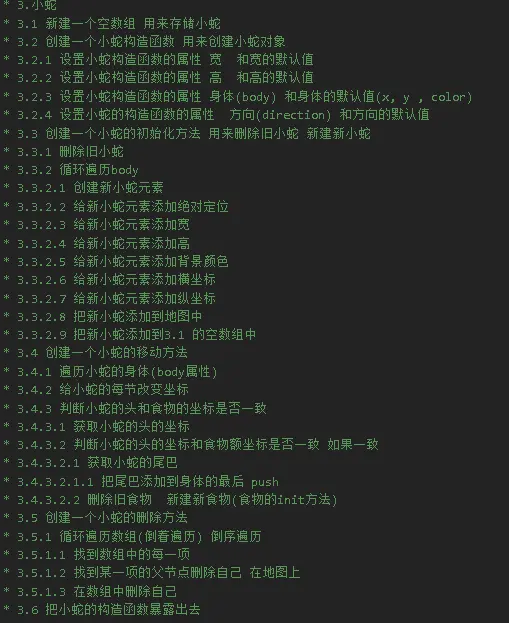
// 小蛇
(function () {
// 先设一个空数组用来储存食物
var elements = [];
// 小蛇构造函数
function Snake(width, height, fx) {
this.width = width || 20;
this.height = height || 20;
// 蛇的身体
this.body = [{
x: 3,
y: 2,
color: "red"
}, {
x: 2,
y: 2,
color: "orange"
}, {
x: 1,
y: 2,
color: "orange"
}]
// 蛇头的方向
this.fx = fx || "right"
}
// 小蛇初始化
Snake.prototype.init = function (map) {
// 先删除旧的小蛇
this.remove();
// 因为蛇的长度是body数组决定,所以要用循环
for (var i = 0; i < this.body.length; i++) {
// 创建小蛇
var div = document.createElement("div");
// 加入到地图中
map.appendChild(div);
// 小蛇的样式
div.style.position = "absolute";
div.style.width = this.width + 'px';
div.style.height = this.height + 'px';
// 坐标
div.style.top = this.body[i].y * this.height + 'px';
div.style.left = this.body[i].x * this.width + 'px';
div.style.backgroundColor = this.body[i].color;
// 添加到数组中 为了删除
elements.push(div);
}
}
// 小蛇动起来
Snake.prototype.move = function (map, food) {
// 蛇的身体部位 因为要达到移动的效果 所以要让蛇头的坐标给蛇身体 蛇身体要给蛇尾
for (var i = this.body.length - 1; i > 0; i--) {
this.body[i].x = this.body[i - 1].x;
this.body[i].y = this.body[i - 1].y;
}
// 判断蛇头位置
switch (this.fx) {
case "left": this.body[0].x -= 1; break;
case "right": this.body[0].x += 1; break;
case "bottom": this.body[0].y += 1; break;
case "top": this.body[0].y -= 1; break;
}
// 获取蛇头坐标
var headx = this.body[0].x * this.width;
var heady = this.body[0].y * this.height;
// 判断舌头的坐标是否跟食物的坐标一致
if (headx == food.x && heady == food.y) {
// 如果一致获取小蛇的尾巴
// 把尾巴添加到身体的最后 push
var last = this.body[this.body.length - 1];
this.body.push({
x: last.x,
y: last.y,
color: last.color
})
food.init(map)
}
};
// 删除小蛇
Snake.prototype.remove = function () {
// 循环遍历数组(倒着遍历) 倒序遍历找到数组中的每一项 找到某一项的父节点删除自己 在地图上在数组中删除自己
var i = elements.length - 1;
for (; i >= 0; i--) {
var ele = elements[i];
ele.parentNode.removeChild(ele);
elements.splice(i, 1);
}
}
// 把小蛇暴露给window对象
window.Snake = Snake;
}());
// var s = new Snake();
// s.init(map)
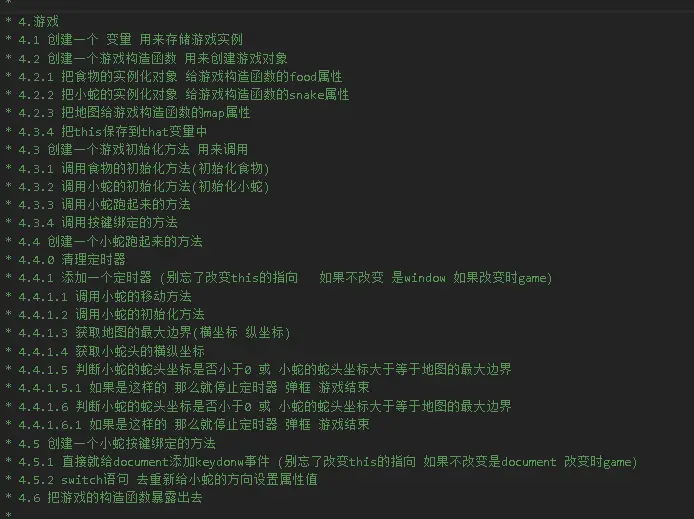
// 游戏
(function () {
// 创建一个 变量 用来存储游戏实例
var that = null;
// 创建小蛇构造函数
function Game(map) {
// 实例化食物
this.food = new Food();
// 实例化小蛇
this.snake = new Snake();
// 把地图给游戏构造函数的map属性
this.map = map;
// 把this储存到that变量中
that = this;
}
// 初始化游戏
Game.prototype.init = function () {
// 初始化食物
this.food.init(this.map);
// 初始化小蛇
this.snake.init(this.map);
// 初始化蛇跑起来的方法
this.runsnake(this.map, this.food);
// 调用键值方法
this.bindkey();
}
// 创建蛇跑起来的方方法
Game.prototype.runsnake = function (map, food) {
// 创建定时器 注意:此处需要改变this指向
var timeId = setInterval(function () {
// 调用小时移动f方法
this.snake.move(map, food);
// 调用小蛇初始化方法
this.snake.init(map);
// 获取地图最大边界
var maxX = map.offsetWidth / this.width;
var maxY = map.offsetHeight / this.height;
// 获取蛇头坐标
var headx = this.snake.body[0].x;
var heady = this.snake.body[0].y;
// 判断蛇头是否碰到地图的横向边界
if (headx < 0 || headx >= maxX) {
clearInterval(timeId);
alert("再见")
}
// 判断舌头是否碰到地图纵向最大边界
if (heady < 0 || heady >= maxY) {
clearInterval(timeId);
alert("再见")
}
}.bind(that), 200)
// 创建小蛇按键方法
Game.prototype.bindkey = function () {
// 直接给document添加keydonw事件 注意此处也要改变this指向
document.addEventListener("keydown", function (e) {
// 重新给小蛇的方向属性赋值
switch (e.keyCode) {
case 37: this.snake.fx = "left"; break;
case 38: this.snake.fx = "top"; break;
case 39: this.snake.fx = "right"; break;
case 40: this.snake.fx = "bottom"; break;
}
}.bind(that), false)
}
};
// 暴露游戏
window.Game = Game;
}());
var game = new Game(map);
game.init()
</script>
</body>
</html>