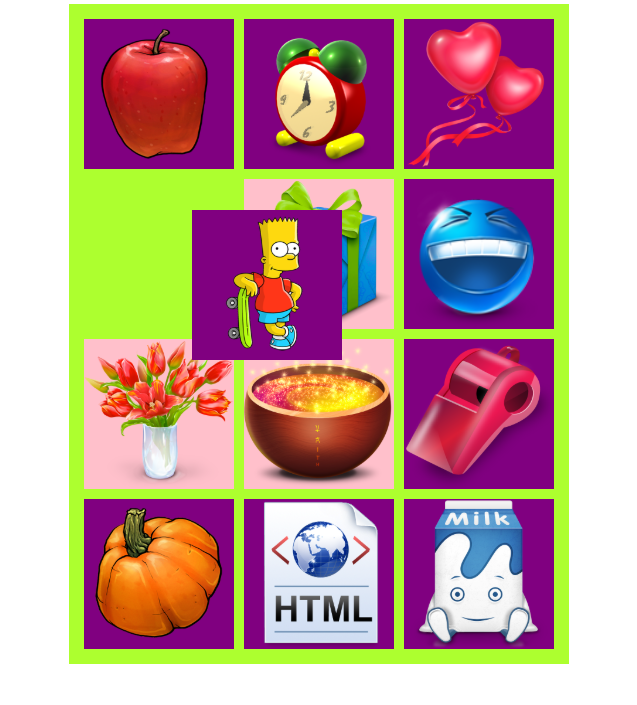
html,css,js
<!DOCTYPE html>
<html lang="en">
<head>
    <meta charset="UTF-8">
    <title>Title</title>
    <style>
       *{
           margin: 0;
           padding: 0;
       }
        ul{
            list-style: none;
            width: 480px;
            height: 640px;
            margin: 10px auto;
            background: greenyellow;
            padding: 10px;
            position: relative;//拖的是li
        }
        ul li{
            float: left;
            width: 150px;
            height: 150px;
            background:purple;
            margin: 5px;
        }
        ul li img{
            width:100%;
            height:100%;
            -webkit-user-select: none;
            -moz-user-select: none;
            -ms-user-select: none;
            user-select: none;
            cursor: move;
            pointer-events: none;
        }
    </style>
</head>
<body>
<ul>
    <li><img src="img/1.png" alt=""></li>
    <li><img src="img/2.png" alt=""></li>
    <li><img src="img/3.png" alt=""></li>
    <li><img src="img/4.png" alt=""></li>
    <li><img src="img/5.png" alt=""></li>
    <li><img src="img/6.png" alt=""></li>
    <li><img src="img/7.png" alt=""></li>
    <li><img src="img/8.png" alt=""></li>
    <li><img src="img/9.png" alt=""></li>
    <li><img src="img/10.png" alt=""></li>
    <li><img src="img/11.png" alt=""></li>
    <li><img src="img/12.png" alt=""></li>
</ul>
<script src="event.js"></script>
<script>
    var oLis=document.getElementsByTagName('li');
    //循环所有的li,加position属性
    for(var i=oLis.length-1;i>=0;i--){
        oLis[i].style.left=oLis[i].offsetLeft+'px';
        oLis[i].style.top=oLis[i].offsetTop+'px';
        oLis[i].style.position='absolute';
        oLis[i].style.margin='0px';
        new Drag(oLis[i]).add("selfdown",changezIndex).add("selfmove",isHit).add('selfup',change)
    }
    //给onmousedown的那张的图片,添加层级
    var zIndex = 0;
    function changezIndex(){
        this.ele.style.zIndex = ++zIndex;
        //console.log(this);//指向Drag的实例
    }
    //碰撞
    function isHit(){
        //进行碰撞的检测;
        //this.ele->代表当前拖拽的li
        //console.log(this);//此处的this是Drag的实例
        var curLi=this.ele;
        this['hit']=[];//this是Drag的实例,this.ele代表当前拖拽的li,给Drag的实例新增属性['hit']=this.ele,定义空数组,存储碰撞的元素
        for(var i=0;i<oLis.length;i++){
            if(curLi===oLis[i])continue;//当前移动的那个curLi,和循环到的oLis[i]是一样的话,就说明是一张图片,什么都不能做,然后用continue结束本轮循环,进行下一轮循环
            if(curLi.offsetTop+ curLi.offsetHeight<oLis[i].offsetTop || curLi.offsetLeft+curLi.offsetWidth<oLis[i].offsetLeft||curLi.offsetTop>oLis[i].offsetTop+oLis[i].offsetHeight ||curLi.offsetLeft>oLis[i].offsetLeft+oLis[i].offsetWidth){
             //只有满足这其中的一个条件,说明这个li不碰撞
             //给不碰撞的样式清空
             oLis[i].style.background='';
            }else{
             //给碰撞的背景色加粉色
                oLis[i].style.background='pink';
                this['hit'].push(oLis[i]);
            }
        }
    }
    //交换位置
    function change() {
        var ary = this['hit'];
        for(var i=0;i<ary.length;i++){
            ary[i].distance = Math.pow(ary[i].offsetLeft-this.ele.offsetLeft,2)+Math.pow(ary[i].offsetTop-this.ele.offsetTop,2);
        }
        ary.sort(function (a,b) {
            return a.distance-b.distance;
        });
        if(ary.length){
            // 如果碰撞的数组不为空;
            this.ele.style.left = ary[0].style.left;//ary[0]是排序的斜边,斜边越小,占的面积越大,所以ary[0].style.left就是要交换的那个li,this.ele.style.left就是我移动的那个li
            this.ele.style.top = ary[0].style.top;
            ary[0].style.left = this["strL"]+"px";
            ary[0].style.top = this["strT"]+"px";
        }else{
            //跟任何li没碰上的情况下,就让移动的当前li回到初始位置
            this.ele.style.left = this["strL"]+"px";
            this.ele.style.top = this["strT"]+"px";
        }
//        isHit.call(this);
    }
</script>
</body>
</html>
event.js
function EventFire() {}
EventFire.prototype.add = function (type,fn) {
    // this --> 指向EventFire这个类的实例;
    if(!this[type]){
        this[type]= [];
    }
    for(var i=0;i<this[type].length;i++){
        if(fn===this[type][i]){
            return;
        }
    }
    this[type].push(fn);
    return this;

}
EventFire.prototype.fire = function (type) {
    var a = this[type];
    for(var i=0;i<a.length;i++){
        if(typeof a[i]==="function"){
            a[i].call(this);
        }
    }
}
EventFire.prototype.remove = function (type,fn) {
    var  a = this[type];
    for(var i=0;i<a.length;i++){
        if(fn===a[i]){
            a[i] = null;
        }
    }
}
Drag.prototype = new EventFire();
function Drag(ele) {
    this.ele = ele;
    this.ele.onmousedown = this.down.bind(this);
}
Drag.prototype.down = function (e) {
    e = e || window.event;
    this["strX"] = e.clientX;
    this["strY"] = e.clientY;
    this["strL"] = parseFloat(getComputedStyle(this.ele).left);
    this["strT"] = parseFloat(getComputedStyle(this.ele).top);
    document.onmousemove = this.move.bind(this);
    document.onmouseup = this.up.bind(this);
    this.fire('selfdown');
}
Drag.prototype.move = function (e) {
    var changeL = e.clientX - this["strX"];
    var changeT = e.clientY - this["strY"];
    this.ele.style.left = this["strL"]+ changeL + "px";
    this.ele.style.top = this["strT"]+ changeT + "px";
    this.fire('selfmove');
}
Drag.prototype.up = function () {
    document.onmousemove = null;
    document.onmouseup = null;
    this.fire('selfup');
    this.fire('selfmove');
}