

#1、创建SSH key
在shell里使用ssh-keygen -t rsa -C "your_email@youremail.com" (your_email@youremail.com为你的email,与github账号不发生关系);出现
Enter passphrase (empty for no passphrase):
Enter same passphrase again:
可以输入你在github上设置的密码,但每次git操作都必须输入密码,如果直接回车就不用了,生成公私钥成功:
Your identification has been saved in /home/you/.ssh/id_rsa.
Your public key has been saved in /home/you/.ssh/id_rsa.pub.
The key fingerprint is:
01:0f:f4:3b:ca:85:d6:17:a1:7d:f0:68:9d:f0:a2:db your_email@youremail.com
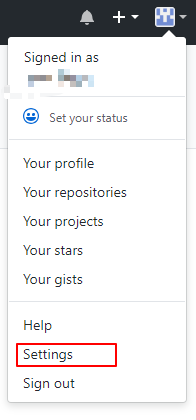
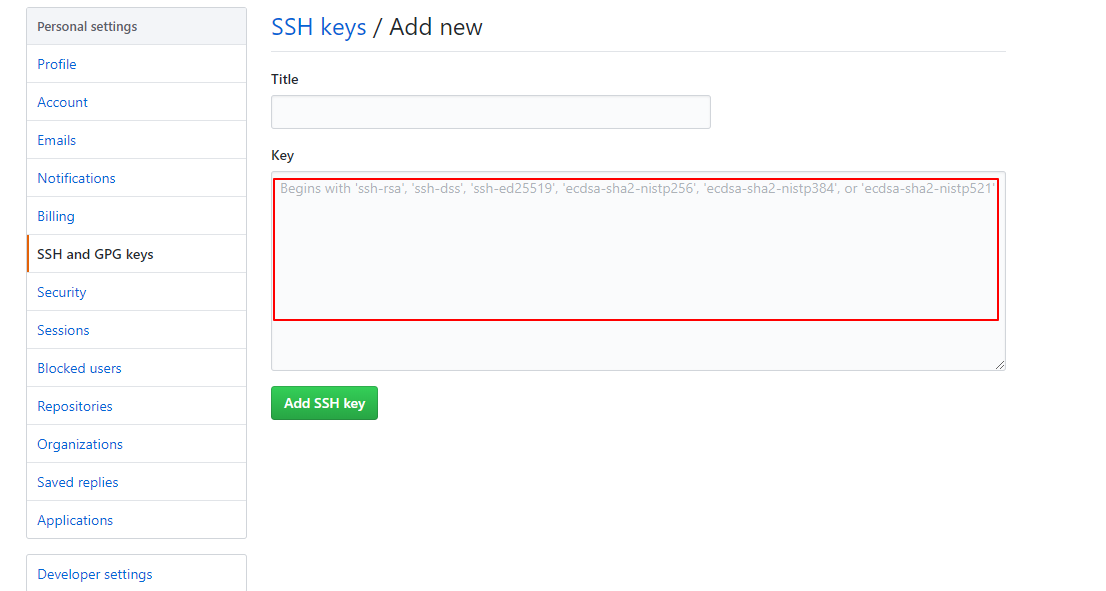
之后将/home/you/.ssh/id_rsa.pub里的内容复制到下面第二张图内
#2、测试是否生效
输入
ssh -T git@github.com当看到以下内容放入时候,直接yes
The authenticity of host 'github.com (207.97.227.239)' can't be established.

RSA key fingerprint is 16:27:ac:a5:76:28:2d:36:63:1b:56:4d:eb:df:a6:48.
Are you sure you want to continue connecting (yes/no)?看到这个内容放入时候,说明就成功了。

Hi username!

You've successfully authenticated, but GitHub does not provide shell access.
#3、上传本地项目到github
mkdir demo
cd demo
echo "# demo" >> README.md
git init //把这个目录变成Git可以管理的仓库
git add README.md //文件添加到仓库
git add . //不但可以跟单一文件,还可以跟通配符,更可以跟目录。一个点就把当前目录下所有未追踪的文件全部add了(空目录不会被添加)
git status //查看当前工作区的状态(需提交的变更)
git commit -m "first commit" //把文件提交到仓库
git remote add origin git@github/... //关联远程github仓库
git push -u origin master //将本地主分支推到远程(如无远程主分支则创建,用于初始化远程仓库)
git push origin master //将本地主分支推到远程主分支
下载操作:
git pull origin master //把远程库更改拉到本地仓库
git clone git@github/... //克隆远程仓库到本地
git clone https://github.com/... //克隆远程仓库到本地
git clone https://github.com/... //克隆远程仓库到本地
参考https://blog.csdn.net/hxf0663/article/details/79527453

