<!DOCTYPE html>
<html lang="en">
<head>
<meta charset="UTF-8">
<title>Title</title>
<style type="text/css">
*{
margin: 0;
padding: 0;
}
width:300px;
height:300px;
margin:100px auto;
background:deeppink;
position: relative;
}
width:50px;
height:50px;
background: yellow;
position: absolute;
}
</style>
</head>
<body>
<div id="box"></div>
<script>
var box = document.getElementById("box");
var mark;
// 1.创建小盒子
box.onmouseenter = function () {
mark = document.createElement("div");
mark.id = "mark";
box.appendChild(mark)
}
// 2. 根据鼠标移动的距离改变小盒子位置
box.onmousemove = function (e) {
console.log(e.target);
// offsetX : 当前鼠标的点距离当前事件源的左边框的距离;
//频闪: 当鼠标滑动过快,浏览器进行回流没有鼠标滑动那么快,导致鼠标划上了小盒子身上;同时触发了小盒子的onmousemove,由于存在事件冒泡传播;导致会继续触发box的onmousemove;这个时候的事件源已经变成了小盒子;所以计算出offsetX 偏小;
//console.log(e.offsetX);
mark.style.left =e.clientX-box.offsetLeft +"px";
mark.style.top =e.clientY-box.offsetTop +"px";
}
// 3. 让小盒子消失
box.onmouseleave = function () {
box.removeChild(mark)
}
</script>
</body>
</html>
附一张烂图
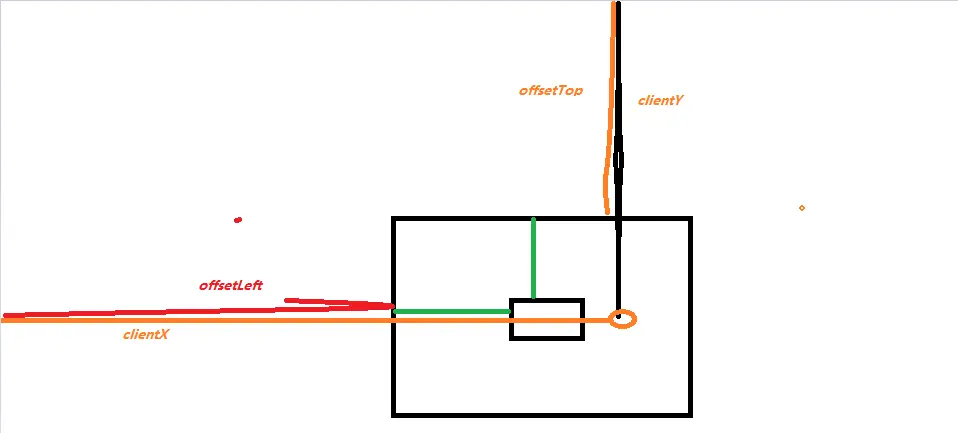
mark=e.clientX-box.offsetLeft+'px';//获取当前鼠标点击的那个点在盒子中的位置,附给mark这个小盒子(宽度),把获取的鼠标的那个位置给了小盒子,让小盒子有鼠标的操作
mark=e.clientY-box.offsetTop+'px';//获取当前鼠标点击的那个点在盒子中的位置,附给mark这个小盒子(高度),把获取的鼠标的那个位置给了小盒子,让小盒子有鼠标的操作
还有一种阻止mark这个小盒子冒泡的方法(写在代码中,方便以后查看)


