

标签解析
iframe标签,作用:嵌套链接(现在不常用,使用时操作会变迟钝)
写iframe,按tab键自动补全后,在""内输入网址,打开就能预览你输入的网址对应的网页了。
和a标签一起使用
<body>
  <iframe name=xxx src="http://baidu.com" frameborder="0"></iframe>
  <a target=xxx href="http://baidu.com">baidu</a>
</body>
a标签 跳转页面(HTTP GET 请求)
用法1
<body>
  <a href="http://qq.com" target="_blank"></a>
	在空的页面打开qq页面
  <a href="http://qq.com" target="_self"></a>
	在自己打开
  <a href="http://qq.com" target="_parent"></a>
	在父亲打开
  <a href="http://qq.com" target="_top"></a>
	在上面打开
</body>
这些不好形容,自己做一遍慢慢理解。
用法2
<body>
 <a href="http://qq.com" download>下载QQ</a>
</body>
点击链接会直接下载QQ,试一下。
用法3
<body>
 <a href="#xxx">QQ</a>
</body>
在本页直接打开
<body>
 <a href="//qq.com">QQ</a>
</body>
新页面打开
<body>
 <a href="./xxx.html">QQ</a>
</body>
<body>
 <a href="javascript:alert(1)">QQ</a>
</body>
<body>
 <a href="javascript:;">QQ</a>
</body>
点击链接不跳转 特殊情况会用到
form标签 跳转页面(HTTP POST 请求)
<body>
  <form action="x" method="POST">
    <input type="text" name="a">
    <input type="password" name="b">
    <input type="submit" class="c"> //几个input后面讲解
</body>
这样写能点提交,加入外面没用form标签,提交是点击不了的。

<body>
  <form action="x" method="GET" target="blank">
</body>
点提交会重开一个页面(现在只是简单模拟,所以提交会出现这样的字样:“This page isn't here :-(”  Don't care
button标签
<button>button</button> ///这样写按button会自动提交,没有写type,默认就是submit提交
<button type="button">button</button>  //按button不会自动提交,因为type=button。
<button type="submit">button</button>  //这样就可以提交
input标签 (select和textarea属于input)
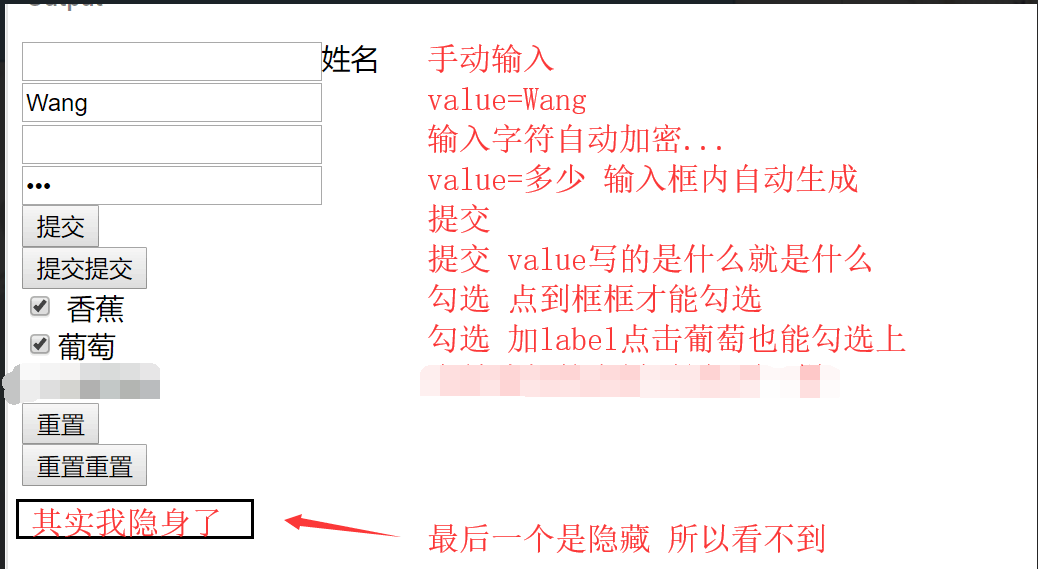
input的几个用法,结合下面的图and自己操作一下。
<body>
  <input type="text">姓名
  <input type="text" value="Wang">  //点击框才能输入
  <label><input type="text">姓名 </label> <br> //用label标签包裹,点击名字也可输入

  <input type="password">
  <input type="password" value="456">

  <input type="submit">
  <input type="submit" value="提交提交">

  <input type="checkbox">香蕉 //单选
  <input type="checkbox" id= "xxx"><label for= "xxx">葡萄</label> //注意这个要id="xxx" type= value=都不行
  <input type="checkbox" name="fruits" value="banana">香蕉 <br>


  <input type="radio"> 选中我
  <label><input type="radio" name="水果" value="banaba">香蕉</label>
  <label><input type="radio" name="水果" value="grape">葡萄</label> //name同设为一个值,只能是单选,图二


  <input type="reset">
  <input type="reset" value="重置重置">

  <input type="hidden" name="abc" value="123">
</body>
图一
图二

select标签
<body>
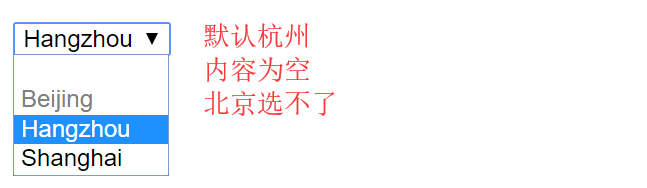
  <select name="citys" id="#">
    <option value=""></option> //没有值
    <option value="Beijing" disabled>Beijing</option> //disabled不可选择
    <option value="Hangzhou" selected>Hangzhou</option> //默认选择
    <option value="Shanghai">Shanghai</option>
  </select>
</body>
图三
图三
textarea标签
<body>
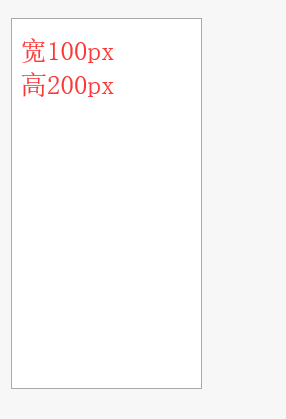
  <textarea style="resize:none; width: 100px; height: 200px;" name="cat"></textarea>
<body>
图四
table标签
<table>
   <thead>
    <tr>
      <th></th><th>姓名</th><th>班级</th><th>分数</th>
    </tr>
   </thead>
  <tbody>
    <tr>
      <th></th><td>张三</td><td>2</td><td>98</td>
    </tr>
  </tbody>
  <tfoot>
    <tr>
      <th></th><td>李四</td><td>2</td><td>96</td>
    </tr>

    <th></th></td><td>王二</td><td>2</td><td>93</td>
  </tfoot>
</table>
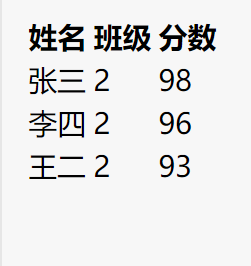
table thead tfoot 每个里面都可以有th就是表格的标题,图中加粗的部分。td就是不加粗部分。这个真得多琢磨。智商不够。
图五
一定要自己写试试 一定要自己写试试 一定要自己写试试
