Spring Cloud Eureka
Eureka是Netflix公司开源的服务发现组件,改组件提供的服务发现可以负载均衡,failover等支持。Eureka是针对AWS本页提供中间服务层的负载均衡的限制而设置开发的。
为什么选择Eureka
AWS Elastic Load Balancer用来对客户段或者终端设备请求进行负载君和,而Eureka用来对中间层的服务做负载均衡。AWS Elastic Load Balancer是基于传统的代理的负载均衡的方式(暴露外网,存在安全性问题),无法使用元数制定定负载均衡泛,因此设置Eureka结合Ribbon组件实现负载均衡,AWS Route 53是一款命名服务,可以结合中间层的服务提供服务发现的功能,但是他是基于DNS的服务,传统的基于DNS的负载均衡技术村子啊缓存更新延迟的问题,因而涉及了Eureka
服务发现技术选型
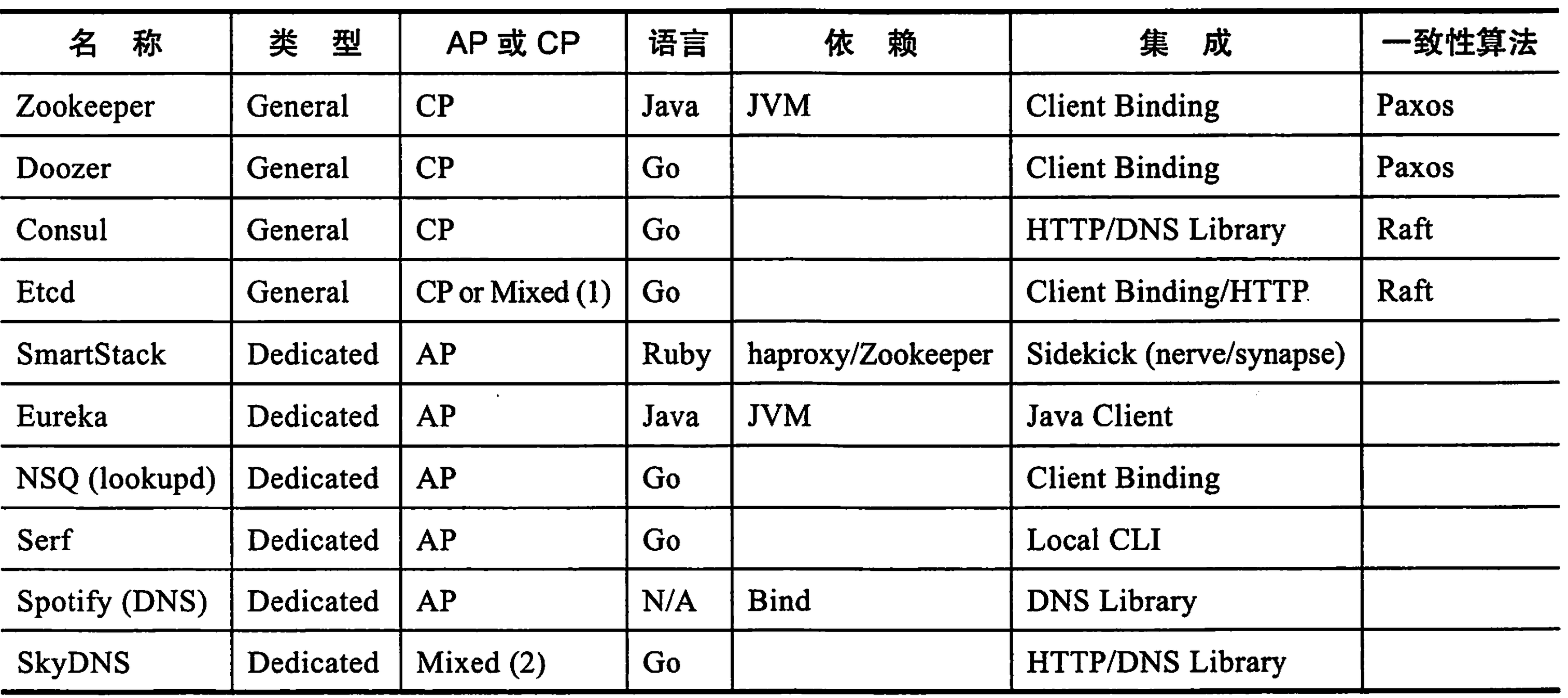
为什么选择了Eureka
- 还是在AP在性能上优于CP
- Eureka是JAVA体系的,出现问题可以很好的排查。
- Eureka是NetflixOSS的一部分,和zuul,Ribbon等组件很好结合.
例子: 公共的pom.xml:
    <parent>
        <groupId>org.springframework.boot</groupId>
        <artifactId>spring-boot-starter-parent</artifactId>
        <version>2.0.3.RELEASE</version>
        <relativePath/> <!-- lookup parent from repository -->
    </parent>

    <modules>
        <module>Chapter2</module>
    </modules>
    <properties>
        <project.build.sourceEncoding>UTF-8</project.build.sourceEncoding>
        <project.reporting.outputEncoding>UTF-8</project.reporting.outputEncoding>
        <java.version>1.8</java.version>
        <spring-cloud.version>Finchley.RELEASE</spring-cloud.version>
    </properties>

    <dependencyManagement>
        <dependencies>
            <dependency>
                <groupId>org.springframework.cloud</groupId>
                <artifactId>spring-cloud-dependencies</artifactId>
                <version>${spring-cloud.version}</version>
                <type>pom</type>
                <scope>import</scope>
            </dependency>
        </dependencies>
    </dependencyManagement>

    <dependencies>
        <dependency>
            <groupId>org.springframework.boot</groupId>
            <artifactId>spring-boot-starter-web</artifactId>
        </dependency>

        <dependency>
            <groupId>org.springframework.boot</groupId>
            <artifactId>spring-boot-starter-test</artifactId>
            <scope>test</scope>
        </dependency>
    </dependencies>

    <repositories>
        <repository>
            <id>spring-snapshots</id>
            <name>Spring Snapshots</name>
            <url>https://repo.spring.io/snapshot</url>
            <snapshots>
                <enabled>true</enabled>
            </snapshots>
        </repository>
        <repository>
            <id>spring-milestones</id>
            <name>Spring Milestones</name>
            <url>https://repo.spring.io/milestone</url>
            <snapshots>
                <enabled>true</enabled>
            </snapshots>
        </repository>
    </repositories>

    <pluginRepositories>
        <pluginRepository>
            <id>spring-snapshots</id>
            <name>Spring Snapshots</name>
            <url>https://repo.spring.io/snapshot</url>
            <snapshots>
                <enabled>true</enabled>
            </snapshots>
        </pluginRepository>
        <pluginRepository>
            <id>spring-milestones</id>
            <name>Spring Milestones</name>
            <url>https://repo.spring.io/milestone</url>
            <snapshots>
                <enabled>true</enabled>
            </snapshots>
        </pluginRepository>
    </pluginRepositories>

    <build>
        <plugins>
            <plugin>
                <groupId>org.springframework.boot</groupId>
                <artifactId>spring-boot-maven-plugin</artifactId>
            </plugin>
        </plugins>
    </build>
Eureka-Server:
pom.xml
<parent>
        <groupId>RedefinitionDemo</groupId>
        <artifactId>Chapter2</artifactId>
        <version>1.0-SNAPSHOT</version>
    </parent>

    <dependencies>
        <dependency>
            <groupId>org.springframework.cloud</groupId>
            <artifactId>spring-cloud-starter-netflix-eureka-server</artifactId>
        </dependency>
    </dependencies>

    <build>
        <plugins>
            <plugin>
                <groupId>org.springframework.boot</groupId>
                <artifactId>spring-boot-maven-plugin</artifactId>
            </plugin>
        </plugins>
    </build>
application.yml
spring:
  application:
    #如果不知道名字,回在注册中心显示UNKOWN
    name: eureka-server

server:
  port: 8081
eureka:
  instance:
    hostname: localhost
  client:
    #不需要将自己注册到注册中心
    registerWithEureka: false
    #由于自己就是服务器,不需要从服务器获取注册信息
    fetchRegistry: false
    serviceUrl:
      defaultZone: http://${eureka.instance.hostname}:${server.port}/eureka/
  server:
      #在Eureka服务器获取不到集群里对等服务器上的实例时,需要等待的时间,单位为毫秒,默认为1000 * 60 * 5
      waitTimeInMsWhenSyncEmpty: 0
      #表示在此eureka服务器中关闭自我保护模式
      enableSelfPreservation: false
EurekaServerApplication.java
@SpringBootApplication
@EnableEurekaServer
public class EurekaServerApplication {

    public static void main(String[] args) {
        SpringApplication.run(EurekaServerApplication.class,args);
    }
}
Eureka-client
pom.xml
    <parent>
        <groupId>RedefinitionDemo</groupId>
        <artifactId>Chapter2</artifactId>
        <version>1.0-SNAPSHOT</version>
    </parent>
    <dependencies>
        <dependency>
            <groupId>org.springframework.cloud</groupId>
            <artifactId>spring-cloud-starter-netflix-eureka-client</artifactId>
        </dependency>
    </dependencies>

    <build>
        <plugins>
            <plugin>
                <groupId>org.springframework.boot</groupId>
                <artifactId>spring-boot-maven-plugin</artifactId>
            </plugin>
        </plugins>
    </build>
application.yml
spring:
  application:
   #如果不知道名字,回在注册中心显示UNKOWN
    name: eureka-client
server:
  port: 8082
eureka:
  client:
    service-url:
      defaultZone: http://localhost:8081/eureka/
EurekaClientApplication.java
@SpringBootApplication
@EnableDiscoveryClient
public class EurekaClientApplication {
    public static void main(String[] args) {
        SpringApplication.run(EurekaClientApplication.class, args);
    }
}
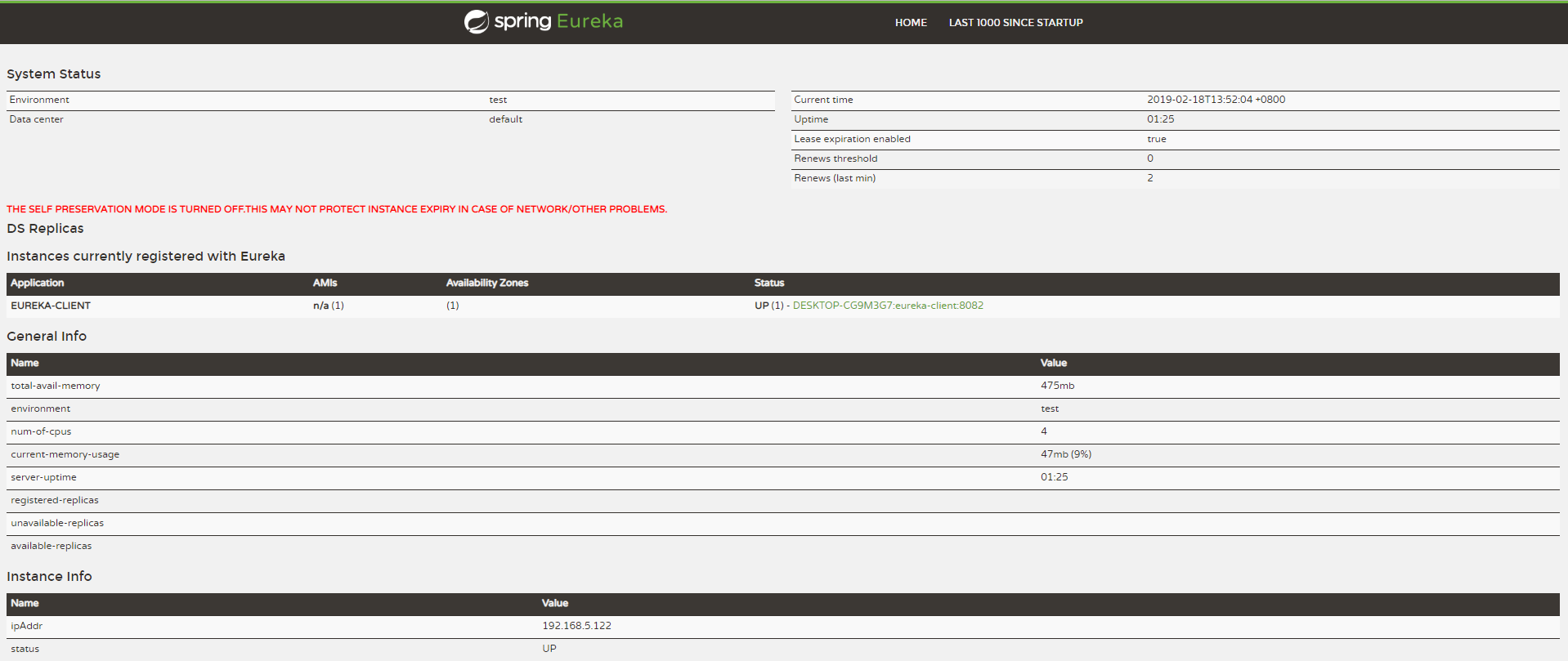
在浏览器输入http://localhost:8081/,可以看到如下图所示的情况的。
REST API请求列表
Eureka对外提供了REST API,允许非Java语言的其他应用服务可以通过HTTP RESR的方式介入Eureka的服务发现中。
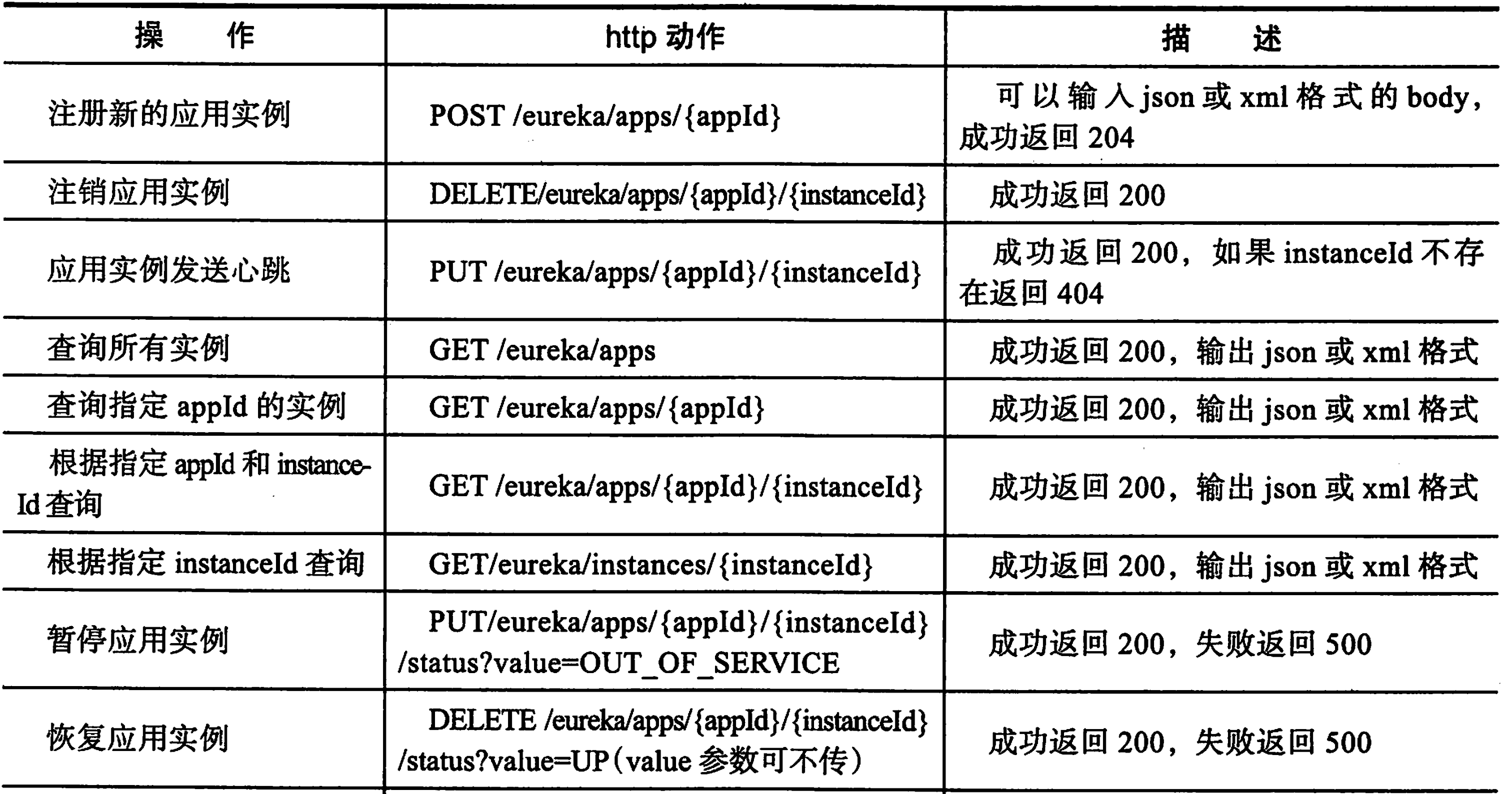
向Eureka注册服务实例
curl -i -H "Content-Type: application/json" -H "Accept-Encoding: gzip" -X POST -d '{ "instance": { "instanceId": "test1", "app": "test-service", "appGroupName": null, "ipAddr": "127.0.0.1", "sid": "na", "homePageUrl": null, "statusPageUrl": null, "healthCheckUrl": null, "secureHealthCheckUrl": null, "vipAddress": "test-service", "secureVipAddress": "test-service", "countryId": 1, "dataCenterInfo": { "@class": "com.netflix.appinfo.InstanceInfo$DefaultDataCenterInfo", "name": "MyOwn" }, "hostName": "127.0.0.1", "status": "UP", "leaseInfo": null, "isCoordinatingDiscoveryServer": false, "lastUpdatedTimestamp": 1525661162147, }' http://localhost:9999/eureka/apps/test-service
下线一个服务实例
curl -i -X PUT http://localhost:9999/eureka/apps/test1/test-service/status?value=OUT_OF_SERVICE
剔除一个服务
curl -i -X DELETE http://localhost:9999/eureka/apps/test-service/test1