使用 jQuery 实现一个选项卡效果。
这个插件可以实现三种选项卡效果:
- 鼠标点击切换。
- 鼠标移入切换,(这种方式可以给切换导航添加链接地址)。
- 自动切换。
效果图:
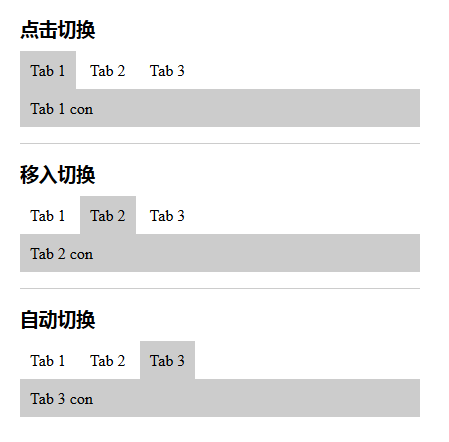
在线预览:jquery_LTabs
兼容性:

HTML
<!DOCTYPE html>
<html lang="en">

<head>
    <meta charset="UTF-8">
    <title>jQuery_选项卡效果</title>
</head>

<body style=" max-width: 400px; margin: 0 auto; padding: 20px; ">

<h3>点击切换</h3>
<div class="tabs_box demo01">
    <div class="tabs_tit">
        <a href="" class="t_nav">Tab 1</a>
        <a href="" class="t_nav">Tab 2</a>
        <a href="" class="t_nav">Tab 3</a>
    </div>
    <div class="tabs_con">
        <div class="tcon_li">Tab 1 con</div>
        <div class="tcon_li">Tab 2 con</div>
        <div class="tcon_li">Tab 3 con</div>
    </div>
</div>

<hr>

<h3>移入切换</h3>
<div class="tabs_box demo02">
    <div class="tabs_tit">
        <a href="" class="t_nav">Tab 1</a>
        <a href="" class="t_nav">Tab 2</a>
        <a href="" class="t_nav">Tab 3</a>
    </div>
    <div class="tabs_con">
        <div class="tcon_li">Tab 1 con</div>
        <div class="tcon_li">Tab 2 con</div>
        <div class="tcon_li">Tab 3 con</div>
    </div>
</div>

<hr>

<h3>自动切换</h3>
<div class="tabs_box demo03">
    <div class="tabs_tit">
        <a href="" class="t_nav">Tab 1</a>
        <a href="" class="t_nav">Tab 2</a>
        <a href="" class="t_nav">Tab 3</a>
    </div>
    <div class="tabs_con">
        <div class="tcon_li">Tab 1 con</div>
        <div class="tcon_li">Tab 2 con</div>
        <div class="tcon_li">Tab 3 con</div>
    </div>
</div>
<style>
* { margin: 0; padding: 0; }
hr { display: block; height: 1px; margin: 1em 0; padding: 0; border: 0; border-top: 1px solid #ccc; }
a { text-decoration: none; outline: none; }
h3 { margin-bottom: 10px; }
.t_nav { display: inline-block; padding: 10px; color: #000; background-color: #fff; }
.t_nav.active { background-color: #ccc; }
.tabs_con { padding: 10px; background-color: #ccc; }
.tcon_li { display: none; }
</style>
<script src="jquery-1.8.3.min.js"></script>
<script src="jquery_LTabs.js"></script>
<script>
$(function() {
    // 点击切换
    $(".demo01").LTabs();

    // 鼠标移入切换
    $(".demo02").LTabs("mouseover");

    // 自动切换
    $(".demo03").LTabs();
    setInterval(function() {
        var active_index = $(".demo03 .t_nav").index($(".demo03 .t_nav.active"));
        active_index++;
        if (active_index == 3) {
            active_index = 0;
        };
        $(".demo03 .t_nav").eq(active_index).click();
    }, 2000);
});
</script>

</body>

</html>
封装的 js 插件文件
jquery_LTabs.js
/**
 * Title: LTabs
 * Description: plugin
 * Author: LiuZhenghe
 * Date: 2018-11-12
 */

(function($) {
    // What does the LTabs plugin do?
    $.fn.LTabs = function(tabStyle, options) {
        if (!this.length) {
            return this;
        }
        var opts = $.extend(true, {}, $.fn.LTabs.defaults, options);

        this.each(function() {
            var $this = $(this);
            var tabs_tit = $(this).find('.tabs_tit');
            var tabs_tit_nav = $(this).find('.tabs_tit .t_nav');
            var tabs_con = $(this).find('.tabs_con');
            var tcon_li = $(this).find('.tabs_con .tcon_li');

            // 初始化样式
            $(tabs_tit_nav).eq(0).addClass('active');
            $(tcon_li).eq(0).css('display', 'block');

            // 点击切换
            // 当不传参时默认为点击切换。
            if (tabStyle == "" || tabStyle == null) {
                $(tabs_tit_nav).click(function(event) {
                    event.preventDefault();
                    $(this).addClass('active').siblings().removeClass('active');
                    var a_index = $(this).index();
                    $(tcon_li).eq(a_index).css('display', 'block');
                    $(tcon_li).eq(a_index).siblings().css('display', 'none');
                });
            };

            // 鼠标移入切换
            // 当传入 mouseover 时为鼠标移入事件。
            if (tabStyle == "mouseover") {
                $(tabs_tit_nav).mouseover(function(event) {
                    $(this).addClass('active').siblings().removeClass('active');
                    var a_index = $(this).index();
                    $(tcon_li).eq(a_index).css('display', 'block');
                    $(tcon_li).eq(a_index).siblings().css('display', 'none');
                });
            };


        });

        return this;

    };

    // default options
    $.fn.LTabs.defaults = {
        tabStyle: null,
        autoPlay: null
    };

})(jQuery);