Prompt
用于离开当前页面的自定义提醒,
message:提示内容
when: true||false,表示触发条件,
Redirect
重定位
to:string 表示要到达的位置。
to: object 表示要到达的位置并携带参数。
push: bool 表示将如果为true,重定向将把新条目推送到历史记录而不是替换当前的条目。 例如:我们从'/one'重定向到'/two',在我们的历史记录里是有/one这条记录的,但是我们如果使用push:false的话就没有这条关于one的记录了。
from: string 表示跳转的出发点。
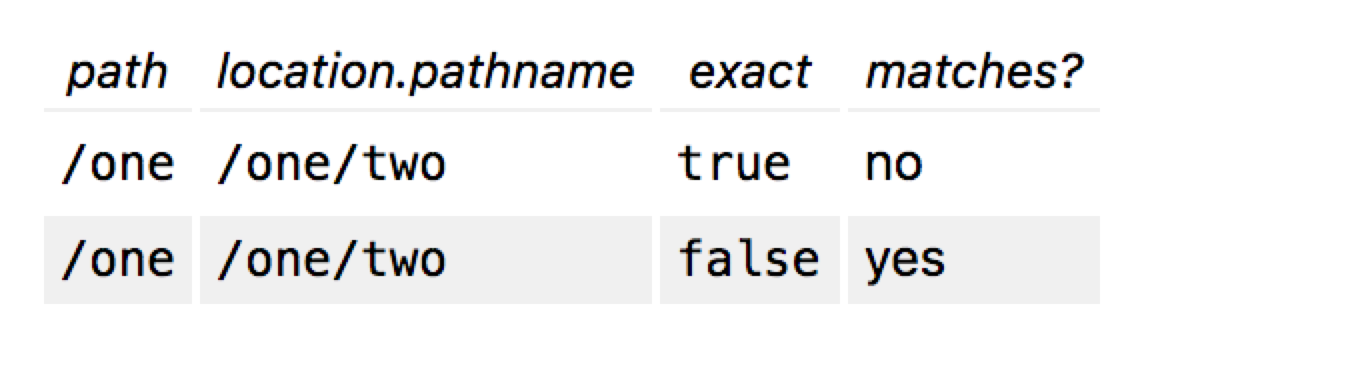
exact: bool 表示严格匹配,当完全匹配的时候才跳转到相应的位置。
我的理解是和from的值对应,且location.pathname的值没有子路由便满足条件。
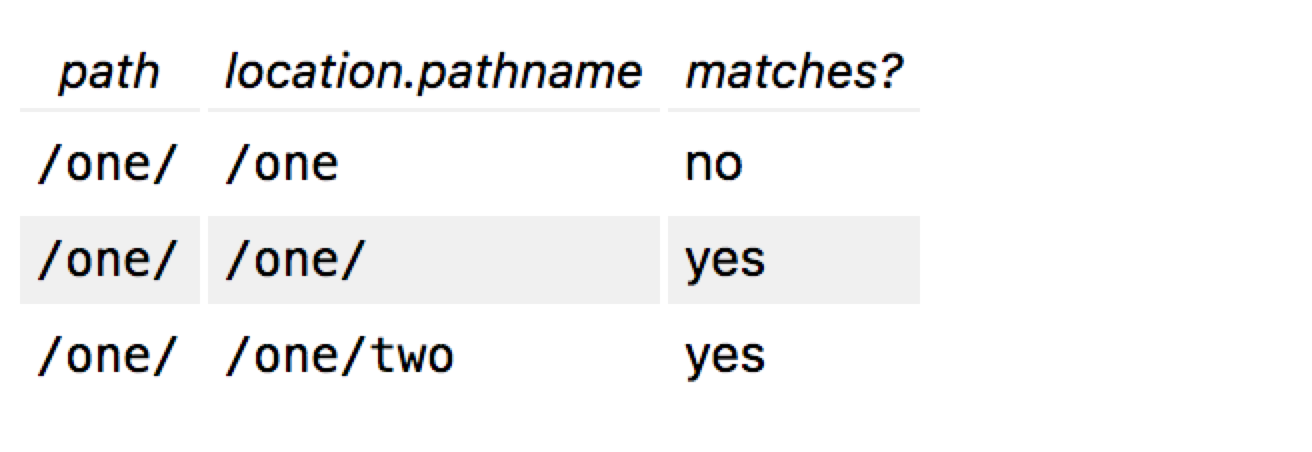
strict: bool 表示另一种匹配模式
我的理解是当location.pathname的路由分级和path严格相等便满足条件。
如果exact和strict都设置为true,则表示location.pathname和path得完全相同。
才满足条件。
Route
这是react路由的核心,其中Route有三种方式来渲染组件,分别是render、component和children。
render、component
首先,我们对比render和component。
当我们使用component属性时,router会调用React.createElement利用给的组件创造一个新的react元素。所以当component写成内联形式时,当状态发生改变时,react.createELement都会重新创建一个新的元素替代老的元素,这是这个内联方法会重新执行。
举个例子
import React from "react";
import { BrowserRouter as Router, Route, Link,Switch } from "react-router-dom";
class Test extends React.Component {
    componentDidMount(...other) {
        console.log('TestcomponentDidMount',other)
    }
    render() {
        console.log('test')
        return <div>测试测试</div>
    }
}
class Two extends React.Component {
    componentDidMount(...other) {
        console.log('twocomponentDidMount',other)
    }
    render() {
        console.log('Two')
    return <h3>Two</h3>
    }
}
class PreventingTransitionsExample  extends React.Component {
    constructor(props) {
        super(props)
        this.state = {
            index:0
        }
    }
    render() {
        return (
            <Router>
              <div>
                <button onClick={()=>{
                 this.setState({
                    index:this.state.index+1
                  })
                }}>点击增加</button>
                <div>{this.state.index}</div>
                <ul>
                  <li>
                    <Link to="/two">Two</Link>
                  </li>
                  <li>
                    <Link to="/test">test</Link>
                  </li>
                </ul>
                <Switch>
                        <Route path="/two" render={()=><Two/>} />
                        <Route path="/test" component={Test} />
                </Switch>

              </div>
            </Router>
          )
    }
}
export default PreventingTransitionsExample;
在这个例子中,当<Route path="/test" component={Test} />这样写的时候,Test组件的componentDidMount并不会因为状态变化而执行。 <Route path="/test" component={()=>} />当这样写的话,当状态发生改变的时候componentDidMount`也会执行。
当我们用render时<Route path="/test" render={()=><Test/>} />,Test组件的componentDidMount并不会因为状态变化而执行。这样我们就很清楚了他们的区别了,这也很清楚,当我们需要向自组件传参的时候,我们可以用 render,因为它有更好的性能。
children
使用children时,无论路径匹配都会渲染组件,如果pathname和path相同,则children的回调函数会传入不为null的对象,当然这个放在<Switch>下时不行的。