

How to use a website to enhance your voice application


Many of the most engaging smart speaker applications extend beyond the smart speaker itself. When in Rome is an example of an Alexa game that combines voice with a traditional board game. Users navigate the globe sending voice commands to Alexa. Alexa asks questions from people in the countries players visit. But it also plays like a board game, with a physical playing board, tokens, and cards that can be used to upgrade the gaming experience.
While creating a physical component to enhance your voice application may be an extreme example, there are many instances where it makes sense to enhance your voice application with a complimentary website.
A website is a convenient way to allow users to provide more detailed entry than they can through voice. Suppose you want to create a voice first experience to let users find the perfect bottle of wine in their collection to pair with their meal. Voice is a great way to narrow down selections in a conversation. Entering the initial list of wines via voice would be a poor user experience. A companion website would be a better option.
If you have a service like a personal wine collection, you’ll want to provide a level of authentication for the user so they know their list is secure. In this scenario, you’ll want to use account linking. This allows an Alexa user to associate your skill with their wine collection account.
However, account linking is a bit tricky to implement, requiring you to have an OAuth2 authentication solution. More problematic, it requires the user to establish the link via either the Alexa companion application or the Amazon website. This imposes some friction in the customer flow. Developers have reported drops of more than half of their customer base when imposing account linking to access functionality.
But what if you don’t need to manage sensitive information from your website? Perhaps you have a multi-player game and only need a way to pair players for a match. An alternative approach is to issue a token from your skill, where you read a short alphanumeric sequence like “AB67.” The user can then enter that sequence into a web form. You can coordinate the issuance of tokens across users with a central service. When multiple users enter the same token, create the association back in the skill. This eliminates the friction for adoption and is simpler to implement.
In this post, I’ll demonstrate how you can use this approach within your skill.
Short Code Association
The general approach is to associate the Alexa User ID with a token. The token can either be a hash of the User ID or generated by a service to ensure uniqueness.
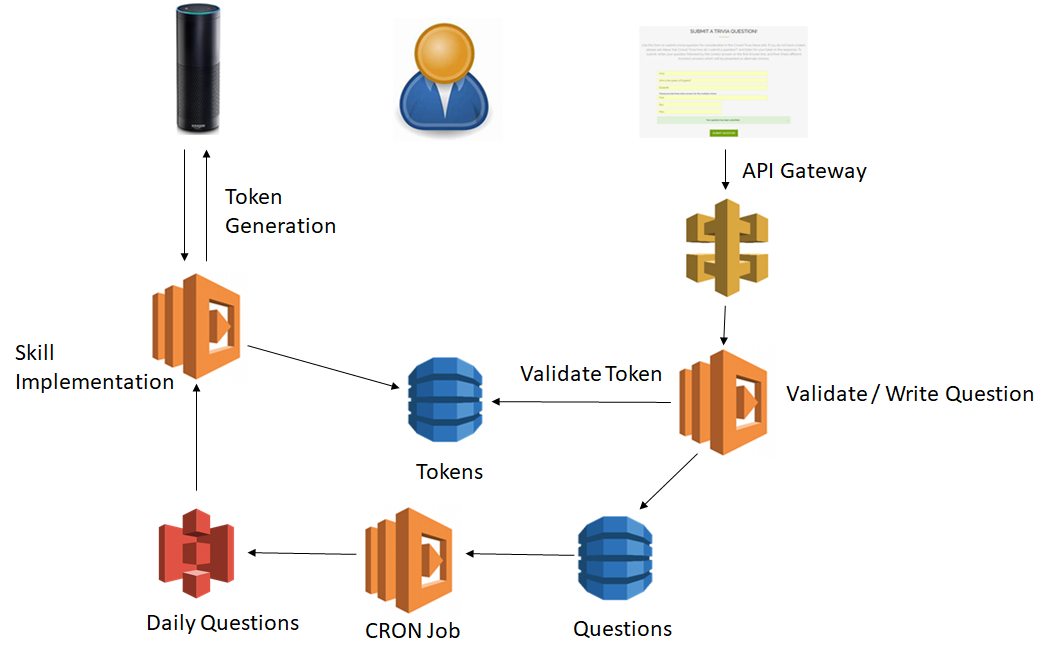
This example demonstrates a crowd-sourced trivia question skill. In this skill, users are presented questions that were supplied by other users. Capturing questions and multiple-choice answers would be difficult to do via voice. So I built a companion website. I want to make sure that a user doesn’t hear their own submitted questions, but otherwise, don’t need to associate questions with a user. In other words, while I need to generate a consistent token from a User ID, it doesn’t have to be a unique mapping. If I did need to have a unique mapping, I might instead have created an EC2 instance that manages the lookup and generation of codes.
Thinking back to the multi-player game matching example, you could imagine the skill first checking the Tokens database to see if there was a recently issued token that had not yet been paired with another player, and issuing that as a way to join another player.
Skill Code
Within the skill, I want to generate a token. I decided to use a system of two characters followed by a two-digit number between 10 and 99. Using the seedrandom library, I can do this based on the User ID via the following typescript code:
function generateToken(handlerInput : HandlerInput) : string { const attributes = handlerInput.attributesManager.getSessionAttributes(); // Generate a token from the userID // It's OK if this isn't globally unique since it's only used to // ensure you don't hear your own submitted questions // Format is two characters and a number from 10-99 const randomChar1 = seedrandom(handlerInput.requestEnvelope.session.user.userId)(); const randomChar2 = seedrandom('1' + handlerInput.requestEnvelope.session.user.userId)(); const randomValue = seedrandom('2' + handlerInput.requestEnvelope.session.user.userId)(); let firstChar = Math.floor(randomChar1 * 26); if (firstChar === 26) { firstChar--; } let secondChar = Math.floor(randomChar2 * 26); if (secondChar === 26) { secondChar--; } let value = Math.floor(randomValue * 90); if (value === 90) { value--; } return String.fromCharCode(65 + firstChar) + String.fromCharCode(65 + secondChar) + String(value + 10);}Once I have a token, I write that token out to a Token database, so that I can later check if it’s a valid token. For analytics purposes, I also want to know how many times a given token has been issued. I increment a counter in the database when the token is presented to the user.
handle(handlerInput : HandlerInput) : Promise<Response> { const token = generateToken(handlerInput); // Record issuance of this token const params = { TableName: 'Tokens', Key: {token: token}, AttributeUpdates: {issued: { Action: 'ADD', Value: 1, }}, };let speech = 'Visit out website to enter a question, using the code {Token}'; speech = speech.replace('{Token}', token);return doc.update(params).promise().then((data) => { speechParams['Code'] = token; return handlerInput.responseBuilder .speak(speech) .reprompt('Visit our website to enter a question') .withSimpleCard('Trivia Game', speech) .getResponse(); });},This same token is used when processing the list of daily questions from S3 to make sure that we don’t present the user with their own questions. This list is generated daily from our Questions database via a Lambda function. It has enough entries so users get a full list of questions even if some are removed.
Website Code
The website in this example consists of a simple webform that makes an AJAX request. The AJAX request passes thru API Gateway into a Lambda function. This Lambda function does two things. First, it reads from the Token database to determine whether the received token is valid. In my case, I do this with the following code:
// Is token valid? Check the Token DB to seeconst params = { TableName: 'Tokens', Key: {token: token},};return doc.get(params).promise().then((data) => { if (!data.Item) { throw new Error("Invalid token"); }// Token exists - continue validation});Second, assuming that the token exists and all other fields are properly filled out, we then write the new question to our database.
This is a simple example. Hopefully it gives you a sense of the use cases you can unleash when you supplement the voice experience with another medium like a website. What use cases will you build with this method? Let me know in the comments!
