

1.clear 属性
clear属性规定元素的哪一侧不允许有其他元素浮动:left,right,both,默认:none
2. 兄弟元素设置 clear:both
    <style>        .wrap {            background-color: green;        }
        .fl {            float: left;        }    </style><body>    <div class="wrap">        <img class="fl" src="./test.png" />        <div style=" clear:both;margin-bottom:50px;">兄弟元素设置clear:both</div>    </div>    <p style="margin-top: 50px;">兄弟元素设置clear:both来清除浮动会有margin重叠现象</p></body>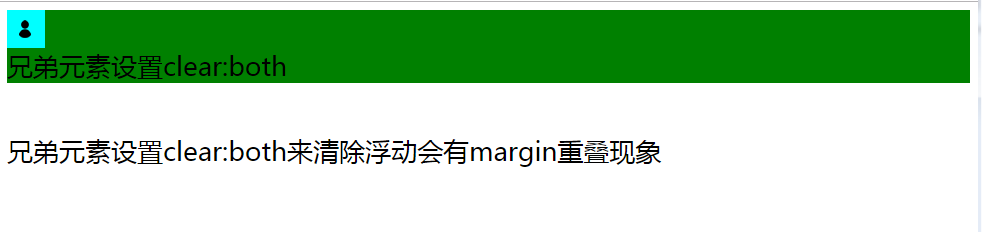
导致margin重叠,如上,margin-top与margin-bottom重叠,因为清除浮动元素和除浮动元素之外的其他元素处于同一个BFC。【下文会将BFC】
3. 父元素添加after伪元素
    <style>        .wrap {            background-color: green;        }
        .fl {            float: left;        }        .clearfix::before,        .clearfix::after {            content: ".";            display: block;            height: 0;            overflow: hidden;        }        .clearfix:after {            clear: both;        }    </style><body>    <div class="wrap clearfix">        <img class="fl" src="./test.png" />        <div>            父元素的::after伪元素并不是浮动元素【在这里是图片】的相邻的兄弟元素,就达不到清除浮动的效果父元素的::after伪元素并不是浮动元素【在这里是图片】的相邻的兄弟元素,就达不到清除浮动的效果父元素的::after伪元素并不是浮动元素【在这里是图片】的相邻的兄弟元素,就达不到清除浮动的效果        </div>    </div></body>
综上所述,清除浮动代码:
.clearfix:after{
content:"";
display:block;
height:0;
overflow:hidden;
clear:both;
}
BFC
BFC:块级格式化上下文。
以下元素会为其内容生成一个BFC:
- 浮动元素,即 float:left、right
- 绝对定位元素,即position:absolute,fixed
- 块容器,block containers,比如: block:iniline等
- 设置了除了visible外的overflow值的块盒子,即overflow:hidden,scroll,auto
BFC特性:
- 创建BFC的元素中,自浮动元素也会参与高度计算
- 与浮动元素相邻的,创建了BFC的元素,都不能与浮动语速互相覆盖
- 创建了BFC的元素不会与他们的子元素margin重叠
note:如果是在js中通过element.style设置元素浮动,就要用cssFloat,因为float是js的一个关键字。
浮动元素的破坏性:元素浮动之后可能导致复原不俗高度塌陷。(因为浮动元素被从正常流中溢出了,父元素还在正常流中,所以父元素不能被浮动元素撑大)
其他破坏性的属性:
- display:none
- position:absolute/fixed/sticky
css3中‘+’选择器表示某元素后相邻的兄弟元素,也就是紧挨着的没事单个的
而‘~’选择器则表示某元素后所有的同级的置顶元素,强调所有的。
