state状态
state中定义的数据可以动态改变。
小案例:【点击button调用state数据改变其状态】
1.在组件中调用this.state,定义likes为0,
constructor 是用于创建和初始化类中创建的一个对象的一种特殊方法。
调用super的原因:在ES6中,在子类的constructor中必须先调用super才能引用this
super(props)的目的:在constructor中可以使用this.props
constructor(props) {
super(props)
this.state = {
likes: 0
}
}2.在render中创建button,
用onClick={()=>this.increaseLikes()} } 为button绑定点击事件increaseLikes(),
注意:【1.绑定事件必须用驼峰式 2.()=>箭头函数是为了使用state中的this】,
在react中state里定义的数据是不能被直接this.拿去函数中用的,必须将this转出,
将this.state中的likes数据绑定在button上,也就是初始的0,
render(){
    return(
       <div className="likes-button-compoent">
           <button
               type="button"
               className="btn btn-outline-primary btn-lg"
               onClick={()=>{this.increaseLikes()}}
             >
               👍{this.state.likes}
           </button>
       </div>
    )
}将this转出还有一种方法:this.increaseLikes = this.increaseLikes.bind(this)
constructor(props) {
    super(props)
    this.state = {
        likes: 0
    }
    //this.increaseLikes = this.increaseLikes.bind(this)
}
3.定义click事件的逻辑
this.setState()是更新state的唯一途径
increaseLikes(){
    this.setState({
        likes:++this.state.likes
    })
}
最终效果

react生命周期
1.组件初始化
2.组件更新
3.组件卸载
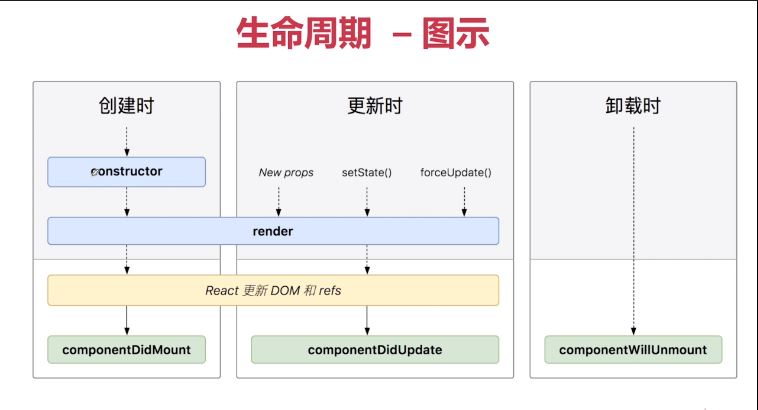
生命周期小案例:【电子钟表】
1.构造一个state,创建一条数据date:new Date()定义当前时间
constructor(props){
    super(props)
    this.state = {
        date: new Date()
    }
}
2.在render中创建视图,展示date数据,把 Date 对象的时间部分转换为字符串
render(){
    return(
        <div className="digital-clock-compoent jumbotron">
            <h1>{this.state.date.toLocaleTimeString()}</h1>
        </div>
    )
}
3.调用钩子函数componentDidMount() ,在第一次渲染后调用
在钩子函数内定义this.timer定时器,调用this.setState更新state中的内容,让date数据每秒刷新一次
componentDidMount(){
    this.timer = setInterval(()=>{
        this.setState({
            date: new Date()
        })
    },1000)
}
4.最后调用componentWillUnmount钩子函数,在组件从 DOM 中移除之前清除定时器。
componentWillUnmount(){
    clearInterval(this.timer)
}
最终效果