
微信公众号:深广大数据Club关注可了解更多的大数据相关资讯。问题或建议,请公众号留言;如果你觉得深广大数据Club对你有帮助,欢迎赞赏 [1]
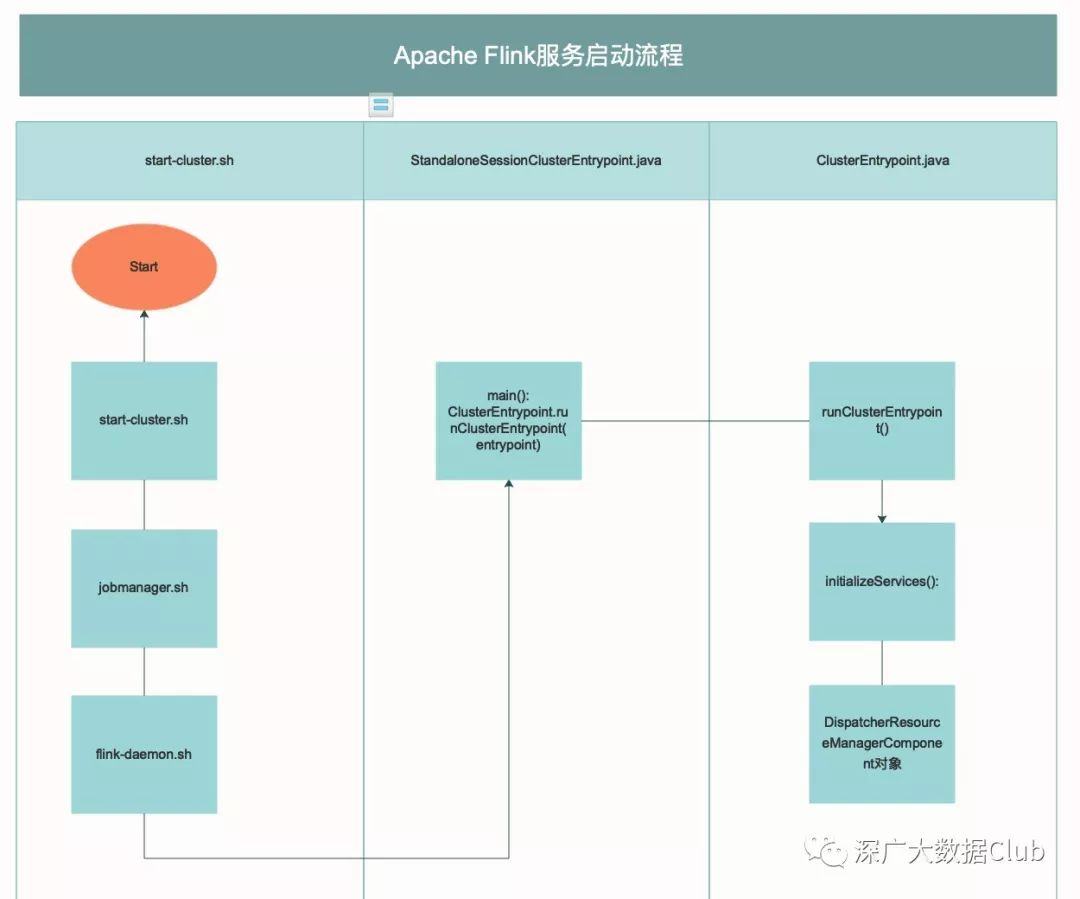
从《Apache Flink本地部署》这篇文章中可以看到,我们启动集群都是通过脚本start-cluster.sh开始执行。我们的源码解析之路就从flink的bash脚本入手。
start-cluster.sh
bin=`dirname "$0"`bin=`cd "$bin"; pwd`. "$bin"/config.sh# Start the JobManager instance(s)shopt -s nocasematchif [[ $HIGH_AVAILABILITY == "zookeeper" ]]; then # HA Mode readMasters echo "Starting HA cluster with ${#MASTERS[@]} masters." for ((i=0;i<${#MASTERS[@]};++i)); do master=${MASTERS[i]} webuiport=${WEBUIPORTS[i]} if [ ${MASTERS_ALL_LOCALHOST} = true ] ; then "${FLINK_BIN_DIR}"/jobmanager.sh start "${master}" "${webuiport}" else ssh -n $FLINK_SSH_OPTS $master -- "nohup /bin/bash -l \"${FLINK_BIN_DIR}/jobmanager.sh\" start ${master} ${webuiport} &" fi doneelse echo "Starting cluster." # Start single JobManager on this machine "$FLINK_BIN_DIR"/jobmanager.sh startfishopt -u nocasematch# Start TaskManager instance(s)TMSlaves start从代码上看,不管是启动HA模式,还是非HA模式,脚本都会调用jobmanager.sh
jobmanager.sh
STARTSTOP=$1...ENTRYPOINT=standalonesession...if [[ $STARTSTOP == "start-foreground" ]]; then exec "${FLINK_BIN_DIR}"/flink-console.sh $ENTRYPOINT "${args[@]}"else "${FLINK_BIN_DIR}"/flink-daemon.sh $STARTSTOP $ENTRYPOINT "${args[@]}"fi这里的STARTSTOP=
flink-daemon.sh脚本
核心分为以下三个代码块
# Start/stop a Flink daemon.USAGE="Usage: flink-daemon.sh (start|stop|stop-all) (taskexecutor|zookeeper|historyserver|standalonesession|standalonejob) [args]"STARTSTOP=$1DAEMON=$2ARGS=("${@:3}") # get remaining arguments as array从脚本的使用定义来看flink-daemon.sh可以启动taskexecutor|zookeeper|historyserver|standalonesession|standalonejob这里的DAEMON= 1,其实 就是S TAR TST OP = sta rt, 所以这 里会走 fli nk − dae mon .sh 脚本这 条线。 ¨K1 2K核 心分为 以下三 个代码 块¨G 2G从 脚本的 使用定义 来看f li nk − da em on .s h可 以启 动t as ke xe cu to r∣ zo ok ee pe r∣ h i s t o r y s e r v e r ∣ s t a n d a l o n e s e s s i o n ∣ s t a n d a l o n e j o b 这 里 的 D A E M O N = 2从上一个脚本传递的值可以的值DAEMON=standalonesession
case $DAEMON in (taskexecutor) CLASS_TO_RUN=org.apache.flink.runtime.taskexecutor.TaskManagerRunner ;; (zookeeper) CLASS_TO_RUN=org.apache.flink.runtime.zookeeper.FlinkZooKeeperQuorumPeer ;; (historyserver) CLASS_TO_RUN=org.apache.flink.runtime.webmonitor.history.HistoryServer ;; (standalonesession) CLASS_TO_RUN=org.apache.flink.runtime.entrypoint.StandaloneSessionClusterEntrypoint ;; (standalonejob) CLASS_TO_RUN=org.apache.flink.container.entrypoint.StandaloneJobClusterEntryPoint ;; (*) echo "Unknown daemon '${DAEMON}'. $USAGE." exit 1 ;;esac根据
case $STARTSTOP in (start) # Rotate log files rotateLogFilesWithPrefix "$FLINK_LOG_DIR" "$FLINK_LOG_PREFIX" # Print a warning if daemons are already running on host if [ -f "$pid" ]; then active=() while IFS='' read -r p || [[ -n "$p" ]]; do kill -0 $p >/dev/null 2>&1 if [ $? -eq 0 ]; then active+=($p) fi done < "${pid}" count="${#active[@]}" if [ ${count} -gt 0 ]; then echo "[INFO] $count instance(s) of $DAEMON are already running on $HOSTNAME." fi fi # Evaluate user options for local variable expansion FLINK_ENV_JAVA_OPTS=$(eval echo ${FLINK_ENV_JAVA_OPTS}) echo "Starting $DAEMON daemon on host $HOSTNAME." $JAVA_RUN $JVM_ARGS ${FLINK_ENV_JAVA_OPTS} "${log_setting[@]}" -classpath "`manglePathList "$FLINK_TM_CLASSPATH:$INTERNAL_HADOOP_CLASSPATHS"`" ${CLASS_TO_RUN} "${ARGS[@]}" > "$out" 200<&- 2>&1 < /dev/null & mypid=$! # Add to pid file if successful start if [[ ${mypid} =~ ${IS_NUMBER} ]] && kill -0 $mypid > /dev/null 2>&1 ; then echo $mypid >> "$pid" else echo "Error starting $DAEMON daemon." exit 1 fi ;; ...esaccase DAE MON 来指定所需要 运行的类名称 ,这里 是CL ASS T O R UN = o rg. apa che .fl ink .run tim e.e ntr ypo int .S tand al on eS es si on Cl us t¨ G4 Gc as e STARTSTOP in程序块中包含三个功能:start、stop、stop-all。我们这里通过start功能进行启动
StandaloneSessionClusterEntrypoint.java
public class StandaloneSessionClusterEntrypoint extends SessionClusterEntrypoint { public StandaloneSessionClusterEntrypoint(Configuration configuration) { super(configuration); } @Override protected DispatcherResourceManagerComponentFactory<?> createDispatcherResourceManagerComponentFactory(Configuration configuration) { return new SessionDispatcherResourceManagerComponentFactory(StandaloneResourceManagerFactory.INSTANCE); } public static void main(String[] args) { // startup checks and logging EnvironmentInformation.logEnvironmentInfo(LOG, StandaloneSessionClusterEntrypoint.class.getSimpleName(), args); SignalHandler.register(LOG); JvmShutdownSafeguard.installAsShutdownHook(LOG); EntrypointClusterConfiguration entrypointClusterConfiguration = null; final CommandLineParser<EntrypointClusterConfiguration> commandLineParser = new CommandLineParser<>(new EntrypointClusterConfigurationParserFactory()); try { entrypointClusterConfiguration = commandLineParser.parse(args); } catch (FlinkParseException e) { LOG.error("Could not parse command line arguments {}.", args, e); commandLineParser.printHelp(StandaloneSessionClusterEntrypoint.class.getSimpleName()); System.exit(1); } Configuration configuration = loadConfiguration(entrypointClusterConfiguration); StandaloneSessionClusterEntrypoint entrypoint = new StandaloneSessionClusterEntrypoint(configuration); ClusterEntrypoint.runClusterEntrypoint(entrypoint); }}StandaloneSessionClusterEntrypoint的main方法的执行流程如下:
-
通过commandLineParser对象解析参数信息
-
loadConfiguration加载配置
-
通过配置实例化StandaloneSessionClusterEntrypoint对象
-
最终通过ClusterEntrypoint的runClusterEntrypoint方法运行StandaloneSessionClusterEntrypoint实例
ClusterEntrypoint.java
private void runCluster(Configuration configuration) throws Exception { synchronized (lock) { initializeServices(configuration); // write host information into configuration configuration.setString(JobManagerOptions.ADDRESS, commonRpcService.getAddress()); configuration.setInteger(JobManagerOptions.PORT, commonRpcService.getPort()); final DispatcherResourceManagerComponentFactory<?> dispatcherResourceManagerComponentFactory = createDispatcherResourceManagerComponentFactory(configuration); clusterComponent = dispatcherResourceManagerComponentFactory.create( configuration, commonRpcService, haServices, blobServer, heartbeatServices, metricRegistry, archivedExecutionGraphStore, new AkkaQueryServiceRetriever( metricQueryServiceActorSystem, Time.milliseconds(configuration.getLong(WebOptions.TIMEOUT))), this); clusterComponent.getShutDownFuture().whenComplete( (ApplicationStatus applicationStatus, Throwable throwable) -> { if (throwable != null) { shutDownAsync( ApplicationStatus.UNKNOWN, ExceptionUtils.stringifyException(throwable), false); } else { // This is the general shutdown path. If a separate more specific shutdown was // already triggered, this will do nothing shutDownAsync( applicationStatus, null, true); } }); } }runCluster方法中流程如下:
protected void initializeServices(Configuration configuration) throws Exception { LOG.info("Initializing cluster services."); synchronized (lock) { final String bindAddress = configuration.getString(JobManagerOptions.ADDRESS); final String portRange = getRPCPortRange(configuration); commonRpcService = createRpcService(configuration, bindAddress, portRange); // update the configuration used to create the high availability services configuration.setString(JobManagerOptions.ADDRESS, commonRpcService.getAddress()); configuration.setInteger(JobManagerOptions.PORT, commonRpcService.getPort()); haServices = createHaServices(configuration, commonRpcService.getExecutor()); blobServer = new BlobServer(configuration, haServices.createBlobStore()); blobServer.start(); heartbeatServices = createHeartbeatServices(configuration); metricRegistry = createMetricRegistry(configuration); // TODO: This is a temporary hack until we have ported the MetricQueryService to the new RpcEndpoint // Start actor system for metric query service on any available port metricQueryServiceActorSystem = MetricUtils.startMetricsActorSystem(configuration, bindAddress, LOG); metricRegistry.startQueryService(metricQueryServiceActorSystem, null); archivedExecutionGraphStore = createSerializableExecutionGraphStore(configuration, commonRpcService.getScheduledExecutor()); transientBlobCache = new TransientBlobCache( configuration, new InetSocketAddress( commonRpcService.getAddress(), blobServer.getPort())); } }-
initializeServices(configuration); 初始化服务
-
创建RPC服务
-
创建HA服务
-
创建blob服务
-
创建心跳服务
-
创建metrice注册
-
创建ActorSystem
-
创建ArchivedExecutionGraphStore
-
创建TransientBlobCache
-
创建dispatcherResourceManagerComponentFactory对象dispatcherResourceManagerComponentFactory的create方法参数中我们可以看到很多服务相关的信息:
-
configuration,
-
commonRpcService,
-
haServices,
-
blobServer,
-
heartbeatServices,
-
metricRegistry,
-
archivedExecutionGraphStore,
-
AkkaQueryServiceRetriever
这块主要是Flink UI上所要展示的内容相关信息。
总结
到这里我们就了解了Apache Flink是如何通过start-cluster.sh脚本执行到最后的程序运行启动的全流程。从下一篇文章开始会根据ScoketWindowWorkCount这个示例,开始讲解任务运行后相关的一些内容。
关注公众号